Convert algorithms 3 (Edexcel GCSE Computer Science): Revision Notes
📚Revision Notes
Convert algorithms 3
What are condition-controlled loops?
When writing programmes, you often need to repeat the same piece of code multiple times, but only while a certain condition remains true. This type of repetition is called a condition-controlled loop. Unlike loops that repeat a fixed number of times, these loops continue running as long as a specific condition is met.
In Python, we use the while statement to create condition-controlled loops. The key idea is that the loop keeps running while the condition is true, and stops when the condition becomes false.
Note
The power of condition-controlled loops lies in their flexibility - they can handle situations where you don't know in advance how many times the loop needs to run. The loop continues until a specific condition is no longer met.
Converting flowcharts to while loops
When you see a flowchart with a loop, you can spot it by looking for a backwards arrow that points back to an earlier part of the flowchart. This backwards arrow indicates that the programme should repeat certain steps.
Here's how to convert a condition-controlled loop from a flowchart to Python:
- Identify the condition being tested (shown in the diamond shape)
- Find what code should repeat (everything the backwards arrow loops back to)
- Write a while statement with the condition
- Indent all the repeating code inside the while block
Important
The backwards arrow is your key visual indicator - it shows exactly which parts of the algorithm need to be repeated. Always trace the flow carefully to identify what code belongs inside the loop.
Worked example: number input validation
Let's look at a practical example of converting a flowchart to Python code.
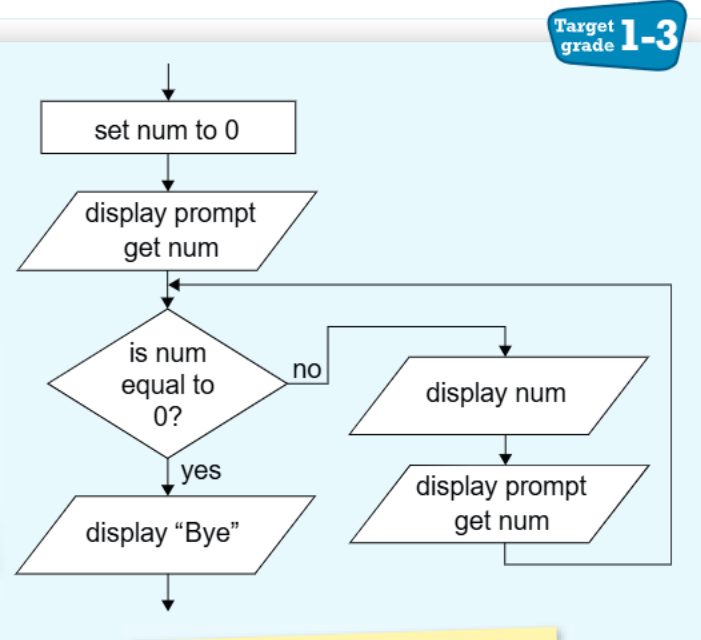
Example
Worked Example: Converting Number Input Validation
This flowchart shows an algorithm that:
- Asks the user to enter a number
- Keeps asking for numbers until the user enters 0
- When the user enters 0, it displays "Bye" and ends
Here's how this converts to Python code:
num = 0
num = int(input("Enter a number"))
while (num != 0):
    print(num)
    num = int(input("Enter a number"))
print("Bye")
Key points about this code:
- The while condition (num != 0) means "while num is not equal to 0"
- The loop continues as long as the user doesn't enter 0
- Inside the loop, we display the number and ask for a new one
- When the user finally enters 0, the condition becomes false and the loop stops
Practice exercise: game choice validation
Now let's try another example to test your understanding.
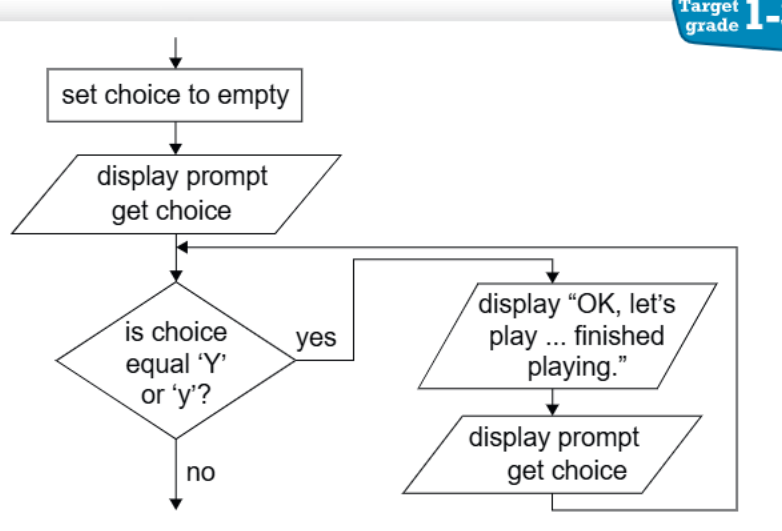
This flowchart shows an algorithm that asks the user if they want to play a game (Y or y for yes). If they say yes, it displays a message about playing and finishing. The algorithm keeps asking until they give a valid response.
Note
Your task: Convert this flowchart to Python code using a while loop. Remember to:
- Set up the initial variable
- Create the correct condition for the while loop
- Include all the necessary input/output statements
- Make sure the loop will eventually end
Understanding loop conditions
When working with condition-controlled loops, it's crucial to understand several key concepts that determine how your loops will behave.
The condition determines when the loop stops - when it becomes false, the loop ends. This means you need to think carefully about what condition will eventually become false to avoid infinite loops.
The loop body must change something that affects the condition, otherwise you'll get an infinite loop. This is usually achieved through user input or by modifying variables inside the loop that are part of the condition.
Important
Avoiding Infinite Loops
One of the most common mistakes with while loops is creating an infinite loop. This happens when the condition never becomes false. Always ensure that something inside your loop can change the condition variable.
User input often controls the loop - the programme keeps asking until it gets the right response. This makes while loops particularly useful for input validation, where you want to keep prompting until the user provides acceptable data.
Test your conditions carefully - make sure you use the right comparison operators (==, !=, <, >, etc.). A simple mistake like using = instead of == can cause your programme to behave unexpectedly.
Common exam tips
Here are some essential points to remember when working with condition-controlled loops in programming and exams:
- Always check that your loop condition will eventually become false
- Remember that != means "not equal to"
- Use parentheses around complex conditions for clarity
- Make sure your indentation is correct in Python - everything inside the loop must be indented
- Test your code with different inputs to make sure it works correctly
When reading flowcharts in exams, take time to trace through the logic step by step. Follow the arrows and identify where the loop starts and ends. This systematic approach will help you avoid missing important details.
Summary
Key Points to Remember:
- Condition-controlled loops use the while statement and repeat as long as a condition is true
- Flowchart loops are identified by backwards arrows that point to earlier steps
- The while condition determines when the loop stops - it continues while the condition is true
- User input validation is a common use for while loops - keep asking until you get valid input
- Always ensure your loop will eventually end by making sure something inside the loop can change the condition