Convert algorithms 5 (Edexcel GCSE Computer Science): Revision Notes
📚Revision Notes
Converting algorithms 5
What is iteration?
When we write programmes, we often need to perform the same action on multiple items in a collection of data. This process is called iteration, which means going through each item one by one and doing something with it. Think of it like checking every book on a shelf or looking at every photo in an album.
In Python programming, we use something called a for...in statement (also known as a for each loop) to handle iteration. This is different from other types of loops because it automatically goes through every single item in a data structure like a list, without us having to count or keep track of positions.
Converting flowchart loops to Python code
When you see a flowchart that processes items in a list, you need to know how to spot the loop and convert it to Python code. Here are the key things to look for:
- Backward arrow: In flowcharts, loops are shown with arrows that point backwards to an earlier part of the process
- Decision diamond: This asks something like "any items left?" or "all items processed?"
- Process box: This shows what action to perform on each item
Note
The pattern is always the same: start with the collection, check if there are more items, process the current item, then move to the next one. This consistent pattern makes it easier to recognise and convert flowchart loops into Python code.
Worked example: Processing a mushroom list
Let's look at how to convert a flowchart into Python code using a practical example.
Example
Worked Example: Converting Mushroom List Flowchart to Python
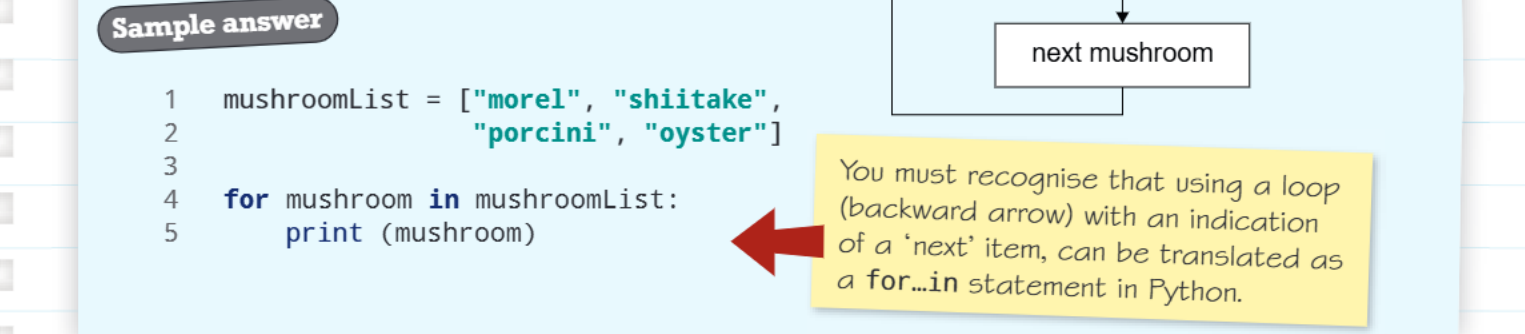
The flowchart shows an algorithm that displays different types of mushrooms from a list. Here's how we convert this to Python:
mushroomList = ["morel", "shiitake", "porcini", "oyster"]

for mushroom in mushroomList:
    print(mushroom)
Key points to understand:
- The list contains four different mushroom types as strings
- The for...in statement automatically goes through each mushroom in the list
- We don't need to count how many mushrooms there are - Python handles this for us
- Each time through the loop, the variable mushroom contains the current item
- The print() function displays each mushroom name
The yellow box in the diagram explains that when you see a backwards arrow in a flowchart pointing to a decision about "next item", this translates directly to a for...in statement in Python.
Practice example: Random numbers and sum calculation
Here's a more complex example that shows how iteration works with numbers and calculations.
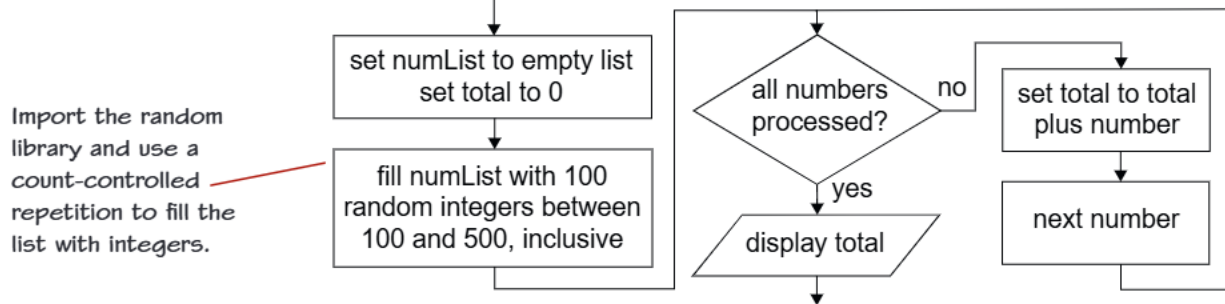
This flowchart shows an algorithm that:
- Creates an empty list for numbers
- Fills the list with 100 random integers between 100 and 500
- Goes through each number and adds it to a running total
- Displays the final sum
Example
Worked Example: Random Numbers Sum Algorithm
Converting this flowchart to Python code:
import random

numList = []
total = 0

# Fill the list with 100 random numbers
for i in range(100):
    random_number = random.randint(100, 500)
    numList.append(random_number)

# Process each number in the list
for number in numList:
    total = total + number

print(total)
What's happening here:
- We import the random library to generate random numbers
- The first loop creates 100 random numbers and adds them to our list
- The second loop (the iteration part) goes through each number and adds it to our total
- This is called the accumulator pattern - we keep adding to a running total
Key programming concepts
Understanding these fundamental concepts will help you write better iteration code:
Note
Count-controlled repetition: When you know exactly how many times something should happen (like generating 100 random numbers), you use range() with a for loop.
Item-controlled iteration: When you want to do something with every item in a collection (like processing every number in a list), you use for...in.
Accumulator pattern: This is when you keep a running total or count by adding to a variable inside a loop. Very common in programming!
Exam tips
Important
Essential Exam Guidelines:
- Spot the loop in flowcharts: Look for backwards arrows and decision diamonds asking about "remaining items" or "all processed"
- Choose the right loop type: Use for...in when processing every item in a collection
- Don't forget imports: If you're using random numbers, remember import random
- Initialize variables: Set totals to 0 and lists to empty [] before you start
- Indentation matters: Make sure your loop body is properly indented in Python
Remember!
Summary
Key Points to Remember:
- Iteration means going through each item in a collection one by one
- For...in loops are perfect for processing every item in a list without counting
- Backward arrows in flowcharts indicate loops that should become for...in statements in Python
- Accumulator patterns use a variable to keep a running total inside a loop
- Always initialize your variables(set totals to 0, lists to empty) before starting loops