Data types, variables and constants (Edexcel GCSE Computer Science): Revision Notes
📚Revision Notes
Data types, variables and constants
What are variables and constants?
When you're programming, you need ways to store information that your programme can use and manipulate. Think of variables and constants as labelled containers in your computer's memory - each one has a name and can hold a specific type of data.
Variables are named storage areas in your computer's memory that have a specific data type. The key thing about variables is that their contents can change while your programme is running, but the type of data they can store stays the same. For example, if you create a variable to store a whole number, it will always store whole numbers, but the actual number can change from 5 to 10 to 100 as your programme runs.
Constants work differently - they're named storage areas whose values should never change during programme execution. Once you set a constant's value, it stays the same throughout your entire programme. This is really useful for values like mathematical constants (like π) or settings that shouldn't change (like a maximum speed limit).
Note
Think of variables as boxes with changeable contents but fixed labels, while constants are boxes that are sealed shut once you put something inside them.
Understanding data types
Every variable and constant must have a data type, which tells the computer what kind of information it will store and how to handle it. The main data types you need to know are:
- Integer - stores whole numbers (like 5, -10, 0, 1000)
- Real or Float - stores numbers with decimal points/fractional parts (like 3.14, -0.5, 99.99)
- Boolean - stores only True or False values (useful for yes/no questions)
- String - stores text values between single or double quotes (like "Hello", "John Smith", "Password123")
Understanding data types is crucial because the computer needs to know how much memory to allocate and what operations it can perform on each piece of data.
Important
Why Data Types Matter: The computer needs to know the data type to determine how much memory space to reserve and what mathematical or logical operations are allowed on that data.
Working with variables
When you create a variable, two important things happen: declaration and initialisation.
Declaration is when you tell the computer "I need a variable with this name and this data type" - this allocates the necessary memory space. Initialization is when you actually put a value into that memory space for the first time.
In some programming languages like Python, you can let the computer figure out the data type automatically based on the first value you assign. This is called implicit data typing - the data type is determined from the first assignment you make.
Note
The Two-Step Process:
- Declaration = "Reserve memory space for this variable"
- Initialization = "Put the first value into that space"
Some languages let you do both steps at once, while others require you to do them separately.
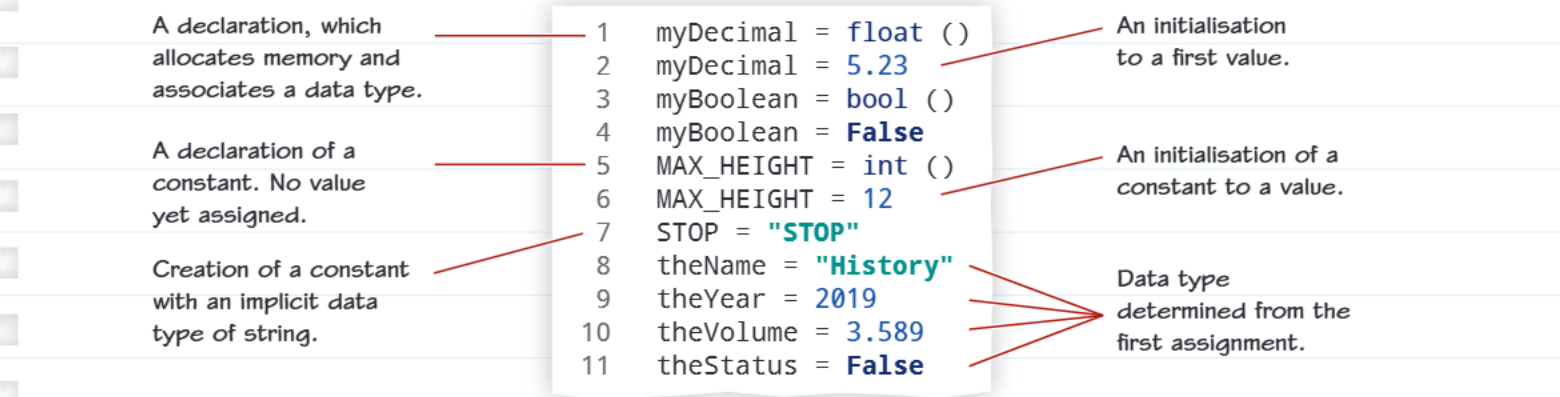
The diagram above shows different ways to declare and initialise variables, including how to create constants and let the programme determine data types automatically.
Best practices with constants
Using constants in your programmes is considered excellent practice because it reduces the need to change the same value in multiple places throughout your code. When you use constants, you're less likely to make errors because you only need to define the value once. If you later need to change that value, you only change it in one place rather than hunting through your entire programme.
Important
Constants Naming Convention: Constants should always be written in UPPER CASE letters (and can include underscores and digits if needed) to make them easily identifiable in your code.
Example: MAX_SPEED, PI_VALUE, TAX_RATE_2024
Choosing the right approach for different scenarios
Different situations require different approaches to creating variables and constants. Here's a helpful guide:
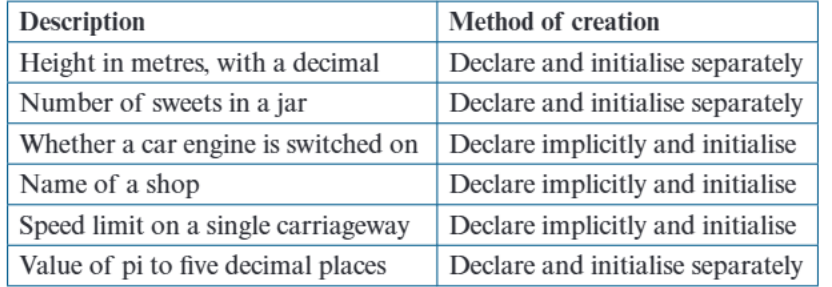
This table shows you when to declare and initialise separately versus when to declare implicitly. Generally, if you know exactly what type of data you need and want to be very explicit about it, declare and initialise separately. If you're working with straightforward values where the type is obvious, implicit declaration can be simpler and cleaner.
Note
Decision Guide:
- Explicit declaration: Use when you need precise control over data types or when working in teams where code clarity is essential
- Implicit declaration: Use for simple, obvious cases where the data type is clear from the value being assigned
Practical programming tips
For your exams and programming projects, remember these key points:
- Always use meaningful variable names that clearly indicate what the data represents
- Initialise every variable and constant with an appropriate starting value
- Use constants for values that shouldn't change during programme execution
- Make sure your variable names follow the rules of your programming language
- Display or use your variables appropriately in your programme output
Important
Common exam pitfalls to avoid:
- Forgetting to initialise variables before using them
- Using variable names that don't clearly indicate their purpose
- Mixing up when to use variables versus constants
- Not understanding the difference between declaration and initialisation
These mistakes can cost you marks in exams and cause bugs in your programmes!
Summary
Key Points to Remember:
- Variables can change during programme execution, but constants stay the same
- Four main data types: Integer (whole numbers), Real/Float (decimals), Boolean (True/False), String (text)
- Declaration allocates memory, initialization sets the first value
- Constants should be in UPPER_CASE and help reduce errors in your code
- Choose meaningful names for all your variables and constants to make your code easier to understand