Fitness for purpose and efficiency (Edexcel GCSE Computer Science): Revision Notes
📚Revision Notes
Fitness for purpose and efficiency
What does fitness for purpose and efficiency mean?
When we create programmes, we need to make sure they work well and don't waste computer resources. Fitness for purpose means the programme does exactly what it's supposed to do. Efficiency means it does this job using the least amount of computer power, memory, and time possible.
To check if a programme is efficient, we need to look at several things:
- How many comparisons the programme makes
- How many times it loops through data
- How much memory it uses
- Whether it uses multiple variables when a single list would work better
- If it makes unnecessary copies of data
Note
Understanding efficiency is crucial for creating programmes that perform well, especially when dealing with large amounts of data or when computer resources are limited.
Key things to check for efficiency
Loop optimisation
The biggest improvements often come from making loops work smarter. Instead of checking every single item in a list, we can:
- Stop early when we find what we're looking for
- Sort data first so we can search more efficiently
- Use while loops instead of for loops when we might not need to check everything
Note
Loop optimisation is often where you'll find the most significant performance gains. A single well-optimized loop can dramatically improve your programme's efficiency.
Memory usage
Programmes work faster when they use memory wisely:
- Use single lists instead of lots of separate variables
- Don't make unnecessary copies of data
- Choose the right data structures for the job
Note
Efficient memory usage not only makes programmes faster but also allows them to handle larger datasets without running out of resources.
Worked example: finding a number in a list
Let's look at how we can make a programme more efficient. Here's an inefficient version that searches for a target number:
Example
Worked Example: Optimising a Search Algorithm
Inefficient version:
numbers = [23, 13, 7, 3, 6, 16, 5, 11]
found = False
target = 7
for item in numbers:
    if item == target:
        print("Found " + str(target))
        found = True
    if found != True:
        print(str(target) + " not found.")
Problems with this code:
- The loop checks every single item, even after finding the target
- It prints "not found" multiple times
- It wastes time and computer power
Improved, efficient version:
data = [3, 5, 6, 7, 11, 13, 16, 23]
found = False
target = 8
position = 0
checked = False
while (not found) and (not checked) and (position < len(data)):
    if data[position] == target:
        print("Found " + str(target))
        found = True
    elif data[position] > target:
        checked = True
    else:
        position = position + 1
if found != True:
    print(str(target) + " not found.")
Improvements made:
- Sorted the data first - this lets us stop searching early
- Used a while loop - stops as soon as we find the answer or know it's not there
- Added early termination - if we pass where the number should be, we stop looking
- Only prints once - much cleaner output
Common efficiency improvements
When you're looking at code, watch out for these optimisation opportunities:
Reducing comparisons
- Sort data before searching through it
- Use early exit conditions in loops
- Choose appropriate search algorithms for the data size
Better data structures
- Use lists instead of multiple variables when storing similar data
- Consider dictionaries for quick lookups
- Avoid nested loops when possible
Memory optimisation
- Don't create unnecessary copies of large datasets
- Reuse variables where appropriate
- Clear unused data from memory
Note
The key to optimisation is understanding your data and choosing the right approach for each situation. Sometimes a simple change in data structure can make a huge difference in performance.
Practice problem: order cost calculator
Here's a pricing structure for bulk orders:
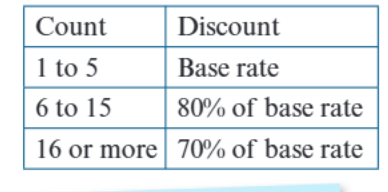
This table shows that:
- Orders of 1-5 items pay the base rate
- Orders of 6-15 items get 20% off (pay 80% of base rate)
- Orders of 16+ items get 30% off (pay 70% of base rate)
When writing a programme to calculate order costs, you could make it more efficient by:
- Using structured data (like lists or dictionaries) instead of multiple if statements
- Organizing discount tiers in a logical order
- Minimizing the number of comparisons needed
Common exam mistakes to avoid
Important
Critical Mistakes That Cost Marks:
- Not stopping loops early - always look for chances to exit loops when you've found what you need
- Using separate variables instead of lists when storing similar data
- Making unnecessary copies of data - this wastes memory
- Not considering data sorting - sorted data can often be searched much faster
- Writing overcomplicated conditions - simpler logic is usually more efficient
Summary
Key Points to Remember:
- Efficiency matters - programmes should use minimal computer resources while still working correctly
- Check for early exit opportunities - don't keep looping if you've already found your answer
- Sort data when possible - this often makes searching much faster
- Use appropriate data structures - lists are better than multiple variables for similar data
- Count compares and loop passes - these are key measures of programme efficiency