Functions (Edexcel GCSE Computer Science): Revision Notes
📚Revision Notes
Functions
What are functions?
A function is a special type of subprogram that can return a value back to the code that called it. Think of functions as mini-programs within your main programme that perform specific tasks. They help make your code more organised, reusable, and easier to understand.
Functions are incredibly useful because you can create them once and then use them multiple times throughout your programme without having to write the same code repeatedly.
Note
Functions are one of the most powerful features in programming because they promote code reusability and help break complex problems into smaller, manageable pieces. This makes your programmes easier to debug, maintain, and understand.
Creating a function
When you want to create a function in Python, you need to follow a specific structure. Let's look at how this works step by step.
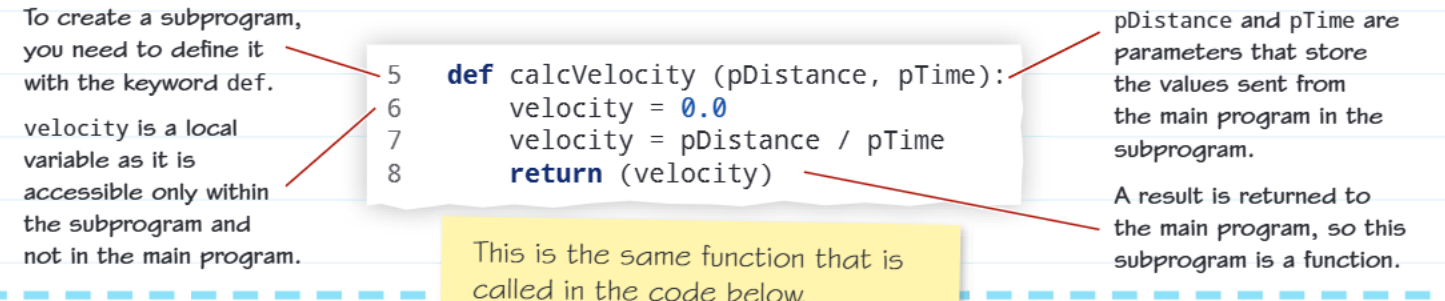
To create a function, you must start with the def keyword followed by your function name and parentheses containing any parameters you want to use. Here's what each part does:
- Function name: Choose a descriptive name that explains what your function does
- Parameters: These are like containers that store values passed from the main programme
- Local variables: Variables created inside the function that can only be used within that function
- Return statement: This sends a result back to the main programme
The basic structure looks like this:
def functionName(parameter1, parameter2):
    # Your code here
    result = parameter1 + parameter2
    return result
Example
Worked Example: Creating a Simple Function
Let's create a function that calculates the area of a rectangle:
def calculateArea(pLength, pWidth):
    area = pLength * pWidth
    return area
Step 1: We use def to start the function definition Step 2: calculateArea is our descriptive function name Step 3: pLength and pWidth are our parameters (note the 'p' prefix) Step 4: area is a local variable that stores our calculation Step 5: return sends the result back to the main programme
Understanding parameters and local variables
Parameters are special variables that receive values from the main programme. When you create a function, any variables you define inside it are called local variables. This means they only exist within that function and cannot be accessed from outside it.
This is actually helpful because it prevents your function variables from interfering with variables in your main programme that might have similar names.
Note
The concept of local scope is crucial in programming. It ensures that variables inside functions don't accidentally overwrite variables in your main programme, making your code more predictable and less prone to bugs.
Calling a function
Once you've created a function, you need to know how to use it. This is called "calling" the function.
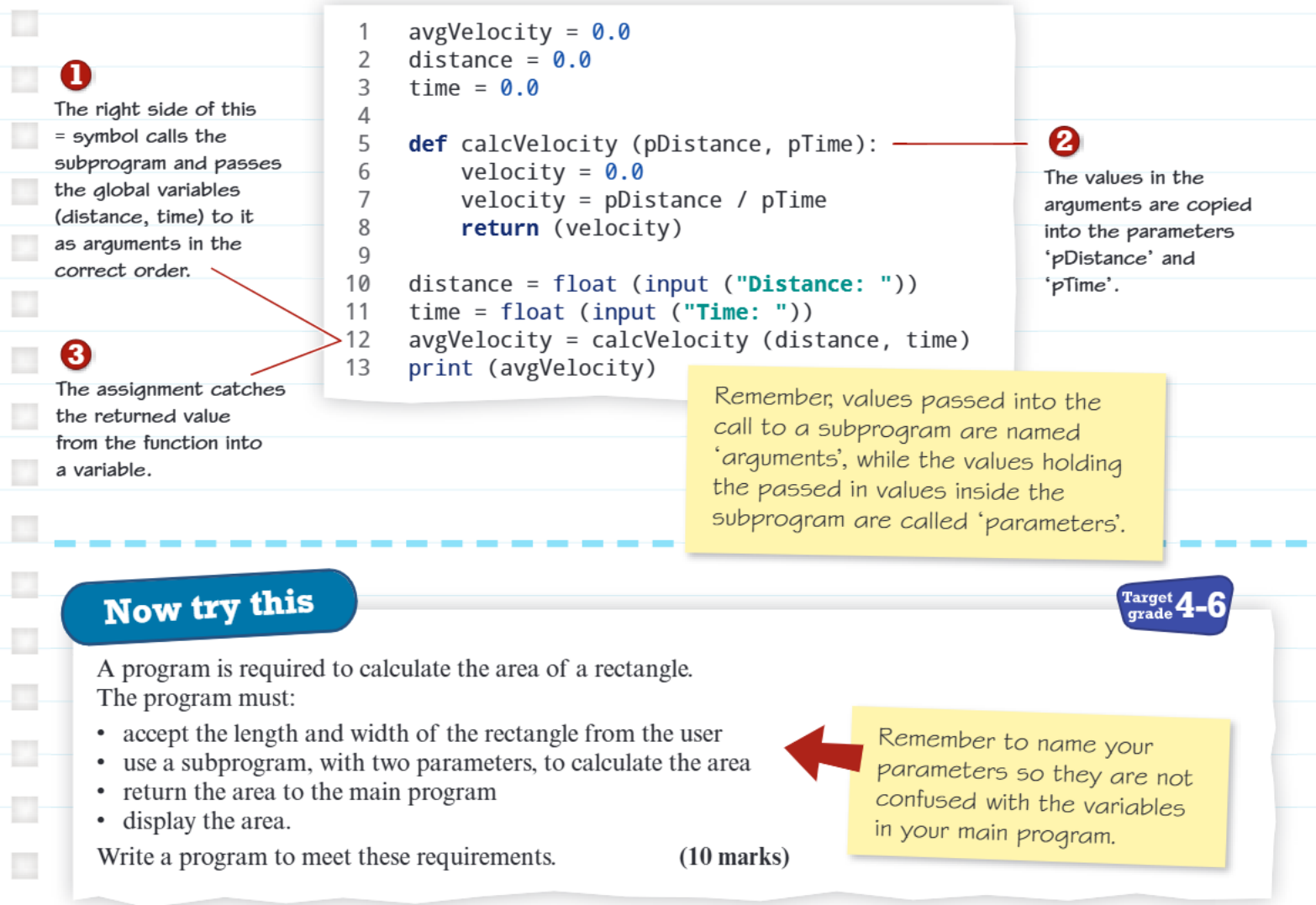
When calling a function, there are three important concepts to understand:
1. Passing arguments
The values you send to a function are called arguments. These get copied into the function's parameters. For example, if you have variables called distance and time in your main programme, you can pass these as arguments to your function.
2. Assignment and function calls
You can capture the value returned by a function by using the equals sign. This assigns the returned value to a variable in your main programme.
3. Arguments vs parameters
This is a key distinction that often confuses students:
Important
Critical Distinction: Arguments vs Parameters
- Arguments: The actual values you pass TO the function
- Parameters: The variables INSIDE the function that receive these values
Think of it this way: arguments are what you send, parameters are what the function receives.
Best practices for functions
Parameter naming convention
A really useful tip is to start your parameter names with the letter 'p'. This helps you avoid getting confused between variables in your main programme and the parameters inside your function.
Note
Parameter Naming Tip
Use pDistance and pTime as parameters, even if your main programme variables are called distance and time. This 'p' prefix makes it immediately clear which variables are parameters and which are regular programme variables.
When to use functions
Functions are particularly useful when you:
- Need to perform the same calculation multiple times
- Want to keep your main programme tidy and organised
- Need to break down a complex problem into smaller, manageable pieces
Real-world applications
Functions are used everywhere in programming! Some examples include:
- Calculating taxes on purchases
- Converting temperatures between Celsius and Fahrenheit
- Validating user input (like checking if an email address is valid)
- Processing data from sensors in smart devices
Exam tips
Note
Exam Success Tips
- Always remember to include the def keyword when creating functions
- Make sure your function has a clear, descriptive name
- Don't forget the return statement if your function needs to send a value back
- Practice identifying the difference between arguments and parameters in exam questions
- When writing functions, test them with different values to make sure they work correctly
Common pitfalls to avoid
Important
Common Mistakes to Avoid
- Forgetting to call your function after defining it
- Using the same variable names in your main programme and function (this can cause confusion)
- Not returning a value when you need one
- Trying to use local variables outside of the function where they were created
These are frequent sources of errors that can cost you marks in exams!
Remember!
Summary
Key Points to Remember:
- Functions are reusable blocks of code that perform specific tasks
- Use the def keyword to create functions, followed by the function name and parameters in parentheses
- Arguments are values you pass TO functions, while parameters are variables INSIDE functions that receive these values
- Local variables only exist within the function where they're created
- Always include a return statement when your function needs to send a value back to the main programme