Procedures (Edexcel GCSE Computer Science): Revision Notes
📚Revision Notes
Procedures in programming
What is a procedure?
A procedure is a special type of subprogram that carries out a specific job or task, but unlike functions, it doesn't send any result back to the main programme. Think of it like giving someone instructions to do something - they complete the task, but they don't need to report back with an answer.
Procedures are incredibly useful because they help you organise your code into manageable chunks. Instead of writing the same instructions over and over again, you can create a procedure once and then use it whenever you need it.
Note
The key thing to remember is that procedures perform actions but don't return values to the code that called them. This is what makes them different from functions.
Creating a procedure
To create a procedure in Python, you use the def keyword followed by the procedure name and any parameters it needs. Here's the basic structure:
def procedure_name(parameter):
    # code to perform the task
    # more code here
Example
Worked Example: Creating the showMenu Procedure
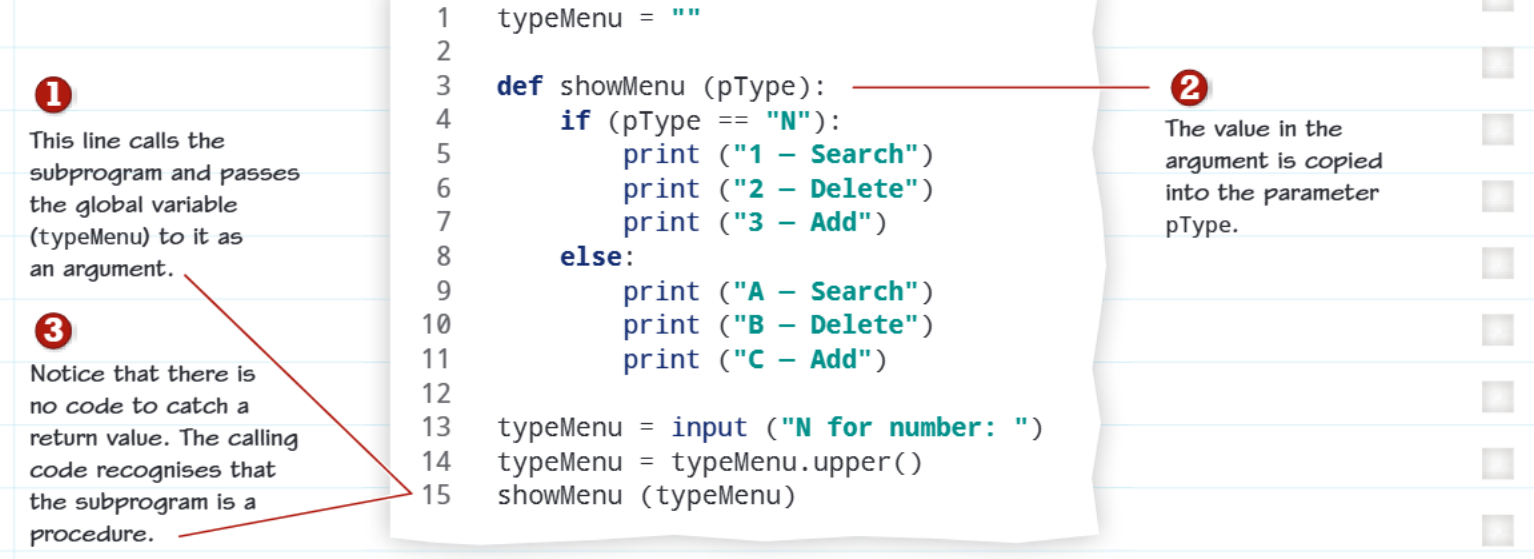
Let's look at the example from the image. The showMenu procedure displays different menu options based on what type of menu is requested:
def showMenu(pType):
    if (pType == "N"):
        print("1 - Search")
        print("2 - Delete")
        print("3 - Add")
    else:
        print("A - Search")
        print("B - Delete")
        print("C - Add")
Step-by-step breakdown:
- def showMenu(pType): - Defines the procedure with parameter pType
- The if statement checks what value was passed to pType
- Different menu options are printed based on the parameter value
- No return statement because procedures don't return values
Notice a few important things about this procedure:
- It starts with def to define the procedure
- pType is a parameter that stores information sent from the main programme
- There's no return statement because procedures don't send values back
- The procedure performs its task (displaying a menu) and then finishes
Note
Top tip: Starting parameter names with 'p' is good practice because it helps you remember they're parameters and won't get confused with other variable names.
Calling a procedure
Once you've created a procedure, you need to call it from your main programme to make it work. When you call a procedure, you can pass information to it through arguments.
Here's how the procedure calling process works:
- The main programme calls the procedure - You write the procedure name followed by any arguments in brackets
- Arguments get copied to parameters - The values you pass get copied into the procedure's parameter variables
- The procedure runs - It executes all its code using the parameter values
- Control returns to main program - Once finished, the programme continues from where it left off
Looking at the example:
typeMenu = ""
typeMenu = input("N for number: ")
typeMenu = typeMenu.upper()
showMenu(typeMenu)
In this code:
- typeMenu is a global variable that gets a value from user input
- When showMenu(typeMenu) is called, the value in typeMenu gets copied into the pType parameter
- The procedure runs and displays the appropriate menu
- Control returns to the main programme after the menu is displayed
Understanding arguments vs parameters
This is a concept that trips up many students, but it's actually quite simple:
Important
Arguments vs Parameters - Don't Get Confused!
- Arguments are the actual values you send to a procedure when you call it
- Parameters are the variables inside the procedure that receive those values
Think of it like posting a letter - the argument is the actual letter you send, and the parameter is the mailbox that receives it.
Key differences from functions
While procedures and functions are both types of subprograms, they have one crucial difference:
- Functions perform a task AND return a value back to the calling code
- Procedures perform a task but DON'T return any value
Note
This means you'll never see a return statement in a procedure (except maybe return by itself to exit early, but not return value).
Practical applications
Procedures are perfect for tasks like:
- Displaying menus (like in our example)
- Drawing shapes on screen
- Printing reports
- Validating user input
- Clearing the screen
- Playing sounds or animations
The turtle graphics example mentioned shows how you might use a procedure to draw a square - the procedure would contain all the instructions for drawing, and you'd just call it whenever you need a square drawn.
Note
Exam Tips
- Remember the key difference: Procedures do things but don't return values
- Parameter naming: Good practice to start with 'p' to avoid confusion
- Always use def to create procedures in Python
- Think about reusability: If you're writing the same code multiple times, consider making it a procedure
- Test your understanding: Can you explain what happens when an argument gets passed to a parameter?
Summary
Key Points to Remember:
- Procedures are subprograms that perform tasks without returning values - they do a job and finish
- Use def to create procedures followed by the procedure name and parameters in brackets
- Arguments from the calling code get copied into parameters when the procedure is called
- Procedures help organise code by breaking complex programmes into manageable, reusable chunks
- The main difference from functions is no return value - procedures just complete their task and stop