Read files (Edexcel GCSE Computer Science): Revision Notes
📚Revision Notes
Read files
Why do we need to read files?
When working with programmes, we often need to use data that's stored outside our programme. This data might be saved in files on your computer's hard drive, a USB stick, or other storage devices. Before your programme can work with this data, it must first read the data into memory. Think of it like taking information from a filing cabinet and putting it on your desk so you can work with it.
Note
Understanding Memory vs Storage
Memory (RAM) is where your programme actively works with data - it's fast but temporary. Storage (hard drive, USB) keeps data permanently but your programme can't directly use it from there. Reading files bridges this gap by copying data from storage into memory where your programme can process it.
Understanding text files
The text files you'll work with in your GCSE exam follow a specific format that makes them easy to process. Here's what you need to know:
File structure
- Each record (like information about one item) is stored on a separate line
- Within each record, different pieces of information called fields are separated by commas
- This format is called CSV (Comma Separated Values)
For example, a file containing prize information might look like this:
Teddy Bear,2215,4.25
Goldfish,2977,1.07
Inflatable Hammer,1785,1.49
Jumbo Sunglasses,1931,3.18
Notice there are no spaces after the commas, and there's no comma after the last field in each record.
Hidden characters
Although you can't see them when looking at a text file, there are special invisible characters called carriage return and line feed at the end of each line. These tell the computer where one line ends and the next begins. When processing files, you'll need to remove these characters to work with clean data.
Important
Why strip() is Essential
These invisible characters will cause problems if not removed - they can make your data comparisons fail and create unexpected errors. Always use strip() when reading file data to ensure clean processing.
Reading a file step by step
Here's how to read and process a text file in Python:
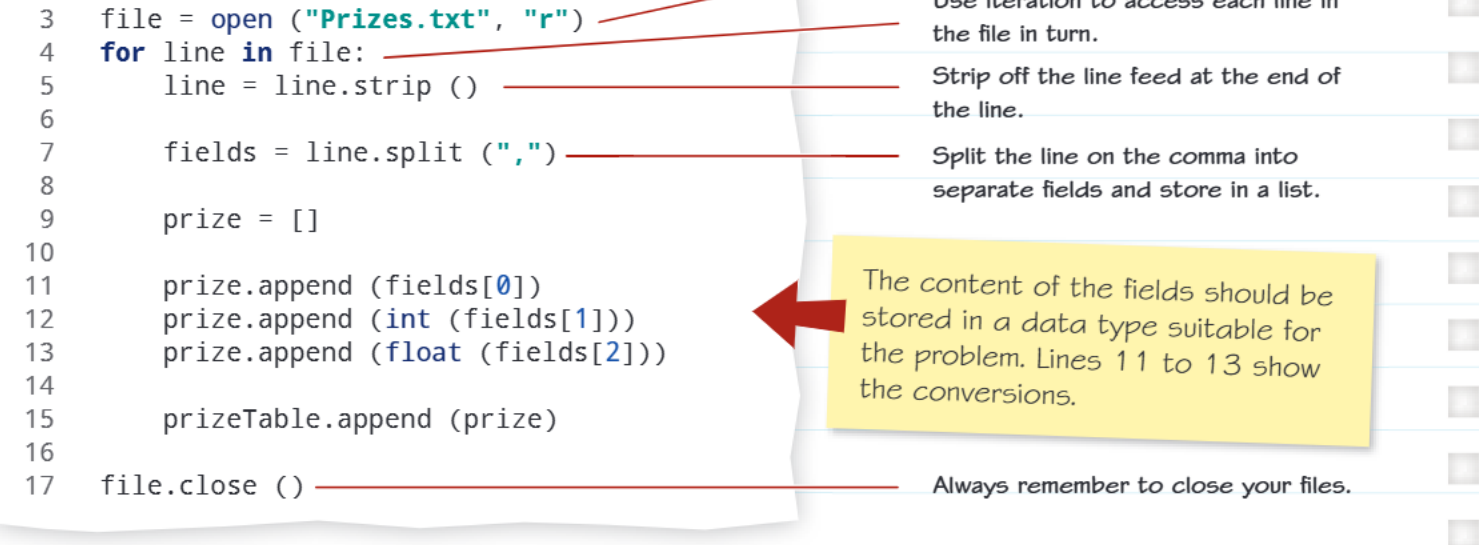
Let's break down this code to understand what each part does:
Opening the file
file = open("Prizes.txt", "r")
This opens your file in read mode (the "r" means read-only). Think of this like opening a book to start reading it.
Processing each line
for line in file:
This creates a loop that goes through the file one line at a time. It's like reading a book page by page.
Cleaning the data
line = line.strip()
The strip() function removes those invisible carriage return and line feed characters from the end of each line. This gives you clean data to work with.
Splitting into fields
fields = line.split(",")
The split() function breaks the line apart wherever it finds a comma, creating a list of separate pieces of information. For example, "Teddy Bear,2215,4.25" becomes ["Teddy Bear", "2215", "4.25"].
Converting data types
This is a crucial step that many students miss in exams! When you read from a text file, everything comes in as a string (text), even numbers. You need to convert them to the right data type:
Important
Critical: Data Type Conversion
Remember - everything from a text file is initially a string, even numbers! You must convert them to the appropriate data type or your calculations will fail.
prize.append(fields[0])        # Keep as string for the name
prize.append(int(fields[1]))   # Convert to integer for whole numbers
prize.append(float(fields[2])) # Convert to decimal for prices
Storing the data
prizeTable.append(prize)
This adds each complete record to your main data structure, building up a two-dimensional list (a list of lists).
Closing the file
file.close()
Always remember to close your files when finished! This is like putting a book back on the shelf when you're done reading it.
Example
Worked Example: Complete File Reading Process
Let's trace through reading one line: "Teddy Bear,2215,4.25"
Step 1: line = file.readline() reads "Teddy Bear,2215,4.25\n"
Step 2: line = line.strip() removes \n to get "Teddy Bear,2215,4.25"
Step 3: fields = line.split(",") creates ["Teddy Bear", "2215", "4.25"]
Step 4: Convert data types:
- fields[0] = "Teddy Bear" (stays string)
- int(fields[1]) = 2215 (converts to integer)
- float(fields[2]) = 4.25 (converts to decimal) Step 5: Store in data structure as [Teddy Bear, 2215, 4.25]
Common exam mistakes to avoid
Important
Avoid These Common Pitfalls
- Forgetting to convert data types - Remember that everything from a text file is initially a string
- Not using strip() - This can cause problems with hidden characters
- Forgetting to close the file - Always include file.close()
- Wrong file opening mode - Use "r" for reading, not "w" (which would overwrite your file)
Real-world applications
Note
File Reading in Everyday Technology
File reading is used everywhere in computing:
- Loading your saved game progress
- Reading your music playlist
- Processing sales data in shops
- Loading your contacts on your phone
Understanding this concept helps you see how fundamental file operations are to modern computing.
Summary
Key Points to Remember:
- Data must be read from storage into memory before a programme can use it
- Text files use comma-separated values with each record on a new line
- Always follow the three-step process: read the line, strip() to clean it, split() to separate fields
- Convert data types appropriately - strings stay as strings, numbers become int or float
- Always close your files when finished to free up system resources