Relational operators (Edexcel GCSE Computer Science): Revision Notes
📚Revision Notes
Relational operators
What are relational operators?
Relational operators are special symbols that allow programmers to write programmes that can make decisions. Think of them as comparison tools that help your programme decide what to do next by comparing different values. They're essential for creating programmes that can respond to different situations and make choices based on the data they're working with.
These operators work by comparing two values and returning either True or False - this is called a Boolean result. Your programme can then use this True or False answer to decide which path to take next.
Note
Relational operators are fundamental building blocks in programming logic. They bridge the gap between simple calculations and intelligent decision-making in programmes, making them essential for creating interactive and responsive software.
The six relational operator symbols
There are six main relational operators that you need to know for your GCSE. Each one compares values in a different way:
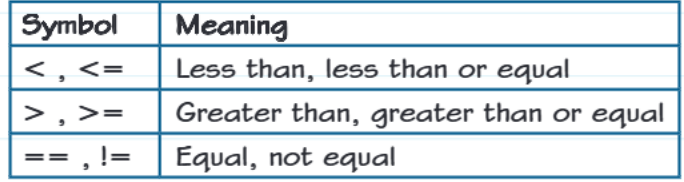
Let's break these down with simple explanations:
- Less than (): Checks if the first value is smaller than the second value
- Less than or equal (): Checks if the first value is smaller than OR exactly the same as the second value
- Greater than (): Checks if the first value is bigger than the second value
- Greater than or equal (): Checks if the first value is bigger than OR exactly the same as the second value
- Equal (): Checks if both values are exactly the same (remember: double equals for comparison!)
- Not equal (): Checks if the values are different from each other
Important
Don't confuse == (comparison) with = (assignment). Use double equals when you want to compare values! This is one of the most common mistakes in programming exams.
Working with strings and characters
Here's something really important that catches many students out: relational operators don't just work with numbers - they can also compare letters, words, and strings of text!
When comparing text, computers use something called ASCII code values. This gives each character a number value, which creates a specific order.
Note
ASCII Character Ordering:
The ASCII system creates a hierarchy for all characters:
- Numbers come first: 0, 1, 2, 3, 4, 5, 6, 7, 8, 9
- Then uppercase letters: A, B, C, D... X, Y, Z
- Finally lowercase letters: a, b, c, d... x, y, z
This ordering is crucial for understanding how string comparisons work in programming.
This means that when you compare strings:
- "Apple" < "Banana" would be True (A comes before B)
- "cat" > "Cat" would be True (lowercase c has a higher ASCII value than uppercase C)
- "123" < "ABC" would be True (numbers come before letters)
Using relational operators in programmes
Relational operators are most commonly used with selection statements (if...else) and repetition statements (while loops). They help your programme make decisions about what to do next.
Example
Worked Example: Using Relational Operators in Code
Here's a practical example showing how they work in real code:
count = 31
letter = "Q"
name = "H"
real = 33.334
myBoolean = False

if (myBoolean == False):
    print("False")

if (count < 50):
    print("Below 50")
elif (count > 100):
    print("Above 100")

if (letter != "H"):
    print("Not H")

if (real > 33.333):
    print("Above 33.333")

count = 0
while (count <= 2):
    print(count)
    count = count + 1
Breaking down what's happening:
Selection examples:
- myBoolean == False checks if the boolean variable is False
- count < 50 tests whether count is less than 50
- count > 100 checks if count is greater than 100 (used in elif)
- letter != "H" tests whether letter is not equal to "H"
- real > 33.333 checks if the decimal number is greater than 33.333
Repetition example:
- count <= 2 in the while loop keeps the loop running as long as count is less than or equal to 2
The programme's output would be:
False
Below 50
Not H
Above 33.333
0
1
2
Practice makes perfect
Note
Practice Challenge
Try working through this type of problem: Write a programme that asks users to input strings multiple times, then determines whether the first string comes before, after, or is the same as the second string in alphabetical order.
Remember to consider:
- How ASCII ordering affects string comparison
- Using appropriate relational operators
- Implementing selection statements to handle different outcomes
- Using repetition to allow multiple comparisons
Important
Common Exam Mistakes to Avoid:
- Using single equals (=) instead of double equals (==) for comparison
- Forgetting that string comparison uses ASCII values - uppercase letters come before lowercase
- Not understanding that operators return Boolean values (True/:success[False])
- Mixing up the direction of < and > symbols
These mistakes can cost you valuable marks in your GCSE exam, so practice identifying and avoiding them!
Summary
Key Points to Remember:
- Relational operators compare values and return True or False - they're essential for programme decision-making
- There are six main operators: , , , , , - each serves a specific comparison purpose
- Double equals (==) compares values, single equals (=) assigns values - don't mix them up in exams!
- Strings are compared using ASCII values where numbers < uppercase letters < lowercase letters
- Use relational operators with if statements and while loops to control programme flow and make decisions