Repetition (Edexcel GCSE Computer Science): Revision Notes
📚Revision Notes
Repetition in programming
What is repetition?
Repetition is a fundamental programming concept that allows us to run the same piece of code multiple times. Understanding repetition is essential for writing efficient programmes and avoiding unnecessary code duplication.
Note
There are two main types of repetition in programming:
- Condition-controlled repetition: The code repeats as long as a certain condition remains true
- Count-controlled repetition: The code repeats for a specific, fixed number of times
Think of repetition as a way to avoid writing the same code over and over again. Instead of copying and pasting similar lines, we can use loops to make our programmes more efficient and easier to manage. This approach not only saves time during development but also makes your code more maintainable and less prone to errors.
Condition-controlled loops (while statements)
Understanding while loops
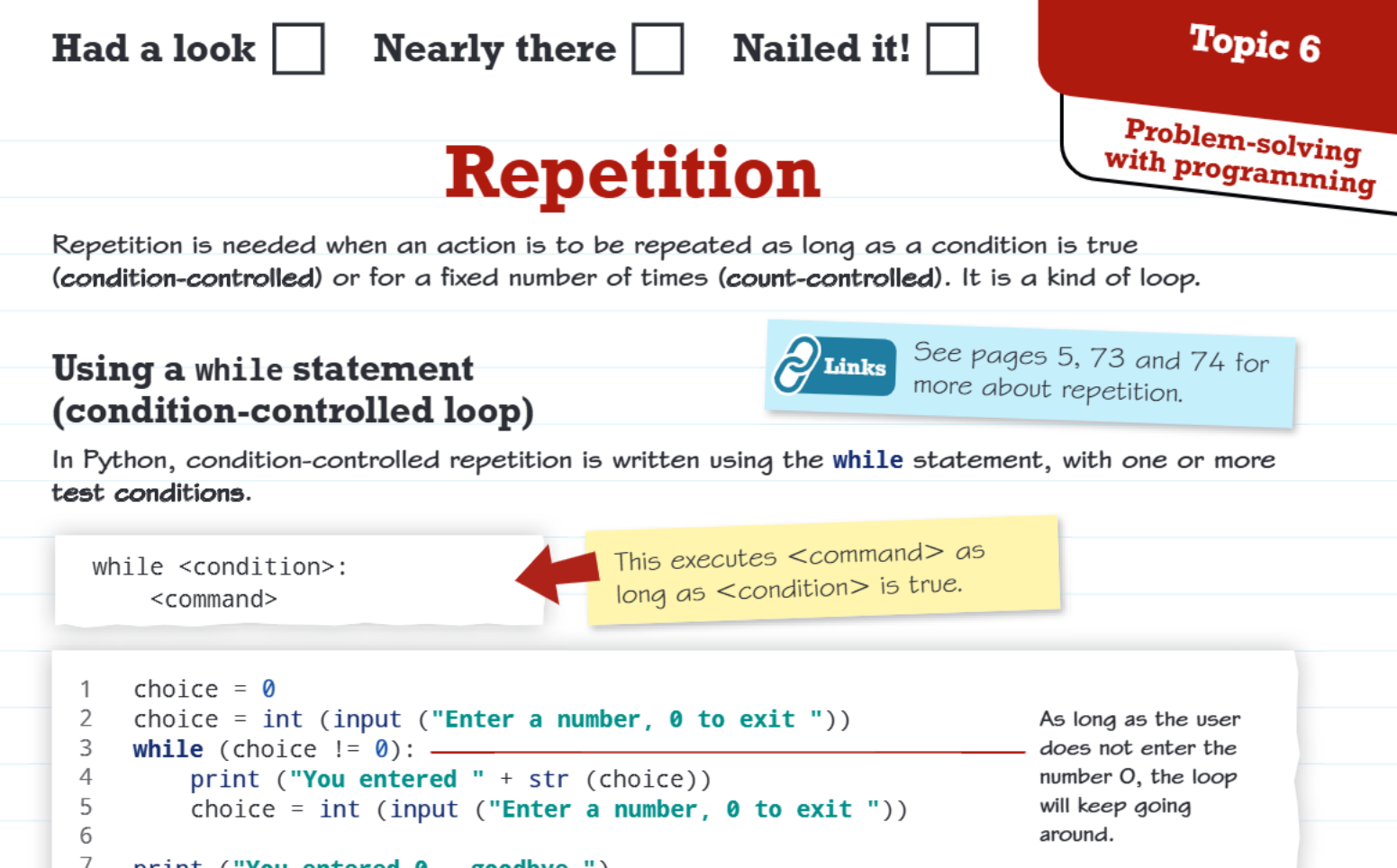
A while loop continues to execute as long as a specified condition remains true. In Python, we write condition-controlled repetition using the while statement. The basic structure looks like this:
while <condition>:
    <command>
The key thing to remember is that the command(s) inside the loop will keep executing repeatedly until the condition becomes false. This makes while loops perfect for situations where you don't know in advance how many times the loop needs to run.
Example
Worked Example: Number Input Program
Let's look at a practical example of a while loop in action:
choice = 0
choice = int(input("Enter a number, 0 to exit "))
while (choice != 0):
    print ("You entered " + str(choice))
    choice = int(input("Enter a number, 0 to exit "))
print ("You entered 0 - goodbye.")
Here's how this programme works:
- We start by setting choice to 0
- We ask the user to enter a number
- The while loop checks if the choice is not equal to 0
- If the user enters anything other than 0, the loop continues
- Inside the loop, we display their number and ask for another input
- When they finally enter 0, the condition becomes false and the loop stops
- The programme says goodbye and ends
This approach is perfect when we don't know exactly how many times we need to repeat something - it all depends on what the user does or when a specific condition is met.
Count-controlled loops (for statements)
Understanding for loops
Sometimes we know exactly how many times we want to repeat something. For these situations, Python provides the for statement combined with the range() function. This gives us precise control over the number of repetitions.
The basic structure is:
for <id> in range(<start>, <stop>, <step>):
    <command>
The range() function generates a sequence of numbers, and the loop executes the command once for each number in that sequence.
Example
Worked Example: Counting and Totaling
Here's a simple example that demonstrates how for loops work:
total = 0
for count in range(0, 10):
    total = total + count
print(count, total)
Let's break this down:
- The range(0, 10) creates numbers from 0 up to (but not including) 10
- So the loop runs with count = 0, 1, 2, 3, 4, 5, 6, 7, 8, 9
- Each time through the loop, we add the current count value to our total
- After the loop finishes, we print both the final count and the total
Important
Remember that the range function stops one number before the stop value - so range(0, 10) gives us 0 through 9, not 0 through 10. This is a common source of confusion for beginners!
Choosing the right type of loop
Selecting the appropriate loop type is crucial for writing efficient code. Here's how to make the right choice:
Important
Use a while loop when:
- You don't know exactly how many times you need to repeat
- You're waiting for a specific condition to be met
- The user controls when the loop should stop
- You're processing data until you reach a certain state
Use a for loop when:
- You know exactly how many repetitions you need
- You're working with a sequence of numbers
- You're processing items in a list or collection
- You need to perform an action a specific number of times
Practical programming tips
When working with loops, especially in user input scenarios, these strategies will help you write more robust and user-friendly programmes:
Important
Key Programming Strategies:
- Input validation: Use string operators to handle both upper and lower case inputs from users
- Compound conditions: You can combine multiple conditions using Boolean operators like and, or, and not
- Avoid infinite loops: Always make sure your while loop condition can eventually become false
- Test your loops: Start with simple examples and gradually build up complexity
- Plan your exit strategy: Every loop should have a clear and reliable way to terminate
Summary
Key Points to Remember:
- Repetition saves time and reduces errors - instead of writing similar code multiple times, use loops to repeat actions efficiently
- While loops are condition-controlled - they continue as long as a condition is true, perfect when you don't know how many repetitions you need
- For loops are count-controlled - they run for a specific number of times, ideal when you know exactly how many repetitions you want
- The range() function is essential for for loops - it generates the sequence of numbers that controls how many times the loop runs
- Always plan your exit strategy - make sure your loops have a clear way to stop, whether through a changing condition or a fixed count