String manipulation (Edexcel GCSE Computer Science): Revision Notes
📚Revision Notes
String manipulation
What are strings?
A string is a sequence of characters that you can type on your keyboard. Think of it like a chain of letters, numbers, symbols, and spaces all linked together. In programming, we use strings to store and work with text data like names, messages, or any written information.
Note
Strings are one of the most fundamental data types in programming. Every piece of text you see in applications - from usernames to error messages - is handled as a string.
Essential string functions
Python gives us lots of built-in tools to work with strings. These functions help us examine, modify, and extract information from text data.
Finding the length with len()
The len() function tells you how many characters are in a string, including spaces and punctuation marks.
Example
Worked Example: Counting Characters
myString = "When data can't drive, it takes the bus."
lengthString = len(myString)
print(lengthString)
This will output 39, counting every character including spaces and punctuation.
This is really useful when you need to know if a password is long enough, or if a message fits within character limits.
Locating text with find()
The find() function searches for a specific piece of text (called a substring) within a larger string. It returns the position where it first finds the text, or -1 if the text isn't there at all.
position = myString.find("drive")
if (position != -1):
    print("Found drive at " + str(position))
Important
Always check if the result is -1, which means the text wasn't found. This prevents errors in your programme.
Changing case with upper() and lower()
These functions convert your string to different cases, which is really helpful for making comparisons or formatting text consistently.
print(myString.upper())  # MAKES EVERYTHING CAPITAL
print(myString.lower())  # makes everything lowercase
This is particularly useful when you want to compare user input without worrying about whether they typed in capitals or not.
Replacing text with replace()
The replace() function swaps one piece of text for another throughout the entire string. This can change the length of your original string.
Example
Worked Example: Text Replacement
myString = "data bus, address bus, control bus"
print(myString.replace("bus", "train"))
This would change all instances of "bus" to "train" in the text.
String query functions
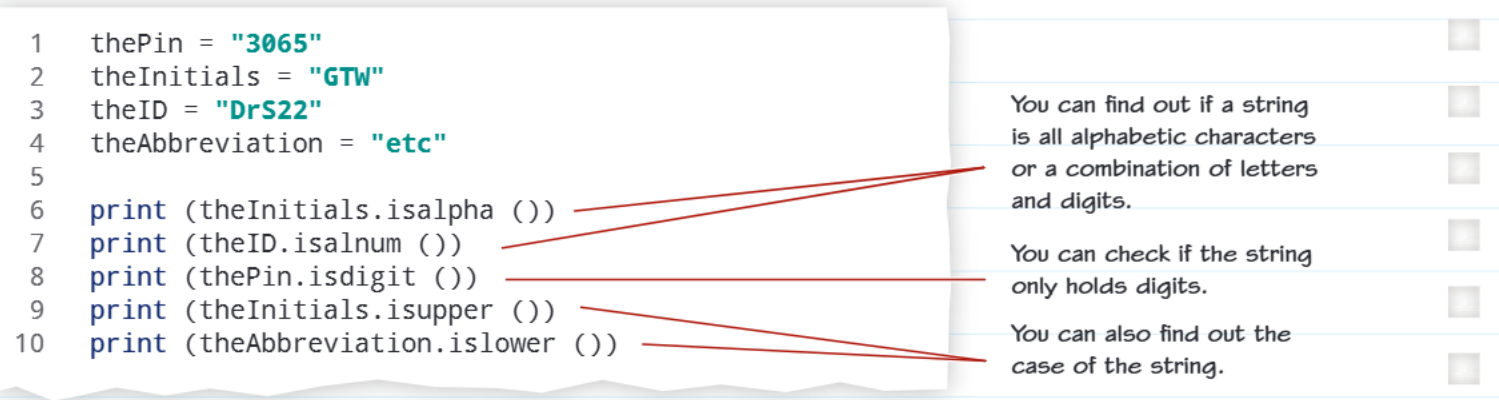
These special functions ask questions about your string and give you True or False answers. They're like detective tools that help you understand what type of characters your string contains.
Note
Query functions are particularly useful for validating user input - you can check if a password contains only letters and numbers, or if a phone number contains only digits.
Checking for letters with isalpha()
The isalpha() function returns True if your string contains only alphabetic characters (letters). No numbers, spaces, or symbols allowed.
theInitials = "GTW"
print(theInitials.isalpha())  # Returns True
Checking for letters and numbers with isalnum()
The isalnum() function returns True if your string contains only letters and numbers - no spaces or special characters.
theID = "DrS22"
print(theID.isalnum())  # Returns True
Checking for numbers only with isdigit()
The isdigit() function returns True if your string contains only numerical digits.
thePin = "3065"
print(thePin.isdigit())  # Returns True
Checking case with isupper() and islower()
These functions tell you whether all the letters in your string are uppercase or lowercase respectively.
print(theInitials.isupper())  # True if all capitals
print(theAbbreviation.islower())  # True if all lowercase
Problem-solving with string manipulation
When tackling string problems in exams, you'll often need to combine multiple functions. For example, you might need to:
- Check if input is valid using query functions
- Transform the case using upper() or lower()
- Find specific text using find()
- Replace unwanted characters using replace()
A common exam question might ask you to write a programme that validates user input, transforms it to a specific format, and handles different cases appropriately.
Important
Exam tip: Always check for edge cases like empty strings (which you can detect using len() function returning 0) and remember that find() returns -1 when text isn't found.
Summary
Key Points to Remember:
- Strings are sequences of characters that store text data in your programmes
- The len() function counts characters, find() locates text, and replace() swaps text pieces
- Query functions like isalpha(), isdigit(), and isalnum() ask True/False questions about string content
- Case conversion with upper() and lower() helps make text comparisons more reliable
- Always handle special cases like empty strings and missing text (when find() returns -1)