Subprograms (Edexcel GCSE Computer Science): Revision Notes
📚Revision Notes
Subprograms
What are subprograms?
A subprogram is like a mini-program within your main programme. It's a self-contained sequence of instructions that performs a specific task. Think of it as a helpful assistant that you can call upon whenever you need it to do a particular job.
Note
Subprograms are one of the most powerful concepts in programming. They allow you to break down complex problems into smaller, manageable pieces, making your code more organised and efficient.
Subprograms make your code more organised, easier to read, and help you avoid writing the same code over and over again. Instead of copying and pasting similar code, you can create a subprogram once and use it multiple times.
Types of subprograms
There are two main types of subprograms you need to know about:
Important
Understanding the difference between functions and procedures is crucial for effective programming. Functions give you something back (a return value), while procedures just perform an action.
Functions
A function is a subprogram that does some work and then gives you back a result (returns a value). It's like asking someone a question and getting an answer back.
For example, if you use len("hello"), this function counts the characters and returns the number 5 back to you.
Procedures
A procedure is a subprogram that performs an action but doesn't give you anything back (doesn't return a value). It just does something useful.
For example, print("Hello") displays text on the screen but doesn't return any value to your programme.
Understanding arguments and parameters
When you want a subprogram to work with specific data, you pass information to it:
Important
Key Distinction:
- Arguments are the actual values you send to the subprogram when you call it
- Parameters are like labelled boxes inside the subprogram that receive and store these values
Think of it like posting a letter: the argument is the actual letter you send, and the parameter is the mailbox that receives it.
Built-in subprograms
Python comes with many ready-to-use subprograms called built-in functions and procedures. These are available everywhere in your programmes without needing any special setup. They help you perform common tasks like getting user input, finding lengths, and converting between data types.
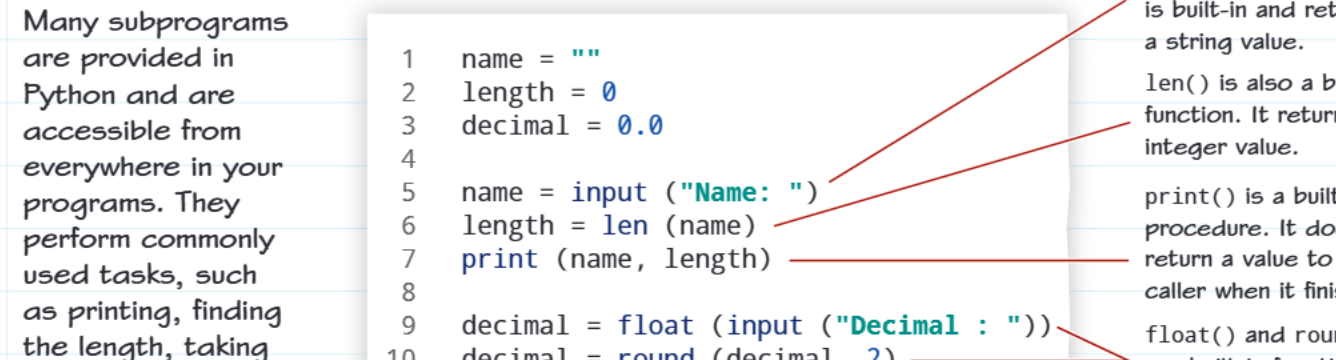
Here are some essential built-in subprograms you'll use frequently:
- input() - Gets text from the user and always returns it as a string
- len() - Counts items (like characters in text) and returns an integer
- print() - Displays information on screen (this is a procedure, not a function)
- float() - Converts text or integers into decimal numbers
- round() - Rounds decimal numbers to a specified number of places
Library subprograms
Sometimes you need subprograms that do more specialised tasks. These are grouped together in libraries (also called modules). To use these, you need to import the library first using the import keyword.
Common libraries include:
Random library - For generating random numbers and making random choices:
import random
roll = random.randint(1, 6)  # Gets random number between 1 and 6
Math library - For advanced mathematical operations:
import maths
print(maths.pi)  # Displays the value of pi
Example
Worked Example: Using Maths Functions
Floor function - maths.floor(4.7) gives you 4 (the largest whole number ≤ 4.7)
Ceiling function - maths.ceil(4.2) gives you 5 (the smallest whole number ≥ 4.2)
Important maths functions:
- Floor - Gives you the largest whole number that's less than or equal to your decimal
- Ceiling - Gives you the smallest whole number that's greater than or equal to your decimal
To use a library subprogram, you write the library name, then a dot, then the subprogram name (like random.randint() or maths.pi).
Practical application
When working with subprograms, you'll often combine built-in functions with library functions to solve complex problems.
Example
Worked Example: Combining Subprograms
Here's how you might combine different types of subprograms:
- Use input() to get data from the user
- Use float() to convert it to a number
- Use maths.floor() to round it down
- Use print() to display the result
This combination approach is very powerful and helps you build sophisticated programmes step by step.
Summary
Key Points to Remember:
- Functions return values (give you something back), while procedures just perform actions
- Arguments are the values you send to subprograms, parameters are what receive them
- Built-in subprograms like input(), len(), and print() are always available
- Library subprograms need to be imported first using the import keyword
- Use dot notation (like maths.pi) to access library subprograms after importing