Write files (Edexcel GCSE Computer Science): Revision Notes
📚Revision Notes
Writing files
Why do we need to write files?
When you're running a programme, all the data exists only in the computer's memory (RAM). This means that as soon as your programme finishes running, all that data disappears forever! This is a problem if you want to keep important information for later use.
To solve this problem, we need to save our data to a file on a storage device like a hard drive or USB stick. This process is called writing to a file, and it allows our data to persist even after the programme ends.
Note
Think of it like this: memory is like writing on a whiteboard - it gets erased when you're done. Writing to a file is like writing in a notebook - it stays there until you deliberately erase it.
Understanding text file formats
In your GCSE exam, you'll work with text files that have a specific structure. These files are organised using:
- Records: Each record contains information about one item (like one prize or one car)
- Fields: Each piece of information within a record (like name, number, price)
- Separators: Commas separate the fields within each record
- Lines: Each record appears on its own separate line
For example, a text file might look like this:
Teddy Bear,2215,4.25
Goldfish,2977,1.07
Inflatable Hammer,1785,1.49
The importance of line feed characters
When writing to files, you need to add a special character called a line feed (written as \n in code) at the end of each line. Without this character, all your text would appear on one extremely long line, making it impossible to read properly in a text editor.
Important
Critical Point: Always remember to add the line feed character \n at the end of each line. Without it, your entire file will become one unreadable line of text!
How to write data to a file
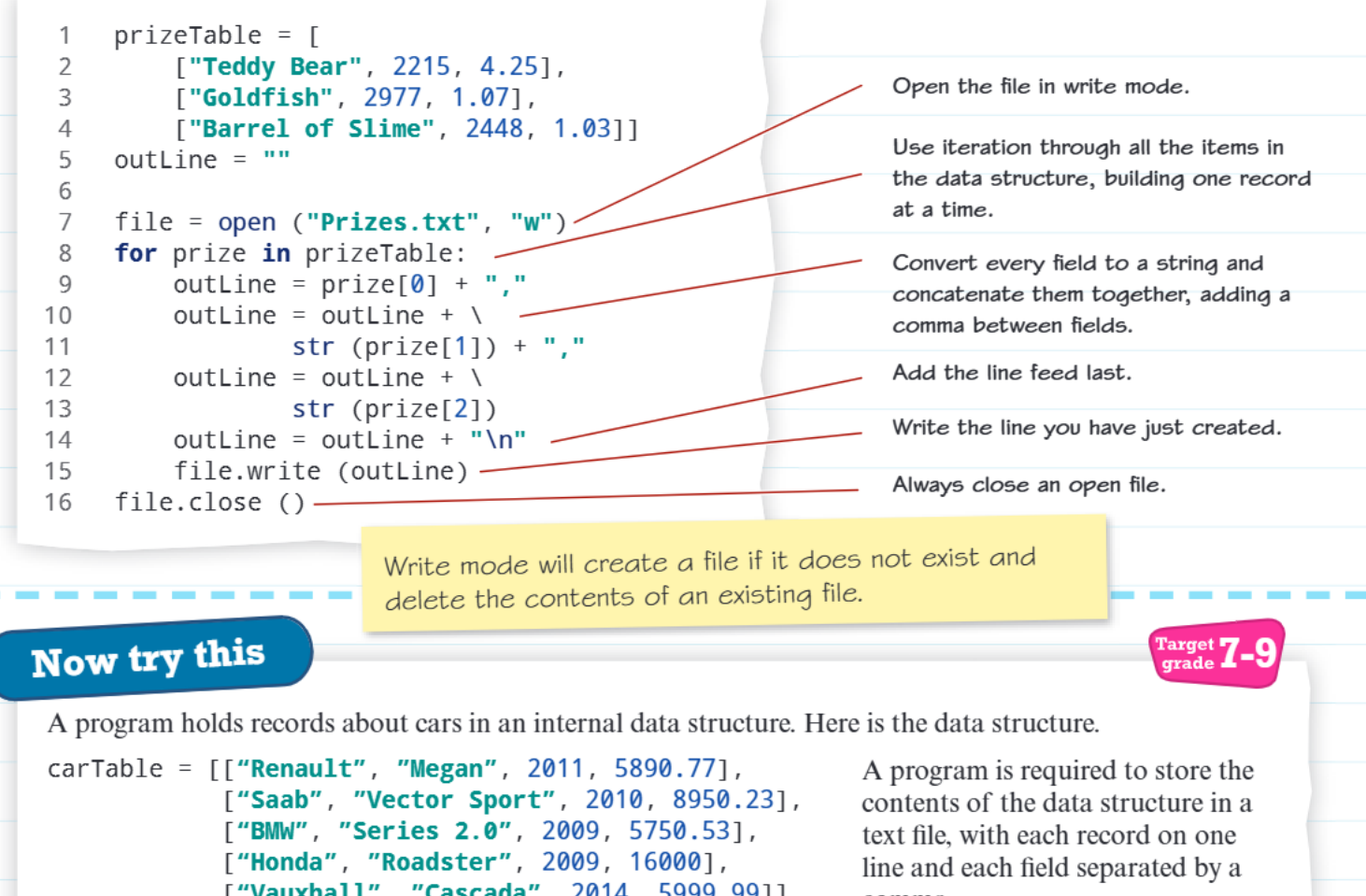
Writing data to a file involves several important steps that you must follow in the correct order:
Step 1: Open the file in write mode
First, you need to tell the computer which file you want to write to and how you want to use it. In Python, you use the open() function with write mode (indicated by "w"):
file = open("Prizes.txt", "w")
Important
Write Mode Warning: Write mode will create a new file if one doesn't exist, but if the file already exists, it will completely delete all the existing content before writing new data!
Step 2: Process your data structure
Most likely, your data will be stored in an internal data structure like an array or list. You'll need to loop through this structure to access each record one at a time:
for prize in prizeTable:
Step 3: Build each line of text
For each record, you need to convert all the fields to strings and combine them with commas. This process is called string concatenation:
outline = str(prize[0]) + ","
outline = outline + str(prize[1]) + ","
outline = outline + str(prize[2])
Step 4: Add the line feed character
Don't forget to add \n at the end of each line to ensure proper formatting:
outline = outline + "\n"
Step 5: Write the line to the file
Use the write() method to actually save the line to your file:
file.write(outline)
Step 6: Close the file
Always remember to close the file when you're finished. This is crucial because it ensures all your data is properly saved and frees up computer resources:
file.close()
Putting it all together
Here's how all these steps work together in a complete example. The programme takes data from an array called prizeTable and writes it to a text file called "Prizes.txt". Each prize has three pieces of information: name, number, and price.
Note
The programme follows the essential pattern: it loops through each prize in the array, converts all the numbers to strings using str(), joins them with commas, adds a line break, and writes the complete line to the file. Finally, it closes the file to ensure everything is saved properly.
Practice example
Example
Practice Exercise: Car Database
Try applying these concepts to a car database scenario. Imagine you have a data structure containing information about different cars:
- Car make and model
- Year of manufacture
- Engine size
- Price
Your task would be to write a programme that saves all this car information to a text file, with each car on its own line and all the details separated by commas.
Think about how you would:
- Open the file in write mode
- Loop through your car data structure
- Convert each field to a string and join with commas
- Add the line feed character
- Write each line to the file
- Close the file when finished
Summary
Key Points to Remember:
- Data persistence: Files allow data to survive after your programme ends, unlike memory which is temporary
- Write mode behavior: Using "w" mode will delete any existing file content, so be careful!
- Essential steps: Always follow the pattern of Open → Process → Write → Close
- Line feeds matter: Don't forget to add \n to create separate lines in your text file
- String conversion: Convert all numbers to strings before writing them to the file using str()