Scientific Notation (Junior Cert Mathematics): Revision Notes
📚Revision Notes
Scientific Notation
Note
Learning intentions:
- What is scientific notation?
- How to write number in scientific notation
- Using a calculator for scientific notation
Scientific Notation is a way of writing very large or very small numbers in a simplified form.
This makes it easier to work with these numbers in calculations, especially when using a calculator.
What is Scientific Notation?
A number is in scientific notation when it is written in the form:
- a is a number that is between 1 and 10.
- n is an integer (it can be positive or negative) which tells you how many places to move the decimal point.
Example
Example 1: Large Number 3400 in scientific notation is written as 3.4 × 10³.
- Here, a = 3.4 (which is between 1 and 10).
- n = 3 because you would move the decimal point 3 places to the right to get back to 3400.
Example
Example 2: Small Number 0.004 in scientific notation is written as 4 × 10⁻³.
- Here, a = 4 (which is between 1 and 10).
- n = -3 because you would move the decimal point 3 places to the left to get back to 0.004.
How to Write Numbers in Scientific Notation
- Identify the most significant digit (the first non-zero digit) in the number.
- Place the decimal point after this digit to make the number between 1 and 10.
- Count the number of places you moved the decimal point:
- If you moved the decimal to the left, n is positive.
- If you moved the decimal to the right, n is negative.
- Write the number in the form .
Example
Example 3: Converting 25,000 to Scientific Notation
- The first significant digit is 2.
- Move the decimal point 4 places to the left to get 2.5.
- Therefore, 25,000 is written as 2.5 × 10⁴ in scientific notation.
Example 4: Converting 0.00056 to Scientific Notation
- The first significant digit is 5.
- Move the decimal point 4 places to the right to get 5.6.
- Therefore, 0.00056 is written as 5.6 × 10⁻⁴ in scientific notation.
Using a Calculator for Scientific Notation
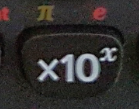
If you are using a Casio calculator, you can enter numbers in scientific notation easily.
Button to Use:
How to Type in 7 × 10⁴: Press 7, then the × button, and then press 4.
Converting a Number to Scientific Notation on Your Calculator
- Type the number and press = to enter it on the screen.
- Press "Shift" + "Mode" and select "Sci" from the menu.
- Press "0" to apply scientific notation.
Note
Exam Tip: Always double-check that the number a is between 1 and 10. If it's not, then your scientific notation is incorrect.