Terms Associated with Perspective (Leaving Cert DCG): Revision Notes
📚Revision Notes
Terms Associated with Perspective
Understanding perspective drawing requires mastering several key terms that describe how we see and represent three-dimensional objects on a two-dimensional surface. These fundamental concepts form the foundation of all perspective projection systems.
Note
The three main terms - picture plane, horizon line, and station point - work together as an interconnected system. Changing any one element will affect how your final perspective drawing appears.
Picture plane
The picture plane is the transparent surface onto which a three-dimensional image is projected to create a two-dimensional representation. Think of it as an invisible window or screen positioned between you and the object you're observing.

When creating perspective drawings, the picture plane acts as the surface where you capture what you see. The image passes through this plane, transforming from three dimensions into a flat, two-dimensional drawing. The position of the picture plane relative to both the object and the observer significantly affects the final perspective.
There are three main arrangements for the picture plane:
- In front of the object: The picture plane sits between you and the object
- Passing through the object: The plane intersects with the object itself
- Behind the object: The plane is positioned beyond the object from your viewpoint
Important
The placement of the picture plane doesn't change the basic perspective principles, but it does affect the size of the projected image. Objects appear larger when the picture plane is closer to them and smaller when it's further away.
Horizon line
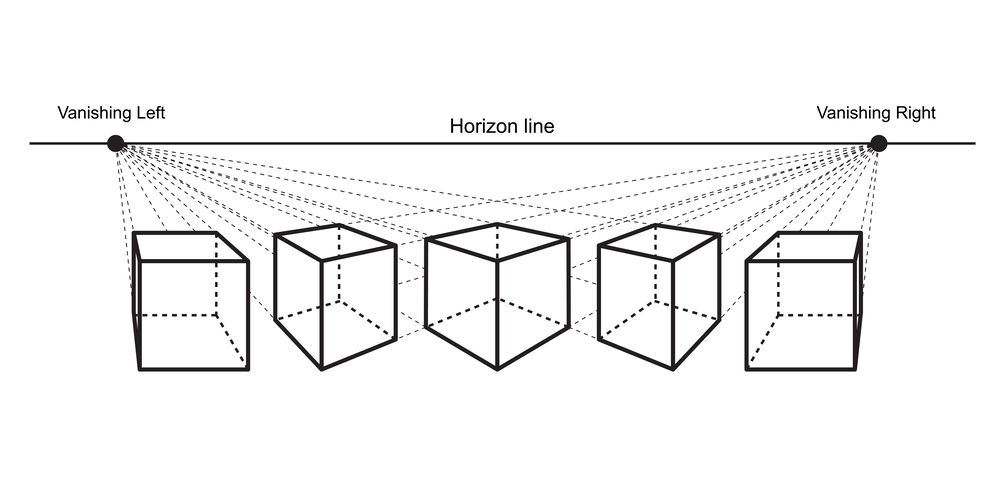
The horizon line represents your eye level and appears as a horizontal line on the picture plane. This line is crucial because it determines which surfaces of an object you can see in your perspective drawing.
The horizon line works as a visual reference that divides your view:
- Objects above the horizon line: You see their bottom surfaces
- Objects below the horizon line: You see their top surfaces
- Objects on the horizon line: You see them straight-on with minimal top or bottom surface visible
Example
Practical Application: Reading Object Positions
When an object sits above your eye level (above the horizon line), you naturally look up at it, giving you a view of its underside. Conversely, when an object is below your eye level (below the horizon line), you look down at it, seeing its top surface.
This principle applies to all objects in perspective, from simple geometric shapes to complex architectural structures.
Understanding horizon line relationships helps you create more realistic and convincing perspective drawings.
Position of the station point
The station point (SP) refers to the exact position where you, the observer, are standing when viewing an object. This position has a dramatic effect on how the final perspective appears.

The station point determines several important aspects of your perspective view:
- Distance from the object: Standing closer creates more dramatic perspective with greater size differences between near and far elements
- Height relative to the object: Your vertical position determines the horizon line location
- Horizontal position: Moving left or right changes which sides of the object are visible
Important
When the station point is close to an object, the perspective becomes more extreme and can appear distorted. As you move the station point further away, the perspective becomes more natural and less dramatic. For most technical drawings, positioning the station point at a moderate distance produces the most realistic results.
The station point also affects the cone of vision - the area you can see clearly without turning your head. Objects should ideally fall within a 30-degree cone of vision from the station point to avoid excessive distortion.
Important
Exam tip: Remember that changing any one of these three elements (picture plane, horizon line, or station point position) will alter your perspective drawing. Practice identifying these elements in different perspective setups.
Summary
Key Points to Remember:
- Picture plane is your projection surface - like a transparent window where the 3D image becomes 2D
- Horizon line equals your eye level and determines which object surfaces you see
- Station point is where you stand - closer creates more dramatic perspective, further away creates more natural views
- Objects above the horizon line show their bottom surfaces, objects below show their top surfaces
- The position of all three elements together determines the final perspective appearance