Spreadsheets and Databases in Data Handling (Grade 11 NSC Matric Computer Application Technology): Revision Notes
📚Revision Notes
Spreadsheets and Databases in Data Handling
What are spreadsheets?
Spreadsheets are digital worksheets organised in a grid format with numbered rows and lettered columns. This structured layout helps you organise and work with data efficiently. Popular spreadsheet applications include Microsoft Excel, Google Sheets, LibreOffice Calc, and iWork Numbers.
The main strength of spreadsheets lies in their ability to help you manipulate and organise raw data before transferring it to more complex database systems. Think of spreadsheets as your first step in making sense of messy, unorganised information.
Note
Spreadsheets serve as an excellent starting point for data handling because they provide an intuitive, visual way to structure information before moving to more advanced database systems.
Key uses of spreadsheets
Spreadsheets serve several important functions in data handling:
Mathematical operations: You can perform calculations like adding totals, working out averages, and calculating percentages automatically. This saves time and reduces errors compared to manual calculations.
Visual data representation: Spreadsheets excel at creating charts and graphs from your data. These visual representations make it easier to spot patterns and trends that might not be obvious in raw numbers.
Data refinement and organisation: You can break down complex data sets by separating information into different columns. For example, you might split a single column containing full names into separate columns for first names and surnames using built-in functions.
Example
Worked Example: Data Organisation
Step 1: Start with a single column containing full names:
- "John Smith"
- "Sarah Johnson"
- "Mike Brown"
Step 2: Use spreadsheet functions to split into separate columns:
- Column A: "John", "Sarah", "Mike" (First Names)
- Column B: "Smith", "Johnson", "Brown" (Surnames)
This separation makes the data more searchable and useful for analysis.
Trend prediction and modelling: Spreadsheets can help you predict future trends based on existing data. For instance, a company might use spreadsheet models to predict how price changes could affect their profit margins.
Understanding databases
Databases perform similar functions to spreadsheets but are designed to handle much larger amounts of information. Unlike spreadsheets, databases typically run on powerful servers, giving them the processing capacity to manage complex operations with vast data sets quickly and efficiently.
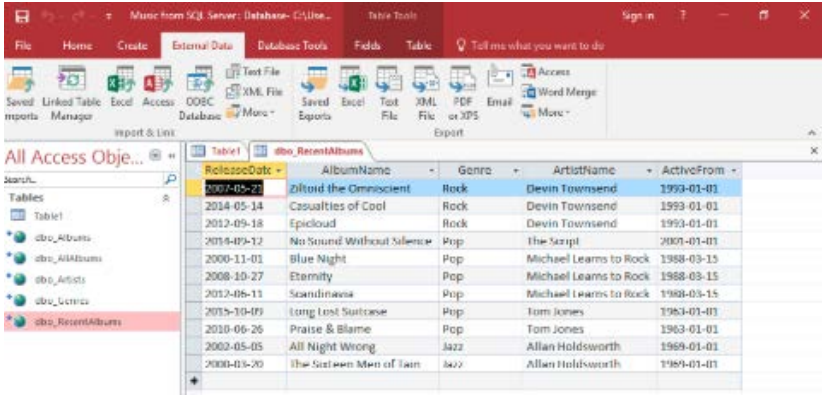
The screenshot above shows a typical database interface (Microsoft Access) managing music and album information with multiple related data tables.
Advantages of databases over spreadsheets
Databases offer several key benefits when dealing with large-scale data handling:
Enhanced data capacity: While spreadsheets have limits on how much data they can hold, databases can store and process enormous amounts of information without performance issues.
Superior processing power: Databases leverage server resources to perform complex calculations and procedures much faster than spreadsheets can manage.
Better data analysis tools: Databases provide more sophisticated tools for analysing and connecting different pieces of information, making it easier to search for specific data and extract meaningful insights.
Improved data relationships: Databases excel at connecting information across multiple tables, allowing for more complex data relationships than spreadsheets typically handle.
Important
When dealing with large datasets (typically over 100,000 rows) or complex data relationships, databases become essential. Spreadsheets may become slow or crash when handling such volumes of information.
How spreadsheets and databases work together
Despite their differences, spreadsheets and databases complement each other well in data handling workflows. Many database reports are actually generated in the database system and then exported to spreadsheets for final presentation and distribution.
This collaboration is made possible through file formats like comma separated values (CSV), which allow easy data transfer between different systems. Website databases often export their information in spreadsheet-compatible formats for users to download and manipulate further.
The similarity between these tools means that skills learned in one area often transfer to the other, making both valuable components of effective data management strategies.
Summary
Key Points to Remember:
- Spreadsheets are ideal for organising smaller data sets, performing calculations, and creating visual representations of information
- Databases excel at handling large volumes of data with superior processing power and complex analysis capabilities
- Both systems can perform mathematical operations, but databases handle bigger jobs more efficiently
- Data interchange between spreadsheets and databases is common, with formats like CSV enabling easy transfer
- Combined approach - Many organisations use both tools together, with databases for storage and processing, and spreadsheets for presentation and final analysis