Graphing Straight Lines (VCE SSCE Mathematical Methods): Revision Notes
📚Revision Notes
Graphing Straight Lines
Introduction
When you have the equation of a straight line, you can sketch its graph by finding two points that lie on the line. The most efficient approach is to locate the two axis intercepts - the points where the line crosses the x-axis and y-axis.
Note
The axis intercept method is particularly powerful because it only requires finding two points to sketch the entire line. This is much faster than plotting multiple points to determine the line's path.
Finding axis intercepts
X-axis intercept
The x-axis intercept is the point where the line crosses the x-axis. At this location, the y-coordinate is zero.
Method: Set in the equation and solve for .
Y-axis intercept
The y-axis intercept is the point where the line crosses the y-axis. At this location, the x-coordinate is zero.
Method: Set in the equation and solve for .
Note
Quick Tip for Gradient-Intercept Form
When an equation is written in the form , the y-intercept can be read directly as the constant term . This saves you from having to substitute into the equation.
Worked examples with intercepts
Example
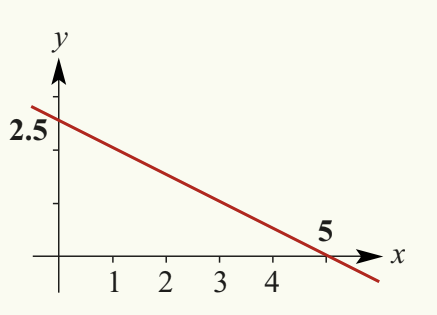
Worked Example: Sketching
Finding the x-axis intercept (set ):
The x-intercept is at the point (5, 0).
Finding the y-axis intercept (set ):
The y-intercept is at the point (0, 2.5).
Final step: Plot these two points on a coordinate plane and draw a straight line through them.
Example
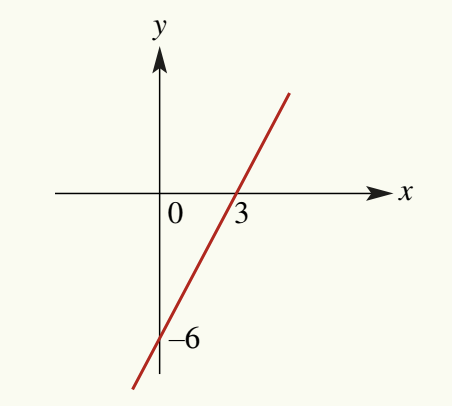
Worked Example: Sketching
Finding the x-axis intercept (set ):
The x-intercept is at the point (3, 0).
Finding the y-axis intercept (set ):
The y-intercept is at the point (0, -6).
Note: Since this equation is already in the form , we can see immediately that the y-intercept is .
Final step: Plot the points and and draw a straight line through them.
Using graphing technology
Modern graphing calculators can automatically plot straight lines and find their intercepts, making the graphing process much faster and more accurate.
Graphing on the TI-Nspire calculator
You can use a graphing calculator to plot straight lines and find their intercepts automatically.
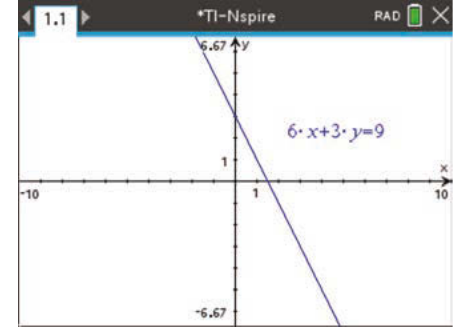
To graph an equation such as :
Opening a graph application:
- Press the appropriate menu button and select the Graphs icon
- Alternatively, use the keyboard shortcut and select Add Graphs
Entering the equation:
- Equations in the form can be entered directly
- Use menu > Graph Entry/Edit > Relation
- Enter the equation as written, for example:
Note
Adjusting the viewing window:
If the axis intercepts don't appear on screen, you'll need to adjust the window settings. Access these through menu > Window/Zoom > Window Settings.
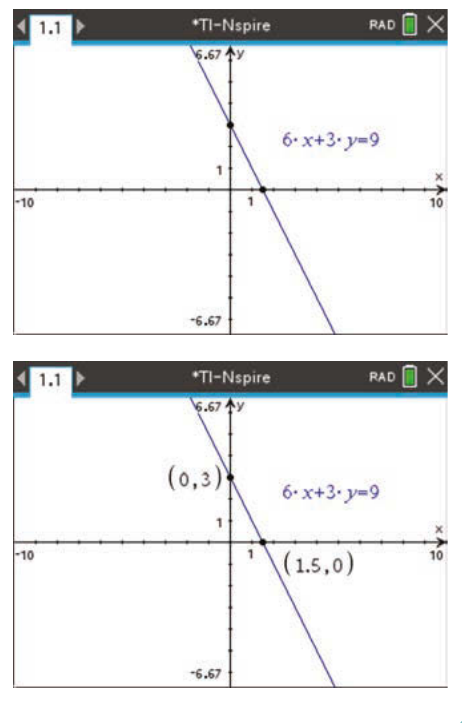
Finding the intercepts:
- Use menu > Geometry > Points & Lines > Intersection Point(s)
- To find the x-intercept: select the x-axis, then select the graph
- To find the y-intercept: select the y-axis, then select the graph
Displaying coordinates:
- Use menu > Actions > Coordinates and Equations
- Double-click on each intercept point to show its coordinates
- Press the escape key to exit this tool
Graphing on the Casio ClassPad calculator
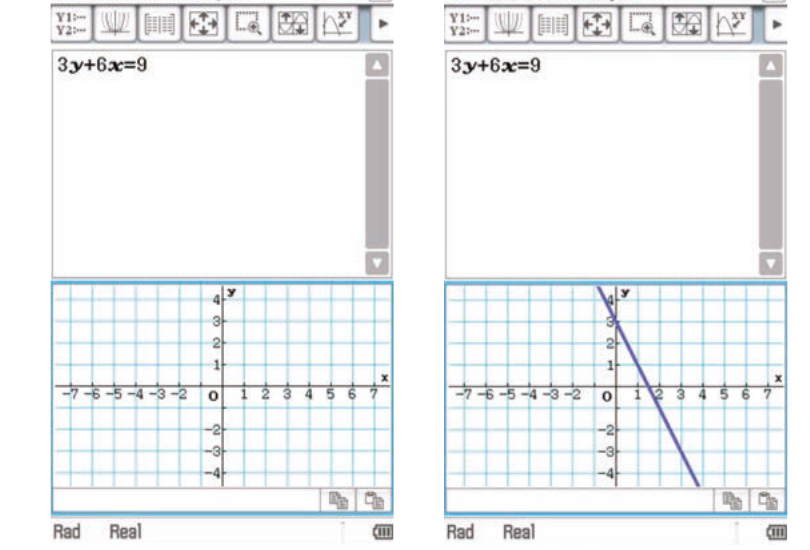
To graph an equation such as :
Entering the equation:
- Type the equation in the main screen
- Tap on the graph icon to open the graph window
Displaying the graph:
- Using your stylus, highlight the equation
- Drag it down into the graph window
- Lift the stylus off the screen and the graph will appear
Adjusting the window:
- Use the window setting icon if you need to adjust the view
- Ensure the graph window is selected and the intercepts are visible
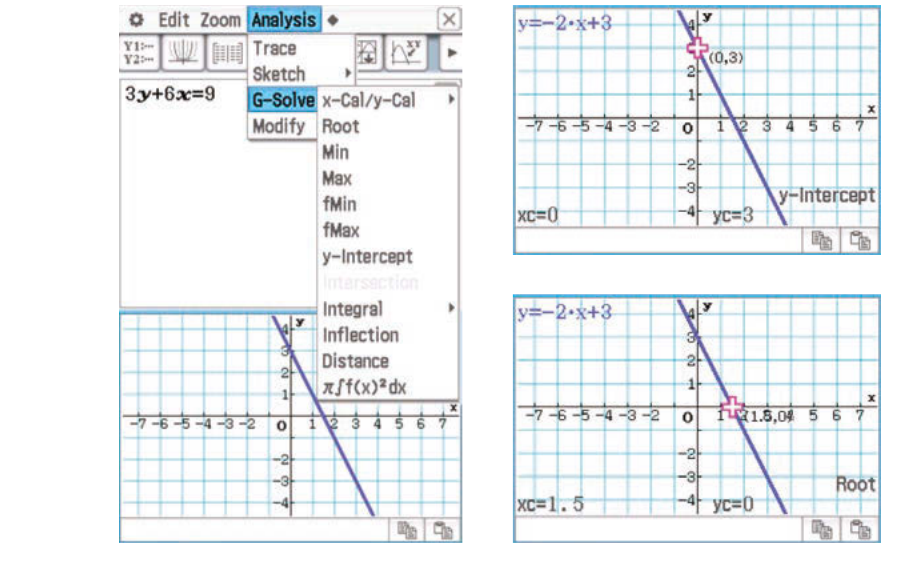
Finding the intercepts:
- Go to Analysis > G-Solve
- Select y-Intercept to find where the line crosses the y-axis
- Select Root to find where the line crosses the x-axis (the x-intercept)
Important
The calculator will display the equation in gradient-intercept form () in the top corner of the graph window. This automatic conversion can help you quickly identify the gradient and y-intercept.
Angle of inclination
The angle of inclination (also called the angle of slope) is the angle that a straight line makes with the positive direction of the x-axis. This angle is directly related to the gradient of the line.
The relationship between gradient and angle
Important
The Fundamental Relationship
The gradient of a line equals the tangent of its angle of inclination:
where:
- is the angle of inclination
- is the gradient of the line
To find the angle when you know the gradient:
For positive gradients:
The angle will be acute (less than ).
For negative gradients:
The angle will be obtuse (between and ). We use this formula because the calculator gives a negative angle for negative gradients, but we want the positive angle measured from the positive x-axis.
Example
Worked Example: Finding Angles of Inclination
For each of the following lines, find the angle (correct to two decimal places) that the line makes with the positive direction of the x-axis:
a)
b)
c)
Solution:
Part a:
The gradient is .
Using the formula:
Answer: 63.43° (to two decimal places)
Part b:
First, rearrange into gradient-intercept form:
The gradient is .
Using the formula:
Answer: 45°
Part c:
The gradient is .
Since the gradient is negative, we need to use the formula for obtuse angles:
Answer: 163.30° (to two decimal places)
Remember!
Summary
Key Points to Remember:
- To sketch a straight line from its equation, find two points on the line by calculating both axis intercepts
- For the x-intercept, substitute into the equation and solve for
- For the y-intercept, substitute into the equation and solve for
- In equations of the form , the y-intercept is simply the constant term
- The angle of inclination is found using , where is the gradient
- For lines with negative gradients, the angle is obtuse and is calculated as