Sorting Algorithms – Bubble and Merge (AQA A-Level Computer Science): Revision Notes
📚Revision Notes
Sorting Algorithms – Bubble and Merge
Introduction
Sorting is a fundamental operation in computer science that involves arranging data elements in a specific sequence, typically in alphabetical or numerical order. You can sort data in ascending order (smallest to largest) or descending order (largest to smallest).
Different sorting algorithms exist, and choosing the right one depends on your specific requirements. Some algorithms work efficiently with large datasets, whilst others are better suited for smaller collections or nearly-sorted data. Understanding how these algorithms work helps you make informed decisions when programming.
Note
The choice of sorting algorithm can significantly impact your program's performance. Factors to consider include:
- The size of your dataset
- Whether the data is partially sorted
- Available memory resources
- The complexity of the data being sorted
Bubble sort
What is bubble sort?
Bubble sort is a straightforward sorting algorithm that arranges data by repeatedly comparing adjacent elements in an array. When two neighbouring elements are in the wrong order, the algorithm swaps them. This process continues through multiple passes until the entire array is sorted.
The algorithm gets its name from the way larger values "bubble up" to one end of the array, whilst smaller values sink to the opposite end, similar to bubbles rising in water.
How bubble sort works
Let's examine how bubble sort operates with a practical example. Consider an array called Storage containing eight elements:

The algorithm works through these steps:
Understanding the process:
The algorithm uses nested loops to perform its sorting operation. The outer loop controls how many complete passes through the array are needed, whilst the inner loop performs the actual comparisons and swaps during each pass.
Example
Worked Example: First Pass Through the Array
During the first iteration, the algorithm compares each element with its immediate neighbour:
- First, it compares Storage(1) which holds 12 with Storage(2) which holds 3
- Since 12 is greater than 3, these values get swapped
- The algorithm then moves to the next pair and compares the values
- This comparison and swapping process continues throughout the array
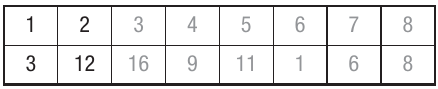
After one complete pass, the largest value (16 in this case) has moved to its correct position at the end of the array.
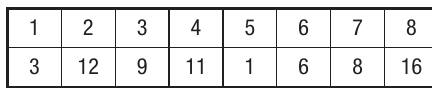
Subsequent passes:
The algorithm continues making passes through the array. With each pass, the next largest value moves into its correct position. Eventually, after enough passes, the array becomes fully sorted:
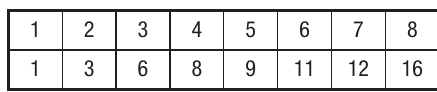
Basic bubble sort algorithm
Here's how you can express bubble sort in pseudocode:
For Loop1 = 1 To NumberOfRecords - 1
    For Loop2 = 1 To NumberOfRecords - 1
        If Storage(Loop2) > Storage(Loop2 + 1) Then
            Temporary ← Storage(Loop2)
            Storage(Loop2) ← Storage(Loop2 + 1)
            Storage(Loop2 + 1) ← Temporary
        End If
    Next Loop2
Next Loop1
Key concept: Iteration
Iteration means repeating a process multiple times to achieve a desired result. In bubble sort, the algorithm iterates through the array repeatedly, making multiple passes until everything is in order.
Improved bubble sort with a flag
Important
The basic bubble sort has a significant inefficiency: it performs all its passes regardless of whether the data is already sorted. This wastes processing time and resources.
A more sophisticated version uses a boolean flag called CompletedFlag to track whether any swaps occurred during a pass. If no swaps happen, the data must already be sorted, so the algorithm can stop early.
Here's the improved algorithm:
Repeat
    CompletedFlag ← True
    For Counter = 1 To NumberOfRecords - 1
        If Storage(Counter) > Storage(Counter + 1) Then
            Temporary ← Storage(Counter)
            Storage(Counter) ← Storage(Counter + 1)
            Storage(Counter + 1) ← Temporary
            CompletedFlag ← False
        End If
    Next
Until CompletedFlag = True
Note
This optimisation means the algorithm terminates as soon as the array is sorted, potentially saving significant processing time. This is especially beneficial when working with data that is already partially sorted.
Visual Basic implementation
Here's a bubble sort implementation in Visual Basic that sorts text strings:
Private Sub btnSort_Click(ByVal sender As System.Object, ByVal e As System.EventArgs) Handles btnSort.Click
    Dim Loop1 As Integer
    Dim Loop2 As Integer
    Dim TempStore As String
    Dim RowsToSort As Integer

    RowsToSort = grdDataIn.RowCount - 2

    For Loop1 = 1 To RowsToSort - 1
        For Loop2 = 1 To RowsToSort - 1
            ' Compare each table value with the next value
            ' Changing the inequality direction will sort from high to low
            If grdDataIn.Rows(Loop2).Cells(0).Value > grdDataIn.Rows(Loop2 + 1).Cells(0).Value Then
                ' Swap values to move larger values towards later positions
                TempStore = grdDataIn.Rows(Loop2).Cells(0).Value
                grdDataIn.Rows(Loop2).Cells(0).Value = grdDataIn.Rows(Loop2 + 1).Cells(0).Value
                grdDataIn.Rows(Loop2 + 1).Cells(0).Value = TempStore
            End If
        Next
    Next
End Sub
Notice how this code implements the same logic as our pseudocode but adapted for Visual Basic syntax and a data grid control. The variables Loop1 and Loop2 control the nested iteration, whilst TempStore temporarily holds values during the swap operation.
Merge sort
What is merge sort?
Merge sort is a sophisticated sorting algorithm that uses a "divide and conquer" strategy. This approach breaks down a large, complex problem into smaller, more manageable sub-problems. The algorithm continues dividing until reaching a level where the problem becomes trivial to solve.
For sorting, this means if you have a list with just one element, it's already sorted by definition. Therefore, merge sort works by:
- Breaking the original list down into individual single-element lists
- Comparing these small lists
- Merging them back together in the correct order to produce a sorted result
The merge process
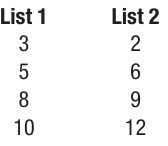
Let's explore how merging works with two lists that are already sorted:
Example
Worked Example: Merging Two Sorted Lists
Step 1: Compare first elements
Compare the first element from each list. In this example, we compare 3 and 2. Since 2 is smaller, we place 2 in our new merged list:
| List 1 | List 2 |
|---|---|
| 3 | |
| 5 | 6 |
| 8 | 9 |
| 10 | 12 |
| Merge list = 2 |
Step 2: Continue comparing
Now compare the first remaining elements: 3 and 6. Place the smaller value (3) in the merge list:
| List 1 | List 2 |
|---|---|
| 5 | 6 |
| 8 | 9 |
| 10 | 12 |
| Merge list = 2, 3 |
Step 3: Keep merging
Continue this process, always taking the smallest value from the front of either list and adding it to the merge list. Eventually, only one element remains, which goes at the end:
Final merged list: 2, 3, 5, 6, 8, 9, 10, 12
Sorting an unordered list with merge sort
To sort a completely unordered list, you first need to break it down. Consider this list of eight elements:

Example
Worked Example: Complete Merge Sort Process
Step 1: Split the list in half
Divide the list into two equal parts:
Step 2: Continue splitting
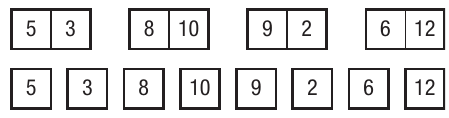
Keep dividing each list in half until every list contains just one element:

When you reach single-element lists, you have eight lists, each containing one number:
Step 3: Start merging pairs
Now merge adjacent pairs of lists, comparing their single elements and putting them in order:
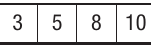
- Compare lists containing 5 and 3: merged result is 3, 5
- Compare lists containing 8 and 10: merged result is 8, 10
- Compare lists containing 9 and 2: merged result is 2, 9
- Compare lists containing 6 and 12: merged result is 6, 12
You now have four sorted lists with two elements each.
Step 4: Merge the pairs
Continue merging pairs of lists. For the first pair containing (3, 5) and (8, 10):
- Compare 3 and 8: place 3 in the merge list
- Compare 5 and 8: place 5 in the merge list
- Since the 8 and 10 are already in the correct order, add them to get: 3, 5, 8, 10
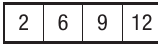
For the second pair containing (2, 9) and (6, 12):
- Following the same process produces: 2, 6, 9, 12
Step 5: Final merge
Now merge these two sorted lists together using the comparison method described earlier:
Final sorted result: 2, 3, 5, 6, 8, 9, 10, 12
Why merge sort is efficient
Merge sort is particularly efficient for large datasets because it repeatedly halves the lists. This halving process means the algorithm doesn't need to make as many comparisons as bubble sort would require.
Important
However, merge sort requires additional memory space to create the intermediate lists and the final merged list, unlike bubble sort which sorts in place. This is an important trade-off to consider when choosing a sorting algorithm.
Visual Basic implementation of merge sort
Merge sort uses a programming technique called recursion, where a subroutine calls itself. Here's how to implement merge sort in Visual Basic:
Public Sub MergeSort(ByVal ptrFirst As Integer, ByVal ptrLast As Integer)
    Dim ptrMiddle As Integer

    If (ptrLast > ptrFirst) Then
        ' Divide the list in half and make recursive calls
        ptrMiddle = (ptrFirst + ptrLast) \ 2
        MergeSort(ptrFirst, ptrMiddle)
        MergeSort(ptrMiddle + 1, ptrLast)
        ' Combine the results
        Merge(ptrFirst, ptrMiddle, ptrLast)
    End If
End Sub

' Subroutine to merge two sorted sublists
Public Sub Merge(ByVal beginning As Integer, ByVal ptrMiddle As Integer, ByVal ending As Integer)
    ReDim TempStore(RowCount)
    Dim CountLeft As Integer
    Dim CountRight As Integer
    Dim counterMain As Integer

    ' Transfer the array into a temporary array
    For LoopCount = 1 To RowCount
        TempStore(LoopCount) = DataStore(LoopCount)
    Next

    ' Set pointers for the next item from left and right halves
    CountLeft = beginning
    CountRight = ptrMiddle + 1
    ' Set the index for where we'll place the next item in the merged list
    counterMain = beginning

    Do While (CountLeft <= ptrMiddle) And (CountRight <= ending)
        ' Determine which value is smaller from the two sublists
        If (TempStore(CountLeft) <= TempStore(CountRight)) Then
            ' Take the smaller value from the left half
            DataStore(counterMain) = TempStore(CountLeft)
            CountLeft = CountLeft + 1
        Else
            ' Take the smaller value from the right half
            DataStore(counterMain) = TempStore(CountRight)
            CountRight = CountRight + 1
        End If
        counterMain = counterMain + 1
    Loop

    ' Handle any remaining data from the list
    If CountLeft <= ptrMiddle Then
        ' Transfer remaining items from left half
        For LoopCount = 1 To ptrMiddle - CountLeft + 1
            DataStore(counterMain + LoopCount - 1) = TempStore(CountLeft + LoopCount - 1)
        Next
    Else
        ' Transfer remaining items from right half
        For LoopCount = 1 To ending - CountRight + 1
            DataStore(counterMain + LoopCount - 1) = TempStore(CountRight + LoopCount - 1)
        Next
    End If
End Sub
Note
Notice how the MergeSort subroutine calls itself repeatedly. This recursive approach naturally handles the divide-and-conquer strategy, splitting the list until it reaches single elements, then merging them back together. The key variables include:
- ptrFirst and ptrLast: track the boundaries of the current sublist
- ptrMiddle: identifies the midpoint for splitting
- TempStore: holds temporary values during the merge process
Comparing bubble sort and merge sort
Efficiency:
- Bubble sort can be very inefficient, especially with large datasets, because it may perform unnecessary comparisons even when data is nearly sorted
- Merge sort is much more efficient for large lists because it uses the divide-and-conquer approach, reducing the number of comparisons needed
- The optimised bubble sort (with the CompletedFlag) improves efficiency by stopping early when the list becomes sorted
Memory usage:
- Bubble sort works "in place", meaning it doesn't require additional memory beyond the original array
- Merge sort requires extra memory space to create temporary arrays for the intermediate lists and merging process
When to use each algorithm:
- Use bubble sort for small datasets or when memory is limited
- Use merge sort when dealing with large amounts of data where efficiency is crucial
- For exam questions, you need to be able to explain and trace through both algorithms
Summary
Key Points to Remember:
- Sorting arranges data elements in a specific order (ascending or descending), typically alphabetical or numerical
- Bubble sort compares adjacent elements and swaps them if they're in the wrong order, repeating this process until the array is sorted
- The optimised bubble sort uses a flag to detect when no swaps occur, allowing early termination
- Merge sort is a divide-and-conquer algorithm that splits lists down to single elements, then merges them back together in sorted order
- Recursion is when a subroutine calls itself, which merge sort uses to repeatedly divide the list
- Bubble sort is simpler but less efficient for large datasets; merge sort is more complex but significantly faster for large amounts of data
- Merge sort requires additional memory space, whilst bubble sort works in place within the original array