Internet Security (AQA A-Level Computer Science): Revision Notes
📚Revision Notes
Internet Security
Introduction
When you use the internet, there are several security risks that you need to be aware of. These risks can affect both individuals and organisations in various ways. Personal or sensitive information might be discovered by unauthorised people, or information could be misused for malicious purposes. There's also a growing threat from malicious software (malware) such as worms, Trojans, and viruses. These can cause network failures, corrupt files, lead to denial of service, or result in serious damage for those affected.
Note
Malware threats are constantly evolving, which means security measures must be regularly updated to remain effective against new types of attacks.
Fortunately, there are several security measures you can use to protect yourself and your organisation from these threats. In this note, we'll explore the main security techniques including firewalls, proxy servers, encryption methods, digital certificates, and how to protect against different types of malware.
Firewall
A firewall is a security technique that protects an organisation's network from unauthorised access by users outside the network. You can implement a firewall using hardware, software, or a combination of both. The most secure firewalls typically use both hardware and software components working together.
Note
Firewall Analogy
Think of a firewall as a security guard at the entrance to a building. Just as the guard checks everyone who wants to enter, a firewall examines all data trying to enter or leave the network.
How networks become vulnerable
When an organisation has a local area network (LAN), multiple computers are connected together and can all access internal information. Often, the LAN will also allow users to access the internet. This connection to the internet is where the network becomes vulnerable to attack.
Important
The internet connection is the primary vulnerability point for any network. Hackers can exploit this connection to use various techniques and tools to access information stored on the LAN.
Creating a firewall using packet filtering
One common method of creating a firewall is packet filtering. This technique examines the contents of data packets travelling on a network and rejects them if they don't conform to certain rules.
Here's how it works: a firewall using packet filtering typically has two network interface cards (NICs) - one for the LAN and one for the internet. When data packets are received through the internet NIC, they can be examined before being passed around internally via the LAN NIC.
The firewall software examines these packets to ensure they don't contain any unauthorised data. At a basic level, the header of each packet can be examined to check that it has come from a recognised source. If the packet comes from a trusted source, it can be routed around the LAN. If it hasn't come from a recognised source, that packet is rejected.
Note
Firewall software may keep a log of all data being transmitted so it can be traced. The IP address of the computer sending each packet can be recorded. The system may also generate automatic warnings if it identifies that the server is being attacked by hackers.
Stateful inspection
At a more sophisticated level, firewalls can use stateful inspection. This technique examines the contents of data packets on a network and rejects them if they don't form part of a recognised communication.
Rather than just examining the header information, stateful inspection examines the actual contents of each data packet. This method keeps track of all open communication channels and therefore knows the context of each packet it receives. For example, if a packet is received from a known communication source and forms part of an existing series of packets, it will be accepted. However, when a packet comes from an unknown source or port, it may be rejected.
Important
Stateful Inspection Advantages
Stateful inspection provides a higher level of security than basic packet filtering because it:
- Examines the full content of packets, not just headers
- Understands the context of network communications
- Can detect suspicious patterns in data flows
- Tracks all active connections and their states
Advanced firewall features
Modern firewalls have become increasingly sophisticated. They can examine each packet in detail, looking not just at the data but also at the protocols being used, the IP address, and the port or socket address of the source. This means packets can be blocked for various reasons - for example, if they contain malware, come from an untrusted or unknown source, or involve an unknown process.
Proxy server
A proxy server is another security measure that can be used to protect a network. The word "proxy" means "on behalf of", so in this context, it's a server that acts on behalf of another computer.
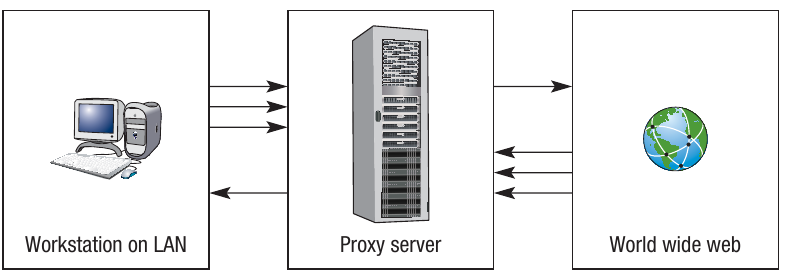
When you route internet traffic through a proxy server, there is no direct connection between the computer on the LAN and the internet. Instead, all requests pass through the proxy server first, where they can be evaluated to ensure they come from a legitimate source. The proxy server can also filter users so they only have access to specific websites.
Note
In the diagram below, the arrows represent requests which are filtered through the proxy server. Only certain data is allowed through in each direction, depending on how the proxy server has been configured.
Private/public key encryption
Encryption is a crucial technique for protecting data as it travels across networks. When data is encrypted, even if it's intercepted, it won't make sense to anyone who doesn't have the key to decrypt it.
Encryption techniques use a key, which is a string of numbers or characters that acts as a code to encrypt and decrypt messages. Typically, keys may be 128-bit or 256-bit, enabling billions of possible combinations for how data can be encrypted. Without the key, the encrypted message cannot be understood.
Symmetric encryption
One encryption method is symmetric encryption, where the sender and receiver both use the same key to encrypt and decrypt data.

In this system, the sender encrypts data using a key, then at some point sends the receiver the key separately. The receiver then uses that same key to decrypt the data.
Important
Symmetric Encryption Weakness
There's an inherent weakness with symmetric encryption: if the key is intercepted during transmission, it would be possible for someone to work out what it is. This would make all further communications vulnerable to unauthorised access.
Asymmetric encryption
To overcome the security weakness of symmetric encryption, we can use asymmetric encryption. This method uses two related keys in combination: a private key and a public key.
The algorithm used to create the two keys results in so many possible combinations that it's almost impossible to work out the combined key. Both the sender and receiver have their own pair of public and private keys.
Example
Worked Example: Asymmetric Encryption Process
Let's look at an example with two computers, A and B:
Setup:
- Computer A has a private key known only to A
- Computer A also has a public key, which is mathematically related to the private key but can be accessed by anyone
- Computer B also has its own private key and related public key
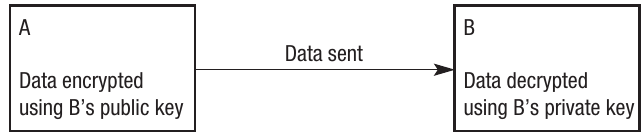
When A wants to send a secure message to B:
Step 1: A encrypts the message using B's public key (which is publicly available)
Step 2: The encrypted data is sent to B
Step 3: Because the private and public keys are mathematically related, the message can only be decrypted by B using B's private key
Step 4: Since no one else knows B's private key, even if the message were intercepted, it could not be decrypted
Security of asymmetric encryption
What makes asymmetric encryption so secure is that although the two keys are mathematically related, it's virtually impossible to work out what the private key is from looking at the public key. This is mainly due to the large number of digits being used in the keys and the complex algorithms used, which produce billions of possible permutations.
Note
At the time of writing, 1024-bit keys are common, although as computing power increases, it becomes more likely that these codes could feasibly be broken. The number of bits used in keys will need to increase over time to maintain security.
Digital certificates and signatures
When dealing with people and organisations on the internet, you need to know that you're communicating with who you think you are. This is where digital certificates and signatures come in.
Digital certificates
A digital certificate is a method of ensuring that an encrypted message is from a trusted source because they have a certificate from a Certification Authority.
Digital certificates are typically used by businesses to authenticate that they are genuine and are important in the use of asymmetric encryption as a secure way of sharing public keys. Certificates are also used by some government agencies such as the Inland Revenue.
A Certification Authority is a trusted organisation that provides digital certificates and signatures. The certificate typically contains the name of the organisation, their domain and server name, and a serial number which is registered with a Certification Authority who issues the certificates.
Important
Why Digital Certificates Matter
Digital certificates were introduced to encourage people to do business on the internet. Many consumers were (and still are) concerned about fraud. If a hacker discovers your credit card number, they could purchase items from the internet using your card. Websites using digital certificates usually advertise this fact prominently on their site using the logo of the Certification Authority.
Examples of Certification Authorities at the time of writing include Symantec (under the VeriSign and Thawte brands), Comodo Group, Go Daddy, and Global Sign. You may see their names and logos on various websites.
Digital signatures
A digital signature is another method of ensuring the authenticity of the sender. In the same way that a signature helps prove someone's identity in real life, a digital signature does the same thing on the computer. However, rather than being an actual signature, a digital signature uses mathematical functions and the public/private key method.
Example
Worked Example: How Digital Signatures Work
Here's how a digital signature works when A wants to send a message to B:
Step 1: The message being sent has a publicly known hashing algorithm applied to it (you learned about hashing in Chapter 10) to create what is known as a hash
Step 2: The hash is encrypted using A's private key
Step 3: The hash is appended to the message and becomes the digital signature
Step 4: The message is sent to B, who then uses A's public key to decrypt the hash
Step 5: The hash is then put through the same publicly known algorithm and the result is compared to that in the original message
Step 6: Where the two hashes are the same, the message is authenticated
Step 7: Where they are different, the message cannot be authenticated
Why this works:
- The message really came from A (because only A has access to A's private key)
- The message hasn't been tampered with during transmission (because any changes would result in a different hash)
Trojans
A Trojan is a computer program designed to cause harm to a computer system or to allow a hacker unauthorised access. It's one type of malicious software (malware). The name comes from the ancient Greek story of the Trojan Horse.
The distinguishing feature of a Trojan is that it's hidden away inside another file and it's not always obvious that a computer is infected. The Trojan doesn't replicate itself in the same way as other malware, and therefore it can remain undetected for a long time.
Important
A Trojan's ability to remain hidden gives a hacker the opportunity to access a computer remotely without the knowledge of the user. Once access is achieved, it's possible to carry out theft of data with a view to carrying out further crime. Alternatively, the Trojan may simply be used to cause damage to the computer or data stored on it.
Hackers and their motivations
Hackers are individuals or groups that gain or attempt to gain unauthorised access to individual computers or the networks of organisations. Hackers' motives vary enormously:
Note
Understanding Hacker Motivations
-
Amateur hackers: At one end of the scale, there's the amateur hacker who views hacking as a game and simply enjoys breaking into other people's systems. When they get in, they rarely do any damage.
-
Professional hackers: At the other end of the scale, there are professional hackers who can make a living by carrying out fraudulent acts.
-
Ethical hackers: There are also groups of "ethical hackers" who enjoy the notoriety that hacking brings. These people tend to target large organisations such as Microsoft in order to expose weaknesses in their security measures. Their justification is to make big businesses take a more serious approach to internet security.
-
Politically or religiously motivated hackers: Other hackers have political or religious motivations and may target the websites of government agencies or religious groups to get their own views across. In some cases, hacking is used as a form of terrorism or sabotage against a particular nation.
Case study: Flame malware
An interesting example is the Flame malware, first reported in 2012, which is being classed as a new generation of superbug that is part Trojan, part worm, and part virus. Unlike many other malware programs, Flame is quite large at 20MB, and its origin is currently unknown.
Once Flame has installed itself, it has the capability to monitor network traffic, access data and programs, take screenshots, record conversations, and monitor keystrokes, among other things. The malware is proliferating in the Middle East and is so large and complex that some people believe it can only have been written by a state government for the purposes of collecting information and espionage.
Viruses
A virus is a small malware program designed to cause damage to a computer system or the data stored on it. When a computer becomes infected, the malware installs itself on the computer from various sources including pop-ups, email attachments, or file downloads.
The virus itself is attached to another file, but once installed on the host machine, it will activate. The defining feature of a virus is that it replicates itself and can therefore cause extensive damage to individual computers and networks. Like a human virus, it can spread anywhere.
Important
Virus Impact Levels
Viruses are created for various reasons and have various impacts:
- At the lowest level, a virus may simply display an unwanted message
- At the other end of the scale, viruses can destroy whole networks and entire databases
The ability of viruses to replicate and spread makes them particularly dangerous in networked environments.
Worms
The nature of the internet means that viruses now have the potential to spread very quickly around the globe. Many of the world's most infamous viruses are classed as worms.
Worms replicate themselves and are designed to spread, exploiting any weaknesses in a computer's defences. The defining feature of a worm is that it doesn't need to be attached to another file to infect a computer - it can spread independently.
[IMAGE
showing worm spread across network]Note
The diagram shows how a worm can quickly be passed around a network and to any other network that connects to it. In this scenario, it's possible for every computer connected to become infected.
Well-known worms over recent years include 'Mydoom', 'Sobig.f', 'Iloveyou', and 'Melissa'. All of these proliferated via email and were able to spread quickly because the malware was automatically sent to the email address list of infected machines. Malware such as this has infected millions of computers, caused billions of pounds worth of damage, and forced some very large websites to close down temporarily.
Protecting against Trojans, viruses and worms
There are several ways of reducing the risks from malware, and the actions taken depend on what kind of user you are. Protection requires a multi-layered approach involving users, programmers, and system administrators.
As a user
As an individual user, there are many things you can do to protect your computer:
Summary
User Protection Measures:
- Use anti-virus software and other anti-malware software and keep it up to date
- Keep operating system software up to date (security patches are regularly released)
- Use a firewall
- Don't open attachments or click on pop-ups from unknown senders
- Operate a white list of trusted sites (a list of websites you know are safe)
- Ensure sites use HTTPS, digital signatures, and certificates
- Use passwords on programs and files
- Encrypt data files
As a programmer
As someone who writes code, you can make programs more secure:
Summary
Programmer Protection Measures:
- Select a programming language with built-in security features, including tools that check for common security errors
- Use recognised encryption techniques for all data stored within the program
- Set administrative rights as part of the program and carefully control access and permission rights for different users
- Don't load up lots of internet services as part of your code unless they are needed
- Thoroughly test your code, as errors can be exploited - specifically test for known security issues
- Keep code up to date in light of new security threats
- Never trust the user! Many threats are internal to an organisation and might not be malicious. Major problems can be caused through accidental misuse by a user
As a system administrator
As someone responsible for maintaining computer systems:
Summary
System Administrator Protection Measures:
- Ensure that requests are coming from recognised sources
- Use a network firewall and implement the packet filtering and stateful inspection techniques described earlier in this chapter
- Use encryption techniques as described earlier and ensure digital certificates and signatures are used and are up to date
- Keep anti-virus software up to date
- Update the network operating system regularly
These protection measures work together to create multiple layers of security, making it much harder for malware to infect systems and cause damage.
Remember!
Summary
Key Points to Remember:
-
Firewalls protect networks by examining data packets and blocking unauthorised access. They can use packet filtering (checking headers) or stateful inspection (checking context).
-
Asymmetric encryption is more secure than symmetric encryption because it uses two mathematically linked keys - a public key for encryption and a private key for decryption. Even if the public key is known, the private key cannot be worked out.
-
Digital certificates and signatures verify authenticity. Certificates from Certification Authorities prove that organisations are genuine, while digital signatures use hashing and encryption to prove who sent a message.
-
Trojans, viruses, and worms are different types of malware. Trojans hide in other files, viruses attach to files and replicate, and worms spread independently without needing to attach to files.
-
Protection requires multiple layers including user awareness (not opening suspicious attachments), secure programming practices (using encryption and testing for vulnerabilities), and system administration (keeping software updated and using firewalls).