The Client-Server Model (AQA A-Level Computer Science): Revision Notes
📚Revision Notes
The Client-Server Model
Introduction to the client-server model
The client-server model is a way of organising networked computers where one powerful machine (the server) provides services and resources to multiple less powerful machines (the clients). Think of it like a library system: the library (server) holds all the books and resources, while library users (clients) can request and access those resources as needed.
Note
This library analogy is helpful for understanding the relationship: just as library users don't need to own all the books themselves, clients don't need to contain all the resources - they simply request what they need from the central server when required.
In a typical client-server setup, the server is a high-specification computer with substantial processing power and storage capacity. The clients are usually lower-specification machines that rely on the server to provide them with the resources they need. This arrangement is particularly useful because clients don't need to be powerful or expensive - they can be relatively simple devices that access the server's capabilities.
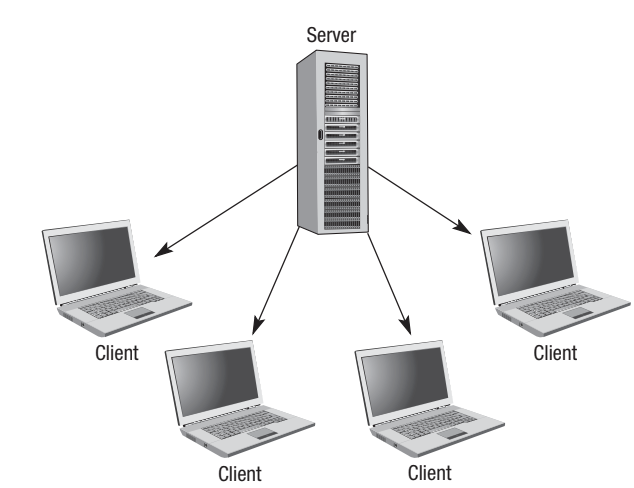
The diagram above shows a typical star network topology, which is the most common way to physically connect clients to a server. In this arrangement, each client has its own direct connection to the central server, much like the spokes of a wheel connecting to the hub at the centre.
How clients and servers communicate
The client-server model operates on a fundamental principle of request and response. When a client needs something - whether it's running an application, accessing a file, or retrieving data - it must send a request to the server. The server then processes that request and sends back the appropriate response.
Important
The Request-Response Cycle is Essential
Every interaction in a client-server model follows this pattern: the client must always initiate communication by sending a request, and the server responds. The server never sends unsolicited data to clients - it only responds to requests.
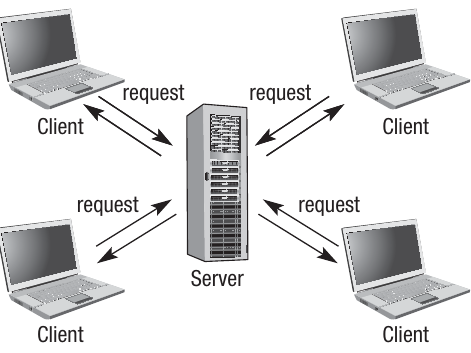
This request-response cycle happens constantly in networked environments. For example, when you check your email, your email client sends a request to the email server, which then responds by sending you your messages. Similarly, when you use FTP (File Transfer Protocol) to upload a file, your client makes a request to upload, and the FTP server handles that request.
Types of servers
In practice, networks often have multiple servers, each specialised for different tasks. Here are the main types you'll encounter:
File server: This stores various types of computer files, including programs and data. In a traditional office network, the file server acts as a central repository where everyone can access shared documents and applications.
Web server: These servers are dedicated to serving up web pages for intranets (internal networks) or the internet. When you visit a website, you're connecting to a web server that sends you the HTML, images, and other files that make up that site.
Proxy server: This acts as a gateway between client computers and the internet. Proxy servers can improve security by filtering traffic, cache frequently accessed content to improve performance, and control what internet resources users can access.
Print server: In a networked environment, all client print requests go to the print server. The server prioritises these requests, manages the print queue (the buffer), and coordinates when each job gets printed. This prevents printing chaos when multiple people try to print at once.
Database server: This stores the contents of databases and handles all the queries and data manipulation requests from client computers. Rather than each client having its own copy of the database, everyone accesses the same centralised data.
Application server: Some applications are too resource-intensive to run on individual client machines. An application server runs these programs centrally, and clients can access them remotely. This is particularly useful for specialist software that requires significant processing power.
Note
Real-World Applications
Different servers work together in modern networks. For example, when you access a company's web-based database application, you might interact with a web server (serving the interface), an application server (running the database queries), and a database server (storing the actual data) - all working together seamlessly.
Application program interface (API)
When programs need to communicate with each other across a network, they need a standardised way to "speak the same language". This is where application program interfaces come in. An API is a collection of standardised subroutines and protocols that define exactly how programs can interact with each other.
Note
The Restaurant Menu Analogy
Think of an API as a menu in a restaurant. The menu (API) tells you what dishes (services) are available and how to order them, but you don't need to know how the kitchen prepares each dish. Similarly, an API tells programmers what functions are available and how to call them, without requiring them to understand the internal workings of the service they're accessing.
APIs are built using standardised subroutines that can be customised to create interfaces between different programs. When you're working with web services, an API also defines which protocols will be used for communication. This standardisation is crucial because it means that different programs, potentially written in different programming languages and running on different operating systems, can work together seamlessly.
The websocket protocol
One particularly important type of API uses the websocket protocol, which creates a persistent, ongoing connection between a client and server. Unlike traditional web connections that close after each request-response cycle, a websocket keeps the connection open, allowing continuous two-way communication.
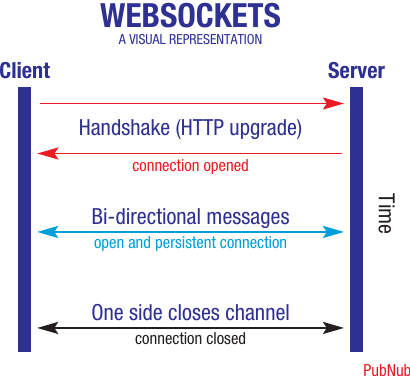
Here's how websockets work:
- Handshake phase: The client sends a handshaking request to the server using an HTTP upgrade request. This is essentially asking, "Can we establish a persistent connection?"
- Connection opened: The server responds by creating a full-duplex connection on a single socket. This creates a dedicated communication channel between the two computers.
- Bi-directional messaging: Once the connection is open and persistent, data can flow in both directions simultaneously. The client and server can send messages to each other whenever needed, without having to constantly request and re-establish the connection.
- Connection closure: When one side decides the communication is finished, it can close the channel, ending the websocket connection.
Data sent through websockets is organised into packets called messages. These messages contain minimal header information, making them efficient for rapid data transfer. The websocket protocol uses port 80, which is the standard HTTP port, so it can work even when firewalls block other types of connections.
Important
When Websockets Are Essential
Websockets are particularly valuable for applications that need real-time updates. For example, an online travel agency needs to respond instantly when someone books a holiday - you don't want to sell the same holiday to two different customers! Similarly, a stock trading platform needs to update share prices continuously so traders can make instant decisions. In these scenarios, constantly refreshing web pages would be too slow and inefficient.
CRUD and REST
When multiple users need to access databases across a network or over the internet, there are standardised conventions to ensure data is stored, managed and represented consistently. Two key concepts in this area are CRUD and REST.
CRUD operations
CRUD is an acronym that represents the four fundamental operations you can perform on any database:
- Create: Adding new data to the database
- Retrieve (or Read): Getting existing data from the database
- Update: Modifying existing data in the database
- Delete: Removing data from the database
Important
These four operations are essential - without them, you simply cannot have a functional database. Every database system, regardless of how it's built, must support all four CRUD operations.
Mapping CRUD to SQL
When working with relational databases, CRUD operations map directly to SQL (Structured Query Language) commands:
| CRUD | SQL |
|---|---|
| Create | INSERT |
| Retrieve | SELECT |
| Update | UPDATE |
| Delete | DELETE |
This relationship is straightforward and logical. When you want to create a new database record, you use an INSERT statement. To retrieve information, you use SELECT. To modify existing records, you use UPDATE, and to remove records, you use DELETE.
REST methodology
REST (Representational State Transfer) is a design methodology for implementing networked database applications. It's particularly clever because it uses the HTTP protocol - the same protocol that already handles all web traffic - to carry out CRUD operations on networked databases.
HTTP uses different request methods to specify what type of operation should be performed. These methods map to CRUD operations:
| CRUD | HTTP |
|---|---|
| Create | POST |
| Retrieve | GET |
| Update | PUT |
| Delete | DELETE |
Note
Why REST is Efficient
REST is an efficient approach because it leverages existing, well-established protocols. Since HTTP is already the standard way of transferring data over the internet, REST will work on any computer system and can pass through firewalls that might block other types of database connections.
How REST works in practice
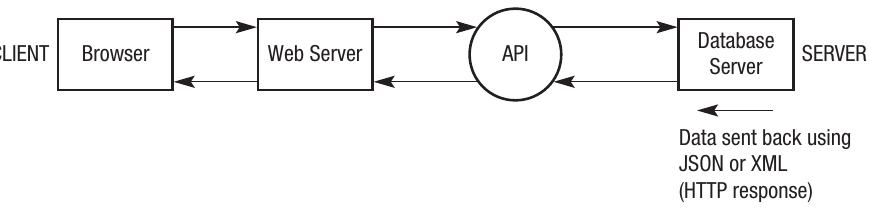
The REST model follows a specific process:
- Client makes a request: The user initiates a request from their browser. This request is made to access a database.
- Resource identification: The requested database resource is identified by its URL (Uniform Resource Locator).
- Web server coordination: The web server receives the request and coordinates with the API.
- API processes the request: The API runs on the server and communicates with the database server to process the client's request.
- Database interaction: The database server performs the requested operation (create, retrieve, update or delete).
- Response formatting: The results are sent back using HTTP. The data is formatted in either JSON or XML so it can be properly displayed on the client side.
- Client display: HTML files ensure the data appears correctly formatted in the user's browser.
Example
Worked Example: REST Query Using URL
To find all customers named 'Brown', you might use a URL like:
http://www.example.com/customers/brown
This looks like a normal website address, but it's actually a database query. The web server interprets this URL, the API processes it, and the database returns all records where the customer name is 'Brown'. The results are then formatted and displayed in your browser.
This entire process happens using standard HTTP protocols, making REST a universal solution for networked databases.
JSON (JavaScript online notation) and XML (extensible markup language)
When data needs to be transferred between servers and web applications, it must be formatted in a standardised way so both sides can understand it. JSON and XML are the two main formats used for this purpose, and both have become industry standards.
JSON format
JSON was originally developed as part of the JavaScript programming language, but it's now available as a standalone format that can be implemented in almost any programming language. It's designed to be human-readable and consists of objects and values.
Example
Example: Customer Database in JSON Format
{"customers":[
    {"firstName":"Alan", "lastName":"Brown"},
    {"firstName":"Asif", "lastName":"Javid"},
    {"firstName":"Mary", "lastName":"Smith"}
]}
In this structure, the objects are firstName and lastName, while the values are the actual names shown in quotation marks. In database terminology, an object is called a field and a value is called a record.
JSON has several advantages:
- Human-readable: It's very easy to understand what the data represents just by looking at it. The structure clearly shows objects and their associated values.
- Easy to parse: Because each object and value is clearly defined on its own line, computers can quickly interpret (parse) JSON files.
- Compact: JSON requires less code than XML, making files smaller and faster to transfer.
- Simple syntax: The coding structure is straightforward, making it easier for developers to create JSON files.
XML format
XML is a markup language that defines how data should be encoded. It's similar to writing code in a programming language and requires more technical knowledge than creating a JSON file.
Example
Example: Customer Database in XML Format
<customers>
    <customer>
        <firstName>Alan</firstName>
        <lastName>Brown</lastName>
    </customer>
    <customer>
        <firstName>Asif</firstName>
        <lastName>Javid</lastName>
    </customer>
    <customer>
        <firstName>Mary</firstName>
        <lastName>Smith</lastName>
    </customer>
</customers>
XML uses markup tags (similar to HTML) to structure the data. Each piece of data is wrapped in opening and closing tags that identify what that data represents.
Comparing JSON and XML
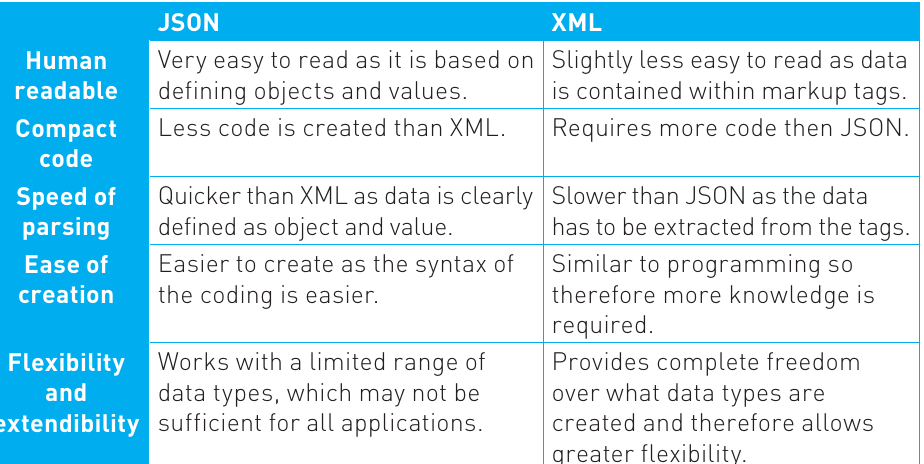
While both formats serve the same basic purpose, they have important differences:
Human readability: JSON is generally easier to read because it's based on defining objects and values in a straightforward way. XML is slightly less easy to read because the data is contained within markup tags.
Compact code: JSON creates less code than XML, which means smaller file sizes and faster transmission over networks.
Speed of parsing: JSON is quicker to parse because the data is clearly defined as objects and values. XML is slower because the data must be extracted from within the markup tags.
Ease of creation: JSON has a simpler syntax, making it easier to learn and use. XML requires more knowledge and skill because it's similar to programming.
Flexibility and extendibility: This is where XML has an advantage. XML provides complete freedom over what data types are created, offering greater flexibility. JSON works with a limited range of data types, which might not be sufficient for all applications.
Note
Despite XML's greater flexibility, JSON has become the more popular choice for most client-server databases because its advantages in simplicity, speed and compactness outweigh the need for extended flexibility in many common applications.
Thin- vs thick-client computing
When designing a client-server network, one important decision is how to distribute computing resources between the server and the clients. There are two main approaches: thin-client computing and thick-client computing.
Thin-client computing
In a thin-client model, the server contains the majority of resources, processing power and storage capacity, which it then distributes to other clients as needed. The server is a large, powerful computer with extensive processing capabilities and storage, whilst the clients have minimal resources.
Note
Understanding Terminals
In the most extreme form of thin-client computing, the client machine is called a terminal - a computer with little or no processing power or storage capacity of its own. In this scenario, the server actually runs all the software, and the client machine simply acts as an input/output device with very little processing capability and no hard disk.
Think of thin clients as being dependent on the server for everything. The clients might have just enough power to display information and accept user input, but all the real work happens on the server.
Thick-client computing
A thick-client model takes the opposite approach. In this setup, resources, processing power and storage capacity are distributed between the server and the client computers. The clients are fully specified computers similar to what most people have at home.
In thick-client computing, clients can perform most tasks independently. They don't need the server to run software most of the time. The resources are allocated between client and server in a way that gives clients significantly more local processing power, storage and access to locally installed software.
Important
Key Difference
The key difference is that more of the hardware and software resources are at the client end in a thick-client model, whereas in thin-client computing, most resources are concentrated at the server end.
Choosing between thin and thick clients
The decision about which model to use depends largely on what tasks users need to accomplish and what resources they require. Additionally, with many applications now being hosted on the internet and accessed through web browsers, organisations can move towards thin clients with services available via the internet rather than only through the local area network (LAN).
Advantages and disadvantages of thin-client computing:
| Advantages | Disadvantages |
|---|---|
| Easy and cheaper to set up new clients as fewer resources are needed | Clients are dependent on the server so if it goes down, all clients are affected |
| The server can be configured to distribute all the hardware and software resources needed | Can slow down with heavy use |
| Hardware and software changes only need to be implemented on the server | May require greater bandwidth to cope with client requests |
| Easier for the network manager to control clients | High-specification servers are expensive |
| Greater security as clients have fewer access rights |
Advantages and disadvantages of thick-client computing:
| Advantages | Disadvantages |
|---|---|
| Reduced pressure on the server leading to more uptime | Reduced security if clients can download software or access the internet remotely |
| Clients can store programs and data locally giving them more control | More difficult to manage and update as new hardware and software need installing on each client machine |
| Fewer servers and lower bandwidth can be used | Data is more likely to be lost or deleted on the client side |
| Suitable for tablets and mobile phones that require more of the processing and storage to be done on the server side | Can be difficult to ensure data integrity where many clients are working on local data |
Note
Both models have their place in modern computing. The thin-client model excels when you need centralised control, easier maintenance and lower costs for client machines. The thick-client model works better when clients need independence from the server, have to work offline, or need substantial local processing power for demanding applications.
Remember!
Summary
Key Points to Remember:
-
The client-server model connects computers over a network where a high-specification server provides resources to multiple lower-specification clients, typically arranged in a star topology.
-
APIs (Application Program Interfaces) provide standardised ways for programs to communicate across networks, with websockets creating persistent connections for real-time two-way data exchange.
-
CRUD operations (Create, Retrieve, Update, Delete) are the four essential database functions that map directly to SQL commands (INSERT, SELECT, UPDATE, DELETE) and HTTP methods (POST, GET, PUT, DELETE) in REST applications.
-
JSON and XML are the two main formats for transferring data between servers and clients - JSON is simpler, faster and more compact, whilst XML offers greater flexibility in defining data types.
-
Thin clients depend heavily on a powerful server for processing and storage (cheaper, easier to manage but dependent on server), whilst thick clients have substantial local resources (more independent but harder to maintain and less secure).