The Internet (AQA A-Level Computer Science): Revision Notes
📚Revision Notes
The Internet
Introduction to the Internet
The Internet is a vast global network that connects billions of computers and devices worldwide. More specifically, it is described as a network of networks - a collection of interconnected computer networks that work together to enable worldwide communication. The Internet has transformed how we communicate, work, socialise, shop, and access information. With an estimated 2.5 billion users (approximately one-third of the world's population), understanding how the Internet is structured and how data travels across it is essential knowledge for computer science students.
The Internet and the World Wide Web
Many people use the terms "Internet" and "World Wide Web" (WWW) interchangeably, but they actually refer to different things. It's important to understand the distinction between these two concepts.
What is the Internet?
Note
The Internet started life as ARPANET in the late 1960s. ARPANET was created by the American military as a secure method of transferring sensitive data during the Cold War with Russia. Throughout the 1980s, the network expanded beyond military use and began to include universities and research centres, creating a broader community of connected computers.
The Internet provides the underlying infrastructure - the physical network of cables, routers, and protocols that allow computers to communicate with each other. It is the foundation upon which many services are built.
What is the World Wide Web?
The Internet as we know it today began to take shape in the mid-1980s when Tim Berners-Lee, a British scientist working in Switzerland, created the World Wide Web. Berners-Lee had been using the Internet to transmit and receive research documents but found the interface very clumsy and difficult to navigate. As a result, he developed the concept of an organised browser to allow people to navigate and search the Internet more easily.
The WWW is a service provided on top of the Internet - it consists of millions of websites and web pages that are accessed using browsers. While the WWW is used by millions of people every day, it is just one of many services available on the Internet. Other services include email, file transfer (FTP), and remote access (SSH). It is entirely possible to use the Internet without using the WWW at all.
After Berners-Lee's innovation, many other organisations began to use the WWW to offer services to users. During the 1990s, there was an explosion in the range of services available, from Internet Service Providers and search engines to email systems. This period also saw a massive increase in people buying personal computers for home use, with manufacturers supplying computers with pre-installed browsers and modems ready to connect to the Internet.
Uniform Resource Locator (URL)
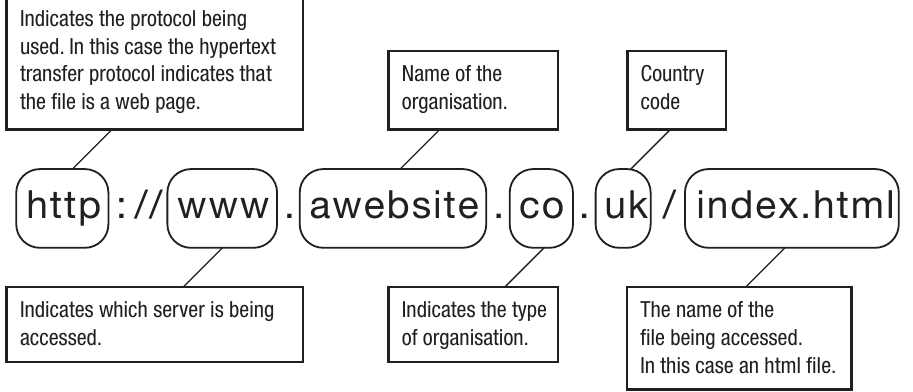
A Uniform Resource Locator (URL) is the full address used to find and access files on the Internet. Each resource on the Internet - whether it's a web page, image, or document - has a unique URL that specifies exactly where it can be found. For example: http://www.awebsite.co.uk/index.html
The URL is made up of several distinct parts, each serving a specific purpose:
Note
The address consists of these components:
-
Protocol: This indicates which protocol is being used to access the resource. In most cases, this will be HTTP (Hypertext Transfer Protocol) for web pages, HTTPS (secure HTTP) for encrypted connections, or FTP (File Transfer Protocol) for file downloads. The protocol tells the browser how to communicate with the server.
-
Server designation (www): This indicates which server is being accessed. The "www" prefix traditionally indicates a web server, though not all websites require this prefix anymore. Some websites work with or without the www prefix.
-
Organisation name: This is the name of the organisation or website. For example, "awebsite" would be the organisation's chosen name.
-
Domain type: This indicates the type of organisation, known as the top-level domain. Examples include .co for companies, .gov for government, .ac for academic institutions, and .org for other organisations.
-
Country code: This two-letter code indicates which country the website is registered in, such as .uk for the United Kingdom, .au for Australia, or .de for Germany.
-
File path: This is the name and location of the specific file being accessed. In this example, index.html is an HTML file. If the file is located in subdirectories on the server, the full path including directory names would be given.
The contents of the file that a URL locates will vary depending on the Internet protocol being used. In the example above, the HTTP protocol indicates that the file is a web page. The file pointed to is an HTML file called index.html, which contains hyperlinks to further pages. HTTP indicates that the file can be accessed using a browser. Consequently, most URLs start with HTTP, although it's not always necessary to type it in the address line, as modern browsers automatically add it.
Domain name
The domain name identifies organisations or groups on the Internet. It's the human-readable part of the address that makes it easy to remember and locate websites. For example: bbc.co.uk
Let's break down what each part of a domain name means:
Organisation name
The first part is the name of the organisation. In the example above, "bbc" is the name of the organisation. Domain names must be unique, so organisations need to act quickly to secure a domain name that matches their organisation's name. All domain names are registered with a central agency called ICANN (Internet Corporation for Assigned Names and Numbers) to ensure uniqueness. This registration system prevents two different organisations from having the same domain name.
Top-level domain
The middle part indicates the type of organisation, known as the top-level domain. This helps users understand what kind of website they're visiting. Here are some commonly used top-level domains that you should be aware of:
- .com indicates that the organisation is commercial - in other words, a business
- .gov indicates that the organisation is part of the government
- .ac indicates that the organisation is an academic institution, usually a college or university
- .sch indicates that the organisation is a school
- .org indicates an organisation other than a commercial business, for example, a charity or trade union
- .net indicates a company providing Internet services
Country code
The .uk at the end indicates that the website is registered in the UK. There are numerous two-letter country codes, and new ones are being added all the time as more countries develop their Internet infrastructure. Country codes are abbreviated using their own language. Here are some examples:
- .au is Australia
- .de is Germany (Deutschland)
- .it is Italy (Italia)
- .es is Spain (España)
The www prefix and FQDN
Note
Notice in the example above that it was not necessary to type "www" before the domain name. The www prefix indicates the host server for the resource. Often, the www prefix does not need to be typed as most commonly used websites are accessed via www. Where the www is typed, the domain name is known as a fully qualified domain name (FQDN) and is completely unambiguous as it can only relate to one specific host. For instance, the domain bbc.co.uk might contain other hosts with different names, such as mail.bbc.co.uk or ftp.bbc.co.uk. Each of these represents a different server providing different services.
IP address
An Internet Protocol (IP) address is a unique numerical identifier assigned to every computer that sends or receives data on a network and on the Internet. Think of it as the computer's postal address - it tells other devices exactly where to send information.
Important
The IP address was originally devised as a 32-bit or 4-byte code made up of four decimal numbers separated by dots, like this: 234.233.32.123. This format is known as "dotted quad" notation. As one byte is allocated to each of the four sets of numbers, the range of each part is between 0 and 255 (since one byte can represent 256 different values, from 0 to 255).
Why we need both domain names and IP addresses
The numbers in an IP address make little sense to us as users, which is why we use domain names instead. Domain names are designed to be easy to remember and relevant to the organisations they represent - for example, it's much easier to remember "bbc.co.uk" than "212.58.244.67".
However, the protocol used to transmit data (TCP/IP) can only work with numbers, not words. Therefore, every domain name is mapped to a numerical IP address. This number is the real Internet address that identifies the computer transmitting or receiving data. The IP address is what the Internet Protocol uses to route data to the correct destination.
The role of DNS
A domain name is sometimes described as a proxy for the IP address. This means that the user types in a domain name, which is then transferred to a domain name server (DNS). The DNS acts like a telephone directory for the Internet - it translates the human-readable domain name into the corresponding IP address. An analogy would be storing phone numbers in a mobile phone contact list: the user selects a name from the list, which is then looked up to find and dial the actual telephone number.
Private and public IP addresses
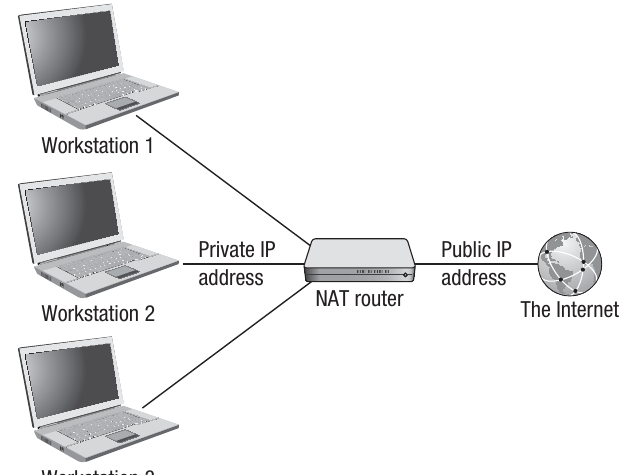
Some IP addresses are classed as private or non-routable addresses. These are IP addresses used by devices on a private network, such as computers in a home, school, or business. A private IP address is needed to route data around the internal network, but it does not need to be made public as the device is not directly connected to the Internet. The device is hidden behind a router or firewall, which provides a layer of security.
Non-routable addresses only need to be unique within the local area network (LAN) and therefore do not need to be allocated on a global basis. Common private IP address ranges include addresses starting with 192.168.x.x or 10.x.x.x.
When a device needs to connect to the Internet, it will be connected to a router or proxy server. In this case, the IP address of that router or server needs to be a public or routable address. A public IP address is unique globally and is registered under the domain name system. The router's public IP address is what the outside world sees when data is sent to or from the internal network.
Ports
A port is used to identify a particular process or application running on a network device. While the IP address tells data where to go (which computer), the port number tells it what to do when it gets there (which application to use).
The port address is a 16-bit number that is attached to the IP address. By addressing a specific port, a process or application can be accessed on the client device. Think of it this way: if the IP address is like a building's street address, the port number is like a specific apartment number within that building.
How ports work
Port addresses are often used to run processes for common networking tasks, and many have been assigned standard port numbers that are in widespread use. For example, port 25 is used for the SMTP (Simple Mail Transfer Protocol) application that checks for incoming email on an email server. Port 110 is used for the POP3 (Post Office Protocol 3) application that fetches email from the email server to deliver it to your email client.
Well-known ports
There are around 250 well-known ports that are used to launch various processes, many of which are applications related to other protocols, such as FTP, DHCP, and SSH (all of which are covered later in this chapter). The table below shows some of the common well-known ports, designated as such because they are among the most widely used networking services:
| Some well-known port numbers | Services |
|---|---|
| 21 | FTP |
| 22 | SSH |
| 23 | Telnet |
| 25 | SMTP |
| 53 | DNS |
| 80 | HTTP |
| 110 | POP3 |
| 143 | IMAP |
Client and server ports
When a client sends a request to a server using a well-known port, the server needs to respond back to a client port, not to the well-known port on the client side. For example, if a server receives a request on port 80 (HTTP), it does not send the response back to port 80 on the client. Instead, as part of the client request, a source port must also be sent so that the server knows which port to send its response to.
Secure Shell Protocol (SSH)
Note
The Secure Shell Protocol (SSH) can be run using port 22 on the well-known ports list. This protocol is used to provide remote access to computers and will be explained in more detail in Chapter 41. Routing through port 22 means that you have the advantage of extra security when accessing files using HTTP, downloading or uploading files using FTP, or accessing mail using either SMTP or POP3. The SSH protocol provides encrypted communication, making it much safer than unencrypted alternatives.
Network Address Translation (NAT)
The system used to match private IP addresses with public ones is called Network Address Translation (NAT). This is an important technology that provides two main advantages.
Advantages of NAT
Firstly, a single public IP address is not needed for every device on a network - only for the router or server that is physically connected to the Internet. This means multiple devices can share one public IP address, which is more efficient and cost-effective.
Secondly, there is an increased level of security because the private IP address is not being broadcast over the Internet. This makes devices on the internal network more secure from unauthorised access, as external attackers cannot directly see or access the private IP addresses of individual devices.
How NAT works
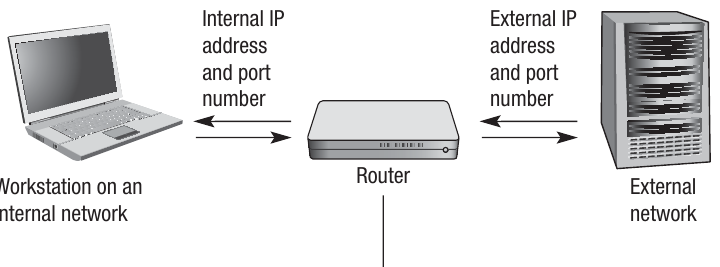
The router will track connections and maintain a listing of the mappings between private IP addresses with port numbers and the corresponding public address. It does this by adding entries to a translation table, which acts as a lookup between the internal IP address and the external IP address.
Example
Worked Example: NAT Process
The following is a common way that NAT works when a workstation on the internal network wants to load data from a server on the Internet:
-
The workstation on the internal network sends a packet to the server on the Internet to request some data. This packet includes the workstation's own internal IP address and port number so that the server knows where to return the data.
-
The router replaces the internal IP address and port number in the packet with its external (public) IP address and a port number that it generates. This port number will be unique to this communication and will only be used for a certain time frame before being reused or expiring.
-
The router stores the mapping information in its translation table, recording which internal IP address and port number corresponds to which external port number.
-
Data sent back from the server will be received by the router, which will look up the port number in the translation table to identify which machine on the internal network sent the original request to the server.
-
The router's IP address in the packet will be replaced with the originating workstation's IP address and port number, as read from the translation table.
-
The reply packet can then be sent on to the originating workstation on the internal network.
-
Where the translation table does not contain a match to a port number in a packet received from a computer on the Internet, the packet is dropped. This is a security feature - it means the packet is not a response to a request from within the network and may be a hacking attempt, so it's rejected.
-
The internal IP address and port are never made public on the external network, maintaining security and privacy.
Port forwarding
Port forwarding is commonly used when a server inside a private network, with a non-routable IP address, needs to provide services to clients on the Internet. As the server has a non-routable IP address, it cannot be accessed directly from the Internet. Therefore, the client on the Internet must use the public IP address of the router that connects the private network to the Internet, along with the server, to initiate a connection.
How port forwarding works
Note
The router can be programmed so that requests sent to it on a particular port number are forwarded to a device with a specific IP address within the internal network. This is called port forwarding.
For example, suppose a web server has the non-routable IP address 192.168.20.4 and the router has the public routable IP address 103.12.94.56. The router could be programmed to forward all requests made from the Internet to port 80 of its IP address to port 80 of the server with IP address 192.168.20.4.
This means that external clients can access the internal web server by connecting to the router's public IP address and port 80. The router then automatically forwards these requests to the internal server, and responses from the server are routed back through the router to the external clients.
Port forwarding is essential for running servers (web servers, game servers, etc.) behind a router on a home or business network, as it allows external users to access these services despite the servers having private IP addresses.
Sockets
A network socket is an endpoint of a communication flow across a computer network. Sockets are created in software, not hardware - they're programming constructs that enable network connections. A TCP/IP socket is made up from the combination of an IP address and a port number.
How sockets work
When a computer needs to communicate with a server, it will send a request to the server using the server's IP address and port number for the type of request being made (for example, HTTP requests usually use port 80).
Note
For instance, suppose Client A is being used on a LAN with a local IP address 192.168.233.100 and wishes to request a web page from Server B which has IP address 192.168.233.2. As a web page is being requested, port 80 on the server will be used, so Client A will send its request to the socket address 192.168.233.2:80. Server B will be listening for web page requests on port 80.
Temporary client ports
In the request sent to the server, Client A will include its own IP address and a port number that has been temporarily generated for this communication, such as 50272. This is included so that the server knows where to send the data back - specifically to socket address 192.168.233.100:50272. The client will listen on this port number for a reply.
The transport layer of the TCP/IP stack uses the port number to direct packets to the correct application. This allows multiple applications to use the network simultaneously - each connection has its own unique socket address (IP + port combination), so data can be correctly routed to the right application.
Sockets can be created at any time to enable a network connection to be established to or from a computer, and they're destroyed when the connection ends. This dynamic creation and destruction of sockets allows for flexible network communication.
Subnet masking
IP addresses are split into two parts: a network identifier and a host identifier. For example, the IP address 120.176.134.32 could be split with the first part (120.176.134) identifying the network and the last part (32) being the actual device (host) that is being used on that network.
Purpose of subnet masking
The network may be a local network within a building, or it could be a remote network accessed over the Internet. The device could be a computer, printer, router, or any other network-connected device. Network IDs can also be written with zeros in the parts of the IP address that would be used to identify the host. For example, the network ID 120.176.134 could alternatively be written as 120.176.134.0.
Subnet masking is a method of dividing a network into multiple smaller networks, known as subnets or subnetworks. Addresses are split in this way to make networks easier to manage and to make routing data more efficient.
For example, in a LAN split across two buildings, the administrator may find it useful to allocate IP addresses according to which building each computer is in. Where a network is separated in this way, each part is known as a subnet or subnetwork. Data sent to a particular computer will only travel around the parts of the network that it needs to, making the network more efficient.
How subnet masking works with gateways
When a computer on a network sends data to another computer, it needs to identify whether the destination computer is on the same subnet as itself. If it is, the sending computer can send data directly to the destination. If not, it will send data to the relevant router or gateway, which will in turn send the data on to the correct subnet and computer.
A gateway is a node on a network that acts as a connection point to another network with different protocols. For example, in an organisation, a gateway may be used to connect two different company networks together. For a home user, a gateway may be used by their Internet Service Provider (ISP) to provide access to the Internet. The gateway carries out all the protocol conversion required to enable the two networks to work together.
Using subnet masks to determine network membership
To identify whether the destination computer is on the same subnet, the sending computer needs to look at the network portion of the destination IP address to see if it is the same as its own network portion. In the example above, if the sender and receiver are on the same subnet, they would both have 120.176.134 as the first part of their IP address.
To do this, a subnet mask is used. To understand how subnet masks work, you need to remember your binary conversions, as the IP address needs to be converted to its binary equivalent so that a bitwise logical AND operation can be performed.
Worked example of subnet masking
Example
Worked Example: Subnet Mask Calculation
For example, the IP address 120.176.134.32 in binary is:
Each device on a subnet is programmed with the same subnet mask. Within the subnet mask, a value of 1 is assigned to all the bits that are part of the network ID, and a 0 to all of the parts that identify the host. In our example, the first three octets are the network address, so the subnet mask would be:
Now suppose the computer with IP address 120.176.134.32 has data to send to the computer with IP address 120.176.134.75. The sending computer will perform the following operation to check if the two computers are on the same subnet:
Full IP address of sending computer: 120.176.134.32
Subnet mask
Network ID of sending computer: 120.176.134.0
Then for the destination computer:
Full IP address of destination computer: 120.176.134.75
Subnet mask
Network ID of destination computer: 120.176.134.0
As the sending computer and destination computer both have the same network ID (120.176.134.0), the data can be sent directly from the sending computer to the destination. Both devices are on the same subnet, so no router or gateway is needed.
Otherwise, if the network IDs were different, the data would be sent to a router that could forward the transmission to the subnet that the destination computer is on. The router acts as an intermediary, connecting different subnets and directing traffic between them.
IP address v4 and v6
It soon became apparent that as the Internet was growing at such a rapid rate, the original 32-bit code was not going to provide enough permutations for the number of devices that would be present on the Internet. With only 32 bits, IPv4 can provide approximately 4.3 billion unique addresses, which seemed like plenty when it was designed but is now insufficient given the explosion of Internet-connected devices.
IPv6: the solution to address exhaustion
Important
Consequently, a new system known as IPv6 was created, which uses 128 bits represented as eight groups of four hexadecimal numbers separated by colons, like this:
13E7:0000:0000:0000:51D5:9CC8:C0A8:6420
This massively increases the range of numbers available. There are now more digits in each number, and hexadecimal is being used rather than decimal, allowing for a far greater range within each group of numbers. IPv6 provides approximately 340 undecillion addresses (that's 340 followed by 36 zeros), which should be sufficient for the foreseeable future.
Current state of IP addressing
The v6 IP addresses are slowly replacing the original v4 format, although both systems are still in use at the time of writing. All of the concepts relating to IP addresses discussed in this chapter are the same regardless of the format. For example, subnetting can still be used on the v6 format in exactly the same way as with v4 addresses.
The transition from IPv4 to IPv6 is gradual, with both systems running in parallel. Modern devices and networks support both versions, using a technique called "dual stack" to maintain compatibility with both old and new systems.
There is more information about TCP/IP in Chapter 41.
Dynamic Host Configuration Protocol (DHCP)
IP addresses are defined as either static or dynamic. Static IP addresses are ones that are assigned to a device and then never change. Dynamic IP addresses are allocated every time a device connects to a network, and this is perhaps the most common approach for most users.
How DHCP works
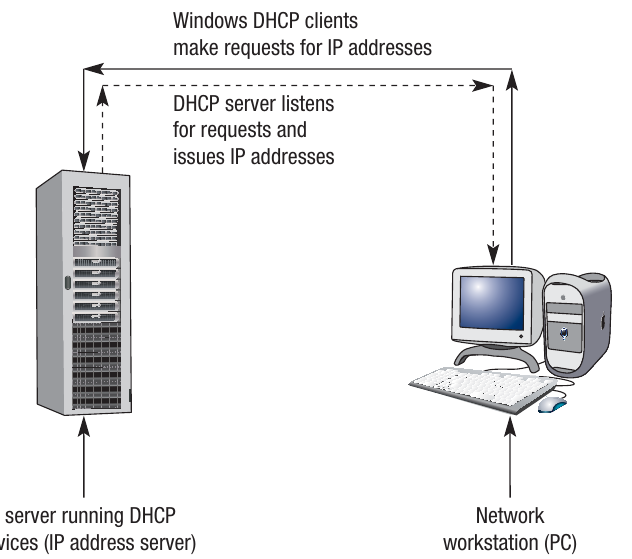
The Dynamic Host Configuration Protocol (DHCP) is a set of rules for allocating locally unique IP addresses to devices as they connect to a network. The allocation is done automatically by an application running in the background as you log on. For home users, this process is typically managed by your Internet Service Provider (ISP).
Note
In simple terms, the DHCP application looks for an available IP address from its pool of addresses and allocates it to your device. Where there are hundreds of users logging on and off a network all the time, this is a very efficient system as it means the administrator does not have to manually assign addresses to each device.
The DHCP server
A dedicated DHCP server is used on the network and handles the requests by managing a pool of available IP addresses. The pool usually consists of a defined range of numbers depending on how the network is physically configured.
In simple terms, when a user attempts to log on, they are making a request to the DHCP server. The server will then offer that device a particular IP address. This might be the last address used by that device (if it's still available), or it might be the next available address within the pool.
When the user logs off, the reverse process takes place, freeing up the IP address for the next user. This dynamic allocation means that IP addresses are efficiently reused, and a network doesn't need as many IP addresses as it has potential users - only as many as will be connected simultaneously.
The DHCP system is transparent to users - it happens automatically in the background whenever a device joins or leaves the network, making network management much simpler.
Domain name server (DNS) system
Some estimates suggest that there are as many as a billion websites on the Internet, and the number is growing all the time, as is the number of users accessing them. This presents a complex problem in terms of allocating unique domain names to all of these sites and mapping them to IP addresses. This enormous task is carried out by large international organisations using the domain name server system.
How DNS works
Once allocated, the domain names are mapped to a unique IP address, and this information is stored in databases on large servers called domain name servers (DNS). Humans use domain names because they are easier to remember than IP addresses. It is the DNS that maps the domain names to the IP addresses - essentially acting as the Internet's address book.
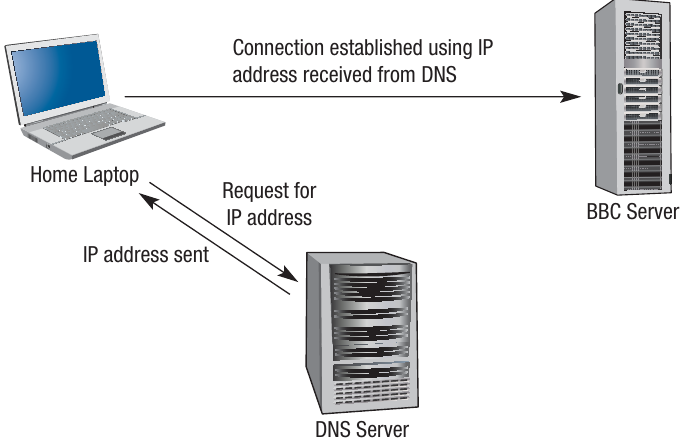
The DNS lookup process
Note
The diagram above shows how the DNS lookup process works. If a user on their laptop wants to connect to the BBC website, a request is sent to the DNS to establish the IP address. The DNS looks in its database and sends the IP address to the laptop. A connection can then be established between the laptop and the BBC server.
Think of the DNS system as a massive directory enquiries system, similar to what we used to have for telephone numbers, but on a global scale and operating in milliseconds.
The distributed nature of DNS
As there are millions of addresses to be stored, all of this information cannot be stored on a single server. Consequently, there are hundreds of DNS servers in use around the world, all of which are connected to each other in a hierarchical structure.
Where a particular DNS does not store the required IP address, it will send a request to other DNS servers until the relevant information is found. The entire DNS system therefore has to be carefully organised and controlled across the whole world to ensure that no two domain names or IP addresses are duplicated, and to make sure that addresses are available whenever they are requested.
Internet registries
The organisation that oversees the allocation of domain names and IP addresses is called ICANN - the Internet Corporation for Assigned Names and Numbers - which is based in the USA. They have a department called the Internet Assigned Numbers Authority (IANA), who at the time of writing manage a further five large organisations around the world called Regional Internet Registries (RIRs).
The five Regional Internet Registries
Each of these RIRs has a defined region of the world and therefore a defined set of IP addresses that they are responsible for allocating. The five RIRs are:
- AFRINIC: African Network Information Centre (Africa)
- APNIC: Asia Pacific Network Information Centre (Asia Pacific region)
- ARIN: American Registry for Internet Numbers (North America)
- LACNIC: Latin American and Caribbean IP Address Regional Registry (Latin America and Caribbean)
- RIPE NCC: RIPE Network Coordination Centre (Europe)
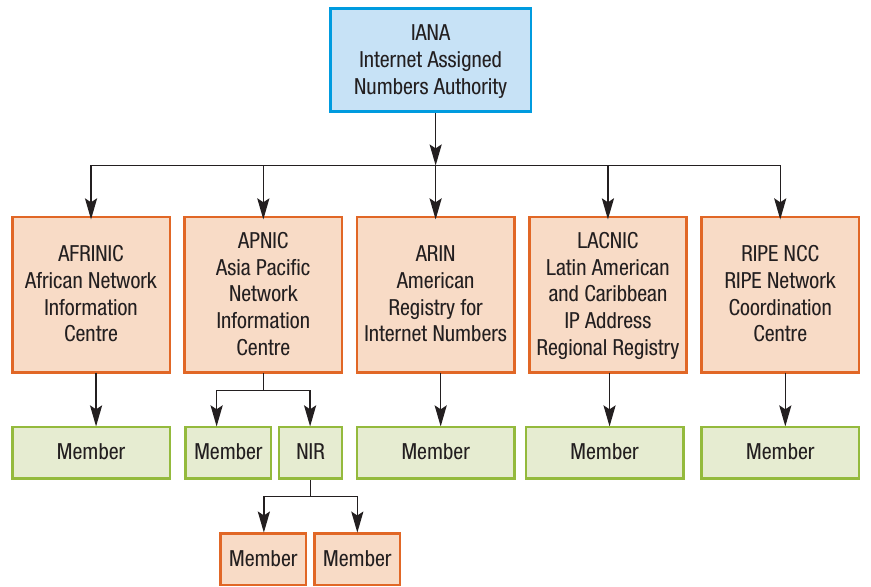
Hierarchical structure
Note
In Europe, the RIR is called RIPE NCC. In turn, each RIR has several members called National Internet Registries (one per country), who in turn have members called Local Internet Registries. All of these organisations work together to allocate IP addresses to users in specific geographical areas.
It is organised into this hierarchical structure to make it easier to manage and to ensure that domain names and IP addresses are not duplicated. The hierarchical system distributes the workload and allows for regional management of IP address allocation, which is more efficient than having one central authority trying to manage everything globally.
Routing and gateways
In any communication, there must be a sender and a receiver, and a connection must be established between the two. There are several ways in which this connection can be made.
When you connect to the Internet, a connection is established between your computer and the website that you are visiting. You probably realise that this is not a direct link - you don't have a dedicated cable running from your computer to every website you might visit. In the first instance, you connect to your Internet Service Provider (ISP), which in turn connects to the ISP hosting the website.
Multiple routes through nodes
In fact, there may be many more connections in the circuit between your computer and the destination. Data being transmitted around a WAN (Wide Area Network) will be sent via a number of nodes. A node is one of the connections within the network - in old-fashioned telephone terms, we would call them exchanges. In Internet terms, there are thousands of nodes and, therefore, thousands of routes that a communication may take to reach its destination.
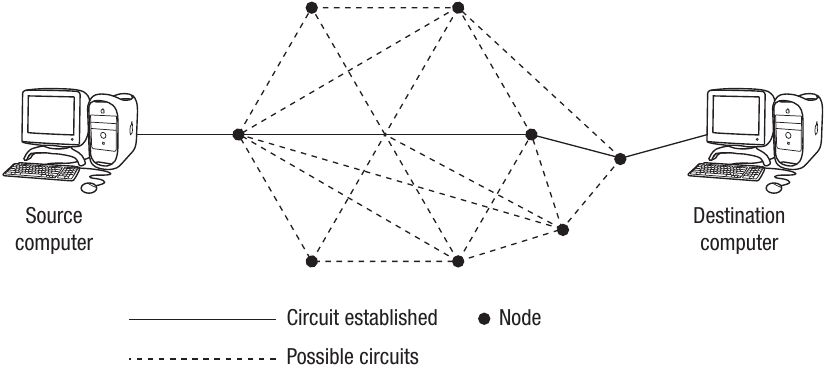
The diagram above shows the basic concept of routing. The transmission will be routed through a number of nodes before a connection is established between sender and receiver.
How routing works
The router is used to send the data to the appropriate node on the network. It knows where to send it as each piece of data is sent as a packet, and the router will read the header information in each packet of data being sent.
As the Internet is often referred to as a "network of networks", data packets often need to be transmitted between networks as well as around them. Sometimes the networks will be dissimilar in that they use different protocols. When data are being transferred between networks that use different protocols, a gateway must be used to convert between the two protocols.
As the name implies, routing finds the optimum route between sender and receiver, which may be made up of many nodes. At each stage of the routing process, the data packets are sent to the next router in the path, often with reference to a routing table.
Routing tables and algorithms
Note
The routing table stores information on the possible routes that each data packet may take between nodes on its path from sender to receiver. Routing algorithms are used to identify the next best step in the routing process. These algorithms take into account factors such as:
- The number of hops (connections) to the destination
- The speed of each connection
- The current network traffic on each route
- The reliability of each route
By analysing these factors, routers can dynamically adjust routes to ensure data takes the most efficient path to its destination.
Packet switching
One of the methods used to send data across networks is called packet switching. Data sent over the Internet are broken down into smaller chunks called packets. Each packet of data will also contain additional information including a packet sequence number, a source and destination address, and a checksum.
Packets of data are normally made up of a header, body, and footer. For example, in a 1KB packet, it might contain:
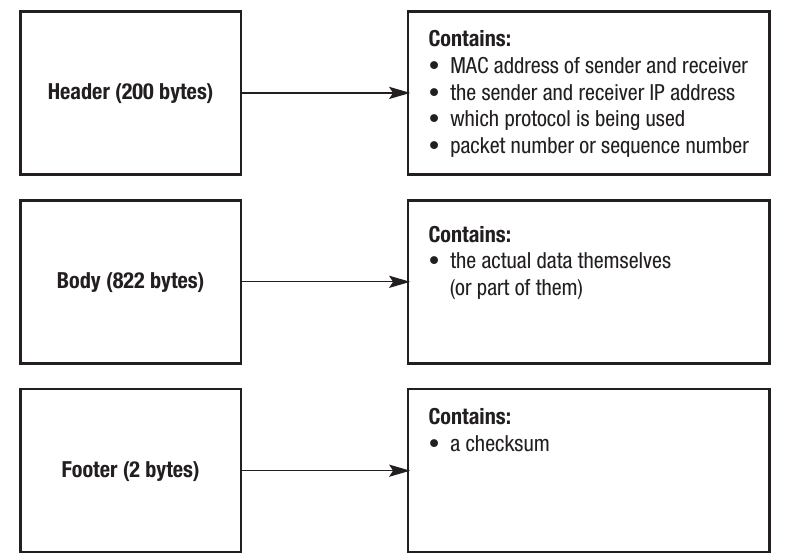
Packet structure components
Note
The header (200 bytes in this example) contains:
- MAC address of sender and receiver
- The sender and receiver IP addresses
- Which protocol is being used
- Packet number or sequence number
The body (822 bytes in this example) contains:
- The actual data themselves (or part of them)
The footer (2 bytes in this example) contains:
- A checksum for error detection
How packets are transmitted
The packets are sent to their destination using the destination address. They are re-assembled at the other end using the packet sequence number. This sequence number is crucial because packets might arrive out of order.
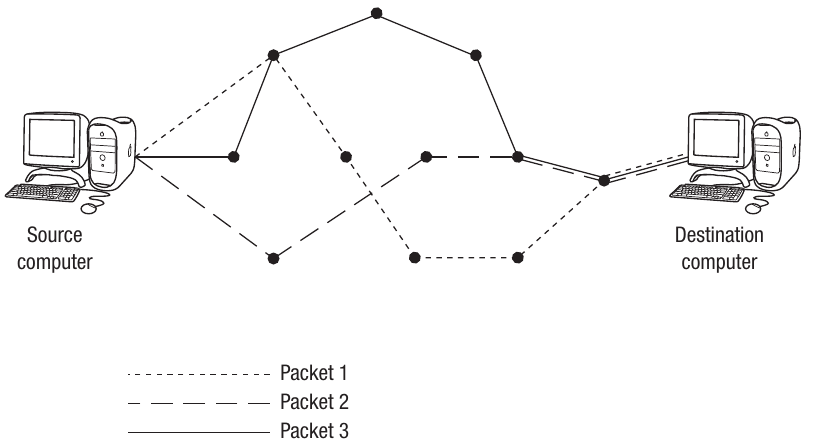
The diagram above shows how different packets can take different routes through the network. Each packet can take a different route to its destination, as it can be re-assembled at the other end regardless of the sequence in which packets are received.
The checksum
The checksum will identify any errors in transmission. It works by adding together the values of all the data held in a packet and transmitting those data along with the packet. For example, if the data in a packet contain numbers, it could add all of those numbers and send the total value as the checksum.
When the packet is received, the values could be added up and compared to the checksum. If the calculated sum matches the checksum, then the chances are that the data have been received correctly. Where the checksum is different, the packet will be sent again. This error-checking mechanism ensures data integrity during transmission.
Benefits of packet switching
Important
Each packet can take a different route to its destination as it can be re-assembled at the other end regardless of the sequence in which packets are received. Therefore, the packets are routed via the least congested routes, and therefore the quickest route.
Data are transferred quicker using this method and are more secure as the packets are taking different routes. This also optimises the use of each connection compared to circuit switching, where a dedicated path is reserved for the entire duration of a communication session.
If one route becomes unavailable due to network failure, packets can be automatically rerouted through alternative paths, making packet switching more resilient and reliable than circuit switching.
Remember!
Summary
Key Points to Remember:
-
The Internet is a global network of networks, while the World Wide Web (WWW) is a service that runs on top of the Internet.
-
URLs specify the location of resources on the Internet using components like protocol, domain name, and file path. Domain names are human-readable addresses that are mapped to numerical IP addresses by DNS servers.
-
IP addresses uniquely identify devices on a network. IPv4 uses 32 bits (dotted quad format), while IPv6 uses 128 bits (hexadecimal groups) to provide more addresses. Private IP addresses are used within local networks, while public IP addresses are routable on the Internet.
-
Ports identify specific applications or services on a device. Well-known ports (like 80 for HTTP, 25 for SMTP, 110 for POP3) are standardised for common services. A socket combines an IP address and port number to create a unique endpoint for communication.
-
Network Address Translation (NAT) maps private IP addresses to public ones, providing security and allowing multiple devices to share a single public IP address. DHCP automatically assigns IP addresses to devices when they connect to a network. Subnet masking divides networks into smaller subnets using bitwise AND operations to determine if devices are on the same subnet.
-
Data are transmitted across the Internet using packet switching, where information is broken into packets with headers (containing addresses and sequence numbers), bodies (containing the actual data), and footers (containing checksums for error detection). Packets can take different routes through network nodes and are reassembled at the destination, making data transfer faster and more secure.