Transmission Control Protocol / Internet Protocol (TCP/IP) (AQA A-Level Computer Science): Revision Notes
📚Revision Notes
Transmission Control Protocol / Internet Protocol (TCP/IP)
Introduction to TCP/IP
When computers communicate across networks, they need to follow agreed-upon rules to ensure data is transmitted correctly. These rules are called protocols. The Transmission Control Protocol and Internet Protocol, commonly known as TCP/IP, is a comprehensive set of protocols that governs how data packets travel around networks, particularly the Internet.
TCP/IP is organised as a protocol stack, which means it consists of multiple layers working together. Each layer has specific responsibilities and contains its own set of protocols. This layered approach makes network communication more manageable and allows different parts of the system to be updated independently.
Note
The TCP/IP stack aligns with the International Standard communication protocol stack called the Open System Interconnection (OSI) model. Within each layer of the TCP/IP stack, there are numerous protocols that handle different aspects of network communication.
The Internet Protocol (IP) manages the delivery of packets across the network, whilst the Transmission Control Protocol (TCP) ensures packets arrive correctly and reassembles them in the proper order.
The TCP/IP stack structure
The TCP/IP stack consists of four main layers, each building upon the one below it. Understanding these layers is crucial for grasping how network communication works.
Layer 4 – Application layer
The application layer sits at the top of the stack and is the closest layer to the user. This layer handles protocols that applications use directly, including the Domain Name System (DNS), File Transfer Protocol (FTP), Hypertext Transfer Protocol (HTTP), HTTPS, Post Office Protocol 3 (POP3), Simple Mail Transfer Protocol (SMTP), and Secure Shell (SSH). We'll explore these protocols in more detail later.
The application layer performs several important functions. It converts data between different presentation formats so that various types of information (such as text, images, video, or audio) can be properly understood by the receiving device. It also handles the interpretation of compressed or encrypted data. For instance, when you visit a website, the application layer ensures that the HTML, CSS, images, and other resources are all processed correctly so they display as intended in your browser.
Important
Remember that the application layer doesn't refer to the applications themselves (like your web browser), but rather to the protocols these applications use to communicate.
Layer 3 – Transport layer
The transport layer handles most of the coordination needed to ensure reliable data transmission. This layer makes certain that all packets arrive at their destination and that they contain no errors. It also manages how connections are established between devices, creating a communication path for data to travel between network nodes.
One of the key functions of the transport layer is authentication - it verifies the identity of both the sender and receiver before communication begins. Once verified, the connection is set up, data is transferred, and then the connection is properly terminated. The transport layer also checks that network resources are sufficient for the communication to take place successfully.
An important concept at this layer is ports. A port is an addressable location on a network that links to a specific process or application. Think of ports as numbered doors on a building - they allow data to reach the correct application. For example, web traffic typically uses port 80 for HTTP or port 443 for HTTPS. Port numbers ensure that incoming data packets are directed to the appropriate application on your computer.
Note
Another related concept is a socket, which is an endpoint of a communication flow that uniquely identifies a specific application on a specific device. A socket combines an IP address with a port number.
Layer 2 – Network or Internet layer
The network layer (also called the Internet layer) is responsible for defining IP addresses and managing the routing of packets. When data needs to travel from one device to another, this layer determines the best path for the packets to take and handles both the creation of packets being sent and the processing of packets being received.
This layer essentially acts as the addressing and navigation system of the network. It ensures each device has a unique IP address and works out how to get data from the source to the destination, even if the journey involves multiple intermediate stops (routers).
Layer 1 – Link layer
The link layer is the lowest level of the TCP/IP stack and deals with the physical transmission of data. This layer provides synchronisation between devices so that the receiving device can manage the flow of incoming data effectively. It identifies the network topology being used (such as star, bus, or mesh) and controls the physical signals that transmit strings of binary digits (0s and 1s) across the network.
The link layer also manages physical characteristics of the connection, including data transmission rates and the type of physical connection (wired or wireless) being used. On wireless networks, this layer handles the Carrier Sense Multiple Access with Collision Avoidance (CSMA/CA) protocol, which prevents data collisions when multiple devices try to transmit simultaneously.
Note
Real-world analogy: Think of the link layer as the roads and traffic signals, the network layer as the postal addresses and delivery routes, the transport layer as the postal service that ensures your package arrives intact, and the application layer as the actual letter or contents you're sending.
How the stack works in practice
Understanding how data flows through the TCP/IP stack is essential. The stack operates differently depending on whether you're sending or receiving data, and it follows a specific pattern that ensures reliable communication.
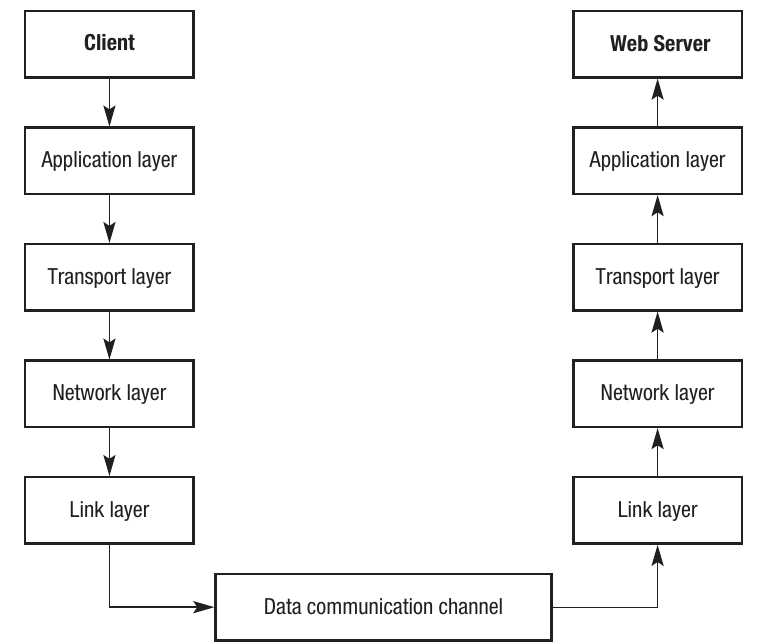
When a client computer (such as your laptop) wants to communicate with a web server, the request starts at the application layer on the client side. The data then moves down through each layer - transport, network, and link - with each layer adding its own information (a process called encapsulation). Once the data reaches the link layer, it travels across the physical network infrastructure (the data communication channel) to the server.
On the server side, the process reverses. The data arrives at the link layer and moves up through the network layer, transport layer, and finally reaches the application layer. Each layer removes its added information (a process called decapsulation) and processes the data according to its specific responsibilities.
This is why it's referred to as a "stack" - because data flows up and down through the layers. The highest level (application layer) is closer to the user, dealing with software and operating system processes. The lower layers are closer to the hardware, handling the physical transmission of data.
Note
This architecture demonstrates a Last In, First Out (LIFO) structure. The last action performed on the client side (at the link layer) becomes the first action on the server side. This symmetrical approach ensures that data is properly packaged for transmission and correctly unpacked upon receipt.
Important
Exam tip: In exam questions, you may be asked to describe the flow of data through the TCP/IP stack. Remember to mention that data moves down the layers on the sending side and up the layers on the receiving side.
Application layer protocols
Now let's explore the specific protocols that operate at the application layer. These are the protocols you interact with most directly when using the Internet.
Hypertext Transfer Protocol (HTTP) and Secure HTTP (HTTPS)
HTTP is the foundational protocol that governs how files are transmitted across the Internet, particularly for the World Wide Web. When you access any website, HTTP ensures that text, graphics, video, audio, and all other content can be transferred as part of a web page. The protocol makes certain that files are transferred and received in a standardised format, allowing different types of computers and devices to communicate seamlessly.
The term "hypertext" refers to how web pages contain hyperlinks to other resources. When you click a hyperlink or type a URL into your browser, the HTTP protocol sends a request to the IP address of the computer hosting that web page. The HTTP protocol on the server then processes the request and sends back the appropriate web page in the correct format.
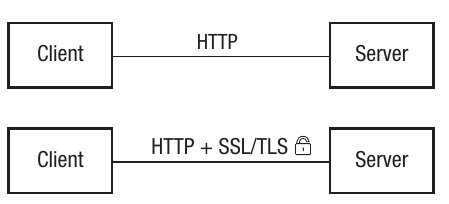
HTTP operates using the client-server model. In this arrangement, your web browser acts as the client, making requests for services from the computer that hosts the content (the server). Both the client and server must use the same protocols to ensure files can be sent and received in compatible formats.
HTTPS is an extension of HTTP that adds a crucial security layer. This protocol is commonly used on websites where personal or financial information is exchanged, such as banking websites or online shopping sites. HTTPS provides two main security features:
- Authentication: It verifies that you're actually connecting to the legitimate web server and not an imposter
- Encryption: It encrypts all data being transmitted, making it unreadable to anyone who might intercept it
HTTPS achieves this security using either the Secure Socket Layer (SSL) protocol or the Transport Layer Security (TLS) protocol. Both of these use data encryption to protect your information. When you visit a website using HTTPS, you'll typically see a padlock icon in your browser's address bar, indicating that the connection is secure.
Important
Exam tip: A common exam question asks about the difference between HTTP and HTTPS. Remember: HTTPS = HTTP + Security (encryption and authentication).
File Transfer Protocol (FTP)
FTP is specifically designed for transferring files across the Internet. Whilst HTTP is primarily used for viewing web content, FTP is the protocol of choice when you need to upload or download actual files.
Common uses of FTP include:
- Uploading a website from a web designer's computer to a web hosting server
- Downloading software and programs from websites
- Transferring data files between systems
Note
When FTP is being used, you'll often see "ftp://" as the prefix in the URL instead of "http://".
Like HTTP, FTP operates using the standard layers of the TCP/IP stack. However, whilst HTTP typically transfers viewable content (web pages), FTP is more commonly used for transferring program files and data files that users will save and use locally.
FTP can operate in two modes:
- Anonymous FTP: Anyone can access and download files without providing credentials
- Protected FTP: Users must identify themselves with a username and password before accessing files
The choice between these modes depends on whether the content should be publicly accessible or restricted to authorised users only.
Secure Shell (SSH) protocol
SSH is a protocol designed for remotely accessing and controlling computers over a network. It's particularly useful when you need to connect to a computer that's in a different location and execute programs or access resources on that machine.
Real-world scenarios where SSH is used include:
- A computer technician fixing a problem remotely without needing to visit the physical location
- Accessing school or university resources from home by logging into the institution's network
- System administrators managing servers remotely
SSH operates using the client-server model, where the computer you're using acts as the client and the computer you're controlling acts as the server (often called the host).
The key feature that sets SSH apart is its security. SSH creates a secure network connection between the client and host using encryption. It employs public key encryption (a topic covered in Chapter 27 of the specification) to protect data during transmission. Additionally, users typically need to provide username and password credentials to authenticate themselves.
Note
Because SSH is secure, it's often used as a tunnel through which other services can be accessed safely. For example, if you wanted to access an email server remotely, doing so through an SSH connection would be more secure than accessing the email server directly.
One characteristic of SSH is that it uses a command line interface rather than a graphical user interface. This means you need to type specific commands rather than clicking on icons. Here are some common SSH commands:
- cd - change directory
- cd/windows/programfiles - change to the windows/program files directory
- rm essay.doc - delete the file essay.doc
- mv essay.doc essay1.doc - rename essay.doc to essay1.doc
- cp essay.doc essay1.doc - create a copy of the file essay.doc called essay1.doc
- vi essay.doc - create a file called essay.doc
This command-based approach is similar to the old DOS interface that was used before graphical interfaces like Windows became standard.
Simple Mail Transfer Protocol (SMTP) and Post Office Protocol (POP3)
Email communication relies on two complementary protocols: SMTP for sending and POP3 for receiving.
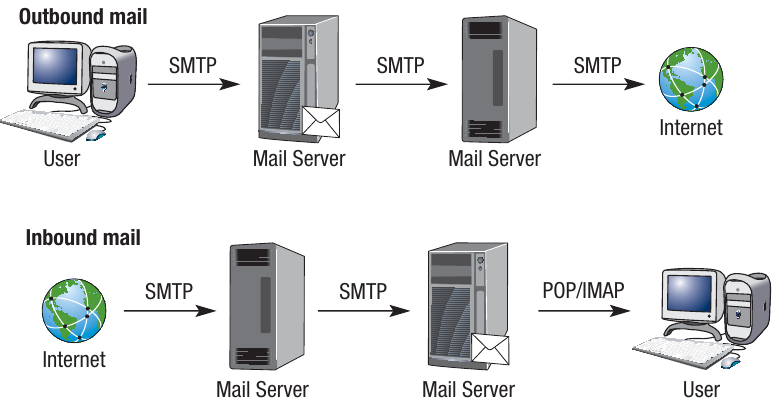
SMTP (Simple Mail Transfer Protocol) is specifically designed for sending emails. When you send an email, SMTP works through a series of mail servers that store information about email addresses for both senders and recipients. The protocol uses DNS servers to find the IP address of the recipient, establishes a connection between sender and receiver, and then transmits the email data. SMTP typically uses ports 25 and 587 for this communication.
Note
SMTP includes a queuing system to handle situations where emails can't be sent immediately. If delivery fails for any reason, SMTP holds onto the email and attempts to send it again at a later time. It will retry multiple times before giving up. If all attempts fail, SMTP sends a message back to the sender indicating that delivery was unsuccessful. You'll also receive a notification if the SMTP or DNS server cannot identify the recipient's email address or IP address.
POP3 (Post Office Protocol version 3) handles the receiving side of email communication. To receive mail, your email client must first connect to the mail server. POP3 uses port 110 to check for incoming messages. When a message arrives, POP3 creates a text file containing the incoming message and associates it with your email address. This text file is stored on the server. The next time you log into your email client (such as Microsoft Outlook), the message is retrieved from the text file and displayed as a properly formatted email.
Important
Exam tip: Remember the flow - SMTP sends emails OUT, POP3 brings emails IN. The diagram showing outbound and inbound mail flow clearly illustrates this distinction.
Network infrastructure
Beyond the protocols themselves, it's important to understand the infrastructure components that make network communication possible.
Email servers
Within a network, there may be one or more servers providing access to various applications and resources. An email server is a dedicated, high-specification computer designed specifically for handling email.
Key features of email servers include:
- Large storage capacity to hold the email addresses of all network users
- Storage for all outgoing and incoming mail
- Specialised software to manage email storage and transmission
Note
Email servers allow users to access their emails regardless of what other services are available on the network. For instance, you don't need a particular Internet Service Provider (ISP) to access your email - the email server handles this independently.
In a typical organisational setup, an email application is chosen for the entire organisation, and all users have access to it as an email client. When a user opens the email application, if POP3 is being used, port 110 would be activated to retrieve any incoming emails, whilst port 25 would be used to send emails via SMTP.
Web servers
A web server is a dedicated computer that hosts a website and manages traffic between users and the site. For home users, the ISP typically provides web server services. For businesses, especially those where the website is critical to operations, it's common to have one or more dedicated web servers.
Web servers are particularly important for organisations whose success depends on their online presence. For example, an online retailer needs sufficient web server capacity to ensure users can access the website quickly at all times. Many high-profile websites have experienced crashes or severe slowdowns when unexpectedly large numbers of people tried to access them simultaneously.
Web servers store various types of content:
- Text and HTML documents
- Scripts and programs
- Multimedia content (images, videos, audio)
- Style sheets and formatting information
The web server uses various protocols, particularly HTTP, to ensure all these different types of data are handled and formatted correctly. This ensures that content appears correctly when viewed over the Internet, regardless of the hardware and software the user is employing.
Web browsers
A web browser is an application that enables users to view web pages and other online resources. Browsers play a critical role in ensuring websites appear exactly as their designers intended. Popular browsers include Internet Explorer, Google Chrome, and Mozilla Firefox, all of which share similar core features despite their differences.
The browser functions by:
- Retrieving resources via the URL
- Formatting content so it displays correctly on screen
- Providing navigation features like bookmarking and searching
Loading a single web page often requires multiple requests to the server to retrieve various components like scripts, images, and style sheets. All major browsers have evolved to include similar functionality because these features have become essential for modern web browsing.
The process of requesting a web page:
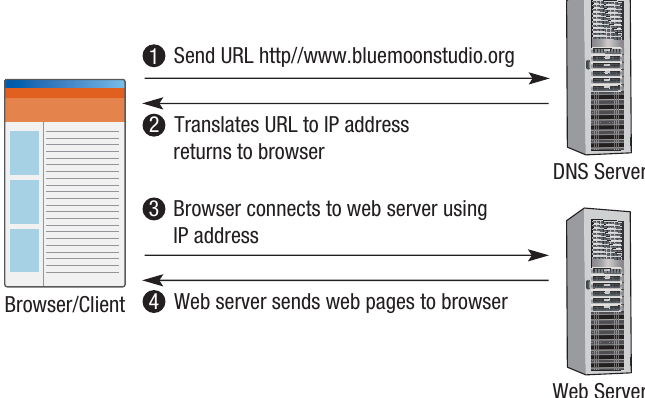
When you want to access a website, the following sequence occurs:
- You send a URL request (e.g., http://www.bluemoonstudio.org) through your browser
- The browser sends this request to a Domain Name System (DNS) server
- The DNS server translates the URL into an IP address and returns it to your browser
- Your browser uses this IP address to connect to the web server hosting the website
- The web server sends the requested web pages back to your browser
- Your browser displays the content
This entire process typically happens in just a few seconds, giving you seamless access to websites around the world.
Note
Browser caching: When a web browser loads a page, it may cache (temporarily store) the content. This is advantageous because if you revisit the same page, it can be retrieved from the local cache much faster than making a new request to the DNS and host servers. Caching significantly speeds up page loading and reduces dependence on bandwidth.
However, caching has a drawback: if the page has been updated on the host server, the cached version may be out of date. In such cases, the page will need to be refreshed to retrieve the latest version from the server.
Important
Exam tip: You may be asked to describe the role of DNS in web browsing. Remember: DNS translates human-readable URLs into IP addresses that computers can use to locate web servers.
Remember!
Summary
Key Points to Remember:
-
TCP/IP is a layered protocol stack consisting of four layers: Application, Transport, Network (Internet), and Link, each with specific responsibilities for network communication.
-
Data flows through the stack by moving down the layers on the sending device (encapsulation) and up the layers on the receiving device (decapsulation), following a client-server architecture.
-
Application layer protocols serve different purposes: HTTP/HTTPS for web pages (with HTTPS adding encryption), FTP for file transfers, SSH for secure remote access, and SMTP/POP3 for email communication (sending and receiving respectively).
-
Ports and sockets enable precise communication: ports are numbered endpoints that direct data to the correct application, whilst sockets uniquely identify specific applications on specific devices.
-
Security is built into modern protocols: HTTPS uses SSL/TLS encryption for secure web browsing, SSH uses encryption for secure remote access, and both require authentication to protect sensitive data from interception.