The Stored Program Concept and Processor Components (AQA A-Level Computer Science): Revision Notes
📚Revision Notes
The Stored Program Concept and Processor Components
Introduction to the stored program concept
The stored program concept is a fundamental principle in computer architecture that revolutionised how computers operate. This concept, originally developed by von Neumann, describes how both program instructions and the data they work with are kept together in the same memory unit.
When you run a program, the processor repeatedly works through what's called the fetch-execute cycle. This is the continuous sequence of operations where each instruction is retrieved from memory, interpreted, and then carried out, with any resulting data being written back to memory. This cycle repeats millions of times every second, controlled by the computer's internal clock which sends electrical pulses to synchronise all the components.
Note
The fetch-execute cycle is the heartbeat of any computer system. Understanding this cycle is essential for grasping how computers process information at a fundamental level.
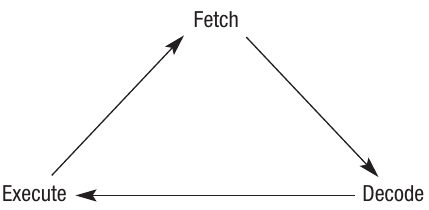
The fetch-execute cycle consists of three main stages:
- Fetch – the processor retrieves the next instruction from memory. This instruction is stored at a specific memory address and is represented in binary code
- Decode – the processor interprets what the binary code at that memory address means
- Execute – the processor carries out the instruction, which might involve reading data from memory, performing a calculation, or writing data back to memory
Important
What seems like a simple operation to us (such as adding two numbers) actually requires multiple cycles through this process. The processor must fetch, decode and execute each individual instruction in sequence.
Processor components
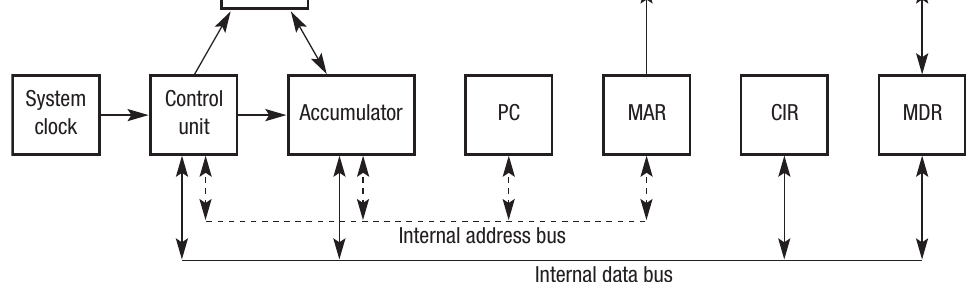
To understand how the fetch-execute cycle works in practice, you need to know about the physical components that make up the processor. The processor is built from several key parts including the clock, control unit, arithmetic logic unit, and various registers. Let's examine each of these components.
The control unit
The control unit is the part of the processor that oversees the fetch-execute cycle. Think of it as the supervisor that ensures all operations happen in the correct order. The control unit makes certain that data being processed flows to the right destination – whether that's a specific register or a section of memory.
During the execution of a program, the control unit coordinates the movement of instructions and data between different components, ensuring everything arrives where it needs to be at the right time.
The arithmetic logic unit (ALU)
The ALU (Arithmetic Logic Unit) is where the processor performs two main types of operations: arithmetic and logic operations.
For arithmetic operations, the ALU handles standard mathematical functions such as addition, subtraction, multiplication and division. It can also perform less common processes like shifting (moving bits left or right).
For logic operations, the ALU compares two values to determine relationships between them. For instance, it can work out whether one number is less than, greater than, or equal to another number. These comparisons result in either TRUE or FALSE values being recorded.
Note
The ALU receives an operation code (often called an op-code) which tells it what operation to perform, along with the operands (the data values to be processed). It then applies logical operations such as OR, AND and NOT to carry out the required process. In some computer systems, a separate arithmetic unit (AU) handles floating-point operations.
The clock
All computers contain an internal clock – a device that produces a signal used to synchronise all the components working within the processor and coordinate the movement of data around the computer.
The speed of a clock is measured in either megahertz (MHz) – millions of cycles per second – or gigahertz (GHz) – 1000 million cycles per second. To give you some historical context, in 1990 typical clock speeds were between 4 and 5 MHz. By 2000, 1 GHz clock speeds had become common. At the time of writing, typical clock speeds range from 2 to 3 GHz.
The clock speed tells us how many electrical pulses the clock generates each second, with each pulse allowing the processor to carry out part of the fetch-execute cycle.
Registers
The control unit needs temporary storage locations for details of the operations being handled during the fetch-execute cycle. Similarly, the ALU needs somewhere to store the results of operations it performs. These small storage locations within the processor are called registers. Although registers have very limited storage capacity, they play a vital role in the computer's operation.
Note
A register must be large enough to hold a complete instruction. For example, in a 32-bit instruction computer, each register must be at least 32 bits in length.
Some registers serve a general purpose and can hold any data, but many registers have specific functions:
The status register keeps track of various aspects of the computer's state. For instance, it records whether the result of the last calculation was positive or negative. It can also indicate if an overflow error occurred during an arithmetic operation.
The interrupt register is a specialised type of status register. It holds details of any signals received by the processor from other components attached to the computer. For example, an I/O controller for a printer will receive input and output requests from the processor and then send device-specific instructions to the printer. The I/O controller handles any necessary conversion of signals between the processor and peripheral devices, ensuring that new peripherals can be connected easily. The role of interrupts is examined in more detail later in this note.
Important
Four registers are particularly important for the fetch-execute cycle:
- Current Instruction Register (CIR) – holds the instruction that the processor is currently decoding or executing
- Program Counter (PC) – stores the memory address of the next instruction that the processor will need to fetch from main memory
- Memory Buffer Register (MBR) / Memory Data Register (MDR) – temporarily holds data that has just been read from memory or is about to be written to main memory
- Memory Address Register (MAR) – stores the memory address where data in the MBR is about to be written to or has just been read from
The fetch-decode-execute cycle
Now that we understand the components of the processor, let's examine how they work together during the fetch-execute cycle.
How the cycle works
Example
Worked Example: The Fetch-Decode-Execute Cycle in Action
Let's walk through what happens when the processor executes a single instruction:
Fetch stage:
- The PC holds the memory address of the next instruction
- The processor sends this address along the address bus to main memory
- The contents stored at that memory location are sent via the data bus to the CIR
- The PC is increased by one (incremented)
- The instruction details are initially loaded into the MAR and the data initially goes to the MBR
- Some instructions need to load multiple bytes or words of data, so they may need to be fetched as successive parts of a single instruction
Decode stage:
- The processor retrieves the instruction from the CIR
- It works out what the instruction means by referring to the instruction set
- Instruction sets are classified as either RISC (reduced instruction set) or CISC (complex instruction set)
- The instruction set is essentially a library of all the operations the processor can perform
- This might involve sending the contents of the MBR to the ALU for processing
Execute stage:
- Once the instruction has been decoded, the processor carries out that instruction
- It then returns to the top of the cycle and fetches the next instruction
- A simple instruction might require only a single clock cycle to complete
- A complex instruction may need three or four clock cycles
- The results of any calculations are written either to a register or to a memory location
Factors affecting processor performance
Several factors influence how quickly a processor can work. Often these factors need to be considered together to understand the overall performance, because increasing one factor alone may not improve performance if other components create bottlenecks.
Clock speed
As we discussed earlier, clock speed is one measure of processor performance. It indicates how quickly each instruction will be executed. In theory, increasing the clock speed will increase the rate at which the processor executes instructions.
Important
Clock speed alone doesn't tell the whole story. There's no benefit fitting a faster clock to a computer if you don't also upgrade the components that will make use of those additional pulses. The other components must be capable of keeping up with the faster pace.
Bus width
The processor needs to make optimal use of each clock pulse. One way to achieve this is by increasing the bus width. In an earlier chapter, we looked at data buses and address buses and learned how the width of the bus determines how many bits can be transferred in one pulse of the clock.
Increasing the width of the data bus means that more bits, and therefore more data, can be passed through it with each clock pulse. This results in more data being processed within any given time interval.
Increasing the width of the address bus increases the amount of memory that can be addressed, which allows more memory to be installed in the computer.
Word length
Related to the data bus width is the concept of word length. A word is a collection of bits that can be addressed and worked with as a single unit. Computer systems may have a word length of 32 or 64 bits, indicating that 64 bits of data can be handled in one pulse of the clock.
Note
Word length and bus width are closely connected – a system with a 64-bit word length will need 64-bit buses to transfer complete words efficiently.
Multiple cores
Most computer systems today contain more than one processor. One effective way of increasing system performance is to use several processors working together. For convenience, multiple processors can be incorporated onto a single chip; this is known as a multi-core processor.
A dual-core processor has two complete processors on one chip and will run considerably faster than a single-core system (which has only one processor). The term 'core' refers to the components that enable instructions to be fetched and executed.
Important
Having a dual-core processor doesn't simply double your computer's speed – there's overhead involved in coordinating between the cores.
Cache memory
Caching is a technique where instructions and data that are accessed frequently are placed into a temporary area of memory that's separate from main memory. The advantage is that the cache can be accessed much more quickly than main memory, which means programs run faster.
The key to effective caching is ensuring that the most commonly used functions or data in a program are stored in the cache. Cache memory sits between the processor and main memory in terms of both speed and physical location.

Interrupts
Note: This section is for A-level students only
The processor in a computer is constantly working, regardless of whether there's an application running. This is because the operating system, which is itself a large collection of programs, is always active. This means the fetch-execute cycle is always in operation.
If an error occurs or a device wants the computer to start doing something else, there needs to be a way to capture the processor's attention. The mechanism for doing this is to send an interrupt – a signal sent to the processor by either a program or an external source such as a hard disk, printer or keyboard.
Sources of interrupts
There are numerous different sources of interrupts. Here are some typical examples:
- A printer sends a request for more data to be sent to it
- The user presses a key or clicks a mouse button
- An error occurs during program execution – for example, if the program attempts to divide by zero or tries to access a file that doesn't exist
- An item of hardware develops a fault
- The user sends a signal to the computer requesting that a program be terminated
- The power supply detects that the power is about to be lost
- The operating system wants to pass control to another user in a multi-user environment
How the interrupt works
What happens is that an additional step is added to the fetch-execute cycle. This extra step fits between the completion of one execution and the start of the next. After each execution stage, the processor checks to see if an interrupt has been sent by examining the contents of the interrupt register.
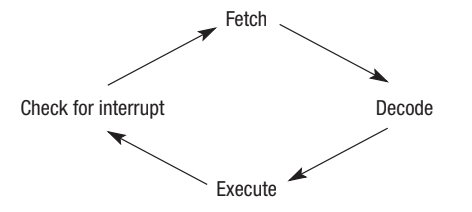
If an interrupt has occurred, the processor will stop whatever it's currently doing in order to service the interrupt. It does this using the Interrupt Service Routine (ISR), which calls the specific routine required to handle that interrupt.
Note
Most interrupts are only temporary, so the processor needs to be able to set aside the current task before it can start on the interrupt. It does this by placing the contents of important registers, such as the PC and CIR, onto the system stack. Once the interrupt has been processed, the CPU will retrieve the saved values from the stack, restore them to the appropriate registers, and carry on with its previous task.
Priorities
Sometimes the program that has interrupted the processor is itself stopped by another interrupt. In this situation, the processor will either place details of its current task on the stack, or it will assess the priority of the different interrupts and decide which one needs to be serviced first.
Assigning different interrupts different priority levels means that genuinely important signals, such as a notification that the power supply is about to fail, get dealt with first.
Important
The table below shows some processes that can generate interrupts, along with the priority level attached to each interrupt. Level 1 is the highest priority, and Level 5 is the lowest. Interrupts with the same priority level are dealt with on a first-come, first-served basis.
| Level | Type | Possible causes |
|---|---|---|
| 1 | Hardware failure | Power failure – this could have catastrophic consequences if it's not dealt with immediately, so it's allocated the top priority |
| 2 | Reset interrupt | Some computers have a reset button or routine that completely resets the computer to a start-up position |
| 3 | Program error | The current application is about to crash, so the operating system will attempt to recover the situation. Possible errors could include variables called but not defined, division by zero, overflow, misuse of command word, etc. |
| 4 | Timer | Some computers run in a multitasking or multiprogramming environment. A timer interrupt is used as part of the time slicing process |
| 5 | Input/Output | Request from printer for more data, incoming data from a keyboard or mouse key press, etc. |
Vectored interrupt mechanism
Once the values of the registers have been pushed to the stack, the processor is free to handle the interrupt. This can be done using a technique called a vectored interrupt mechanism.
Each interrupt has an associated section of code that tells the processor how to deal with that particular interrupt. When the processor receives an interrupt, it needs to know where to find that code. Every type of interrupt has an associated memory address known as a vector. This vector points to the starting address of the code associated with each interrupt.
Example
How the Vectored Interrupt Mechanism Works:
- An interrupt occurs
- The processor identifies what type of interrupt it is
- The processor finds the interrupt's associated interrupt vector
- The processor uses this vector to jump to the address specified
- From that address, it runs the Interrupt Service Routine (ISR)
Summary
Key Points to Remember:
-
The stored program concept means that both instructions and data are stored together in the same memory, and the processor works through them using the fetch-execute cycle
-
The fetch-execute cycle has three stages: Fetch (retrieve instruction from memory), Decode (interpret what the instruction means), and Execute (carry out the instruction)
-
Key processor components include the control unit (manages the cycle), ALU (performs calculations and logic), clock (synchronises operations), and registers (temporary storage)
-
Four crucial registers for the fetch-execute cycle are: CIR (holds current instruction), PC (holds address of next instruction), MAR (holds memory address being accessed), and MBR/MDR (holds data being transferred)
-
Processor performance is affected by multiple factors: clock speed, bus width, word length, number of cores, and cache memory – all of these work together
-
For A-level: Interrupts allow devices and programs to get the processor's attention; they have different priority levels to ensure important signals are handled first, and use the vectored interrupt mechanism to find the appropriate handling code