Data Structures and Abstract Data Types (AQA A-Level Computer Science): Revision Notes
📚Revision Notes
Data Structures and Abstract Data Types
Introduction to data structures and abstract data types
When writing programs, you'll often need to work with collections of related information rather than individual pieces of data. For example, you might want to store the names of all students in a class, the exam results for multiple subjects, or customer details in a database. This is where data structures become essential.
A data structure is a way of organizing and storing data in a format that allows programs to work with it efficiently. Different data structures suit different purposes – for instance, a list works well for storing names, whilst a table structure might be better for exam results.
An abstract data type (ADT) is the theoretical concept or blueprint that describes how data should be organized and what operations can be performed on it. Think of it as the "idea" of a data structure. The actual data structure is the practical implementation of this idea in a programming language.
Note
Understanding the Distinction:
The key difference is that an abstract data type is the conceptual model—what you want your data to do and how it should behave—whilst a data structure is the concrete implementation—how you actually build it in code.
For example, the concept of a "list of items that can be added to or removed from" is an abstract data type. When you create this in Python using an array or list, that's the data structure – the real, working version of the concept.
Understanding this distinction helps you think about what you want your data to do (the abstract data type) separately from how you'll actually make it work in code (the data structure).
Arrays
Arrays provide a fundamental way to store multiple related pieces of data under a single variable name. Rather than creating separate variables for each item, an array lets you group them together and access each one using its position.
What is an array?
An array is a collection of data items of the same type, stored together under one identifier (name). Each individual piece of data in the array is called an element, and you can access any element by referring to its position number, called an index.
Important
Arrays are static data structures, which means their size is fixed when you create them. Once you've declared an array to hold 30 items, it will always occupy memory space for exactly 30 items, even if you're only using some of them.
One-dimensional arrays
A one-dimensional array is essentially a list. Imagine you need to store the names of pupils in a class. Without arrays, you'd need to create separate variables:
Name1 = "Derrick"
Name2 = "Peter"
Name3 = "Jill"
Name4 = "Lynn"
This quickly becomes impractical with larger numbers. Instead, you can create an array called StudentName and access each element by its position:
StudentName(1) = "Derrick"
StudentName(2) = "Peter"
StudentName(3) = "Jill"
StudentName(4) = "Lynn"
Now you can access Jill's name using StudentName(3) – much more efficient!
Example
Worked Example: Days in Month Array
Suppose you want to store how many days are in each month. You could create an array called DaysInMonth where the index represents the month number (1 for January, 2 for February, etc.), and the value at that position represents the number of days:

Using the array: To find out how many days are in March (month 3), you'd simply look up DaysInMonth(3), which gives you 31. This type of lookup table is extremely useful in programming.
Multi-dimensional arrays
Arrays can have more than one dimension. A two-dimensional array works like a table or grid, with rows and columns. This is particularly useful for storing data that naturally fits into a table format.
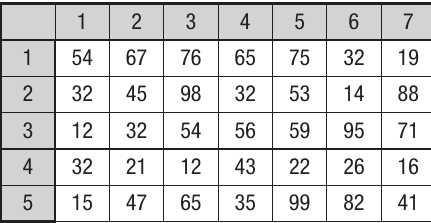
Imagine you want to store mock exam results for a group of pupils across multiple subjects. You could create a two-dimensional array called Results:
Example
Worked Example: Accessing Exam Results
In this two-dimensional array, one dimension represents the pupils (rows 1-5) and the other represents the subjects (columns 1-7).
To access a specific result: If pupil 4 is Hilary and subject 1 is French, then Results(4, 1) would give you Hilary's French mark – which is 65 in this case.
Note
Important Programming Practice:
The rows and columns aren't automatically labelled – it's up to you as the programmer to remember which dimension represents what. Good programming practice means keeping clear notes about your array structure!
You can even create arrays with three, four, or more dimensions, though these become increasingly difficult to visualize. For example, a three-dimensional array might store exam results for multiple papers: Results(4, 1, 2) could represent pupil 4's mark on question 1 of paper 2 in French.
Files
Files provide a way to store data permanently, even after your program stops running. Whilst arrays and variables only exist whilst a program is active, files save information to disk storage where it persists.
Understanding file structure
A file is a collection of related data stored together. Files come in many different formats, each with its own internal structure suited to particular purposes. Some formats are highly specialized (like image or video files), whilst others are designed to be portable and work across many different programs.
Two important portable formats for programming are text files and binary files.
Text files
A text file contains human-readable characters – letters, numbers, and symbols that you could open and read yourself in a text editor. Text files are organized into lines called records, and each piece of information within a record is called a field.
Note
Text File Structure:
Text files often include a header (a first line explaining what data the file contains) and an end of file (EOF) marker that tells programs when to stop reading. Common text file formats include .txt files (plain text) and .csv files (comma-separated values), both used for transferring data between programs.
Fields within text files are separated using delimiters. Here's an example of a tab-delimited file where fields are separated by tab spaces:
John Smith 22 Acacia Avenue LE11 1AA
Mary Jones 1 High Street LE12 5BD
Imran Siddiqi 12 Harrow Road LE13 1GG
Yin Li 24 Royal Road LE1 1AA
The same data in a comma-separated values (csv) format looks like this:
John,Smith,22 Acacia Avenue,LE11 1AA
Mary,Jones,1 High Street,LE12 5BD
Imran,Siddiqi,12 Harrow Road,LE13 1GG
Yin,Li,24 Royal Road,LE1 1AA
Using delimiters like commas or tabs helps programs know where one field ends and the next begins, making it easy to extract specific pieces of information.
Working with text files
When programming, you'll commonly need to write data to text files or read data from them. Here's how these operations typically work:
Example
Worked Example: Writing to a Text File
The process involves opening a file for output, then iterating through your data structure (like an array) and writing each record. For example, to write data from a two-dimensional array called ArrayStore to a CSV file:
FileOpen(1, "NewTable.csv", OpenMode.Output)
' Process each row
For RecordCount = 1 to 30
    ' Get first field
    RecordString = ArrayStore(recordcount,1)
    ' Add remaining fields with commas
    For FieldCount = 2 To 4
        Recordstring = recordstring & "," & Arraystore(Recordcount,fieldcount)
    Next
    ' Write complete record to file
    Print(1, OutputString)
Next
FileClose(1)
Key steps:
- Open the file for output
- Loop through each record
- Build a string with comma-separated fields
- Write the complete record to file
- Close the file when finished
Example
Worked Example: Reading from a Text File
Reading reverses the process, opening a file for input and reading line by line until reaching the end:
'load csv file from folder
FileOpen(1, "C:\Users\NameList.csv", OpenMode.Input)
Do
    Input(1, DownLoadText)
    grdTableIn.Rows(RowCount).Cells(0).Value = DownLoadText & RowCount
    RowCount = RowCount + 1
Loop Until EOF(1)
FileClose(1)
Key steps:
- Open the file for input
- Loop until reaching EOF (End Of File)
- Read each line into a variable
- Process the data as needed
- Close the file when finished
Binary files
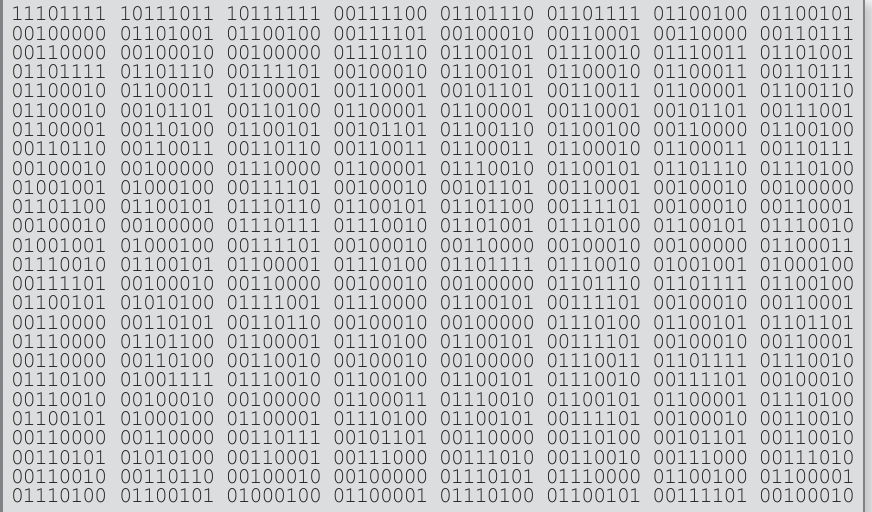
A binary file stores information as sequences of 0s and 1s – the fundamental language of computers. All program code, as well as data like text, graphics, and sound, ultimately exists as binary.
Binary files are organized in groups of 8 bits called bytes. Whilst humans can't easily read binary files, programs can interpret them very efficiently. Binary files usually include header information describing what the data represents.
Note
Advantages of Binary Files:
Binary files offer several advantages:
- More efficient storage – use less memory than text equivalents
- Portability – work across different applications and systems
- Faster processing – computers can read binary directly
- Common formats like PNG images and program executables use binary
Example
Worked Example: Binary File Operations
Writing to a binary file:
OpenFile ("DemoFile.bin", Binary) For Output as # 1
Write 1, "Help"
Write 1, True
Write 1, 3.123
Write 1, 5
Close #1
Reading from a binary file:
Dim TTData as Binary
Open "TTFile" For Binary As #2
    ReDim TTData(1 To LOF(2)) As Byte
    Get 2, 1, TTData
Close #2
The main operations with binary files mirror text files: writing data from your program to a binary file, and reading data from a binary file into your program.
Static and dynamic data structures
Note: This section covers A-level content only.
Data structures can be categorized based on how they use computer memory. Understanding whether to use a static or dynamic structure is an important programming decision that affects both efficiency and flexibility.
Static data structures
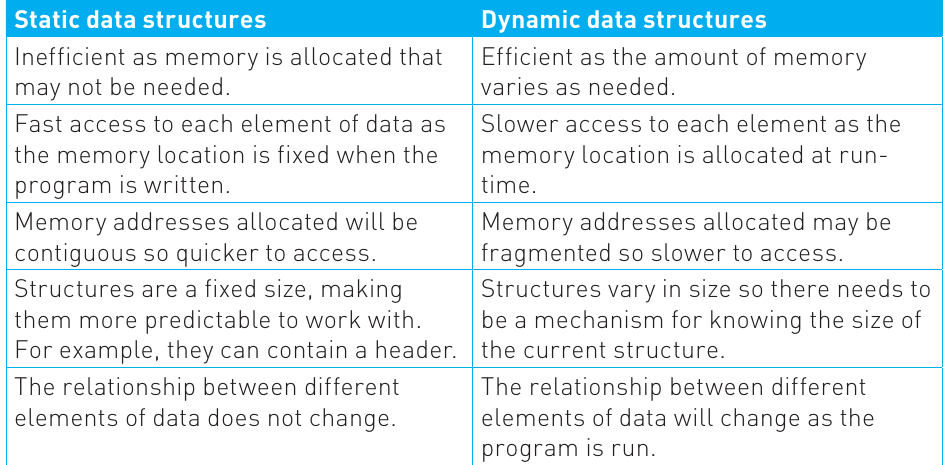
A static data structure allocates a fixed amount of memory when the program is written or compiled. This memory allocation doesn't change whilst the program runs.
Note
The Car Park Analogy:
Think of a static structure like a car park with a fixed number of spaces. Once built, it has exactly that many spaces, whether they're all being used or not. Similarly, a static data structure reserves its memory space right from the start, regardless of how much data you actually store in it.
Characteristics of static structures:
- Memory is allocated upfront and remains constant
- Very fast access to data because memory locations are fixed
- Memory addresses are typically contiguous (next to each other)
- Structures have a predictable, fixed size
- The relationship between data elements doesn't change
- Records and arrays are common examples
The main advantage of static structures is speed – accessing data is very quick because memory locations are predetermined. However, they can be inefficient if you allocate more memory than you need, or problematic if you need more space than you've allocated.
Dynamic data structures
A dynamic data structure can grow or shrink as needed whilst the program runs. Memory is allocated from a pool called the heap – unused memory that can be assigned to data structures as required.
Note
The Flexible Car Park Analogy:
Using the car park analogy, a dynamic structure is like having temporary spaces that can be added or removed based on demand. This provides much greater flexibility.
Characteristics of dynamic structures:
- Memory usage varies based on actual needs
- Slower access because memory is allocated at runtime
- Memory addresses may be fragmented (scattered) rather than contiguous
- Structures vary in size, requiring mechanisms to track current size
- Relationships between data elements can change during execution
- Queues, stacks, and binary trees are often implemented dynamically
Important
Understanding FIFO and LIFO:
Queues follow a First In, First Out (FIFO) principle – the first item added is the first removed, like a queue at a shop.
Stacks follow Last In, First Out (LIFO) – the most recently added item is removed first, like a stack of plates.
Dynamic structures use memory much more efficiently because they only take what they need and can return it when finished. They're also much more flexible, allowing elements to be added or removed easily. However, this comes at the cost of slightly slower access times and more complex memory management.
Comparing static and dynamic structures
Here's a comparison of the key differences:
Important
Memory Management Considerations:
Programmers typically set a maximum limit on memory for any data structure to prevent errors. Problems can occur if you try to remove items from empty structures or add items to full ones.
The choice between static and dynamic structures depends on your specific needs – whether you prioritize speed and predictability (static) or flexibility and memory efficiency (dynamic).
Remember!
Summary
Key Points to Remember:
• A data structure is the practical implementation for storing organized data, whilst an abstract data type is the conceptual model of how that data should work.
• Arrays are static structures that store related data under a single name, accessed by index position. They can be one-dimensional (lists) or multi-dimensional (tables), and their size is fixed when created.
• Text files contain human-readable data organized into records (lines) and fields (individual data items), often using delimiters like commas or tabs. Binary files store data as sequences of 0s and 1s, offering efficiency and portability.
• Static data structures have fixed memory allocation, providing fast access but less flexibility. Dynamic data structures can grow and shrink as needed using heap memory, offering flexibility at the cost of slightly slower access.
• Understanding when to use static versus dynamic structures is crucial – static suits predictable data with fixed sizes, whilst dynamic works better when data requirements change during program execution.