Hash Tables and Dictionaries (AQA A-Level Computer Science): Revision Notes
📚Revision Notes
Hash Tables and Dictionaries
Introduction
Hash tables and dictionaries are efficient data structures that work by storing information in key/value pairs. These structures allow extremely fast data retrieval by using special algorithms to calculate exactly where data should be stored and found.
Note
Think of hash tables and dictionaries as highly organised filing systems where you can find any document instantly because the filing location is mathematically calculated rather than searched for sequentially. This eliminates the need to check every item one by one.
Both structures can be visualized as two-dimensional arrangements where one dimension represents the data itself, and the other dimension represents a key that uniquely identifies where that data is located.
What is a hash table?
A hash table is a data structure consisting of two main components working together. The first component is a table or array of slots where data is stored. The second component is a key, which identifies the specific location of data within that table. Each stored item forms a key/value pair - the key combined with its associated data.
What makes hash tables special is how they determine where to store data. A hashing algorithm (code that creates a unique index from key data) is performed on the key. This calculation produces an index value, which then points directly to the specific location within the array where the data item should be stored. You can think of this as a lookup system that uses a key/value combination.
Important
When you need to retrieve data, the same hashing algorithm is applied to the key you're searching for. The algorithm calculates the index and allows you to retrieve the data in just one step. This makes hash tables exceptionally efficient for searching, because you don't need to check every item - you jump straight to the correct location.
Example of how a hash table works
Consider a customer database stored as an array containing records of millions of customers, including CustomerID, Name, Address and other details. A hashing algorithm could be applied to the CustomerID field. This algorithm would generate a unique index for each customer, pointing directly to where that customer's record is stored in the array.
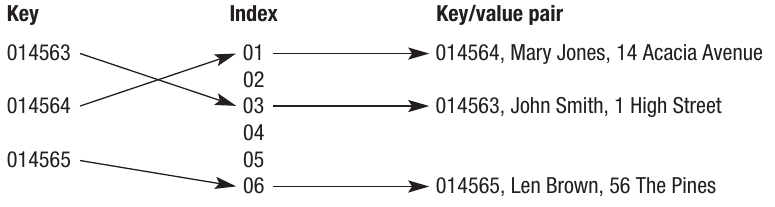
The array storing the data can be visualized as a series of slots, each with a unique index number. The index is then used to access all the data stored in that record.
Note
Note that the key/value pair represents the key alongside all the data stored in relation to that key. In this example, the entire customer record would form the value part of the pair.
Hashing algorithms
To generate the index values, you need a suitable algorithm. Let's examine a simple example to understand the concept.
Imagine an array with six elements (slots 0-5) used to store six values. We could calculate the index using an algorithm that adds all the digits in the key together, then performs a modulo 6 operation on the result (dividing by 6 and taking the remainder). Since there are six slots available, this makes sense.
Example
Worked Example: Simple Hashing Algorithm
For the first data item with key value 25463:
- Add the digits together:
- Perform modulo 6 calculation: remainder
- Therefore the index
- The data is placed in slot 2
For the second data item with key value 34255:
- Add the digits together:
- Perform modulo 6 calculation: remainder
- Therefore the index
- The data is placed in slot 1
This process continues for every key. You can see how the index is created directly from the data in the key.
The real advantage of using an algorithm is that it determines the storage location initially, and then recreates the same indices when retrieval is needed.
Uses of hashing algorithms
Hashing algorithms have numerous practical applications in computing:
Databases: Hashing is used to create indices for databases, enabling quick storage and retrieval of data. Without hashing, databases would need to search through records sequentially, which becomes extremely slow with large datasets.
Memory addressing: Hashing algorithms generate memory addresses indicating where data will be stored. This is particularly useful for cache memory (a high-speed temporary storage area), where data is placed temporarily, allowing users fast access to programs and data stored in the cache.
Note
Cache memory is a high-speed temporary area of memory that stores frequently accessed data. By using hashing algorithms to manage cache memory efficiently, systems can dramatically improve performance when accessing commonly used programs and data.
Operating systems: As an example of memory addressing, some operating systems use hashing tables to store and locate executable files for all programs and utilities. This allows the system to launch applications quickly.
Encryption: Hashing is used to encrypt data, which is why encryption keys are sometimes called 'encryption keys'. In this application, the algorithm must be highly complex so that if data is intercepted, it cannot be reverse-engineered back to its original form.
Checksums: A checksum is a value calculated from a dataset that is going to be transmitted. When the data is received, the algorithm runs again on the received data. The two results are compared to verify whether the data has been corrupted during transmission.
Programming: Hashing is used to index keywords and identifiers. Compilers need to access these elements quickly as programs are compiled, making hashing an efficient solution.
Choosing a hashing algorithm
The basic example demonstrated earlier shows a few important features and associated challenges when creating a suitable algorithm:
Important
Generating numeric values: A numeric value must be generated from the data to perform the calculation. For non-numeric keys such as text and other characters, the ASCII or Unicode value for each character is normally used.
Uniqueness requirement: The algorithm must generate unique indices. For example, if the next data item had key value 43525, the algorithm would generate index 1 again. There is already data stored at this location, creating what's called a collision. It is theoretically possible to create a perfect hashing algorithm that avoids collisions completely, but in practice they are unavoidable. A good algorithm will create as few collisions as possible and needs a mechanism to handle them when they occur.
Uniform distribution: The algorithm needs to create a uniform spread of indices. For example, if you were storing millions of data items into millions of slots, the algorithm must provide an even spread of index values from the data and avoid clustering. Clustering occurs when a hashing algorithm produces indices that are not randomly distributed. This reduces the possibility of collisions by ensuring indices spread evenly across available slots.
Note
Load factor is the ratio of how many indices are occupied to how many there are in total. A high load factor means it will become increasingly difficult for the algorithm to produce unique results, as most slots are already filled.
Sufficient capacity: There must be enough slots to store the volume of data. For example, if a database will store 1 million records, the algorithm must be capable of producing at least 1 million distinct indices. In fact, more slots are needed than this to avoid collisions as the table fills up. Hash tables have a load factor, which is the number of keys divided by the number of available slots.
Balancing complexity: The algorithm must balance issues of speed with complexity. For example, a database index-generating algorithm needs to calculate the index very quickly. An encryption algorithm needs to be very complex, but may not need to calculate the index as rapidly.
Important
Creating suitable algorithms is sometimes described as a 'black art' because there is no universally accepted method for designing them. The algorithm design depends largely on the specific application and requires careful consideration of all the factors above.
Collisions
One of the main challenges of a hashing algorithm is that it must produce a unique index (the location where values will be stored, calculated from the key). When a collision occurs (when the algorithm produces the same index for two or more different keys), there must be some way of handling it so that a unique index can still be assigned to each key.
There are two main methods for handling collisions:
Chaining
Chaining is a technique for generating a unique index when there is a collision by adding the key/value pair to a list stored at the same index. When a collision occurs, a linked list is created at that slot, and the key/value pair becomes an element of the list. If another collision occurs at the same location, that key/value pair becomes the next element in the list, and so on.
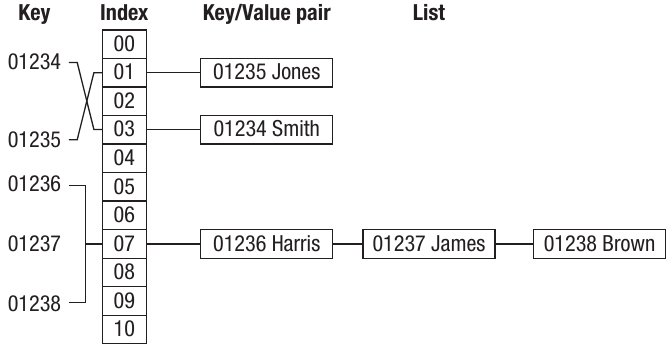
Where the index is unique, the key/value pairs work normally. Where two or more keys generate the same index, a linked list is formed. This is called chaining because the additional key/value pairs get chained together inside a list. Each key/value pair is uniquely identified by its position within the list.
Example
Chaining Example:
In the diagram shown, keys 01236, 01237 and 01238 all produced index 07. These key/values have been chained together in a linked list at that location. When searching for a specific key:
- The hashing algorithm calculates index 07
- The system then traverses the linked list at that location
- It compares each key until finding the matching one
Rehashing
Rehashing is the process of running the hashing algorithm again when a collision occurs. In this approach, if a collision occurs, either the same algorithm is run again, or an alternative algorithm is used until a unique key is created. This normally uses a technique called probing, which means the algorithm searches for an empty slot. It could do this by simply looking for the next available slot after the index where the clash occurred.
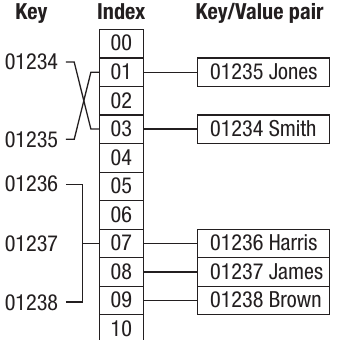
The diagram shows a simple linear probe where the next available slot is used. This approach is not very sophisticated because if the hashing algorithm is leading to clustering (as in this example), the results will still be clustered around the same slots.
Note
A more sophisticated method is to apply another hashing function to the index where the clash occurred, to generate a different index location. This helps to avoid the clustering problem associated with simple linear probing.
Code example
The following extract shows a hashing algorithm that creates a key using the day and date of birth multiplied by 28, with modulo 100 applied to the result. Notice that it also rehashes if there is a collision:
HashKey = (28 * (FindMonth - 1) + FindDay) Mod 100

If grdTable.Rows(HashKey).Cells(3).Value = txtFindRecord.Text Then
    ' record found using first hash key
Else
    Do
        HashKey = HashKey + 1
        If grdTable.Rows(HashKey).Cells(3).Value = txtFindRecord.Text Then
            ' found using rehashing
        End If
    Loop Until grdTable.Rows(HashKey).Cells(3).Value = "" Or HashKey = 100
    ' record not found
End If
Note
This code first calculates a hash key from the FindMonth and FindDay values. If the record is found at that location, it's retrieved. If not (indicating a collision), the algorithm enters a loop where it increments the HashKey by 1 and checks the next slot. This continues until either the record is found or an empty slot is reached, or the end of the table is reached.
Dictionaries
A dictionary (data structure) is an abstract data type that maps keys to data. It is called an associative array because it links together two sets of data that are associated with each other. The dictionary data structure is analogous to a real-life dictionary - there is a word (the key) associated with a definition (the data). This is similar to a hash table in that it contains key/value pairs.
In the same way that a real-life dictionary is accessed randomly (you don't read it sequentially from cover to cover), a dictionary data structure also requires random access. The common procedures you would need to carry out on a dictionary would be to add, retrieve and delete data.
Important
Unlike a real-life dictionary however, the data inside a dictionary data structure is unordered - it doesn't follow alphabetical or any other sequence. This is a key distinction from physical dictionaries.
Dictionary structure example
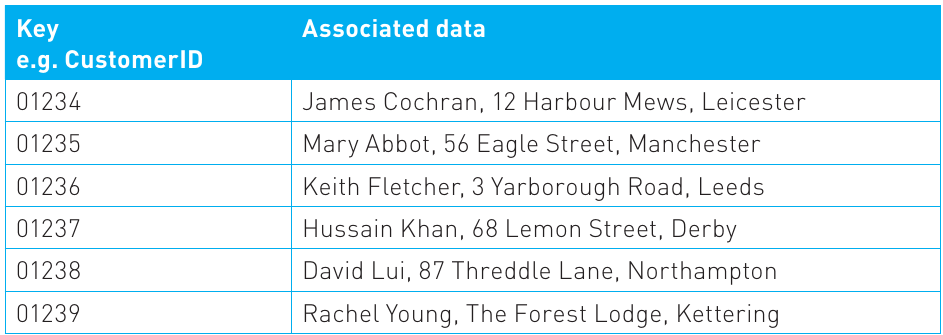
We could use the customer database example again. Each record has a key, which might be the CustomerID. This key links to all the data stored about that customer. At any time we may want to retrieve, add or delete a customer record. Dictionary data structures are often used to implement databases because there will be inherent associations within the data, and records need to be searched and sorted routinely to retrieve information.
In simple terms, the dictionary data structure can be visualized as a two-dimensional array:
Note
As you can see from this example, dictionaries and hash tables are very similar. In fact, a hash table is one way of implementing a dictionary. Dictionaries can also be created using binary trees (covered in Chapter 9).
Using dictionaries in programming
Some programming languages such as Visual Basic and Python have a dictionary data type built in. For example, in Python, it is possible to use a dictionary constructor to build a dictionary directly from key/value pairs. Visual Basic has a dictionary object which allows key/value pairs to be added directly.
The following Visual Basic-based pseudo-code shows the implementation of a dictionary data structure using the data dictionary type.
To add an item:
Dim Dict As Dictionary (Of String, Integer)

Dictionary.Add ("Anne", 10)
Dictionary.Add ("Dave", 52)
Dictionary.Add ("Ethel", 17)
Note
The data in speech marks is the key, and the integer is the value assigned to it in the format ("key", value) where key is a string and value is an integer. This code simply adds three names to the dictionary.
To retrieve an item from the dictionary, the key/value pair needs to be identified:
For Each pair As KeyValuePair(Of String, Integer) In dict
    MsgBox(pair.Key & " - " & pair.Value)
Next
This code would display the list of all the names in the dictionary in a message box.
To delete an item:
Dictionary.Remove ("Anne")
This code would delete the item identified by the key value input - in this case, "Anne".
Remember!
Summary
Key Points to Remember:
-
A hash table is a data structure consisting of two components: a table or array for storing data, and a key that identifies the specific location of data within the table through an index calculated by a hashing algorithm.
-
Hashing algorithms must generate unique indices, create uniform distribution of values, provide sufficient capacity for the data volume, and balance speed with complexity depending on the application.
-
Collisions are inevitable in practical hashing systems and can be handled through chaining (creating linked lists at collision points) or rehashing (probing for the next available slot).
-
Dictionaries are abstract data types that map keys to data in an unordered structure, similar to hash tables but representing a more general concept that can be implemented using various underlying structures.
-
Hash tables and dictionaries are fundamental to many computing applications including database indexing, memory management, encryption, and compiler design, making them essential data structures for efficient data storage and retrieval.