Queues and Stacks (AQA A-Level Computer Science): Revision Notes
📚Revision Notes
Queues and Stacks
Introduction
Queues and stacks are both examples of abstract data types. An abstract data type is a theoretical data structure that doesn't exist as a built-in feature in programming languages but can be created by programmers using existing data types. For instance, you can build a stack using an array. This chapter explores how stacks and queues operate and examines their practical applications in computing.
Note
Abstract data types are powerful programming concepts because they allow us to create custom data structures tailored to specific needs. While they're not built into programming languages, we can implement them using fundamental data structures like arrays, giving us the flexibility to design efficient solutions for different problems.
How stacks work
A stack operates as a Last In First Out (LIFO) structure. This means the most recent item added to the stack will be the first one removed. Think of it like a stack of books waiting to be marked or a pile of dishes waiting to be washed—whichever item was added to the top of the stack will be the first one to be dealt with.
However, unlike washing dishes where items are physically removed, data in a computer stack isn't actually deleted. Instead, a special variable called the stack pointer keeps track of where the top of the stack is located. The stack pointer indicates which element is currently at the top.
Note
Understanding the Stack Pointer
The stack pointer is a crucial concept in stack implementation. Rather than physically moving or deleting data, the stack pointer simply changes its position to indicate which element should be considered the "top" of the stack. This makes stack operations very efficient, as we're only updating a pointer value rather than moving large amounts of data around in memory.
Stack operations
There are three main operations you can perform on a stack:
- Pushing: Adding a new item to the top of the stack
- Popping: Removing an item from the top of the stack
- Peeking: Looking at the top item without removing it
When you push an item onto the stack, the stack pointer moves up to point to the new top element. When you pop an item off the stack, the stack pointer moves down, though a copy of the data remains in memory.
Example
Worked Example: Stack Operations in Action
Here's a simplified example showing how a stack works. This particular stack can store six data items:
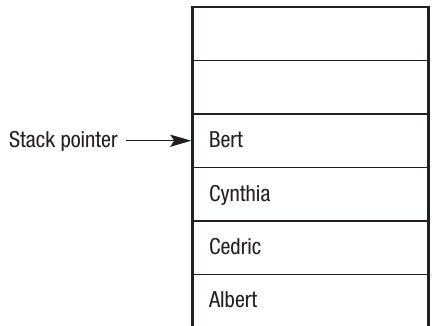
The stack pointer shows where the top of the stack is currently located. In this case, "Bert" is at the top.
Step 1: Pushing onto the stack If we push "Linda" onto the stack, the pointer moves up to point to the new top element:
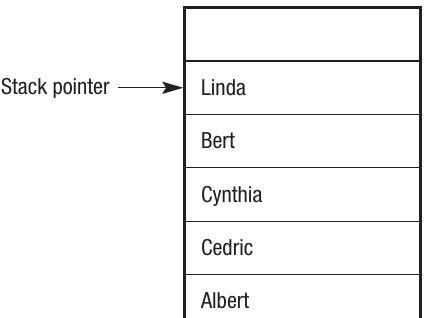
Notice how "Linda" is now at the top and the stack pointer has moved up accordingly.
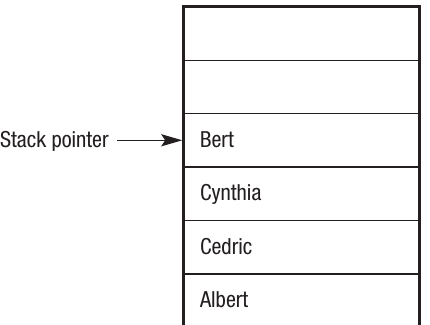
Step 2: Popping from the stack When the stack is popped, the data at the pointer position ("Linda") is read and the pointer moves back down:
Stack overflow and underflow
It's possible for a stack to need more memory than has been allocated to it. If the stack is implemented as a static data structure and you try to push three more data items when there's no space available, the last item would have nowhere to go. This situation is called a stack overflow error.
Similarly, if the stack is empty and you try to pop an item, this results in a stack underflow error, as there's no data to be removed.
Important
Critical Stack Errors
Stack overflow and underflow are serious errors that can crash programs if not handled properly. Always implement error checking:
- Before pushing, verify there's available space in the stack
- Before popping, verify the stack isn't empty
- These checks prevent your program from attempting impossible operations that would cause runtime errors
Implementing a stack
The following routines demonstrate how to implement a stack using a single-dimension array called StackArray. The variable StackPointer tracks how far up or down the stack the pointer should be positioned, and StackMaximum stores the maximum number of values that can be held in the stack.
Push routine
'routine to push on to a stack
'check there is room on the stack
If StackPointer < StackMaximum Then
    'push on to the stack
    StackPointer ← StackPointer + 1
    StackArray(StackPointer) ← DataItem
Else
    Error message "Data not saved - stack full"
End If
Note
Error Checking is Essential
The error checking mechanism performs an important function. The stack will only be allocated a limited number of memory locations, stored in the variable StackMaximum. If this check wasn't included, the stack would overflow—attempting to store too much data in it. This is why the condition StackPointer < StackMaximum must be checked before every push operation.
Pop routine
'Routine to pop off a stack
'check the stack is not empty
If StackPointer > 0 Then
    'pop off the stack
    DataItem ← StackArray(StackPointer)
    'decrease stack pointer
    StackPointer ← StackPointer - 1
Else
    Error message "There is no data to pop from the stack"
End If
This routine shows how an item can be removed from a stack. Notice that the first line checks for an underflow error before attempting to pop.
Uses of stacks
Due to their LIFO nature, stacks can be used anywhere you want the last data item added to be the first one processed. Here are some practical applications:
Reversing data
A simple application is reversing the contents of a list. Consider this list:

If you push each name onto the stack in order, the stack would look like this:

When you pop the names off the stack in order, you get them back in reverse sequence.
Note
This reversal property of stacks is fundamental to many algorithms. Because of the LIFO principle, any sequence of items pushed onto a stack will naturally come out in the opposite order when popped. This makes stacks perfect for tasks like reversing strings, undoing operations, or navigating backward through a sequence of actions.
Stack frames
Stacks can store information about running programs. In this context, they're known as stack frames. A pointer identifies the start point of the frame. This mechanism is used as a call stack when programs call functions and pass parameters and arguments.
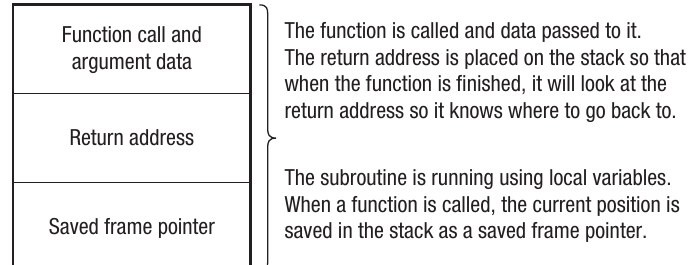
When a function is called, the following happens:
- The function is called and data is passed to it
- The return address is placed on the stack so the program knows where to resume after the function finishes
- The current position is saved in the stack as a saved frame pointer
Important
Why Stack Frames Matter
Stack frames are fundamental to how programs execute. Every time a function is called, the computer needs to remember where to return to once the function completes. The stack provides this memory mechanism automatically. This is why deeply nested function calls or infinite recursion can cause stack overflow errors—each function call adds a new frame to the stack, and eventually the stack runs out of space.
Handling interrupts and exceptions
This is the same mechanism used for handling interrupts and exceptions in programs. Interrupts are events where hardware or software demands the processor's attention and causes the current program to stop. This could be something happening inside the running program or an external event such as a power failure or a printer running out of paper.
When an interrupt occurs, special blocks of code called interrupt handlers and exception handlers are loaded into memory and executed. While the new task is being dealt with, the details of the first program are stored on a stack. As soon as the interrupt or exception has been handled, the details are retrieved from the stack and the first program can continue where it left off.
Nesting and recursion
It's common practice to nest program constructs. For example, you might place one selection process inside another, or have a selection process carried out inside an iterative loop. When this happens, the details of successive nested loops are stored on the stack.
Example
Worked Example: Nested Loop Structure
Consider this nested loop structure:
For HourCounter = 0 To 23
    For MinuteCounter = 0 To 59
        For SecondCounter = 0 to 59
            Output Hour, Minute, Second
        Next SecondCounter
    Next MinuteCounter
Next HourCounter
This pseudo-clock won't keep very good time, but it demonstrates how For/Next loops can be nested inside each other. The stack keeps track of:
- Which loop iteration we're currently in for each level
- Where to return to when each inner loop completes
- The values of all loop counters at each nesting level
Stacks also play a vital role in a process called recursion. This is where a subroutine calls itself repeatedly in order to complete a task.
Queues
A queue operates as a First In First Out (FIFO) structure. A queue in a computer works just like people queuing for a bus—the first person in the queue will be the first person to get on the bus, and the first item of data added to a computer queue will be the first to be removed.
A common use of queues is when a peripheral device such as a hard disk or keyboard is sending data to the CPU. The CPU might not be in a position to deal with the data immediately, so items are temporarily stored in a queue. Data being sent from the CPU might also need to be stored temporarily, and this is certainly the case when a document is sent to a printer. Your document is placed in the queue until the printer (which is a very slow device compared to the CPU) has time to process the job. Queues used in this way are also known as buffers.
Example
Worked Example: How a Queue Operates
Here's a simplified example of how a queue operates. This queue can store six data items:

The queue has already received four data items, but none has yet been removed. The first item in the queue is "Bert" (indicated by the front pointer), and the last item is "Albert" (indicated by the rear pointer).
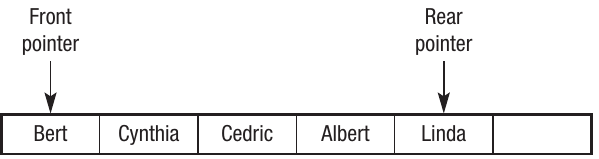
Step 1: Adding to the queue When an item is added to the queue, it's added at the end. If "Linda" is added, the rear pointer moves to point to the new item while the front pointer remains unchanged:
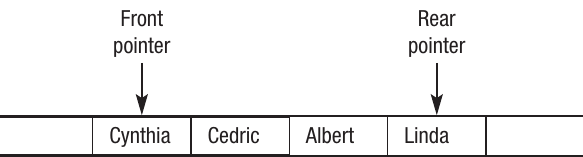
Step 2: Removing from the queue When a name is removed from the queue, it's taken from the front. If "Bert" is removed, the front pointer moves to the next item in the queue. The rear pointer doesn't move:
Linear, circular and priority queues
Linear queue
The examples above show a linear queue—you can visualise the data arranged in a line. The first item in is the first item out. The maximum size of the queue is fixed in this case, although it could be dynamic. A typical method for storing data in a queue is as a one-dimensional array.
Note
Linear queues are the simplest form of queue to understand and implement. However, they have a significant drawback: once items are removed from the front, that memory space cannot be reused even though it's now empty. This can lead to inefficient memory usage, especially in long-running programs where the queue is constantly being added to and removed from.
Circular queue
A circular queue can be envisaged as a fixed-size ring where the back of the queue is connected to the front. This is often referred to as a circular buffer. Like a linear queue, it's the pointers that move rather than the data. However, with a circular queue, the first items of data can be seen as being next to the last item of data in the queue.
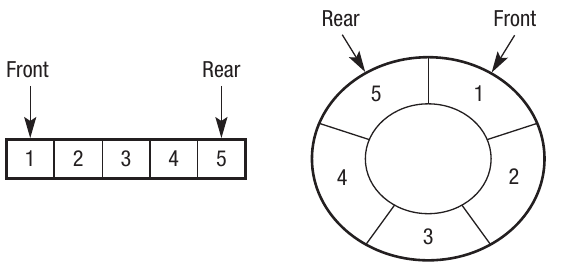
A common implementation is for buffering, when items of data need to be stored temporarily while waiting to be passed to or from a device.
Note
Advantages of Circular Queues
Circular queues solve the memory inefficiency problem of linear queues. When the rear pointer reaches the end of the array, it wraps around to the beginning, allowing the queue to reuse memory locations that were freed when items were removed from the front. This makes circular queues much more efficient for applications that continuously add and remove data over extended periods.
Priority queue
A priority queue adds a further element: the priority of each item. For example, if documents are being sent to print on a network printer, it might be possible for the user or system manager to control the queue in some way. They may be able to force certain print jobs to the top of the queue or put print jobs on hold whilst others are pushed through. This is known as a priority queue and requires the programmer to assign priority ratings to different jobs. Higher priority jobs can effectively jump the queue. Where two jobs have the same priority, they're handled according to their position in the queue.
Implementing a linear queue
A queue typically consists of multiple data items of the same type. Therefore, a common implementation uses an array. To demonstrate the principle, this example shows a queue with a fixed size of nine elements. Currently, five items are in the queue. FP shows the front pointer and RP shows the rear pointer:

It's possible for the queue to become empty or full as data is added and removed, and not every element will necessarily have data in it. Therefore, when implementing a queue, you need to know:
- The name of the array
- The maximum size of the queue
- Whether the queue is full or empty
- Where the front of the queue is
- Where the rear of the queue is
Example
Worked Example: Queue Operations in Practice
Assuming element 0 is the front and element 4 is the rear, when an item is removed, the queue will look like this:

The front pointer has moved forward by 1 so the front is now pointing at element 1. The rear pointer remains at position 4.
Any item added to the queue is added to the rear. If "Beth" is added at position 5:

The front pointer remains at position 1 and the rear pointer is now at position 5.
Items can continue to be added and removed with the front and rear pointers moving accordingly. For example, if we removed the next two elements and added "Jessica":

The front pointer has moved forward to position 3 and the rear pointer has moved to position 6.
Eventually, if data items keep being added, the rear pointer will reach the end of the array and there will be no more room, despite some earlier locations being empty because elements have been removed from the front. The simplest way to deal with this is to always keep the front pointer at index 0 in the array and move elements forward each time an item is removed. This method is simple but can be quite time-consuming to move elements along in the array, especially if the queue is long. Therefore, a more efficient method of dealing with this problem, known as a circular queue, is more common.
Important
The Linear Queue Problem
Linear queues have a critical limitation: once the rear pointer reaches the end of the array, no more items can be added even if there are empty spaces at the beginning. While you could shift all elements forward each time an item is removed, this is very inefficient for large queues. This is why circular queues are the preferred implementation in most real-world applications.
Implementing a circular queue
A circular queue works similarly to a linear queue except the front and rear pointers move when items are added or removed, making more efficient use of memory. For example, in the linear queue above, items 1, 2 and 3 have all been removed. However, there's no way of adding items into those empty elements as the front pointer has moved to element 3.
The circular queue makes use of the spaces freed up at the front after items have been removed. It does this by wrapping the rear pointer around the array, starting again at element 0 once the queue becomes full. If we start with the same queue as before, the front pointer is 0 and the rear pointer is 4:

If two items are removed, the queue will look like this:

Four new items are now added: "Jane", "Davina", "Yvonne" and "Kelly". Notice the rear pointer is now at position 8:

As this is a circular queue, the rear pointer can now wrap back around to the beginning. If a further item is added, the rear pointer would move to position 0. To add "Maria":

Note
Notice how "Maria" has been placed at position 0, which was previously occupied by an item that was removed. This demonstrates the key advantage of circular queues: memory locations are reused efficiently as items are added and removed.
The following pseudo-code shows how circular queue operations work. The variable Rear is used to point to the end of the queue and Front is used to point to the start. The pseudo-code handles situations where the queue is either empty or full.
Adding to a circular queue
'routine to add to a circular queue
'increment Rear pointer
Rear ← Rear + 1
'Check to see if end of array has been reached
'If so go back to the start of the array
If Rear = 9 Then Rear ← 0
'add data
Put DataItem at position Rear in array
Removing from a circular queue
'routine to remove data from a circular queue
'remove data
Take DataItem from position Front in array
'move Front on
Front ← Front + 1
'Check to see if the end of the array has been reached
'If so go back to the start of the array
If Front = 9 Then Front ← 0
Note
The key to circular queues is the wrapping logic: If Rear = 9 Then Rear ← 0. This simple check ensures that when either pointer reaches the end of the array, it resets to the beginning, creating the circular behavior. This same logic applies to both the Front and Rear pointers.
Implementing a priority queue
A priority queue can be implemented using an array by assigning a value to each element indicating its priority. Items with the highest priority are dealt with first. Where the priority is the same, items are dealt with on a FIFO basis like a normal queue.
There are two possible solutions using an array:
Method 1: Add at end, search when removing
Items are added in the usual way at the end of the queue. When items are removed, each element in the array is checked for its priority to identify the next item to be removed. Where this method is used, adding data is straightforward but removing it is more complex.
Example
Worked Example: Method 1 in Action
Starting with a queue where priorities are shown in subscript (assuming 1 is the highest priority):
Adding an item: If "Jane" is added with a priority of 1, it's simply added at the end and the rear pointer moves:
Removing items: When data is removed, it's done in order of priority. There are two items with priority 1 in this case. "Belinda" would be removed first as she's closest to the front of the queue. "Jane" would be the next item removed. This example shows how the principle of FIFO is still being used, as "Belinda" entered the queue before "Jane".
Method 2: Maintain in priority order
An alternative is to maintain the queue in priority order. When a new item is added, it's inserted into the correct position in the queue. Removing items can then be done in the usual way by taking the item at the front. Where this method is used, removing data is straightforward but adding it is more complex.
Example
Worked Example: Method 2 in Action
Working with the same list, this time the names are in priority order. To remove the next item, you simply take it from the front of the queue:

Therefore, "Belinda" would be removed first as she has the highest priority:

Adding items in priority order: If a new item is added, it's inserted into the correct position based on its priority. Where it has the same priority, it's added after existing items of the same priority. For example, if "Yvonne" is added with a priority of 1:

If "Kelly" is added with a priority of 2:

Notice how "Kelly" is inserted between the priority 1 and priority 3 items, maintaining the sorted order of the queue.
Note
Choosing Between Methods
The choice between these two methods depends on your application's needs:
- Method 1 is better when items are added frequently but removed infrequently
- Method 2 is better when items are removed frequently but added infrequently
- Consider which operation happens more often in your specific use case
Remember!
Summary
Key Points to Remember:
- Stacks are LIFO structures (Last In First Out) where the last item added is the first to be removed, tracked using a stack pointer
- Stack operations include pushing (adding), popping (removing), and peeking (viewing without removing)
- Stack overflow and underflow are critical errors that must be checked for: overflow occurs when pushing to a full stack, underflow occurs when popping from an empty stack
- Stacks are used for function calls (stack frames), handling interrupts and exceptions, supporting recursion, and managing nested program structures
- Queues are FIFO structures (First In First Out) where the first item added is the first to be removed, tracked using front and rear pointers
- Three types of queues exist:
- Linear queues (simple but inefficient memory use)
- Circular queues (efficient memory use by wrapping pointers around)
- Priority queues (items can jump the queue based on priority values)
- Circular queues solve the memory problem of linear queues by reusing freed space at the beginning
- Priority queues can be implemented by either searching for the highest priority when removing (Method 1) or maintaining items in priority order (Method 2)