Vectors (AQA A-Level Computer Science): Revision Notes
📚Revision Notes
Vectors
Introduction to vectors
Vectors are mathematical objects that can be represented and used in several different ways, both mathematically and geometrically. In computer science, vectors serve multiple important purposes:
- As a data structure to store collections of values
- As a method for mapping one value to another
- As a way of defining geometric shapes and positions in space
Understanding all three interpretations of vectors is essential for A-Level Computer Science, as they each have practical applications in programming and problem-solving.
Note
Vectors are unique in that they have three distinct but equally valid representations: as data structures in code, as mathematical functions, and as geometric arrows. Mastering all three perspectives will help you understand their full power in computing.
Representing vectors as a data structure
When writing programs, vectors can be stored as values within a list structure. This is perhaps the most straightforward way to think about vectors in computing.
Using lists and arrays
Consider the Fibonacci sequence, where each number is the sum of the two preceding ones. The first six values of this sequence can be stored in a vector like this:
fibonacci[0] = 0
fibonacci[1] = 1
fibonacci[2] = 1
fibonacci[3] = 2
fibonacci[4] = 3
fibonacci[5] = 5
This can also be described as a one-dimensional array, where each piece of data is an element in the array that can be accessed by its position (index).
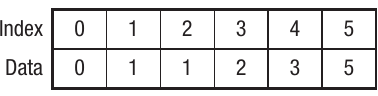
In the table above, the top row shows the index (position) and the bottom row shows the corresponding data value. This structure allows quick access to any element by referencing its index number.
Example
Worked Example: Creating a Fibonacci Vector
To create a vector storing the first six Fibonacci numbers:
Step 1: Start with the first two values: and
Step 2: Each subsequent value is the sum of the previous two:
- Position 2:
- Position 3:
- Position 4:
- Position 5:
Step 3: Store in vector format:
Using dictionaries
A dictionary is a data structure that creates a mapping between a key and a value. We've already seen that we can create sets of real numbers that can be applied to vectors. Using a dictionary structure allows us to call an index, which then acts as a look-up to retrieve the actual values.
The general format of a dictionary is:
{0: Value 1, 1: Value 2, 2: Value 3, 3: Value 4...}
The Fibonacci sequence vector from earlier could be represented in a dictionary as:
{0:0, 1:1, 2:1, 3:2, 4:3, 5:5}
This dictionary structure provides a flexible way to store and retrieve vector data, especially when dealing with non-sequential indices.
Representing vectors as a function
A function is a mathematical construct that maps an input to an output. For example, the function takes the value of and maps it to its square. Vectors can be used to represent this type of function relationship.
When using a vector to represent a function, we define:
- F = the function that creates the vector
- S = the complete set of values that the function can be applied to (the domain)
- R = the potential outputs of the function (the range)
This relationship is written as:
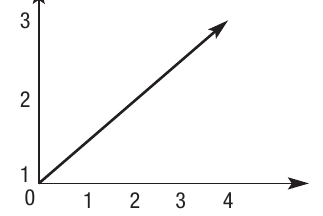
The graph shows a visual representation of how a function maps input values to output values. All output values must be drawn from , which is treated as a single field from which the function takes its values.
Note
The notation means the function maps elements from set to set , showing the relationship between inputs and outputs. The arrow () indicates the direction of the mapping.
Representing vectors as arrows
Geometrically, vectors can be visualised as arrows. This representation is particularly useful for understanding vector operations and applications in graphics and physics.
Components of a vector
A vector has two key properties:
- Magnitude: the size or length of the vector
- Direction: the orientation of the vector in space
The direction of the arrow is shown by the arrow head, and the magnitude is represented by the length of the arrow. The starting point of the arrow is called the tail, and the endpoint is called the head.
Plotting vectors on coordinate axes
To quantify both the size and direction of a vector, we plot it on and axes. A vector can be written in the format , where and are called the components of the vector.
The components represent the distance from the origin on the and axes respectively. For example, a vector described as means:
- The -component is (4 units along the -axis)
- The -component is (3 units along the -axis)
This is often written in column vector notation as:
This notation helps differentiate vectors from coordinate pairs used to plot points on a graph.
Important
Vector Notation vs. Coordinate Points
Column vector notation specifically indicates a vector, distinguishing it from a simple coordinate point on a graph. This distinction is crucial when working with vector operations.
Three-dimensional vectors
Objects in three-dimensional space can be represented using the same method, but with an additional component for the -axis.
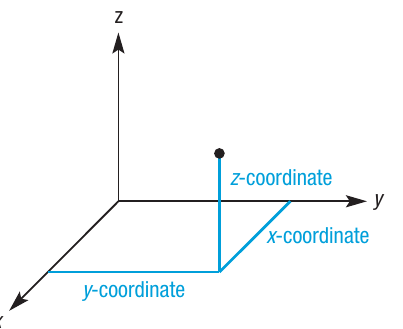
In this 3D coordinate system, a vector could be represented as , where:
- represents the distance along the -axis
- represents the distance along the -axis
- represents the distance along the -axis
For example, a 3D vector might be written as .
Practical applications
Vectors are extremely useful in computing. For instance, in vector graphics, you can resize an image simply by changing the component values in the vector. This is much more efficient than recalculating every pixel.
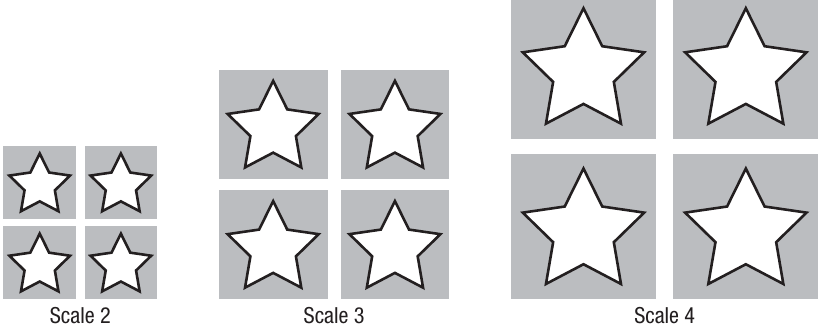
The diagram shows how the same star shape can be scaled to different sizes (Scale 2, Scale 3, Scale 4) by changing the vector components. This demonstrates one of the key advantages of vector graphics over bitmap images.
Note
Vector Graphics Advantage
Unlike bitmap images that store individual pixel data, vector graphics store mathematical descriptions of shapes. This means you can scale them infinitely without losing quality, making them ideal for logos, icons, and scalable designs.
Vector addition
It is possible to add vectors together, which has the effect of translating or displacing the vector. Geometrically, this can be visualised by joining the tail of one vector to the head of another vector.
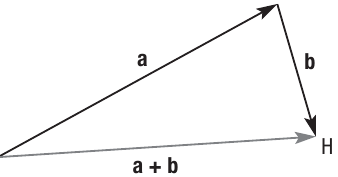
The diagram shows two vectors and being added together. Notice that a new point has been created, which can be used as the head of a new resultant vector .
Calculating vector addition
The sum of two vectors and can be calculated as follows:
If:
Then:
Important
Dimension Compatibility
The two vectors must have the same number of dimensions (the same number of components). You cannot add a 2D vector to a 3D vector without first transforming one of them.
Example
Worked Example: Adding 3D Vectors
If and , then:
Step 1: Identify the components
- has components: , ,
- has components: , ,
Step 2: Add corresponding components
Step 3: Calculate the result
Each corresponding component is added together to produce the new vector.
Scalar-vector multiplication
It is possible to multiply vectors by a number, which has the effect of scaling the vector. The number used is called a scalar, and it represents the amount by which you want to change the scale of the vector.
Understanding scaling
Think of it like zooming in on a map. When you zoom in, you are changing the scale. In the case of a vector, if you scale it by a factor of two, it will have twice the magnitude (length). However, the direction will not change as a result of scaling.
This visual example shows how scaling affects the size of objects while maintaining their shape and orientation.
Note
Direction Preservation
A key property of scalar multiplication is that it only affects the magnitude (size) of the vector, never its direction. The vector points in the same direction, just longer or shorter depending on the scalar value.
Scalar multiplication process
The original vector . When we multiply this by the scalar , we get:
Notice that the tail position and direction do not change - only the magnitude has doubled.
Dot product
The dot product is a process of combining two vectors to calculate a single number (scalar value). It has important applications in computing and mathematics.
Dot product formula
The dot product is calculated using the formula:
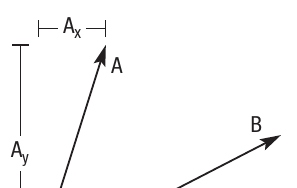
The diagram shows vector broken down into its components (horizontal) and (vertical).
Calculating the dot product
The process involves:
- Multiplying the -components together
- Multiplying the -components together
- Adding these products
Example
Worked Example: 2D Dot Product
If and , then:
Step 1: Multiply corresponding components
- -components:
- -components:
Step 2: Sum the products
Three-dimensional dot product
This method also works in three dimensions by including the component in the calculation.
Example
Worked Example: 3D Dot Product
For two vectors with coordinates and , the dot product would be:
Step 1: Multiply each pair of corresponding components
- -components:
- -components:
- -components:
Step 2: Sum all products
Each corresponding pair of components is multiplied, and all the products are summed together.
Convex combinations
When two vectors are combined to create a third vector, a special relationship exists between all three vectors. This is called a convex combination.
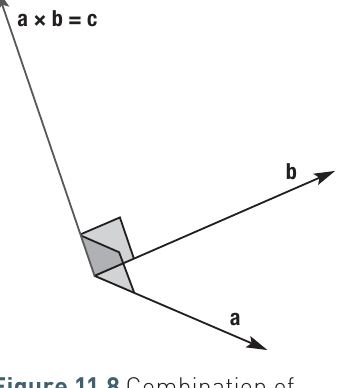
In the diagram, you can see that a new vector has been created at right angles to the other vectors. When these combinations are created, they must follow certain mathematical principles.
Understanding convex hull
A convex combination of vectors is one where the new vector must lie within the vector space of the two vectors from which it is made. The convex hull is a spatial representation of the vector space between two vectors.
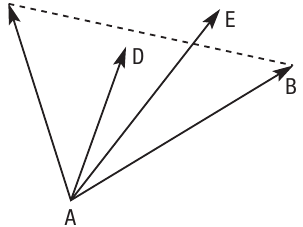
This diagram shows multiple vectors emanating from point . Vector is created by combining vectors and . Notice the imaginary line between points and . The new vector must fall within the vector space defined by points , and in the diagram. This is a visual representation of the convex hull that represents all the points that make up the vector space.
Notice point , which represents the head for another vector. This falls outside the convex hull and is therefore not a valid convex combination.
Mathematical representation
To perform a convex combination mathematically, you multiply one vector either by a scalar or by another vector. This can be represented as:
where:
- and are the two vectors being combined
- (alpha) and (beta) represent the real numbers that each vector will be multiplied by
Important
Convex Combination Constraints
For a valid convex combination, the following conditions must be met:
- (alpha must be greater than or equal to zero)
- (beta must be greater than or equal to zero)
- (the sum must equal exactly one)
When these conditions are met, vector will fall within the vector space, making it a valid convex combination.
Uses of dot product
The dot product has practical applications in computing, particularly for generating parity bits used in error checking.
Generating parity using vectors
Given two vectors and , it is possible to generate parity using the bitwise AND and XOR operations.
Example
Worked Example: Parity Calculation
For and , the dot product would be:
This is calculated by performing arithmetic over GF(2) (Galois Field of 2 elements):
Step 1: Apply AND and XOR operations
Step 2: Evaluate the AND operations
Step 3: Evaluate the XOR operations
This calculation works out the parity bit for even parity. The first vector will always be , and in this example, the second vector is . As you can see, we would expect the parity bit to be , as the vector currently has an odd number of s.
Summary tables for GF(2) arithmetic
Arithmetic over GF(2) can be summarised in two small tables:
Multiplication (bitwise AND):
| 0 | 1 | |
|---|---|---|
| 0 | 0 | 0 |
| 1 | 0 | 1 |
Addition (bitwise XOR):
| 0 | 1 | |
|---|---|---|
| 0 | 0 | 1 |
| 1 | 1 | 0 |
Note
In GF(2), subtraction is identical to addition: and .
Summary
Key Points to Remember:
-
Vectors have multiple representations: Vectors can be represented as data structures (lists/arrays or dictionaries), as functions mapping inputs to outputs, or as geometric arrows with magnitude and direction.
-
Vector operations preserve dimensions: When adding vectors or performing dot products, the vectors must have the same number of components (same dimensionality).
-
Scalar multiplication changes magnitude only: Multiplying a vector by a scalar changes its size but not its direction - think of it like zooming in or out.
-
Dot product produces a scalar: Unlike vector addition, the dot product of two vectors gives you a single number, calculated by multiplying corresponding components and adding the results.
-
Convex combinations have constraints: For a valid convex combination, the coefficients and must be non-negative and sum to , ensuring the new vector stays within the vector space defined by the original vectors.