Relational Databases (AQA A-Level Computer Science): Revision Notes
📚Revision Notes
Relational Databases
Introduction to relational databases
A relational database is a method of organising data using tables that contain related information. These tables are linked together through relationships, allowing you to store and manage complex data efficiently. When you create a relational database using software, each table represents a collection of related information, and each row within a table represents a single record of data.
Note
The key concept behind relational databases is that data is organised into separate tables based on what the data represents, and these tables are then connected to each other through special linking fields. This structure avoids storing the same information multiple times and makes it easier to maintain and query your data.
Relationships between tables
When designing a database for a real-world system, such as a movie download service, you'll need to create multiple tables to store different types of information. For instance, you might have:
- A CUSTOMER table storing details about each customer (name, address, phone number, date of birth)
- A MOVIE table storing information about each available movie (title, genre, age classification)
- A DOWNLOAD table storing details about each download transaction (date, price, payment method)
These tables need to be linked together to represent how the data relates to each other in the real world. There are three main types of relationships you can create between tables.
One-to-many relationships
A one-to-many relationship occurs when one record in a table can be associated with multiple records in another table, but each record in the second table relates to only one record in the first table.
Example
One-to-Many Relationship: Customer Downloads
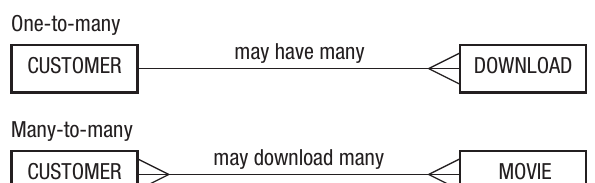
In a movie download system, one customer may download many movies, creating a one-to-many relationship between CUSTOMER and DOWNLOAD.
- Customer 1 can have: Download A, Download B, Download C
- Customer 2 can have: Download D, Download E
- Each specific download (A, B, C, D, E) belongs to only one customer
This means each customer can have multiple download records, but each specific download belongs to only one customer.
Many-to-many relationships
A many-to-many relationship exists when multiple records in one table can be associated with multiple records in another table.
For instance, in a movie download system, one customer could download many different movies, and one movie could be downloaded by many different customers. This creates a many-to-many relationship between CUSTOMER and MOVIE.
Important
When implementing a relational database, you cannot directly create many-to-many relationships. Instead, you must introduce a link table (also called a junction table) that sits between the two entities. This link table breaks the many-to-many relationship into two one-to-many relationships.

In the movie download example, the DOWNLOAD table acts as this link table, connecting customers to the movies they've downloaded. This creates a one-to-many relationship between CUSTOMER and DOWNLOAD, and another one-to-many relationship between MOVIE and DOWNLOAD.
One-to-one relationships
A one-to-one relationship occurs when one record in a table is associated with exactly one record in another table, and vice versa. These relationships are less common in database design but can be useful in specific scenarios.
Note
One-to-one relationships are often used when:
- You want to split a table for security reasons (e.g., separating sensitive personal data)
- You need to improve performance by separating frequently accessed data from rarely accessed data
- You want to represent an optional relationship where not all records will have the associated data
For example, if a school has a rule that each teacher only teaches in one classroom, and each classroom is only used by one teacher, this would create a one-to-one relationship between teachers and classrooms.
Entities
An entity is an object or thing about which you want to store information in your database. When you implement a relational database, each entity becomes a table.
In the movie download example, we've identified several entities:
- CUSTOMER (representing each person who uses the service)
- MOVIE (representing each film available for download)
- DOWNLOAD (representing each download transaction)
- MOVIEFORMAT (representing the different file formats available)
When planning a database, one of your first tasks is to identify all the entities you'll need. This requires careful analysis of the problem you're trying to solve. You'll need to use a technique called normalisation (explained later) to ensure you've identified all necessary entities and organised them effectively.
Note
Naming Convention: It's standard practice to write entity names (which become table names) using capital letters, and this convention is used throughout database design.
Attributes
An attribute is a piece of information or characteristic about an entity. When you implement a relational database, attributes become the fields (columns) in your tables.
For the movie download database, different entities have different attributes:
CUSTOMER attributes might include:
- Customer Name
- Address
- Phone Number
- Date of Birth
MOVIE attributes might include:
- Movie Title
- Age Classification
- Genre
DOWNLOAD attributes might include:
- Date of Download
- Price
- Method of Payment
MOVIEFORMAT attributes might include:
- File Type
Each attribute stores one specific piece of information about the entity. When you create a record (row) in a table, you fill in values for each of these attributes.
Entity relationship diagrams
An entity relationship diagram (ERD) is a visual tool used to show the relationships between entities in a database. These diagrams help you plan and communicate your database structure before you start building it.
ERDs use boxes to represent entities, with lines connecting them to show relationships. The lines include special symbols called "crow's feet" to indicate the nature of the relationship.
Note
ERD Notation:
The notation works as follows:
- A single line indicates "one"
- A crow's foot (a line that splits into three) indicates "many"
Labels are added above the relationship lines to clarify what the relationship means. For example, "may have many" or "may download many" help explain the connection between entities.
When describing relationships, you should choose the phrasing that best represents the real-world situation. For the relationship between CUSTOMER and DOWNLOAD, you could say:
- One customer has one download (too restrictive)
- One customer has many downloads (possible but not complete)
- One customer may have many downloads (best choice - allows for the possibility but doesn't require it)
The most accurate description captures the real-world nature of the relationship as closely as possible.
Primary keys and entity identifiers
A primary key is an attribute in a table that uniquely identifies each record. This is crucial because it allows you to distinguish between different records even if some of their other attributes are the same.
An entity identifier is the conceptual equivalent at the design stage - it's an attribute that can uniquely identify each instance of an entity. When you implement the database, the entity identifier becomes the primary key.
Important
Consider the CUSTOMER table. If you tried to use CustomerName as the primary key, you'd run into problems when two customers have the same name. Every record must be uniquely identifiable, so you need a better approach to selecting primary keys.
There are three approaches to solving this problem:
Use a unique attribute
Sometimes an attribute is naturally unique. For example:
- National Insurance numbers are unique to each person in the UK
- Vehicle Identification Numbers (VIN) are unique to each car
If such an attribute exists, you can use it as the primary key.
Create a unique attribute
You can invent a unique identifier for each record. Many database systems include features to generate these automatically. For example, Microsoft Access has an "AutoNumber" feature that assigns a unique number to each new record.
Example
Creating Unique Identifiers
In our movie download example, we could create:
- CustomerID for the CUSTOMER table
- MovieID for the MOVIE table
- DownloadID for the DOWNLOAD table
- FormatID for the MOVIEFORMAT table
This approach is very common and ensures that each record can be uniquely identified regardless of what other data it contains.
Use a composite key
A composite key consists of two or more attributes used together to uniquely identify a record. For example, using both CustomerName and Address together might uniquely identify each customer, as it's unlikely two people with the same name live at the same address.
Important
Caution with Composite Keys
Composite keys should be used with caution. For instance, imagine a father and son with the same name living at the same address - this would violate the uniqueness requirement. Always consider edge cases when designing composite keys.
Foreign keys
A foreign key is an attribute that appears in one table but is actually the primary key from another table. Foreign keys are used to create the links between tables in a relational database.
Example
Foreign Key Relationship
To create a one-to-many relationship between CUSTOMER and DOWNLOAD (where one customer may have many downloads), you include the CustomerID in the DOWNLOAD table as a foreign key. This allows each download record to reference which customer made that download.
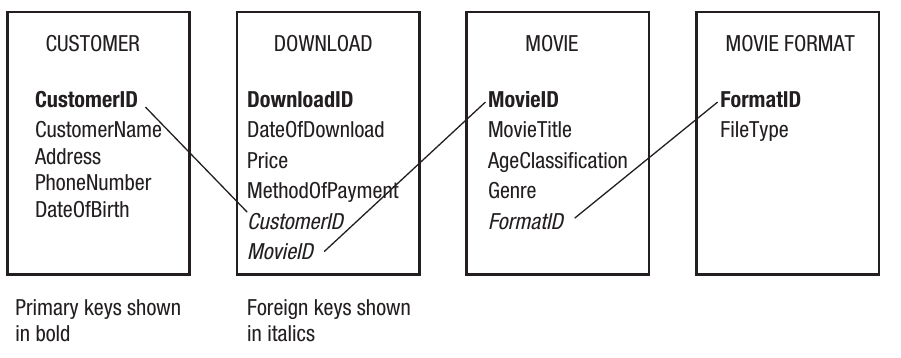
Looking at the complete database schema, you can see how foreign keys create connections:
- CustomerID appears as the primary key in the CUSTOMER table and as a foreign key in the DOWNLOAD table
- MovieID appears as the primary key in the MOVIE table and as a foreign key in the DOWNLOAD table
- FormatID appears as the primary key in the MOVIEFORMAT table and as a foreign key in the MOVIE table
These foreign key relationships allow you to link related data across multiple tables without duplicating information.
Standard database notation
When documenting a relational database design, there's a standard notation format that makes the structure clear:
CUSTOMER (CustomerID, CustomerName, Address, PhoneNumber, DateOfBirth)
MOVIE (MovieID, MovieTitle, AgeClassification, Genre, FormatID)
DOWNLOAD (DownloadID, DateOfDownload, Price, MethodOfPayment, CustomerID, MovieID)
MOVIEFORMAT (FormatID, FileType)
Note
Understanding the Notation:
In this notation:
- The table name is written in capital letters
- All attributes are listed in brackets after the table name
- Primary keys are underlined
- Foreign keys are shown in italics (though in plain text they may be indicated differently)
This notation provides a quick, text-based way to describe the entire structure of a database without needing to draw diagrams.
Normalisation
Normalisation is the process of organising a relational database to ensure it's structured efficiently. A properly normalised database avoids redundant data and ensures data is stored at the appropriate level of detail (called the "atomic level").
Important
Why Normalisation is Essential
Normalisation is critical because it prevents data problems that can make your database inefficient, inconsistent, and difficult to maintain. Without proper normalisation, you'll encounter issues with redundant data and non-atomic storage.
Redundant data causes problems
Redundant data occurs when the same information is unnecessarily stored in multiple places. For example, if you stored complete movie details (title, genre, format) every time someone downloaded that movie, you'd be storing the same movie information repeatedly.
This redundancy leads to:
- Wasted storage space
- Data inconsistency - if movie details need updating, you'd have to change multiple records, and if you miss some, your database contains contradictory information
- Increased complexity in maintaining the database
Atomic data is important
Storing data at an atomic level means it cannot be broken down further. For example, if you store a complete address like "23 Maple Drive, London, SW1 1AA" as a single field, you can't easily search for all customers in London or all customers with a specific postcode.
Example
Breaking Down Address Data
Instead of storing a complete address as one field, you might break it down into:
- HouseNumber
- Street
- Town
- County
- Postcode
Or alternatively:
- AddressLine1
- AddressLine2
- Town
- Postcode
This makes the data more flexible and searchable, allowing queries like "find all customers in London" or "find all customers with postcode SW1".
The three normal forms
There are several levels of normalisation, called "normal forms". For A-Level Computer Science, you need to understand the first three normal forms and be able to normalise a database to Third Normal Form (3NF).
Let's work through the normalisation process using the movie download database as an example.
First normal form (1NF)
A table is in first normal form when:
- It contains no repeating groups of attributes
- All data in the table is atomic (cannot be broken down further)
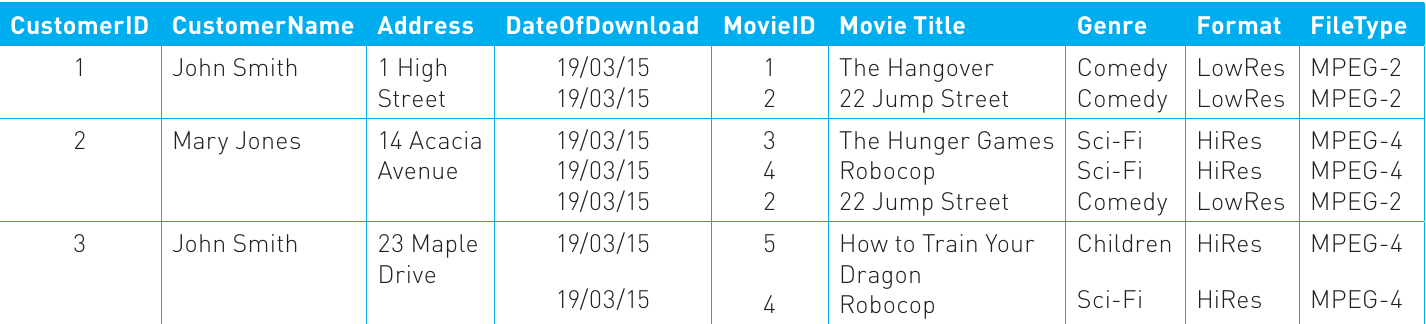
Consider an initial, unnormalised attempt at the movie download database:
Important
Repeating Groups Problem
This table has serious problems. Looking at the data, you can see that for some customers, there are multiple movies listed in single cells, creating repeating groups. A repeating group occurs when a set of values is stored at a particular row/column intersection instead of a single value.
This violates the first rule of normalisation and must be fixed.
To achieve first normal form, create one record for each download:
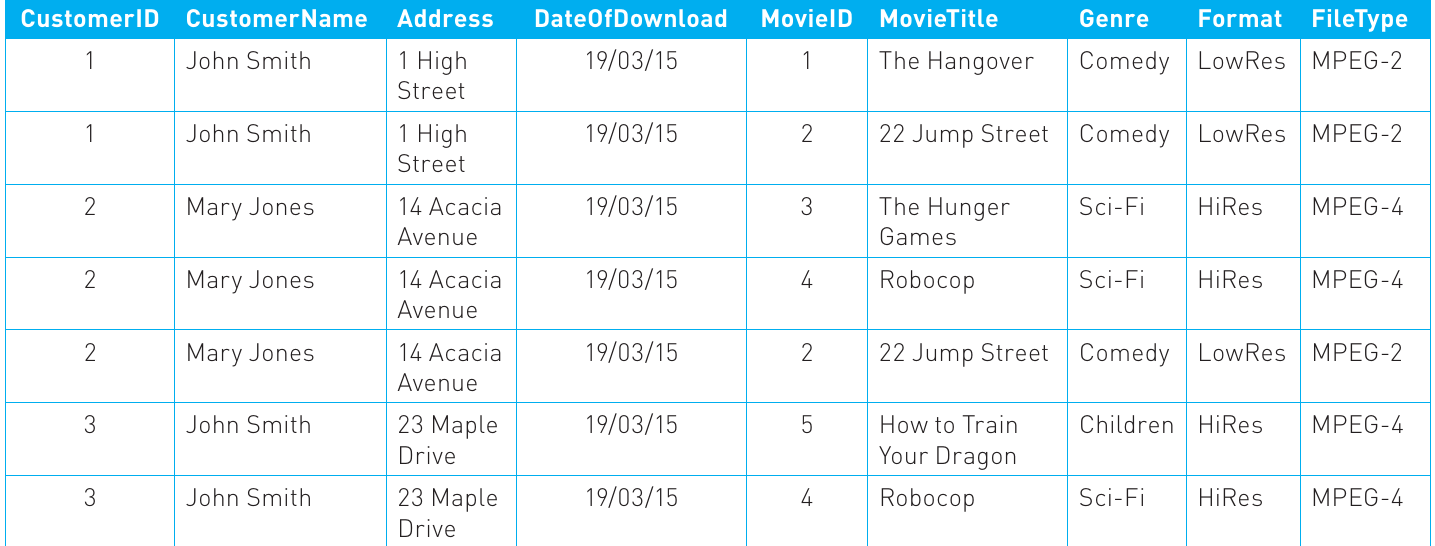
Now each row represents a single download, and there are no repeating groups. If a customer downloads multiple movies, they appear in multiple rows.
At this point, we can identify a composite key for the table. Each download can be uniquely identified by combining CustomerID and MovieID (assuming a customer only downloads each movie once). This makes the table compliant with first normal form.
Second normal form (2NF)
A table is in second normal form when:
- It is already in first normal form
- All non-key attributes depend on the whole of the primary key (not just part of it)
This particularly applies when you have a composite primary key. Looking at our current table, we need to examine whether each attribute depends on the whole key (CustomerID + MovieID) or just part of it.
Note
Non-Key Attributes
Non-key attributes are all attributes except the primary key. In our table, these include:
- CustomerName
- Address
- DateOfDownload
- MovieTitle
- Genre
- Format
- FileType
Now let's check dependencies:
- CustomerName depends only on CustomerID (not on MovieID) - this violates 2NF
- Address depends only on CustomerID (not on MovieID) - this violates 2NF
- Genre depends only on MovieID (not on CustomerID) - this violates 2NF
- FileType depends only on Format (we'll address this in 3NF)
To achieve second normal form, we must split attributes that depend on only part of the primary key into separate tables:
| CustomerID | CustomerName | Address |
|---|---|---|
| 1 | John Smith | 1 High Street |
| 2 | Mary Jones | 14 Acacia Avenue |
| 3 | John Smith | 23 Maple Drive |
| MovieID | MovieTitle | Genre | Format | FileType |
|---|---|---|---|---|
| 1 | The Hangover | Comedy | LowRes | MPEG-2 |
| 2 | 22 Jump Street | Comedy | LowRes | MPEG-2 |
| 3 | The Hunger Games | Sci-Fi | HiRes | MPEG-4 |
| 4 | Robocop | Sci-Fi | HiRes | MPEG-4 |
| 5 | How to Train Your Dragon | Children | HiRes | MPEG-4 |
| CustomerID | MovieID | DateOfDownload |
|---|---|---|
| 1 | 1 | 19/03/15 |
| 1 | 2 | 19/03/15 |
| 2 | 3 | 19/03/15 |
| 2 | 4 | 19/03/15 |
| 2 | 2 | 19/03/15 |
| 3 | 5 | 19/03/15 |
| 3 | 4 | 19/03/15 |
Note
Notice that we've kept MovieID in both the MOVIE table (where it's the primary key) and the DOWNLOAD table (where it's a foreign key), allowing us to link the information together.
The CUSTOMER table now has CustomerID as its primary key, and all other attributes in this table depend on the whole of this key (since there's only one attribute in the key). Similarly, the MOVIE table has MovieID as its primary key. The DOWNLOAD table has a composite primary key (CustomerID + MovieID), and the only other attribute (DateOfDownload) depends on both parts of this key. All three tables are now in second normal form.
Third normal form (3NF)
A table is in third normal form when:
- It is already in second normal form
- No non-key attributes depend on other non-key attributes
This is called removing "non-key dependencies". Looking at our MOVIE table, we can spot a problem:
| MovieID | MovieTitle | Genre | Format |
|---|---|---|---|
| 1 | The Hangover | Comedy | LowRes |
| 2 | 22 Jump Street | Comedy | LowRes |
| 3 | The Hunger Games | Sci-Fi | HiRes |
| 4 | Robocop | Sci-Fi | HiRes |
| 5 | How to Train Your Dragon | Children | HiRes |
Important
Non-Key Dependency Problem
The FileType attribute depends on Format, not directly on MovieID. All LowRes movies use MPEG-2 format, and all HiRes movies use MPEG-4 format. This means FileType depends on Format (a non-key attribute), which violates third normal form.
To fix this, we create a separate MOVIEFORMAT table:
| Format | FileType |
|---|---|
| LowRes | MPEG-2 |
| HiRes | MPEG-4 |
Now the MOVIE table becomes:
| MovieID | MovieTitle | Genre | Format |
|---|---|---|---|
| 1 | The Hangover | Comedy | LowRes |
| 2 | 22 Jump Street | Comedy | LowRes |
| 3 | The Hunger Games | Sci-Fi | HiRes |
| 4 | Robocop | Sci-Fi | HiRes |
| 5 | How to Train Your Dragon | Children | HiRes |
All non-key attributes in the MOVIE table (MovieTitle, Genre) now depend only on the primary key (MovieID), and the MOVIEFORMAT table has Format as its primary key with FileType depending on it. Both tables are in third normal form.
Let's verify the other tables:
CUSTOMER table:
- Primary key: CustomerID
- Non-key attributes: CustomerName, Address
- Both CustomerName and Address depend on CustomerID and not on each other
- This table is in third normal form ✓
DOWNLOAD table:
- Composite primary key: CustomerID + MovieID
- Non-key attribute: DateOfDownload
- DateOfDownload depends on the whole composite key (you need to know both which customer and which movie to determine when that download occurred)
- This table is in third normal form ✓
The fully normalised database
After completing the normalisation process, the final database structure consists of four tables:
CUSTOMER
| CustomerID | CustomerName | Address |
|---|---|---|
| 1 | John Smith | 1 High Street |
| 2 | Mary Jones | 14 Acacia Avenue |
| 3 | John Smith | 23 Maple Drive |
MOVIE
| MovieID | MovieTitle | Genre | Format |
|---|---|---|---|
| 1 | The Hangover | Comedy | LowRes |
| 2 | 22 Jump Street | Comedy | LowRes |
| 3 | The Hunger Games | Sci-Fi | HiRes |
| 4 | Robocop | Sci-Fi | HiRes |
| 5 | How to Train Your Dragon | Children | HiRes |
MOVIEFORMAT
| Format | FileType |
|---|---|
| LowRes | MPEG-2 |
| HiRes | MPEG-4 |
DOWNLOAD
| CustomerID | MovieID | DateOfDownload |
|---|---|---|
| 1 | 1 | 19/03/15 |
| 1 | 2 | 19/03/15 |
| 2 | 3 | 19/03/15 |
| 2 | 4 | 19/03/15 |
| 2 | 2 | 19/03/15 |
| 3 | 5 | 19/03/15 |
| 3 | 4 | 19/03/15 |
Note
Relationships Through Keys
The relationships between tables are maintained through primary and foreign keys:
- CustomerID is the primary key in CUSTOMER and a foreign key in DOWNLOAD
- MovieID is the primary key in MOVIE and a foreign key in DOWNLOAD
- Format is the primary key in MOVIEFORMAT and a foreign key in MOVIE
- The DOWNLOAD table has a composite key made up of CustomerID and MovieID
Summary of normalisation requirements
For a relational database to be fully normalised (to third normal form), it must meet these criteria:
Summary
Normalisation Requirements for Third Normal Form:
All data must be atomic
- No repeating groups of attributes
- No attribute can be broken down into smaller meaningful parts
No partial dependencies
- A non-key attribute cannot depend on only part of a composite primary key
- All non-key attributes must depend on the whole primary key
No non-key dependencies
- A non-key attribute cannot depend on another non-key attribute
- All non-key attributes must depend directly on the primary key, not on other non-key attributes
Following these rules ensures your database is efficient, avoids redundant data, and maintains data consistency.
Key Takeaways
Summary
Remember These Key Points:
-
Relational databases organise data into linked tables where each table represents an entity and contains attributes about that entity
-
Relationships between tables can be one-to-many, many-to-many, or one-to-one, with many-to-many relationships requiring a link table to implement properly
-
Primary keys uniquely identify each record in a table, while foreign keys create links between tables by referencing primary keys from other tables
-
Entity relationship diagrams use boxes for entities and lines with crow's feet notation to visually represent database structure and relationships
-
Normalisation is the process of efficiently organising database structure to eliminate redundant data and ensure data is stored atomically, progressing through first normal form (no repeating groups), second normal form (no partial dependencies), and third normal form (no non-key dependencies)