Basic Operations in Programming Languages (AQA A-Level Computer Science): Revision Notes
📚Revision Notes
Basic Operations in Programming Languages
Introduction to programming operations
When you write programs, you need to perform various operations on data to achieve your goals. These operations fall into four main categories that form the foundation of programming: arithmetic operations, relational operations, Boolean operations, and string-handling operations. Understanding how these work is essential for writing effective code.
The syntax for each operation varies depending on the programming language you're using. For example, what works in Python might look slightly different in C#, but the underlying principles remain the same. As you develop your programming skills, you'll become familiar with combining different operations to create more complex programs that solve particular problems.
In programming, the values you work with typically come from variables, constants, or are generated as part of the program's execution. A variable is a data item whose value can change while the program runs. For instance, if you write a program that adds two numbers together, you might use three variables: one for the first number, one for the second number, and one to store the answer.
Example
Worked Example: Simple Addition
Consider this simple example:
Answer = FirstNumber + SecondNumber
5 = 3 + 2
Here, the program adds the values stored in FirstNumber and SecondNumber, then stores the result in Answer.
One important consideration is that operations can sometimes work on different types of data. For example, the addition operator can add numeric values together, but in some languages it can also combine text strings:
txtAnswer = txtFirstVariable + txtSecondVariable
DavidSmith = David + Smith
This flexibility can be powerful, but it also means you need to be careful about how you declare your variables.
Important
If you're not clear about whether a value should be treated as a number or text, you might get unexpected results. For instance, adding 2 + 2 could give you either 4 (if treated as numbers) or 22 (if treated as text). This is why it's good practice to declare your variables with specific data types at the start of every program.
Arithmetic operations
Arithmetic operations are the mathematical calculations you perform in programming. These are the operations you use every day, such as adding, subtracting, multiplying, and dividing. Understanding how these work in programming languages is fundamental to writing code that processes numerical data.
Basic arithmetic operations
Addition combines two or more values to produce their sum. For example, if you want to calculate , you would write something like:
Answer = FirstNumber + SecondNumber
Subtraction takes one value away from another. For instance, would be written as:
Answer = FirstNumber - SecondNumber
Multiplication calculates the product of two values. When you want to find , you write:
Answer = FirstNumber * SecondNumber
Note
Programming languages use the asterisk (*) symbol for multiplication rather than the symbol you might be familiar with from mathematics.
Division operations
Division in programming comes in two flavours, and understanding the difference is crucial for writing correct code.
Division of real numbers produces a result that can include a fractional part. A real number is one that can have digits after the decimal point. For example, gives you a decimal answer:
Answer = FirstNumber / SecondNumber
All variables here would need to be declared as Real or Float data types to handle the decimal values correctly.
Division of integers works differently because integers are whole numbers. When you divide one integer by another, you might get a whole number result with a remainder left over. For example, means 7 divided by 2 equals 3 with a remainder of 1:
Answer = FirstNumber / SecondNumber
Important
In integer division, all variables would be declared as Integer. Many languages provide a DIV operation that calculates both the quotient and remainder simultaneously:
Answer = FirstNumber DIV SecondNumber
The modulo operation
The modulo (or MOD) operator is particularly useful when you need to find just the remainder from a division. It divides one number by another and returns only the remainder. For example, because 7 divided by 2 leaves a remainder of 1:
Answer = FirstNumber MOD SecondNumber
Since 72 divided by 7 equals 10 with a remainder of 2, we can also write .
Note
The modulo operation is commonly used to determine if a number is even or odd, or to cycle through a fixed range of values.
Exponentiation
Exponentiation involves raising a number to a power through repeated multiplication. The operation takes the form , where is the base number and is the number of times to repeat the multiplication. For example, means , which equals 16:
Answer = FirstNumber ^ SecondNumber
This operation is particularly useful in scientific calculations, compound interest problems, and many mathematical formulas.
Rounding numbers
Rounding allows you to replace a real value with a simpler representation that's close to the original. For example, the number 2.315432 might be rounded to 2.3. This is useful when you don't need extreme precision or want to make numbers easier to read and understand.
Different rounding methods exist within programming languages. You might round up, round down, or round to a specific number of decimal places. For instance, would give you:
Answer = Round(FirstNumber)
Note
The syntax varies between languages, but the concept remains the same: reducing precision while maintaining approximately equivalent values.
Truncating numbers
Truncating is the process of cutting off a number after a certain number of digits, essentially shortening it by removing the unwanted part. Unlike rounding, truncating simply removes digits without considering whether the number should be rounded up or down. The operation is equivalent to rounding down in most cases.
Example
Worked Example: Truncating Decimals
For example, gives you:
Answer = Truncate(FirstNumber)
Where FirstNumber contains a decimal value. Different programming languages offer various methods for truncating, but the result is always a shortened number.
Random number generation
Creating random numbers is an important capability in programming. A random number can be used for many purposes, such as:
- Creating test data for a new program
- Producing data for computer simulations
- Creating unpredictable events and movements in computer games
- Selecting a random sample from a dataset
The basic syntax looks something like:
0.123 = Rnd() or Answer = Rnd()
However, there's an important caveat here. Most random number generation techniques in programming languages start from a seed value and use an algorithm to create what appears to be a random number.
Important
Because an algorithm is used, the results have some structure, which means the number cannot be truly random. These are called pseudo-random numbers.
For the purposes of creating games, simulations, or test data, pseudo-random numbers work perfectly well. However, in situations requiring genuine randomness (such as cryptography), this level of randomness would not be sufficient. The predictable nature of pseudo-random generators makes them unsuitable for security applications.
Relational operations
Relational operations are comparisons that help your program make decisions. These operations compare two data items and return a result that tells you about their relationship. Understanding relational operations is essential for creating programs that can respond differently based on different conditions.
Relational operations work by comparing two values to see how they relate to each other. The operations consist of operands (the values being compared) and an operator (the comparison being made). For example, in the expression A > B, A and B are the operands, and > (greater than) is the operator.
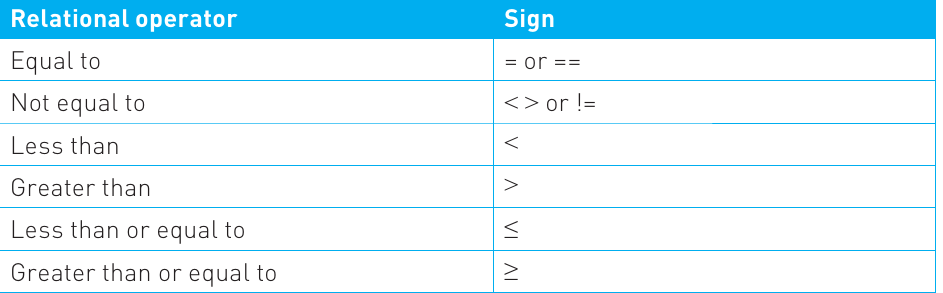
Most programming languages use a standard set of operators to represent these comparisons, as shown in this table:
Note
These operators allow you to check if values are equal, not equal, less than, greater than, less than or equal to, or greater than or equal to another value. The result of a relational operation is always either TRUE or FALSE.
Relational operations are frequently used to create selection statements in your programs. For example, the statement IF A > 1 Then... means if A is 2 or more, then the next action is carried out. If A is 1 or less, the program skips that action and continues with the next part of the code.
An important feature of relational operations is that they work with different types of data. You can compare numerical values, but you can also compare textual data. For instance, you might compare strings alphabetically to sort a list of names, or check if two passwords match.
Boolean operations
Boolean operations form the foundation of logical thinking in computer programs. These operations are those which result in either a TRUE or FALSE answer, with no middle ground. Understanding Boolean logic is crucial because it underpins how computers make decisions, how search engines find relevant information, and how logic circuits work at the hardware level.
Boolean algebra is used in logic circuits within computer hardware, and it's also fundamental to how modern computers work. It's equally important for searching databases and the web. When you perform a search online, Boolean operations help determine which results match your criteria. Once the Boolean operation has been evaluated, a further action is taken based on whether the result is TRUE or FALSE.
Example
Worked Example: Car Database Search
Imagine you're searching an online car database to find your next vehicle. You want a car with four doors that's less than three years old. The Boolean operations help filter the database to show only cars matching your requirements.
This practical example demonstrates how Boolean logic works in real-world applications.
The four basic Boolean operations
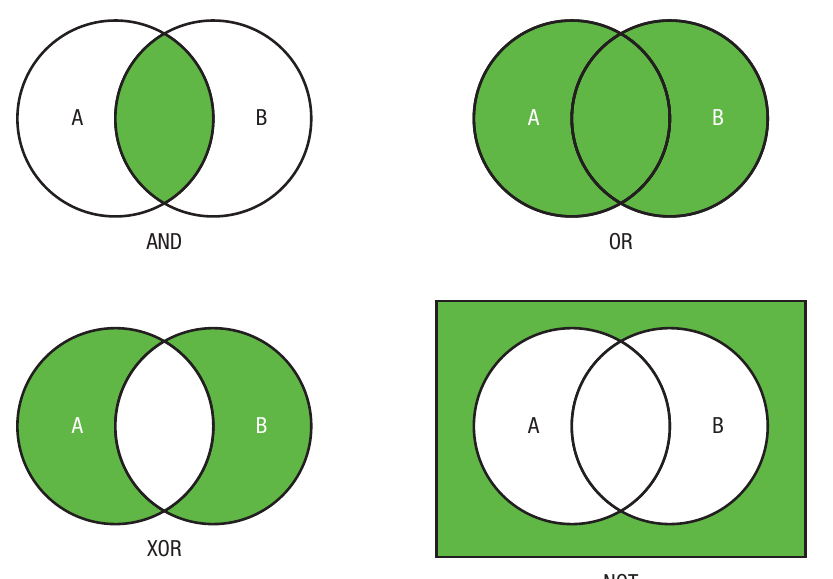
AND is known as a conjunction because it joins conditions together. For a result to be TRUE, both conditions must be met. Using our car search example, the phrase "Four Door AND Less than 3 years old" would return TRUE only if both conditions are satisfied. The car would need to have four doors AND be less than 3 years old. If either condition isn't met, the result is FALSE.
OR is known as a disjunction, meaning that a TRUE result is produced if any of the conditions are met. In a search phrase like "Four Door OR Three Door", you'd get a TRUE result as long as at least one of the conditions is satisfied. This means all three- and four-door cars would be listed. The OR operator is more inclusive than AND.
NOT is known as a negation because it reverses the input. If you search for "NOT Ford", you would get data that does NOT contain the word Ford. Essentially, it flips TRUE to FALSE and FALSE to TRUE.
XOR (exclusive OR) is known as an exclusive disjunction, meaning that a TRUE result is produced when one or the other condition is met, but not both. For example, "Sunroof XOR Air conditioning" would return cars that have either a sunroof or air conditioning, but not both features. If a car has both, or neither, the result would be FALSE.
Here's a visual representation of these operations using Venn diagrams, where the green shaded areas show when the operation returns TRUE:
Note
Boolean operations are used extensively when creating logic gates in computer circuits. You'll learn more about these applications in later chapters.
Combining Boolean operations
You can embed relational operators within Boolean operations to create more sophisticated searches. For example, "Four Door AND Less than 3 years old" uses the less than operator as part of the Boolean expression.
It's also possible to join multiple Boolean operations together to produce the exact outcome you need. A very specific search might be: "Four Door AND Less than 3 years old AND Ford OR Vauxhall NOT Fiat". This complex expression combines several operations to precisely define the search criteria, filtering the database to show only results that match all the specified conditions.
String-handling functions
At the beginning of this chapter, we saw that it's possible to carry out operations on numbers and text data. This section examines specifically how text can be handled in programming. To be more precise, we'll look at how strings can be manipulated.
A string is a sequence of characters that can include letters, numbers, and symbols. String-handling functions are actions that allow you to perform operations on these character sequences. There are many situations where you'll need to work with strings, such as searching for particular character sequences or combining strings together to create new text.
String length
The length of a string tells you how many characters are used to store a particular piece of data. The string length is often variable, though there's usually an upper limit placed on its size. Various operations allow you to work with string length.
You might want to set a maximum length for a data field or calculate the length of a particular string of data. For example:
Dim LastName As String
This code defines a string data type. The function Len(Variable1) calculates the length of the data value stored in Variable1.
Note
Understanding string length is useful when you need to validate user input, ensure data fits within database fields, or manipulate text based on its size.
Position within strings
Within a text string, it's possible to identify the position of every character. This capability is useful when you want to extract particular characters from the string or identify where substrings appear within the data.
Various operations allow you to determine character positions. For example, to find where a particular string of characters starts within another string:
Txt = "JohnSmith22HighStreetLeicester"
AddressPosition = InStr(txt,"22HighStreet")
Example
Worked Example: Finding Character Position
In the example above, this would return a value of 10, as that's the position where the address data starts within the string being searched. This assumes the start position is 1, though some languages use 0 as the starting position, in which case the result would be 9.
Position operations are particularly valuable when parsing data, extracting information from formatted text, or locating specific patterns within strings.
Substrings
A substring is a string contained within another string. Various techniques allow you to extract data from anywhere in a string by creating a substring. You might provide the start and end position, or the start position and length.
Example
Worked Example: Extracting a Substring
txt = "JohnSmith22HighStreetLeicester"
txtAddress = str.Substring (10,21)
This would create the substring "22HighStreetLeicester" and store it in a variable called txtAddress. It does this by starting at position 10 of the string and then extracting the next 21 characters.
Substrings are essential for breaking down complex data into manageable pieces, extracting relevant information from larger text blocks, or processing specific portions of strings.
Concatenation
Concatenation is the process of adding strings together to create another string. This is extremely useful when you need to build text dynamically or combine multiple pieces of data.
Example
Worked Example: Combining Strings
txtFirstName = "John"
txtLastName = "Smith"
txtFullName = txtFirstName + txtLastName
This would create the value "JohnSmith" stored in a variable called txtFullName. You can concatenate as many strings as needed, and you can include spaces or other characters to format the output properly.
Concatenation is commonly used to construct messages, build file paths, create formatted output, or assemble data from multiple sources.
Character codes
Every character you can use on a computer, including all the keyboard characters, has a corresponding character code. This binary representation uniquely identifies each letter, number, or special character. Character codes might use ASCII or Unicode standards (you'll learn more about these in Chapter 26).
Character codes serve various purposes. For example, if you need to convert a text value to a numeric value to carry out a calculation, or when encrypting data, you'll work with character codes.
Several functions help you work with character codes:
Converting characters to codes:
- asc(Variable1) returns the ASCII code value of the value stored in Variable1, where Variable1 is a text character
- chr(Variable1) returns the text character where Variable1 is an ASCII code
- chrW(Variable1) returns the Unicode code value of Variable1, where Variable1 is a text character
Note
Understanding character codes is important for text processing, encryption algorithms, and working with different character encoding systems.
Type conversions
In addition to converting strings to character codes, there are numerous other conversions that programmers need to perform to manipulate data effectively. Most programming languages include specific functions to carry out these conversions.
String to Integer / Integer to String: An integer is a whole number. Some programming languages convert between these two data types automatically if the variables are declared correctly. For example:
Dim i as Integer
Dim s as String
i = 1
s = i
This would result in s (a string) becoming 1 (an integer). The same code could be used to reverse the process, converting an integer back to a string.
String to Float / Float to String: A float (also called a real number) is any number including those with a fractional part. In Visual Basic, functions exist to carry out this conversion. For instance, Convert.ToDouble(x) will convert the text string x into a Double data type, which Visual Basic uses to store real numbers. Similarly, Convert.ToString(n) will convert the real number n into a string.
String to Date-time / Date-Time to String: Date-time values are usually stored with built-in formatting such as dd.mm.yyyy and hh:mm
. To manipulate individual parts of the data, you can convert it into a string format. Most programming languages have built-in functions for this purpose. For example, in Visual Basic:- DateTime.ToString(date) converts the date and time into a string
- String.ToDateTime(String) converts a string into date-time format
Important
These conversion functions are essential for processing user input, storing data in databases, performing calculations, and displaying information in the correct format.
Examples of common operations in Python and C#
Now that we've explored the different types of operations, let's look at how they're implemented in two popular programming languages: Python and C#. You'll notice that while there are some commonalities between programming languages, certain operations are handled in completely different ways.
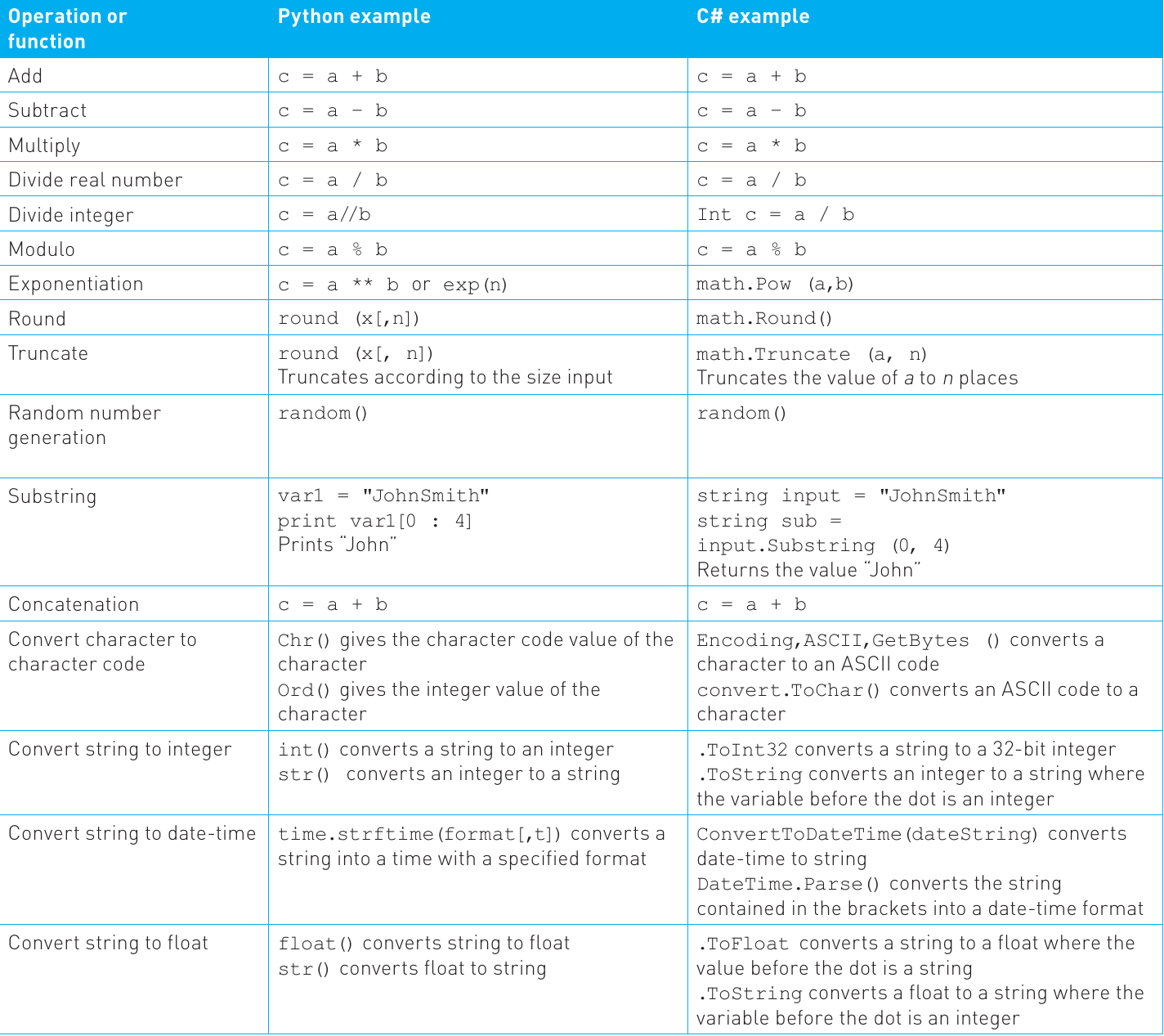
The following table provides examples of how common operations are executed in both Python and C#. Note that there will be other ways of implementing these operations based on the specific requirements of the program you're writing:
Note
Understanding these differences is important because you'll often need to work with multiple programming languages throughout your computing career. While the underlying concepts remain the same, the syntax and specific functions vary significantly between languages.
Some operations look very similar across languages (like basic arithmetic), while others require completely different approaches (like type conversions and string manipulation). As you gain experience, you'll become more comfortable switching between languages and looking up the specific syntax needed for each operation.
Summary
Key Points to Remember:
-
The syntax of a programming language describes the rules you must follow when writing code. Each operation has specific syntax that varies between languages.
-
Arithmetic operations include common mathematical processes such as addition, subtraction, multiplication, and division, along with more specialized operations like modulo, exponentiation, rounding, and truncating.
-
Relational operations compare two or more values to produce a result, typically determining if values are equal, not equal, less than, or greater than each other.
-
Boolean operations return a TRUE or FALSE value and include AND, OR, NOT, and XOR. These operations are fundamental to logic circuits, database searches, and program decision-making.
-
String handling involves identifying, extracting, and manipulating sequences of characters, including operations for length, position, substrings, concatenation, and character code conversions.
-
Different programming languages implement the same operations in different ways, but the underlying principles remain consistent across all languages.