Programming Concepts (AQA A-Level Computer Science): Revision Notes
📚Revision Notes
Programming Concepts
Introduction
Programming is essentially the process of creating a series of instructions that a computer can follow to complete a specific task. While different programming languages may implement these instructions in various ways, there are four fundamental building blocks that are common across all high-level programming languages. These core constructs include sequence, selection, repetition (also known as iteration), and assignment. Understanding these four concepts is crucial for writing effective programs that solve real-world problems.
Note
These four building blocks - sequence, selection, repetition, and assignment - form the foundation of every program you'll ever write, regardless of which programming language you use. Mastering these concepts is essential for becoming a proficient programmer.
Sequencing
Ensuring that instructions are executed in the correct order is absolutely essential when writing programs. Sequence is the principle of putting the correct instructions in the right order within a program. If any instruction is placed incorrectly, missed out, or executed in the wrong sequence, the entire program may fail to work as intended.
Example
Practical Example: Programming a DVD Recorder
Consider programming a DVD recorder to record a television programme at a specific time. The sequence of instructions might look like this:
Set time to record = 15:00
Set channel to record = Channel 4
Check time
If time = 15:00 Then Record
Each line must be executed in this exact order. If you checked the time before setting it, or attempted to record before setting the channel, the program would not function correctly. This demonstrates why sequencing is so fundamental to programming.
Understanding syntax
The way we write programming statements varies between different programming languages because each language has its own syntax. Syntax defines the rules of how words and symbols are used within a given language. Just as in human languages where sentences must follow grammatical rules (for example, "Birds south fly in the winter" is syntactically incorrect because the verb should come after the noun), programming languages have strict rules about how statements must be structured.
Important
If programmers don't follow the correct syntax, the code simply won't work, and the compiler or interpreter will generate error messages. Even a single misplaced character or incorrect keyword can prevent your entire program from running.
Assignment
Assignment is one of the most fundamental operations in programming. It involves giving a value to a variable or constant. When you perform an assignment, you're storing data that your program can use and potentially modify later.
For example, if you're working with a variable called Age, you might write:
Age ← 34
This statement assigns the value 34 to the variable Age. From this point in the program, whenever Age is referenced, it will have the value 34 (unless it's reassigned later).
The power of variables lies in their ability to change as the program runs. Consider a computer game that uses a variable called Score. At the start of the game, the score might be initialised to 0:
Score ← 0
Each time the player scores a point, the program performs another assignment to update the score. Perhaps the assignment process adds 1 to the current score, so Score becomes 1, then 2, and so on as the game progresses.
Note
Assignment operations happen repeatedly throughout a program's execution. Initially, programmers assign values to variables. Then, as the program runs, algorithms perform calculations and reassign new values to these variables. This continuous process of assigning and reassigning values is what allows programs to process data and produce meaningful results.
Assignments are truly the fundamental building blocks of any computer program because they define what data the program is working with.
Selection
Selection is the principle of choosing what action to take based on certain criteria. The selection process enables a computer to compare values and then decide which course of action to take based on the result of that comparison. This is how programs make decisions and respond to different situations.
Example
Worked Example: Age Verification for Driving
Imagine you want to create a program that determines whether someone is old enough to drive a car. The selection logic might be structured like this:
If Age < 17 Then
    Output = "Not old enough to drive"
Else
    Output = "Old enough to drive"
End If
In this example, the computer evaluates whether the value stored in Age is less than 17. If this condition is true, it outputs the message "Not old enough to drive". For any other age (17 or above), it follows the Else path and outputs "Old enough to drive".
The If...Then...Else construct is one of the most common structures you'll encounter in programming. It works by testing whether a statement is true, and if so, executing the code in the Then section. If the statement is false, the program executes the code in the Else section instead. This particular example is quite straightforward because it has only two possible outcomes, but selection statements can become much more complex.
Nested selection
When you need to handle more complex decision-making scenarios, you can use nested selection statements. Nesting means placing one set of instructions within another set of instructions, allowing you to create sophisticated decision trees.
Example
Worked Example: Parcel Postage Calculator
Imagine a program that calculates postage charges for parcels of different weights. Using nested selection, you could write something like this:
If Weight >= 2000 Then
    Price = £10
Else If Weight >= 1500 Then
    Price = £7.50
Else If Weight >= 1000 Then
    Price = £5
Else
    Price = £2.50
End If
When a weight value is input, the program works through these If statements in order. For example, if a parcel weighs 1700g, it will first check if the weight is greater than or equal to 2000g (it's not), then check if it's greater than or equal to 1500g (it is!), and therefore set the price to \£7.50. If the parcel weighs 2000g or more, the first If statement catches it and sets the price to \£10 immediately.
Some programming languages provide alternative constructs for handling complex selections, such as the Case statement (also known as Switch in some languages). Here's an example showing how a program might determine where to send a parcel based on a country code:
Select Case ParcelDestination
    Case 1
        WriteLine ("Mainland UK")
    Case 2
        WriteLine ("Europe")
    Case 3
        WriteLine ("USA")
    Case Else
        WriteLine ("Rest of the World")
End Select
This code takes the value stored in ParcelDestination and compares it against different criteria. If ParcelDestination equals 1, it outputs "Mainland UK". If it equals 2, it outputs "Europe", and so on. The Case Else section handles any value that doesn't match the specific cases, outputting "Rest of the World". This structure is often cleaner and more readable than multiple nested If statements when you have many possible outcomes.
Repetition (iteration)
There are many situations in programming where you need to repeat a particular process or set of instructions. This concept is called iteration, though it's more commonly referred to as using loops. Iteration is the principle of repeating processes. For example, you might want to count the number of words in a block of text, or keep a device moving forward until it encounters an obstacle. Both of these scenarios involve repeating something until a certain condition is met.
An iterative process consists of two essential components: a pair of commands that mark the start and finish of the instructions to be repeated, and some form of condition that determines when to stop repeating. There are two fundamental categories of iteration: definite iteration and indefinite iteration.
Definite iteration
Definite iteration means that the instructions are repeated a specific, predetermined number of times. You know in advance exactly how many iterations will occur. Definite iteration is a process that repeats a set number of times. The most common structure for definite iteration is the For...Next loop.
Example
Worked Example: Robotic Device Movement
Here's an example that could be used to control a robotic device, making it move forward 40 units:
For Counter = 1 To 40
    Move forward 1 unit
Next
This loop will execute the instruction "Move forward 1 unit" exactly 40 times. The Counter variable starts at 1, and after each iteration, it automatically increments by 1. When it reaches 40, the loop completes one final iteration and then stops. The robot will attempt to move forward regardless of whether there are any obstacles in its path – this is characteristic of a For...Next loop, which will always complete the specified number of iterations.
Indefinite iteration
Indefinite iteration is used when you don't know in advance how many times the loop needs to repeat. Indefinite iteration is a process that repeats until a certain condition is met. Instead, the loop continues until a particular condition is satisfied. This could involve checking sensor data, waiting for user input, or monitoring whether a calculation has reached a certain value.
Example
Worked Example: Obstacle Detection System
Consider a device that needs to move forward until its sensor detects an obstacle:
Repeat
    Move forward 1 unit
Until Sensors locate an obstacle
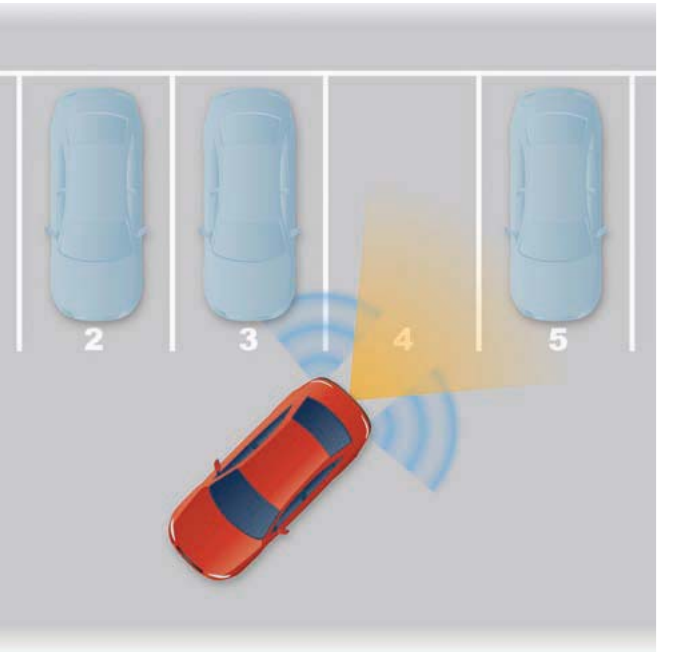
In this Repeat...Until loop, there's no way to predict how many times the loop will execute – it might be 5 times, 50 times, or it could potentially run forever if no obstacle is ever detected (creating what's known as an infinite loop). The loop repeats the instruction and then checks the condition. If the condition is met (sensors have located an obstacle), the loop terminates; otherwise, it continues.
Important
Understanding Loop Conditions
The Repeat...Until loop always executes at least once before checking the condition. In contrast, While and Do While loops check the condition first. If the condition is not met from the start, the code inside a While loop won't execute at all – the loop will simply be skipped.
Another common form of indefinite iteration checks the condition before executing the loop body. This is typically implemented using a While or Do While loop. For instance, a program that converts marks to grades might use:
While Mark <=100
    Convert Mark to Grade
End While
In this case, the condition is evaluated first. If the mark is over 100, the code inside the While loop won't execute at all – the loop will simply be skipped. This is different from Repeat...Until, which always executes at least once before checking the condition.
Nested loops
Just as you can nest selection statements, you can also place loops within other loops. This technique is particularly useful for tasks that involve multiple levels of repetition.
Example
Worked Example: Web Counter with Nested Loops
Consider creating a web counter for a website that can display numbers up to 10 million. The counter might have 8 digits, and each digit needs to count from 0 to 9 before the next digit increments. Starting with just the units and tens, the structure would be:
Tens = 0
Units = 0
While Tens < 10
    While Units < 10
        Output Tens and Units to web counter
        Units = Units + 1
    End While
    Tens = Tens + 1
    Units = 0
End While
The way this works is that the units count from 0 to 9. Once they reach 9, the inner While loop completes, and control returns to the outer loop. The outer loop then increments the tens digit by 1 and resets the units back to 0. This process continues, with the inner loop completing 10 full cycles for each single iteration of the outer loop. The result is that the counter displays 00, 01, 02... all the way up to 99.
Note
You can extend this same principle to create counters with hundreds, thousands, and more digits by adding additional nested loops. Notice how indentation in the code helps to show which instructions belong to which loop – this visual structure makes it much easier to understand the sequence of events.
The constructs covered in this chapter – sequence, selection, repetition, and assignment – are the fundamental characteristics of high-level programming languages. While they're relatively straightforward when examined individually, combining them to create complex, useful programs requires careful planning and organisation. As you move forward in programming, you'll need to think ahead about how to structure your code effectively to solve increasingly sophisticated problems.
Summary
Key Points to Remember:
-
Programming is built on four main constructs: sequence (putting instructions in the correct order), selection (making decisions based on criteria), repetition/iteration (repeating processes), and assignment (giving values to variables).
-
Sequencing is critical – even one instruction out of order can cause a program to fail completely. Syntax rules must be followed precisely for the code to work.
-
Selection statements enable decision-making using If...Then...Else or Case constructs. Nested selection allows for complex, multi-layered decisions.
-
Iteration comes in two forms: definite iteration (using For...Next loops when you know how many times to repeat) and indefinite iteration (using While or Repeat...Until loops when repeating until a condition is met).
-
Nesting allows for sophisticated programs – you can place selection statements within other selections, or loops within other loops, to handle complex tasks like multi-digit counters or multi-criteria decisions.