Creating Logic Circuits from Expressions (AQA GCSE Computer Science): Revision Notes
📚Revision Notes
Creating logic circuits from expressions
When working with Boolean logic, you'll often need to convert between Boolean expressions (the mathematical form) and logic circuits (the physical gate diagram). This skill is essential for understanding how computers process information at the hardware level.
Note
This conversion skill is fundamental to computer science and digital electronics. Mastering it will help you understand how software instructions eventually become hardware operations.
Understanding the process
Converting a Boolean expression into a logic circuit means taking the written mathematical form and drawing it as a series of connected logic gates. Think of it like translating a recipe (the expression) into actual cooking steps (the circuit).
The key to success is remembering that Boolean expressions follow the same order of operations rules as regular mathematics. Just like in maths, brackets come first, then we work from left to right, respecting the natural precedence of operations.
Step-by-step approach for expressions to circuits
When you're given a Boolean expression and need to create a logic circuit, follow these steps:
- Identify the brackets first - anything in brackets gets calculated before everything else
- Look for NOT operations - these are applied to specific inputs or outputs
- Work through AND and OR operations in the order they appear
- Connect the gates together to show the flow from inputs to final output
Let's work through a detailed example to see this in action.
Worked example: P = NOT (A AND B) AND C
Example
Worked Example: Converting P = NOT (A AND B) AND C to a Circuit
This expression might look complicated at first, but we can break it down step by step.
Step 1: Identify what's in brackets The expression has (A AND B) in brackets, so this needs to be calculated first. We'll need an AND gate with inputs A and B.
Step 2: Apply the NOT operation The NOT applies to the entire result of (A AND B), not to the individual inputs. This means we need a NOT gate connected to the output of our AND gate.
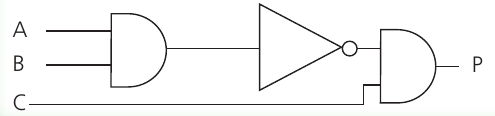
Step 3: Complete the final operation Now we need to AND the result of NOT (A AND B) with input C. This requires another AND gate that takes the output from our NOT gate and combines it with input C to produce the final output P.
The complete circuit shows how the Boolean expression translates into physical gates connected together.
Understanding the truth table
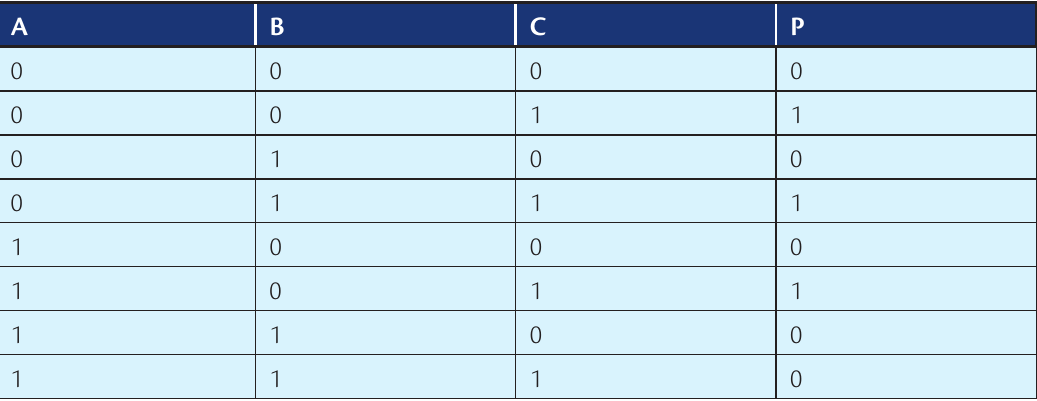
To verify our circuit works correctly, we can create a truth table that shows all possible input combinations and their outputs:
Note
Truth tables are an excellent way to verify that your circuit design matches the intended Boolean expression. They show every possible input combination and the corresponding output.
This truth table confirms that our circuit produces the correct output for every possible combination of inputs A, B, and C.
Creating expressions from circuits
Sometimes you'll need to work backwards - taking a logic circuit and writing the Boolean expression it represents. This is equally important and follows a logical process.
The key is to trace through the circuit from inputs to output, building up the expression as you go.
Step-by-step approach for circuits to expressions
- Start at the inputs on the left side of the circuit
- Follow the signal path through each gate
- Write down what each gate does as you encounter it
- Use brackets to show which operations happen first
- Combine everything to create the final expression
Worked example: Circuit to expression
Example
Worked Example: Converting a Circuit to Expression
Let's say we have a circuit with an OR gate followed by an AND gate.
When we trace through from left to right, we can see that inputs A and B go into an OR gate first. This gives us (A OR B).
The output from this OR gate then goes into an AND gate along with input C. This means we're ANDing the result of (A OR B) with C.
Therefore, our final expression is: P = (A OR B) AND C
The brackets are important here because they show that the OR operation happens before the AND operation.
Common mistakes to avoid
Important
Watch out for these typical errors:
- Forgetting brackets - always use brackets to show the order of operations clearly
- Misplacing NOT gates - remember that NOT gates apply to outputs, not individual inputs
- Ignoring precedence - just like in maths, the order of operations matters
- Missing connections - make sure every gate input is connected to something
Exam tips
Note
Essential Exam Strategies:
- Practice both directions - converting expressions to circuits AND circuits to expressions
- Check your work with a simple truth table if you have time
- Use clear, standard gate symbols in your drawings
- Label all inputs and outputs clearly
- Show your working - even if your final answer is wrong, you can get marks for the correct method
Remember!
Summary
Key Points to Remember:
- Boolean expressions follow the same order of operations as regular maths - brackets first!
- NOT gates are applied to outputs of other operations, not individual inputs
- When converting circuits to expressions, trace from left to right through the signal path
- Always use brackets to make the order of operations crystal clear
- Practice makes perfect - try converting simple expressions both ways until it becomes automatic