Levels of Programming Language (AQA GCSE Computer Science): Revision Notes
📚Revision Notes
Levels of programming language
Introduction to programming languages
Every computer contains a processor that fetches, decodes and executes instructions. These instructions come from programmers, but the programming language used to give these instructions can take many different forms.
You might be familiar with programming languages like Python, C#, or Visual Basic from your practical work. However, there's something important to understand: processors cannot actually execute instructions written in any of these languages directly. All programming languages must first be translated into machine code before the processor can run them. This happens because machine code uses a binary format (1s and 0s), which is the only language processors can understand.
Note
The translation from programming languages to machine code is a fundamental concept in computing. This process bridges the gap between human-readable code and the binary instructions that processors can actually execute.
Machine code - the lowest level
Machine code is considered a low-level language because it can be executed directly by the processor without any translation needed. It also has no abstraction - this means every instruction deals directly with the computer's hardware, so programmers need to understand exactly how the processor works.
Example
Machine Code Example: Binary Instructions
Here's what a simple machine code programme looks like:
10110101 10010010
01101101 10110001
00100111 11100101
01101101 10110001
As you can see, it's just rows of 1s and 0s! This is because machine code is written in binary format.
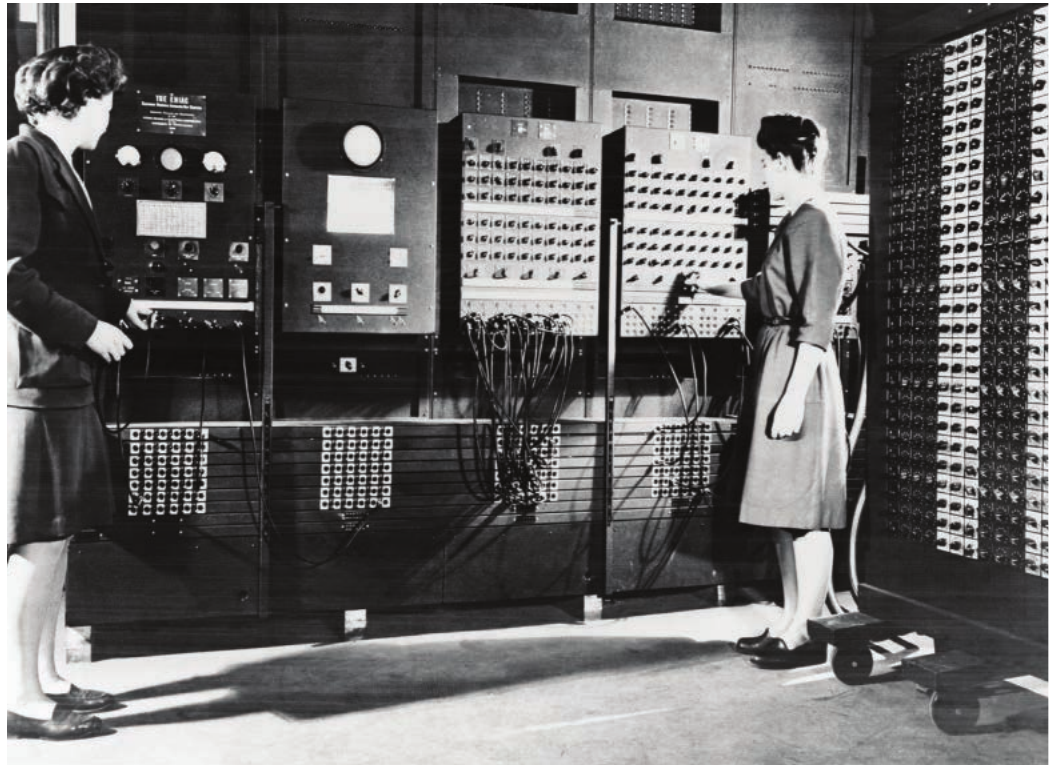
In the early days of computing, this was exactly how computers were programmed. Programmers had to physically input these binary numbers by flipping switches or connecting wires on massive computers.
Note
The photograph above shows the ENIAC (Electronic Numerical Integrator And Computer) from 1945, where operators had to manually set up the computer using switches and cables. This demonstrates just how hands-on early programming really was!
Problems with machine code
Important
Why Machine Code Programming Was Problematic:
Programming directly in machine code was incredibly time-consuming and error-prone. Even simple mistakes were very hard to spot when you're looking at endless rows of 1s and 0s. Additionally, each different type of computer had its own version of machine code, so programmes written for one computer wouldn't work on another.
Assembly language - a step up
To make low-level programming slightly easier, assembly language was developed. Assembly language replaces the binary machine code instructions with short, memorable words called mnemonics.
For example, instead of writing the binary code 0010111, a programmer could write ADD to represent an addition operation. This makes the code much more readable and less prone to typing errors.
Assembly language is still considered a low-level language because:
- Each assembly instruction represents exactly one machine code instruction (they have a one-to-one correspondence)
- It still requires detailed knowledge of how the processor works
- Programmes are still hardware-dependent
To convert assembly language back into machine code, programmers use a special programme called an assembler.
Key terms explained
Note
Understanding Key Concepts:
Abstraction means removing unnecessary detail. High-level programming languages use abstraction so programmers don't need to know exactly how the processor performs each task. For example, when you write x = 1 + 2 in a high-level language, you don't need to worry about loading values into registers or specifying memory addresses.
Mnemonics are short text codes that represent machine code operations in assembly language. They're designed to be memorable - like ADD for addition or SUB for subtraction.
High-level languages - closer to human language
Languages like Python, C#, and Visual Basic are examples of high-level languages. These languages are much easier for humans to read and write because they use English-like syntax with familiar keywords such as WHILE or IF.
Example
High-Level Language Example: Python Code
Here's a simple Python programme that adds two numbers:
x = 10
y = 20
total = x + y
print(total)
This is much more readable than machine code!
How abstraction works in high-level languages
High-level languages use abstraction to hide the complex details of what the processor actually needs to do. Understanding this concept is crucial for appreciating why high-level languages are so powerful.
Example
Abstraction in Action: Simple Addition
When you write the simple line:
x = 1 + 2
The processor actually needs to:
- Load the first value (1) into the accumulator
- Add the second value (2) to it
- Store the result at the memory address referenced by the label x
By hiding these underlying steps, programming becomes much easier. This abstraction also means that high-level languages are hardware-independent - the same code can run on many different types of computer after translation.
The translation requirement
However, there's a trade-off: programmes written in high-level languages cannot be executed directly by the processor. They must first be translated into machine code, which takes time to carry out.
Comparing low-level and high-level languages
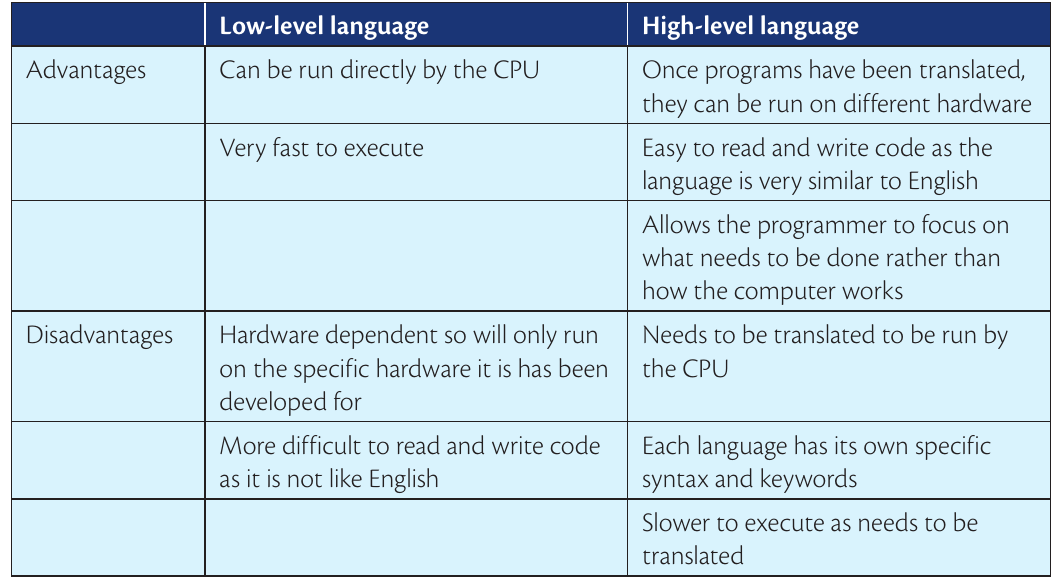
Understanding the differences between low-level and high-level languages is essential for choosing the right tool for different programming tasks.
Summary
Low-Level Language Characteristics:
Advantages:
- Can be executed directly by the CPU without translation
- Very fast execution speed
- Efficient use of computer memory and storage
- Gives programmers precise control over hardware
Disadvantages:
- Hardware-dependent - programmes only work on specific computers or processors
- Difficult to read and write code since it's not like English
- Time-consuming to develop programmes
- Easy to make mistakes that are hard to find
Summary
High-Level Language Characteristics:
Advantages:
- Once translated, programmes can run on different types of hardware
- Easy to read and write code because the language is similar to English
- Allows programmers to focus on solving problems rather than worrying about how the computer works
- Faster programme development time
- Easier to spot and fix errors
Disadvantages:
- Must be translated before the CPU can run the programme
- Each language has its own specific syntax and keywords to learn
- Slower execution speed because translation is needed
- Less efficient use of computer resources
Understanding "high" and "low"
Note
The terms "high" and "low" refer to the level of abstraction from the processor. Low-level languages are close to how the processor actually works, while high-level languages are much further away from these hardware details.
Remember!
Summary
Key Points to Remember:
- Machine code consists of binary instructions (1s and 0s) that processors can execute directly
- Assembly language uses short mnemonics like ADD instead of binary, but still represents machine code instructions one-to-one
- High-level languages use English-like syntax and abstraction to hide hardware complexity from programmers
- Low-level languages are fast and hardware-specific, but difficult to programme in
- High-level languages are easier to use and portable across different computers, but require translation and run more slowly
- All programmes must eventually be converted to machine code before the processor can execute them