The Fetch-Execute Cycle (AQA GCSE Computer Science): Revision Notes
📚Revision Notes
The Fetch-Execute cycle
What is the Fetch-Execute cycle?
The Fetch-Execute cycle is the most important process that happens inside every computer processor. It's how your computer actually runs programmes and carries out tasks. Think of it as the computer's way of reading and following a set of instructions, similar to how you might follow a recipe step by step.
Note
Just like following a recipe where you read each step, understand what it means, then do it, the processor follows the same pattern with computer instructions - this systematic approach is what makes computing possible!
The processor works in a continuous loop, constantly performing three main activities:
- Getting instructions from memory
- Working out what those instructions mean
- Carrying out what the instructions ask for
This repeating process is what makes it possible for your computer to run everything from games to web browsers.
The three stages explained
The cycle has three distinct stages that always happen in the same order. Let's look at what each stage does:
Fetch
During the fetch stage, the processor retrieves the next instruction that needs to be processed. Every single instruction in a computer programme is stored at a specific location in the computer's memory - think of these locations as having unique addresses, like houses on a street.
The processor finds the instruction at its memory address and copies it into a temporary storage area called a register. This gets the instruction ready for the next stage of processing.
Decode
Once the instruction has been fetched, the control unit (a key component of the CPU) takes over. Its job is to examine the instruction and figure out exactly what needs to be done.
Example
Real-world Example: Understanding Instructions
This is like reading a recipe instruction such as "add 2 cups of flour" and understanding that you need to measure flour and mix it in - the control unit works out what action the computer needs to take in exactly the same way.
Execute
Finally, the processor carries out the decoded instruction. Depending on what the instruction asks for, this might involve:
- Performing mathematical calculations using the ALU (Arithmetic Logic Unit)
- Reading information from memory or saving information to memory
- Moving data between different parts of the computer
- Controlling other hardware components
Important
The three stages - Fetch, Decode, and Execute - must always happen in this exact order. You cannot decode an instruction before fetching it, and you cannot execute an instruction before decoding it!
The continuous cycle
Here's the crucial part: as soon as the execute stage finishes, the whole process immediately starts over again with the next instruction. This creates an endless loop that continues as long as the computer is switched on and has work to do.
The cycle repeats incredibly quickly - modern processors can complete millions or billions of these cycles every second. This amazing speed is why computers can handle complex tasks and run multiple programmes at the same time.
How memory systems support the cycle
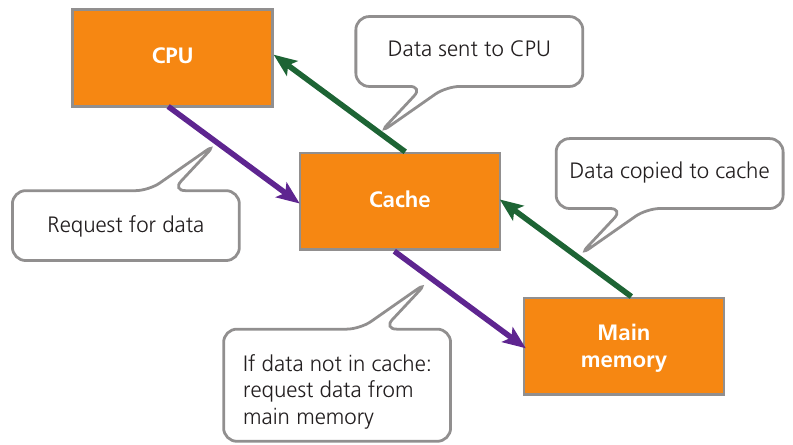
The cache memory system plays an important role in making the Fetch-Execute cycle more efficient. Cache memory is a small amount of very fast storage that sits between the processor and main memory.
Note
How Cache Memory Speeds Things Up
When the processor needs to fetch an instruction, it first checks if that instruction is already stored in the cache. If it is, the processor can grab it much faster than having to go all the way to main memory. This speeds up the fetch stage considerably and makes the whole cycle more efficient.
Summary
Key Points to Remember:
- The Fetch-Execute cycle has three stages that always happen in order: Fetch (get the instruction), Decode (understand what it means), and Execute (carry it out)
- This cycle repeats continuously while the computer is running - it never stops!
- The control unit handles the decode stage, while the ALU performs mathematical operations during execution
- Cache memory helps speed up the fetch stage by storing frequently-used instructions closer to the processor
- Modern processors complete millions of these cycles per second, which is why computers are so fast