Characters (Edexcel GCSE Computer Science): Revision Notes
📚Revision Notes
Characters
What are characters in computing?
When you type on a keyboard or see text on a screen, computers need a way to understand and store each letter, number, and symbol. Computers work with binary code (1s and 0s), so they need a system to convert characters into numbers that can be represented in binary. This is where character encoding comes in.
The most common character encoding system is called ASCII, which stands for American Standard Code for Information Interchange. Think of ASCII as a giant dictionary that tells the computer exactly which number represents each character you might want to use.
Note
ASCII has been the foundation of computer text processing since the 1960s and remains one of the most important encoding standards today, even as more comprehensive systems like Unicode have been developed to handle international characters.
Understanding ASCII code
ASCII is a 7-bit code system, which means it uses 7 binary digits to represent each character. With 7 bits, you can create 128 different combinations (), giving us 128 possible character codes numbered from 0 to 127.
Each character has its own unique ASCII code number. For example:
- The letter 'C' has the ASCII code 67 (which is 100 0011 in binary)
- A space character has the ASCII code 32 (which is 010 0000 in binary)
The complete set of these 128 codes is called the character set - this is the list of all binary codes that the computer's hardware and software can recognise and work with.
Important
The 7-bit limitation of ASCII means it can only represent 128 characters total. This is why ASCII only includes English letters and basic symbols - it doesn't have enough codes for international characters, which is why extended encoding systems were later developed.
How ASCII codes are organised
ASCII codes aren't just random numbers - they're carefully organised into groups based on what type of character they represent. This makes the system logical and easier to work with.
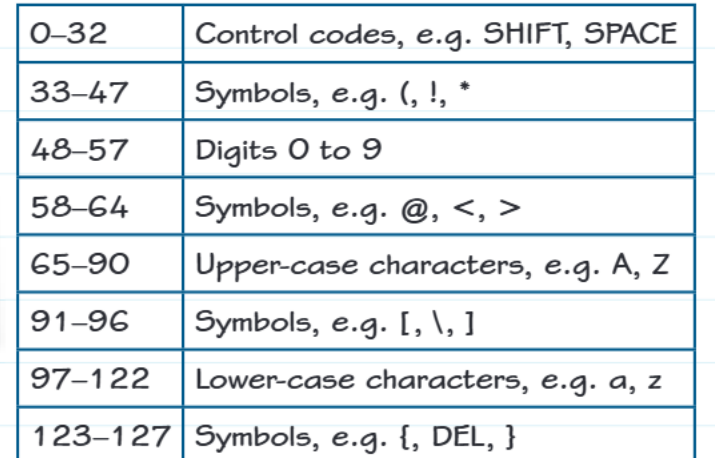
The ASCII codes are grouped as follows:
- Codes 0-32: Control codes like SHIFT and SPACE - these control how text behaves rather than displaying visible characters
- Codes 33-47: Symbols such as punctuation marks (!, ", #, $, %, &, ', (, ), *, +, comma, -, ., /)
- Codes 48-57: The digits 0 through 9 in order
- Codes 58-64: More symbols including @, <, >, and =
- Codes 65-90: Uppercase letters A through Z in alphabetical order
- Codes 91-96: Symbols like square brackets [ ], backslash , and underscore _
- Codes 97-122: Lowercase letters a through z in alphabetical order
- Codes 123-127: Final symbols including curly braces { }, and DEL
This organisation is really clever! Notice how all the uppercase letters are together in one block, and all the lowercase letters are in another block. The digits are also all together. This makes it easy to work with characters programmatically.
Note
The logical grouping of ASCII codes wasn't accidental - it was designed this way to make programming easier. When you need to check if a character is a letter or digit, you can simply check if its ASCII code falls within the appropriate range.
Using ASCII codes in Python
Python provides two very useful functions for working with ASCII codes:
The ord() function
The ord() function takes a character and returns its ASCII code number.
code = ord("c") # Returns 99
The chr() function
The chr() function does the opposite - it takes an ASCII code number and returns the corresponding character.
char = chr(100) # Returns "d"
These functions are incredibly useful when you need to process text or manipulate characters in your programmes.
Example
Practical Example: Using ord() and chr() functions
# Convert a character to its ASCII code
letter = 'A'
ascii_code = ord(letter)
print(f"The ASCII code for '{letter}' is {ascii_code}")  # Output: 65

# Convert an ASCII code back to a character
code_number = 72
character = chr(code_number)
print(f"ASCII code {code_number} represents '{character}'")  # Output: 'H'
Finding ASCII codes for other characters
One of the most useful features of ASCII is that related characters have consecutive codes. This means if you know the code for one character, you can easily work out the codes for nearby characters.
For example, since uppercase and lowercase letters are arranged alphabetically:
- If you know 'a' is ASCII code 97, then 'c' must be 99 (97 + 2, since 'c' is 2 letters after 'a')
- If you know 'S' is ASCII code 83, then 'W' must be 87 (83 + 4, since 'W' is 4 letters after 'S')
This pattern works because the ASCII codes follow the alphabetical order exactly. The same principle applies to digits - '0' is code 48, so '5' is code 53.
Example
Worked Example: Calculating ASCII codes
Given: We know that 'A' has ASCII code 65.
Find: The ASCII code for 'F'.
Solution:
- Count the position difference: F is 5 positions after A in the alphabet (A, B, C, D, E, F)
- Add this to the known code: 65 + 5 = 70
- Therefore, 'F' has ASCII code 70
Verification: We can check this with Python: ord('F') returns 70 ✓
Worked example: processing strings with ASCII
Let's look at a practical example of using ASCII codes in programming:
Example
Worked Example: Processing strings with ASCII
Given: myString = "Once upon a time."
Question 1: Write a programme to print the ASCII codes of each character in myString.
Solution:
for index in range(len(myString)):
    print(ord(myString[index]))
This programme goes through each character position in the string and uses ord() to convert each character to its ASCII code.
Question 2: The character at index [2] returns 99 and index [3] returns 101. What number will be returned at index [8]?
Solution: Looking at the string "Once upon a time.", we can work this out:
- Index [2] is 'c' with ASCII code 99
- Index [3] is 'e' with ASCII code 101
- Index [8] is 'n'
Since lowercase letters have consecutive ASCII codes and 'n' comes 11 positions after 'c' in the alphabet, the ASCII code for 'n' is 99 + 11 = 110.
Real-world applications
ASCII codes are everywhere in computing:
- File formats: Text files use ASCII to store readable content
- Programming: Many programming languages use ASCII for variable names and code
- Data transmission: When sending text over networks, ASCII ensures compatibility
- Databases: Text data in databases is often stored using ASCII encoding
Note
While ASCII is still fundamental to computing, modern systems often use extended character sets like UTF-8, which includes ASCII as a subset but can represent thousands of additional characters from different languages and symbol sets.
Exam tips
Understanding ASCII is crucial for computer science exams, and questions often test both theoretical knowledge and practical application.
Important
Common exam question types:
- Code conversion: You might be asked to convert characters to ASCII codes or vice versa
- Pattern recognition: Questions often test whether you understand the consecutive nature of ASCII codes
- Programming: You may need to write code using ord() and chr() functions
- Problem-solving: Word problems involving string manipulation and character processing
Key things to remember for exams:
- Uppercase A = 65, lowercase a = 97 (there's a difference of 32)
- Digits start at 48 ('0' = 48, '1' = 49, etc.)
- Letters are consecutive (if you know one, you can calculate others)
- Space character is code 32
Summary
Key Points to Remember:
- ASCII is a 7-bit encoding system that represents 128 different characters using codes 0-127
- Characters are organised logically - uppercase letters (65-90), lowercase letters (97-122), and digits (48-57) are all in consecutive blocks
- Python's ord() function converts characters to ASCII codes, while chr() converts ASCII codes back to characters
- You can calculate ASCII codes for consecutive characters by adding or subtracting from a known code
- ASCII is essential for all text processing in computers - it's the foundation that allows computers to understand and display text