Data compression (Edexcel GCSE Computer Science): Revision Notes
📚Revision Notes
Data compression
What is data compression?
Data compression is a clever way of making files smaller by using special algorithms. Think of it like packing your clothes more efficiently in a suitcase - you're fitting the same stuff into less space! The main goal is to reduce file sizes so they take up less storage space and transfer faster over the internet.
There are billions of videos, audio files, multimedia content and images uploaded and downloaded every single day. Without compression, this would be practically impossible due to the massive file sizes involved.
Note
The Digital Challenge
Every day, users worldwide upload and download enormous amounts of digital content. Without compression technology, our current internet infrastructure and storage systems simply couldn't handle this volume of data efficiently.
Types of data compression
There are two main types of data compression that work in completely different ways:
Lossless compression
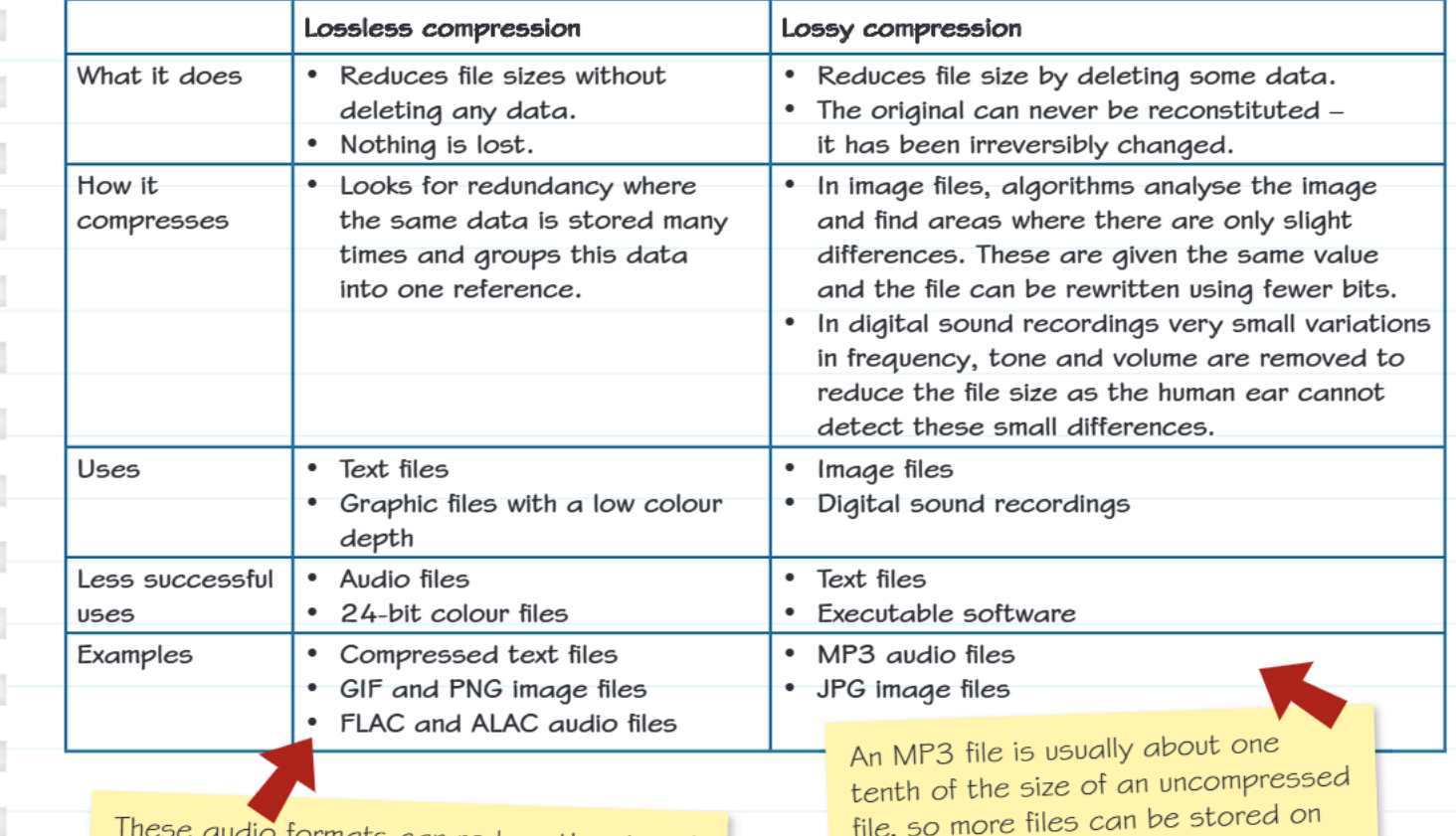
Lossless compression is like having a magic way to shrink files without throwing anything away. When you uncompress the file later, you get back exactly what you started with - every single bit of data is preserved perfectly.
How it works: Lossless compression looks for patterns and redundancy in your data. For example, if your file contains the same piece of information repeated many times, the algorithm groups this data together and creates just one reference to it.
Example
Worked Example: Text Pattern Recognition
Instead of storing: "the quick brown fox jumps over the quick brown fox"
The algorithm stores: "A jumps over A" + reference table: "A = the quick brown fox"
This reduces the storage needed while preserving all original information.
Best uses:
- Text files (like Word documents or code)
- Graphics with few colours (like simple logos)
- Any situation where you absolutely cannot afford to lose any data
Not so good for:
- Audio files (they don't compress much this way)
- Complex colourful images (24-bit colour files)
Common examples: ZIP files, GIF images, PNG images, FLAC and ALAC audio files
Lossy compression
Lossy compression is more aggressive - it actually throws away some data to make files much smaller. The clever part is that it only removes information that humans typically won't notice is missing.
Important
Data Loss is Permanent
Remember that lossy compression permanently removes data from files. Once compressed, you cannot recover the original quality by decompressing - the discarded information is gone forever.
How it works:
- For images: The algorithm analyses the picture and finds areas where colours are very similar. It gives these areas the same colour value and reduces the number of bits needed to store them.
- For audio: It removes very quiet sounds and frequencies that human ears struggle to detect. Our ears can't pick up these tiny differences, so removing them doesn't affect what we actually hear.
Best uses:
- Digital photographs and complex images
- Music and audio recordings
- Video files
Not so good for:
- Text files (you'd lose letters and words!)
- Programme files or software (they'd stop working!)
Common examples: MP3 audio files, JPG/JPEG images
The need for compression
Here's why compression is so important in our digital world:
Storage benefits:
- Less storage space needed on your devices
- More files can fit on USB sticks, SD cards, and hard drives
- Cloud storage costs less when files are smaller
Internet benefits:
- Faster download and upload speeds
- Less internet bandwidth used
- Websites load quicker
- Streaming services can deliver content more smoothly
- Video calls work better on slower connections
Note
Real-World Impact
An MP3 file is typically about one-tenth the size of the same uncompressed audio file. This means you can store 10 times more music on your phone, and songs download 10 times faster!
Key differences explained
When you uncompress a losslessly compressed file, it's identical to the original - like unfolding a perfectly pressed shirt from your suitcase. Every thread is exactly where it should be.
When you uncompress a lossy compressed file, it's very close to the original but not perfectly identical. However, the differences are so tiny that you normally can't tell - like a photo that's been slightly adjusted but still looks exactly the same to your eyes.
Important
The Critical Choice
The choice between lossless and lossy compression depends entirely on whether you can afford any quality loss. For critical data like documents or software, always use lossless. For media where small quality reductions are acceptable, lossy compression provides much better file size reduction.
Exam tips
Summary
Key Points to Remember:
- Always give specific examples when asked (MP3 for lossy audio, PNG for lossless images)
- Explain that lossy compression permanently removes data, while lossless doesn't
- Mention that the choice depends on what type of file you're compressing and how you plan to use it
- Consider file size reduction vs quality when discussing which type to use
Summary
Essential Takeaways:
- Lossless compression keeps all original data intact - perfect for text and important files
- Lossy compression removes some data permanently but creates much smaller files - great for media
- Compression makes files transfer faster and use less storage space
- MP3s are about 1/10th the size of uncompressed audio files
- Choose your compression type based on whether you can afford to lose any data quality