Unsigned integers (Edexcel GCSE Computer Science): Revision Notes
📚Revision Notes
Unsigned integers
What are unsigned integers?
Unsigned integers are whole numbers that can only be positive (including zero). In computer science, we often work with 8-bit unsigned integers, which can represent values from 0 to 255. These numbers are stored in binary format using exactly 8 binary digits (bits).
The reason we can only go up to 255 with 8 bits is because each bit can be either 0 or 1, giving us different possible combinations (from 0 to 255). If you need to store larger numbers, you would need more bits.
Note
It's worth noting that decimal numbers and denary numbers mean exactly the same thing - they're both terms for our normal base-10 number system that uses digits 0-9.
Converting decimal to binary
When converting a decimal number to its 8-bit binary representation, we use a systematic approach that compares the number with place values, starting from the highest.
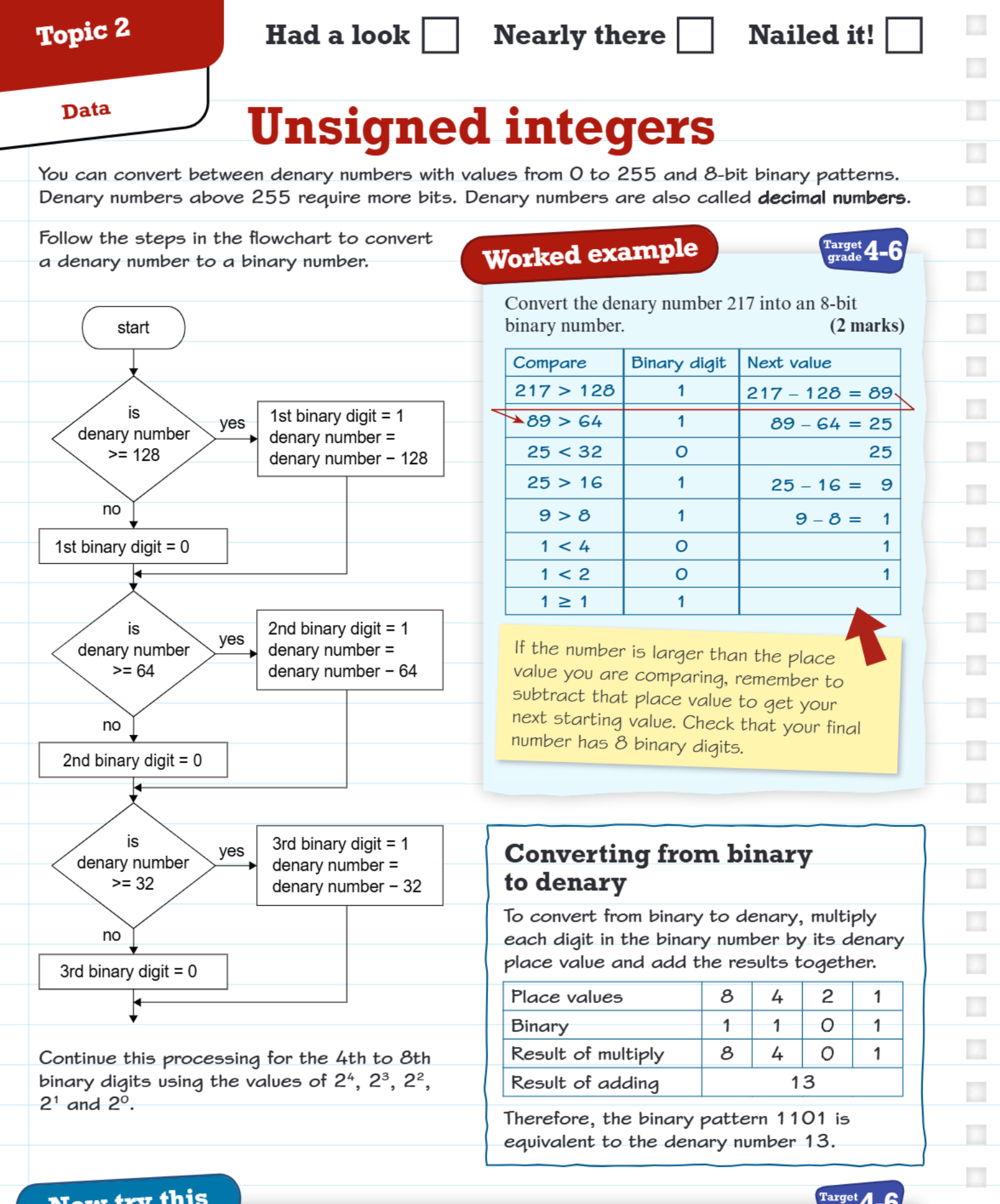
The algorithm works by checking if your decimal number is greater than or equal to each place value in descending order. The 8-bit place values are: 128, 64, 32, 16, 8, 4, 2, 1.
Note
Systematic Conversion Algorithm:
Here's how the process works:
-
Start with the highest place value (128)
- If your number ≥ 128, write down '1' and subtract 128 from your number
- If your number < 128, write down '0' and keep the same number
-
Move to the next place value (64)
- If your remaining number ≥ 64, write down '1' and subtract 64
- If your remaining number < 64, write down '0' and keep the same number
-
Continue this pattern for all remaining place values (32, 16, 8, 4, 2, 1)
-
Check your work by ensuring you have exactly 8 binary digits
Worked example: Converting 217 to binary
Example
Worked Example: Converting 217 to Binary
Let's see how this works with the decimal number 217:
| Compare | Binary digit | Next value |
|---|---|---|
| 217 > 128 | 1 | 217 - 128 = 89 |
| 89 > 64 | 1 | 89 - 64 = 25 |
| 25 < 32 | 0 | 25 |
| 25 > 16 | 1 | 25 - 16 = 9 |
| 9 > 8 | 1 | 9 - 8 = 1 |
| 1 < 4 | 0 | 1 |
| 1 < 2 | 0 | 1 |
| 1 ≥ 1 | 1 | 1 - 1 = 0 |
Reading the binary digits from top to bottom: 11011001
The key tip to remember is that when your number is larger than the place value you're comparing with, you write '1' and subtract that place value to get your next starting value. This ensures you always end up with exactly 8 binary digits.
Converting binary to decimal
Converting from binary back to decimal uses a multiplication method. You multiply each binary digit by its corresponding place value, then add all the results together.
Example
Worked Example: Converting Binary 1101 to Decimal
Here's an example with the binary pattern 1101:
| Place values | 8 | 4 | 2 | 1 |
|---|---|---|---|---|
| Binary | 1 | 1 | 0 | 1 |
| Result of multiply | 8 | 4 | 0 | 1 |
| Result of adding | 13 |
So the binary pattern 1101 equals the decimal number 13.
For 8-bit numbers, you would use all eight place values: 128, 64, 32, 16, 8, 4, 2, 1.
Important exam tip
Important
Watch out for leading zeros!
If the decimal number you're converting is less than 128, then the first binary digit will be 0. Since you've been asked to find an 8-bit binary number, you must include this leading 0 in your answer.
For example, if you're converting the number 50:
- 50 < 128, so the first digit is 0
- Your final answer should be something like 00110010 (not just 110010)
This is a common mistake in exams, so always double-check that your binary number has exactly 8 digits.
Remember!
Summary
Key Points to Remember:
- Unsigned integers using 8 bits can represent values from 0 to 255
- Use the systematic comparison method: compare with place values 128, 64, 32, 16, 8, 4, 2, 1
- When your number is ≥ the place value, write '1' and subtract; when it's smaller, write '0'
- To convert binary to decimal, multiply each digit by its place value and add the results
- Always include leading zeros to make sure you have exactly 8 binary digits