Representing Sound (OCR GCSE Computer Science): Revision Notes
📚Revision Notes
Representing Sound
When sound is represented in digital form, it must be sampled and stored as binary data. This process involves taking regular measurements of the sound wave's amplitude (height) and converting these measurements into binary values.
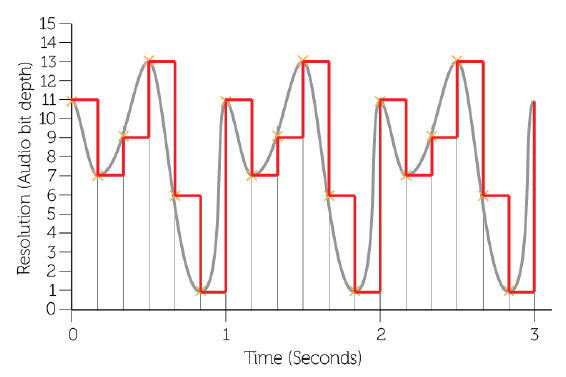
Sampling
Sampling is the process of measuring the amplitude of the sound wave at regular intervals. Each measurement is stored as a binary number, and the more bits used for each sample, the more accurate the representation of the sound.
The quality and size of a sound file depend on several factors:
- Sample Rate: The number of samples taken per second, measured in Hertz (Hz). A higher sample rate improves the playback quality by capturing more detail from the original sound wave.
- Duration: How long the sound is recorded for, measured in seconds. Longer recordings naturally result in larger file sizes.
- Bit Depth: The number of bits available to store each sample, such as 16-bit or 24-bit. A higher bit depth increases the accuracy of each sample and improves the quality of the sound but also increases the file size.
Key Sound Terms
- Bit Rate: The number of bits used to store each sample. The higher the bit rate, the more accurate the sound, but this also increases the size of the sound file.
- Sample Rate: The time period between each sample, measured in Hertz (Hz). The higher the sample rate, the more often the sound is sampled, which improves playback quality.
- Sample Size: This refers to the duration of the sound file – how many seconds of sound are recorded.
The Effect of Sample Rate, Duration, and Bit Depth on Sound
- Playback Quality improves when:
- The sample rate is higher, meaning more measurements are taken per second.
- The bit depth is larger, allowing for a more accurate representation of the sound.
- File Size increases when:
- The sample rate and bit depth are higher, as more data is recorded per second of audio.
- The duration of the sound recording is longer.
The Formula for Calculating the Size of a Sound File
The size of a sound file can be calculated using the following formula:
Note
Size = Bit Rate (in bits) × Sample Frequency × Sample Size (duration in seconds)
This means the higher the bit rate, the sample rate, or the length of the recording, the larger the resulting sound file will be.
Note
Key Points to Remember
- Sampling measures the sound wave at regular intervals and stores the amplitude as binary data.
- Sample rate is the number of samples per second (Hz); higher rates improve sound quality.
- Bit depth is the number of bits per sample; higher bit depths increase sound accuracy and file size.
- Larger file sizes result from higher sample rates, bit depths, and longer durations.
- The size of a sound file can be calculated using the formula: Bit Rate × Sample Frequency × Duration.