Correlation Coefficient (Leaving Cert Mathematics): Revision Notes
📚Revision Notes
Correlation Coefficient
Correlation Coefficient ()
Linear correlation is a measure of how close a set of points lie to a straight line. Correlation is measured using a value called the Product Moment Correlation Coefficient, or , for short.
How to Calculate the Value on Different Calculators
Casio ClassWiz (fx-991EX / fx-570EX / 83/85/991 CW series)
Goal: Enter paired data (xi,yi)(x_i,y_i)(xi,yi) and read off r from the regression results.
-
Enter STAT mode Press [MENU] (or [MODE]) → choose STAT.
-
Choose linear regression Select A+Bx (that's the straight-line model).
-
Type your data You'll see two columns (usually List1 and List2).
- Type an x value, press = to place it.
- Move right, type the matching y value, press =.
- Move down and continue until all pairs are entered.
- Get the regression/correlation Press [OPTN] → choose Reg (Regression) → choose r.
The display shows the correlation coefficient.
Tip: To clear a whole list: while in the table, press [OPTN] → Data → Delete All (wording can vary slightly by model).
Casio fx-83/85GTX and fx-991ES PLUS (ES family)
-
STAT mode Press [MODE] → choose STAT.
-
Pick A+Bx Select the A+Bx regression type.
-
Enter pairs
- Type x, press =.
- Move right, type y, press =.
- Repeat for each pair.
- Show r Press [SHIFT] [1] (STAT) → choose Reg → choose r → =.
The calculator prints the value of r.
Notes:
- If you hit AC you do not lose data; it just exits the table. Use SHIFT 1 → Reg → r from the main screen any time after entry.
- If "Reg" is missing, you're not in a regression (A+Bx) setup—return to STAT and re-select A+Bx.
Texas Instruments TI-84 Plus CE / TI-84 Plus / TI-83
- Enter data in lists Press [STAT] → 1…
Put xxx-values in L1, yyy-values in L2 (use the arrow keys to move).
- (One-time only) Make sure 'r' will display If your regression output doesn't show r/r², turn diagnostics on:
[2nd] [0] (CATALOGUE) → press D to jump to D-items → choose DiagnosticOn → ENTER, ENTER. (This setting is remembered.)
- Run the linear regression [STAT] → CALC → 8(a+bx)
If needed, specify lists: type L1 , L2 (use [2nd][1] for L1, [2nd][2] for L2).
Press ENTER. You'll see a, b, r², and r.
Optional (nice for graphs): Before pressing ENTER, you can store the regression into Y1:
Type , then [VARS] → Y-VARS → 1
→ 1 so the line plots automatically.Common fixes: If you get DOMAIN ERROR, some lists are different lengths or contain blanks—clean them in STAT → Edit.
Casio fx-CG50 / fx-CG20 (graphing)
-
Open STAT [MENU] → STAT → [1] Edit.
-
Enter data Put x in List1, y in List2.
-
Compute regression Press [F2] CALC → [F1] SET and choose Linear Reg (A+Bx) if asked.
Then [F1] CALC (or [F3] depending on OS) to show results.
- Read r The results screen lists a, b, r (and often r²). Use arrows to scroll if needed.
Sharp (e.g., EL-W531/531XH/506 family)
(Menu labels differ slightly by model, but this sequence fits most modern Sharp scientifics.)
-
STAT mode Press [MODE] until you see STAT, or select STAT from the menu.
-
Select 2-variable linear regression Choose LinReg a+bx (wording may be "a+bx" or "LR").
-
Enter paired data Many Sharps accept an x, then , (comma), then y, then = to store the pair.
Repeat for all pairs. (On models with a data table, enter xxx and yyy in side-by-side columns like Casio.)
- Show r Open the STAT calculation menu (often 2ndF → STAT or a dedicated STAT key), choose Reg results, then select r to display it.
If the exact key names differ: look for STAT, a+bx, and a results page listing a, b, and r—that's the right place.
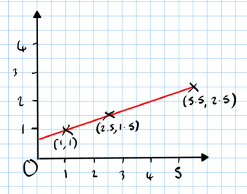
In this case, . This means perfect linear positive correlation between and .
Types of Correlation
There are different types of correlation that can be observed on the graph or through calculating the value.
Strong Positive Correlation
- The points lie close to a straight line with a positive slope.
- will be close to .
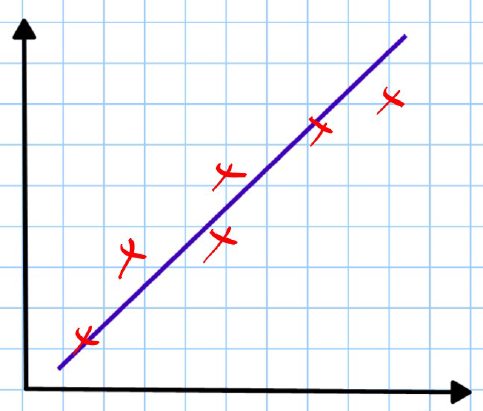
Weak Positive Correlation
- The points show some positive correlation but are more spread out.
- .
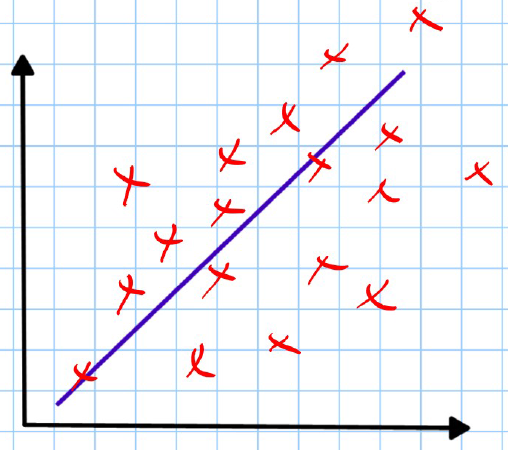
No Correlation
- The points do not show any trend or pattern.
- .
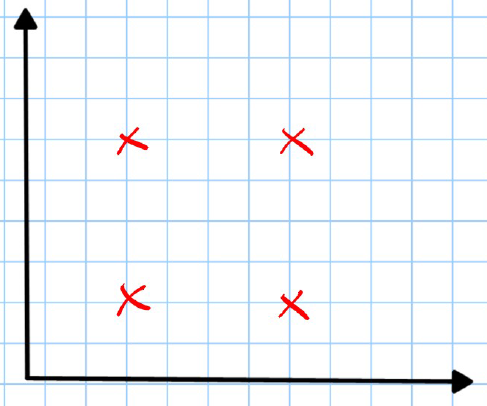
Weak Negative Correlation
- The points show some negative correlation but are more spread out.
- .
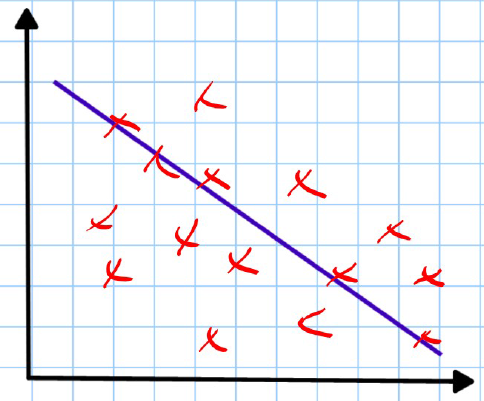
Strong Negative Correlation
- The points lie close to a straight line with a negative slope.
- is close to .
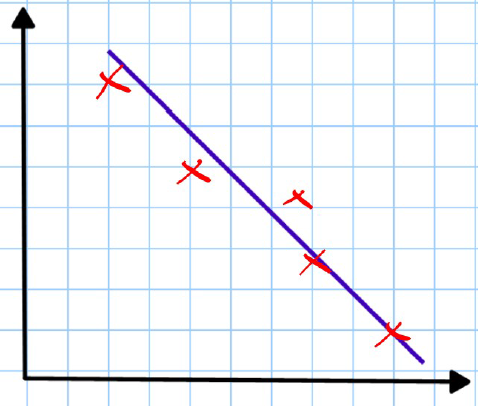
Perfect Negative Correlation
Note
Example: Sea deaths vs Ice creams Perfect negative correlation so .
When describing correlation between two variables, it must be done in context (if possible).
If asked to describe the correlation between the variables in the above graph, we would write:
- "There is perfect negative correlation between the number of ice creams sold and sea deaths. As more ice creams are sold, the number of sea deaths decreases." Be careful not to state that one causes the other as:
"Correlation does not imply CAUSATION."