The Area of a Triangle (VCE SSCE General Mathematics): Revision Notes
📚Revision Notes
The Area of a Triangle
Introduction
When calculating the area of a triangle, you need to choose the appropriate formula based on the information you have been given. There are three main methods:
- Using base and height: When you know the base and perpendicular height
- Using two sides and the included angle: When you know two sides and the angle between them
- Using Heron's rule: When you know all three sides but no angles or heights
Understanding which method to use is essential for solving triangle area problems efficiently.
Note
The key to solving triangle area problems is identifying what information you have available. Each method is designed for a specific situation, so selecting the right formula from the start will save you time and effort.
Method 1: Area using base and height
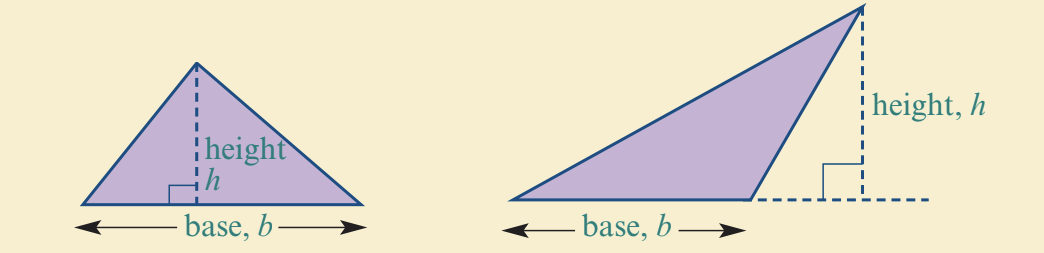
The basic formula
The most fundamental formula for finding the area of a triangle is:
Or more simply:
where:
- represents the length of the base
- represents the perpendicular height (the height measured at right angles to the base)
Understanding the formula
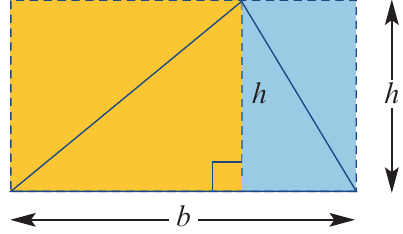
The diagram below illustrates why this formula works. A triangle fits inside a rectangle and occupies exactly half of its area. The rectangle has area , so the triangle has area .
Important
The height must always be perpendicular (at right angles) to the base. This perpendicular height can be drawn from any vertex to the opposite side, which becomes the base.
When to use this method
Use the formula when:
- You are given the base and the perpendicular height directly
- You can calculate the perpendicular height from other given information
Worked example: Finding area using base and height
Example
Worked Example: Finding Area Using Base and Height
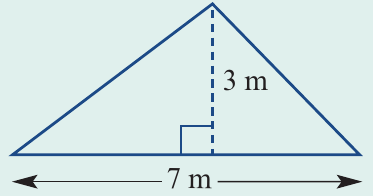
Question: Find the area of the triangle shown to one decimal place.
Solution:
Step 1: Identify the given information
- Base, m
- Height, m
Step 2: Write the appropriate formula
Since we have the base and height, we use:
Step 3: Substitute the values
Step 4: Calculate the result
Answer: The area of the triangle is 10.5 m²
Method 2: Area using two sides and an included angle
Deriving the trigonometric formula
When you know two sides of a triangle and the angle between them, you can use a trigonometric formula to find the area. This formula is derived from the basic base × height formula.
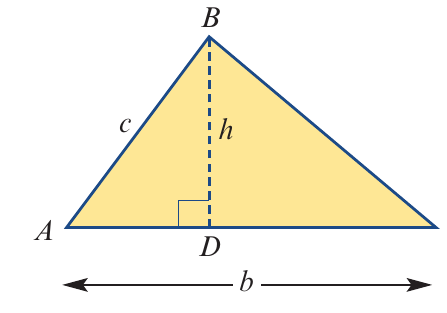
Consider triangle with sides and , and angle between them. If we draw the perpendicular height from vertex :
Therefore:
Substituting this into the basic area formula:
The three formula variations
Depending on which sides and angle you are given, there are three versions of this formula:
Important
Important Pattern to Remember:
Each formula follows the same structure:
The key is to identify which angle sits between which two sides. For example, angle A sits between sides b and c, so you use .
When to use this method
Use the formula (or its variations) when:
- You are given two sides and the angle between them (SAS - Side-Angle-Side)
- The perpendicular height is not directly given
- You need to use trigonometry to find the area
Worked example: Finding area using two sides and an angle
Example
Worked Example: Finding Area Using Two Sides and an Angle
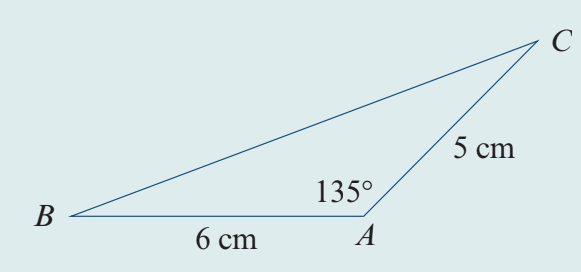
Question: Find the area of triangle where cm, cm, and angle . Give your answer to one decimal place.
Solution:
Step 1: Identify the given information
- Side cm
- Side cm
- Angle (the angle between sides b and c)
Step 2: Choose the appropriate formula
Since we have two sides ( and ) and the angle between them (), we use:
Step 3: Substitute the values
Step 4: Calculate using a calculator
Step 5: Round to one decimal place
Answer: The area of the triangle is 10.6 cm²
Note
Calculator Mode Reminder: Always make sure your calculator is in degree mode when working with angles measured in degrees, or in radian mode for angles in radians. Using the wrong mode is a common source of errors!
Method 3: Heron's rule
The formula
Heron's rule (also called Heron's formula) allows you to calculate the area of a triangle when you know the lengths of all three sides but don't have any angle measurements or the height.
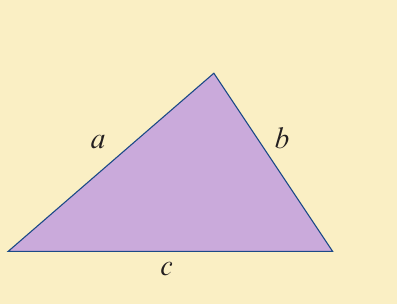
where:
Understanding the semi-perimeter
The variable is called the semi-perimeter because it equals half the perimeter of the triangle. It is calculated by adding all three side lengths together and dividing by 2:
Once you have found , you subtract each side length from it to get , , and , then multiply these values together with and take the square root of the result.
Note
The semi-perimeter is a crucial intermediate step in Heron's formula. Always calculate and write down the value of before proceeding with the rest of the calculation. This helps prevent errors and makes your working easier to follow.
When to use this method
Use Heron's rule when:
- You are given all three sides of the triangle (SSS - Side-Side-Side)
- You don't know any angles
- The perpendicular height is not given
Worked example: Finding area using Heron's formula
Example
Worked Example: Finding Area Using Heron's Formula
Question: The boundary fences of a farm form a triangle with sides of 6 km, 9 km, and 11 km. Find the area of the farm to the nearest square kilometre.
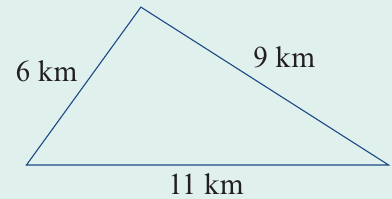
Solution:
Step 1: Identify the given information
Let:
- km
- km
- km
Step 2: Calculate the semi-perimeter
Step 3: Write Heron's formula
Step 4: Substitute the values
Step 5: Calculate using a calculator
Step 6: Round to the nearest whole number
Answer: The area of the farm is 27 km²
Important
When using Heron's rule, always calculate s first and write it down before substituting into the main formula. This reduces the chance of making errors in your calculation and keeps your working organized.
Remember!
Summary
Key Points to Remember:
-
Three methods for finding triangle area: Choose the method based on what information you have been given
-
Method 1 (): Use when you know the base and perpendicular height
-
Method 2 (): Use when you know two sides and the angle between them (SAS). Remember the pattern: half the product of two sides times the sine of the angle between them
-
Method 3 (Heron's rule): Use when you know all three sides (SSS) but no angles or heights. First calculate the semi-perimeter , then use
-
Always check your calculator mode: Make sure it's set to degrees when working with angles in degrees