Algorithms and Flowcharts (VCE SSCE Mathematical Methods): Revision Notes
📚Revision Notes
Algorithms and Flowcharts
Introduction to algorithms
An algorithm is a step-by-step set of instructions designed to solve a problem or complete a task. Algorithms are fundamental in mathematics and computer science, providing clear procedures that can be followed systematically.
Note
Algorithms form the backbone of computational thinking. They allow us to break down complex problems into manageable steps that can be executed methodically, making them essential tools for problem-solving across many disciplines.
The Sieve of Eratosthenes
One famous algorithm is the Sieve of Eratosthenes, an ancient method for finding all prime numbers up to a given natural number . This algorithm works by systematically eliminating composite numbers, leaving only the primes.
Note
The algorithm steps:
Step 1: Create a list of all natural numbers from to .
Step 2: Cross out and let be (the first prime).
Step 3: Circle and then cross out all the other multiples of .
Step 4: Let be the smallest number in the list that has not been marked.
Step 5: If , then repeat from Step 3.
The prime numbers are all the numbers in the list that remain uncrossed.
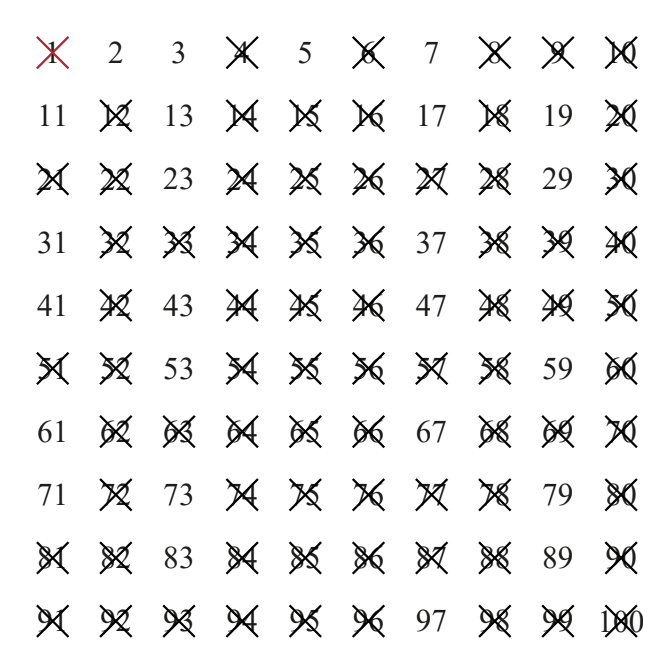
In this algorithm, the variable represents the current prime number being considered. Its value updates each time Step 4 is performed. For example, when applied to find all primes up to , the algorithm systematically identifies: .
Assigning values to variables
In algorithms, a variable is a name (consisting of one or more letters) that acts as a placeholder for storing values. The concept differs from variables in pure mathematics because algorithmic variables can be reassigned different values as the algorithm progresses.
Important
Unlike mathematical variables which typically represent fixed unknown values, algorithmic variables are storage locations whose values can change throughout the execution of an algorithm. This dynamic nature is fundamental to how algorithms process and manipulate data.
We use a left-pointing arrow () to show when a value is assigned to a variable. For example:
means "assign the value to the variable "
Often, a variable's new value depends on its previous value. Here are two examples:

Understanding how variables update is crucial. In the first example, takes the current value of (which is ), adds to it, and stores the result () back in . This replaces the old value completely.
Worked example: Tracing variable values
For each sequence of instructions, we can trace how variable values change by creating a table:
Example
Worked Example: Tracing Single Variable
Part a
- Step 1:
- Step 2:
- Step 3:
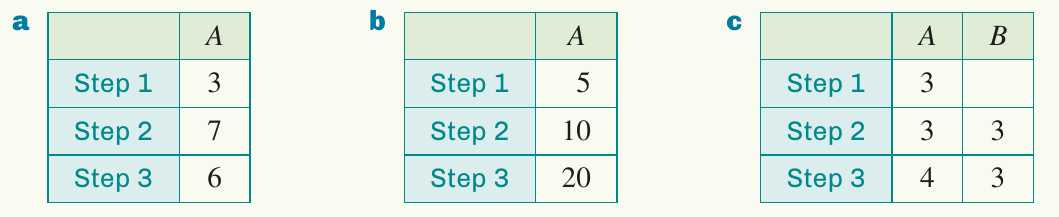
Starting with , adding gives , then subtracting gives the final value .
Example
Worked Example: Tracing Multiple Variables
Part c (two variables)
- Step 1:
- Step 2:
- Step 3:
The table shows how both variables change. Initially . Then is assigned the value of , so . Finally, is reassigned to , whilst remains .
Flowcharts
A flowchart is a visual diagram that represents an algorithm. It uses different shapes connected by arrows to show the sequence of steps and decisions in a process.
Flowchart components
Each shape in a flowchart has a specific meaning:
Note
Standard Flowchart Shapes:
- Oval (Start/End): Marks the beginning or end of the algorithm
- Rectangle (Process): Represents a basic step or operation
- Diamond (Decision): Indicates a decision point with yes/no outcomes
- Parallelogram (Input/Output): Shows where data is received or displayed
The arrows between shapes show the order in which steps should be followed.
Worked example: Flowchart for a piecewise function
Example
Worked Example: Creating a Flowchart for a Piecewise Function
Create a flowchart to evaluate the piecewise-defined function:
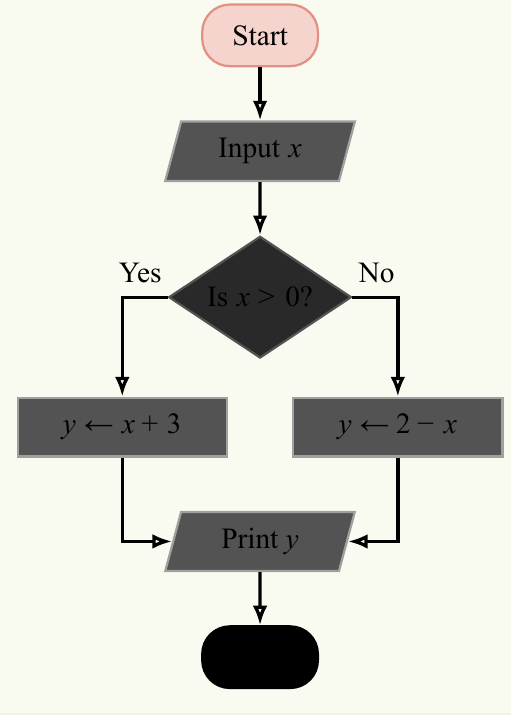
This flowchart demonstrates how decisions work. After inputting , the diamond shape asks "Is ?". If yes, we calculate . If no, we calculate . Both paths then converge to print the result.
Worked example: Swapping variable values
A common algorithmic task is swapping the values of two variables. Consider this incorrect attempt:
- Step 1: Input
- Step 2:
- Step 3:
- Step 4: Print
Example
Worked Example: The Problem with Direct Swapping
Testing with and :
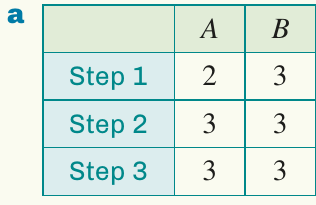
The problem is that when is executed in Step 2, the original value of is lost. Both variables end up with the value .
Important
When swapping variables, you cannot simply assign one to the other and then reverse it. The first assignment overwrites the original value, making it impossible to complete the swap. A temporary variable is essential to preserve the original value.
The solution uses a temporary variable to preserve values:
- Step 1: Input
- Step 2:
- Step 3:
- Step 4:
- Step 5: Print
Example
Worked Example: Correct Variable Swapping
Testing this corrected algorithm:
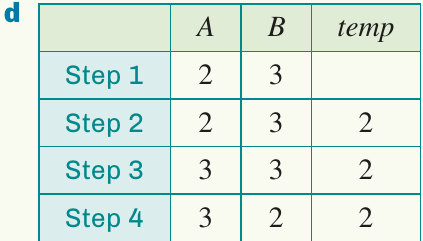
Now the values swap correctly: the output is and .
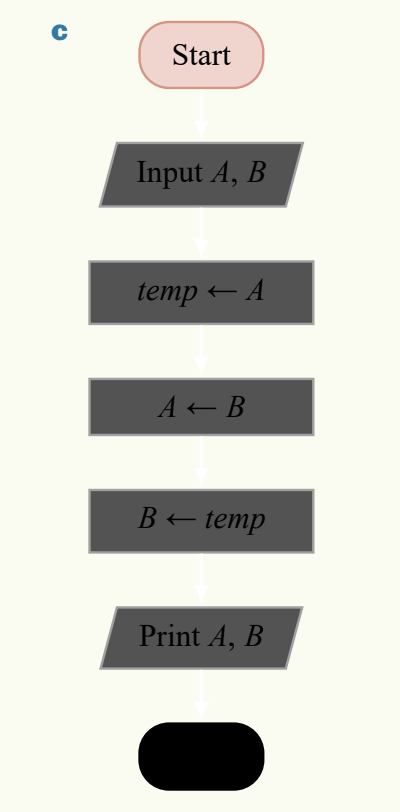
The flowchart shows the sequence clearly. By storing in a temporary variable first, we preserve its value so it can be assigned to later.
Desk checking and loops
A desk check is a method for verifying that an algorithm works correctly. It involves carefully following the algorithm step by step and recording all variable values in a table after each step.
Loops in algorithms
Some algorithms contain loops - sections of code that repeat until a certain condition is met. Each time the loop repeats, we say we have completed another pass of the loop.
Note
Loops are powerful constructs that allow algorithms to perform repetitive tasks efficiently. Rather than writing the same instructions multiple times, a loop executes them repeatedly until a specified condition is no longer true.
Worked example: Finding remainders using loops
Example
Worked Example: Using Loops for Remainder Calculation
Create a flowchart to find the remainder when a natural number is divided by , using repeated subtraction.
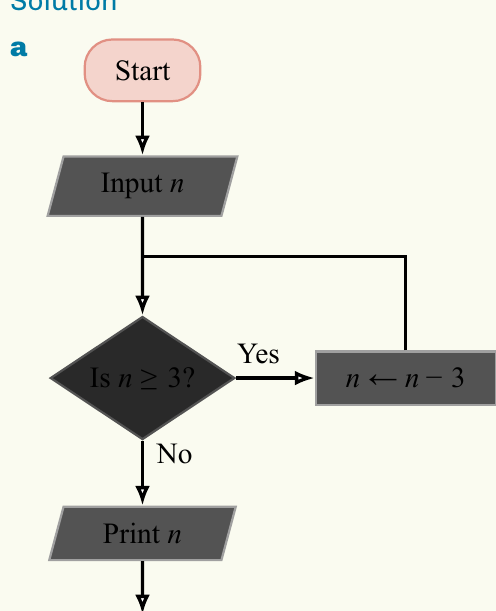
This flowchart contains a loop. Starting from the decision box "Is ?", if the answer is yes, we subtract from and return to the decision box. This continues until , at which point we exit the loop and print the final value.
Desk check for :
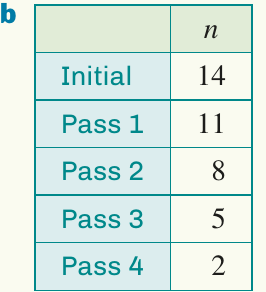
Starting with , we subtract repeatedly: . After four passes through the loop, we reach , which is less than , so we stop. The output is , which is indeed the remainder when is divided by (since ).
Remember!
Summary
Key Points to Remember:
- Algorithms are step-by-step instructions for solving problems
- Variables in algorithms store values that can change, using the assignment notation
- Flowcharts visualise algorithms using standard shapes: ovals (start/end), rectangles (processes), diamonds (decisions), and parallelograms (input/output)
- Desk checking verifies algorithms by tracing variable values through each step
- Loops repeat sections of an algorithm until a condition is met, with each repetition called a pass