Introduction to Pseudocode (VCE SSCE Mathematical Methods): Revision Notes
📚Revision Notes
Introduction to Pseudocode
This section introduces pseudocode, a way of writing algorithms that bridges the gap between natural language and actual programming code. Understanding pseudocode helps you plan and communicate algorithms before implementing them on a computer.
Note
Pseudocode is like a bridge between human thinking and computer instructions. It allows you to focus on the logic of your algorithm without worrying about the strict syntax rules of specific programming languages.
Terminology
Before diving into pseudocode, it's important to understand some key terms.
A computer is a machine that executes the instructions contained in algorithms. Every computer has two main components:
- Hardware: the physical parts of the machine (keyboard, screen, processor, etc.)
- Software: the instructions that tell the computer what to do
Computers cannot understand natural human language directly. Instead, we must give them instructions in a programming language—a formal language designed for computers to interpret. The process of converting an algorithm into a programming language is called coding.
Pseudocode is an informal notation for writing algorithms that sits between natural language and programming code. It doesn't follow the rules of any specific programming language, making it easier to read and understand. When you're ready to run an algorithm on a computer, you must translate the pseudocode into an actual programming language.
Important
Why use pseudocode?
Pseudocode allows you to plan and communicate algorithms without getting bogged down in programming syntax. It's easier to understand, easier to modify, and serves as excellent documentation for your algorithm's logic before you start coding.
If–then blocks
When algorithms need to make decisions, we use if–then blocks. These structures allow different instructions to execute depending on whether a condition is true or false.
Basic if–then structure
The simplest form checks one condition:
if condition then
    follow these instructions
end if
If–else structure
We can provide alternative instructions when the condition is not satisfied:
if condition then
    follow these instructions
else
    follow these instructions
end if
Extended if–else if structure
For multiple alternatives, we can chain conditions together:
if first condition then
    follow these instructions
else if second condition then
    follow these instructions
else
    follow these instructions
end if
Example
Worked Example: Finding the Maximum of Two Numbers
Let's write an algorithm in pseudocode to find the larger of two numbers and .
Solution:
input a, b
if a ≥ b then
    print a
else
    print b
end if
Explanation:
When , the maximum value is .
Otherwise, we must have , so the maximum value is .
Only one of these two outcomes will occur, and the appropriate value gets printed.
Example
Worked Example: Assigning Letter Grades
Let's create an algorithm that assigns a letter grade based on a numerical mark out of .
Solution:
input mark
if mark ≥ 90 then
    print 'A'
else if mark ≥ 75 then
    print 'B'
else if mark ≥ 60 then
    print 'C'
else if mark ≥ 50 then
    print 'D'
else
    print 'E'
end if
Explanation:
The algorithm checks conditions in order from highest to lowest mark.
Only one grade is printed for any given input.
The grade is assigned at the first stage where the condition is satisfied.
For example, if the mark is , it doesn't meet the first condition (), but it does meet the second condition (), so 'B' is printed.
For loops
A for loop allows us to repeat the same instructions multiple times in a controlled manner. We use for loops when we know exactly how many times to repeat.
Basic for loop template
for i from 1 to n
    follow these instructions
end for
This loop uses the sequence . There are iterations in total.
The variable i takes the values in turn, and the instructions execute once for each value.
Important
When to Use For Loops
Use a for loop when you know in advance exactly how many times the instructions need to repeat. The loop counter variable automatically tracks which iteration you're on.
Example
Worked Example: Desk Check of Sum of Squares
Let's perform a desk check for the following algorithm:
sum ← 0
for i from 1 to 4
    sum ← sum + i²
end for
print sum
Solution:
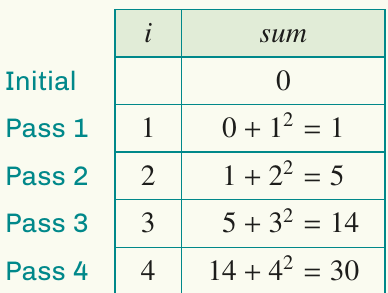
Explanation:
The initial value of sum is .
There are four passes through the loop, with the variable i taking the values and in turn.
In each pass, we add to the current sum:
- Pass 1:
- Pass 2:
- Pass 3:
- Pass 4:
The printed output is .
This algorithm calculates .
Example
Worked Example: Sum of Reciprocals of Cubes
Part a: Write an algorithm in pseudocode to calculate the sum of the first terms of the sequence:
Part b: Perform a desk check for (give values correct to six decimal places).
Solution to part a:
input n
sum ← 0
for i from 1 to n
    sum ← sum + 1/(i³)
end for
print sum
Solution to part b:
| Initial | |
| Pass 1 | |
| Pass 2 | |
| Pass 3 | |
| Pass 4 | |
| Pass 5 |
Each pass adds to the running sum.
While loops
A while loop provides another way to repeat instructions, but it's used when we don't know in advance how many iterations will be needed. The loop continues executing as long as a specified condition remains true.
When to use while loops
While loops are particularly useful when:
- You're working towards a target accuracy
- You're searching for something and don't know when you'll find it
- The number of iterations depends on the values calculated during execution
Basic while loop template
while condition
    follow these instructions
end while
The loop checks the condition before each iteration. If the condition is true, the instructions execute. If false, the loop ends and the algorithm continues.
Important
For Loop vs While Loop
Use a for loop when you know exactly how many iterations are needed.
Use a while loop when the number of iterations depends on a condition that changes during execution.
Example
Worked Example: Division with Quotient and Remainder
Part a: Write an algorithm that divides by and returns the quotient and remainder.
Part b: Show a desk check to test the operation of the algorithm.
Solution to part a:
count ← 0
remainder ← 72
while remainder ≥ 14
    count ← count + 1
    remainder ← remainder − 14
end while
print count, remainder
Explanation:
We use a while loop because we don't know in advance how many times can be subtracted from .
The variable count tracks how many times we can subtract from (this will be the quotient).
The variable remainder keeps track of what's left after each subtraction.
Solution to part b:
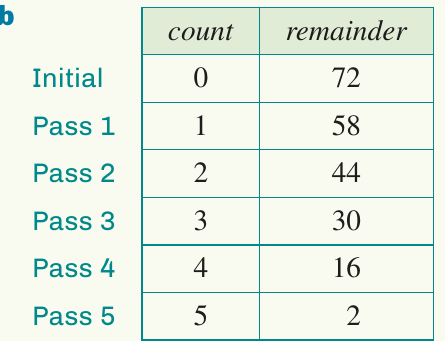
The first output is (the quotient) and the second output is (the remainder).
We can verify: ✓
After the 5th pass, the value of remainder is . Since , the condition is no longer satisfied, so we exit the loop.
Example
Worked Example: Approximating √11
Perform a desk check for this algorithm (give values correct to six decimal places):
A ← 3
while A² > 11 + 10⁻⁴ or A² < 11 − 10⁻⁴
    A ← 0.5 × (A + 11/A)
    print A, A²
end while
Solution:
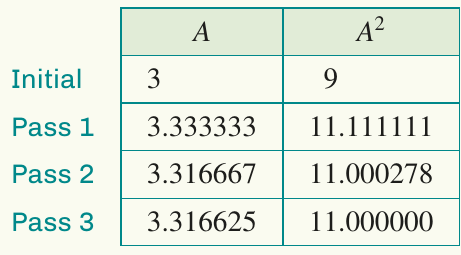
Explanation:
The table shows the values of A and after each pass through the loop.
After the 3rd pass, (to six decimal places), so the condition is no longer satisfied and the algorithm finishes.
Note
Absolute Value Function
The condition on the while loop above checks that the distance between and is greater than . Using the absolute value function, this condition can be written more compactly as . Most calculators and programming languages have this as a built-in function called abs.
Functions
In algorithms, a function is a self-contained block of code that performs a specific task. Functions can be reused throughout different algorithms.
Key features of functions
Functions have several important characteristics:
- Functions must be defined before they can be used
- They can accept one or more inputs
- They return an output value
- Once defined, they can be called (used) repeatedly
Important
Benefits of Functions
Functions make your code more readable, reusable, and easier to debug. Instead of writing the same code multiple times, you define it once and call it whenever needed. This follows the programming principle: "Don't Repeat Yourself."
Defining functions
Here are two examples of function definitions:
Example 1: A linear function
define f(x):
    y ← 3x + 2
    return y
We can call this function by writing f(5), which would return .
Example 2: A function with two inputs that calculates distance from the origin
define dist(x, y):
    dist ← √(x² + y²)
    return dist
We can call this function by writing dist(3, 4), which would return .
Example
Worked Example: Factorial Function
For a natural number , the factorial function gives the value .
Part a: Write the factorial function using pseudocode.
Part b: Using your function from part a, write an algorithm to evaluate the sum:
Solution to part a:
define factorial(n):
    product ← 1
    for i from 1 to n
        product ← product × i
    end for
    return product
Solution to part b:
sum ← 0
for i from 1 to 10
    sum ← sum + 1/factorial(i)
end for
print sum
This demonstrates how functions make code more readable and reusable. Instead of writing the factorial calculation ten times, we define it once and call it repeatedly.
Nested loops
A nested loop is a loop placed inside another loop. This creates a two-level (or more) iteration structure.
How nested loops work
When a loop is nested inside another:
- The outer loop starts its first iteration
- This triggers the inner loop, which runs through all its iterations
- Once the inner loop completes, control returns to the outer loop
- The outer loop moves to its second iteration
- This triggers the inner loop again, which runs through all its iterations
- This pattern continues until the outer loop finishes
Important
Key Concept: Complete Inner Cycles
For each single iteration of the outer loop, the inner loop completes all of its iterations. If the outer loop runs times and the inner loop runs times, the innermost instruction executes times in total.
Example
Worked Example: Desk Check of Nested Loop
Perform a desk check for this algorithm that tracks the values of a, b and c at each step:
c ← 0
for a from 1 to 2
    for b from 1 to 3
        c ← c + 1
    end for
end for
Solution:
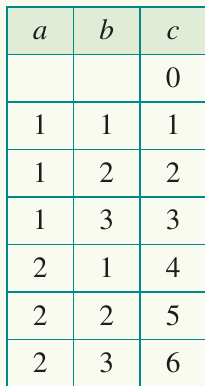
Explanation:
The initial value of a in the outer loop is .
With , we enter the inner loop where b takes the values and in turn.
After the inner loop completes (three iterations), we exit back to the outer loop.
The variable a then takes its next value, which is .
With , we enter the inner loop again where b takes the values and once more.
In total, there are iterations of the innermost instruction.
Remember!
Summary
Key Points to Remember:
-
Pseudocode is an informal way to write algorithms before translating them into actual programming code.
-
If-then blocks allow algorithms to make decisions based on conditions. Always close them with end if.
-
For loops are used when you know exactly how many times to repeat instructions. The loop variable takes each value in sequence.
-
While loops are used when the number of iterations is unknown. They continue as long as a condition is true.
-
Functions are reusable blocks of code that perform specific tasks. They must be defined before being called.
-
Nested loops have one loop inside another. For each iteration of the outer loop, the inner loop completes all its iterations.
-
Desk checks help verify that algorithms work correctly by manually tracking variable values through each step.