Abstraction and Automation (AQA A-Level Computer Science): Revision Notes
📚Revision Notes
Abstraction and Automation
Introduction to computational thinking
Computing involves processing data to solve problems. While we often think of computers performing calculations and manipulating data, much of the actual problem-solving work happens before any code is written. Computer scientists use specific techniques to help with problem solving, and this note explores two key concepts:
- Abstraction: the process of identifying the essential features of a problem whilst removing less important details
- Automation: creating computer models of real-world situations and implementing them
These concepts are particularly useful for problems that need mathematical calculations to solve them, rather than simple data processing tasks.
Logical reasoning
Logical reasoning involves using a set of known facts to work out whether new facts are true or false. This skill is fundamental for computer scientists because it helps us understand problems, identify relevant information, and draw valid conclusions. The process is based on deductive reasoning, which comes from mathematics and philosophy - starting with established rules or premises and applying them to reach conclusions.
Why logical reasoning matters for problem solving
When you're trying to solve a problem computationally, logical reasoning helps you to:
- Understand the nature of the problem itself
- Identify which facts are relevant
- Draw accurate conclusions from available information
- Deduce new facts based on existing knowledge
Note
Logical reasoning is not just about knowing facts - it's about understanding how to combine multiple pieces of information to reach new, valid conclusions. This skill becomes increasingly important as problems become more complex.
Example: name classification
Example
Worked Example: Name Classification Logic
Consider this scenario: We know that "Alex is a boy". From this single fact, we might conclude that Alex is a boy's name.
However, if we also know that "Alex is a girl", we can combine these two facts to reach a more accurate conclusion: Alex can be either a boy's or a girl's name.
This demonstrates how combining multiple facts leads to better conclusions.
Example: seating arrangement
Example
Worked Example: Solving the Seating Problem
Here's a practical problem requiring logical reasoning:
Four friends are sitting at a concert together. Jane is in seat A3, Kian is sitting to the right of Jane in seat A4, Ravi is to the left of Jane, and Dev is to the left of Ravi. Which seat is Dev in?
Solution:
To solve this, we notice the seats are arranged sequentially. With only four people, the answer must be between seats A1 and A6.
Step 1: Since Ravi is to the left of Jane (who is in A3), Ravi must be in A2.
Step 2: Since Dev is to the left of Ravi, Dev must be in A1.
Example: satnav system facts
Logical reasoning is also essential when developing complex systems. Consider these facts about road types and speed limits:
Given facts:
- Motorways have higher speed limits than single-lane roads
- Single-lane roads have speed limits between 30 mph and 60 mph
- Dual carriageways have the same speed limits as motorways
- Most roads in urban areas are single carriageway
Facts we can deduce:
- A single-lane road could have a 40 mph speed limit
- The speed limit on motorways must be more than 60 mph
- Subject to traffic conditions, a journey would typically be quicker on a dual carriageway than on a single-lane road
- Journeys through towns are likely to be slower than journeys along motorways
Important
This demonstrates how logical reasoning allows us to build up our understanding by deriving new information from existing knowledge. When designing systems, this ability to deduce implications from known facts is essential for identifying all requirements and constraints.
Problem solving
Problem solving through computational thinking has been happening for thousands of years. It involves identifying a problem and then working out the steps needed to solve it efficiently. The aim is always to create the most effective solution that can be applied to similar problems in the future.
The evolution of navigation: a problem-solving case study
Human travel provides an excellent example of how problem solving has evolved over time. The fundamental problem has always been: "How do I get from point A to point B in the quickest and easiest way?"
Stage 1: Verbal instructions
Before writing existed, people gave each other spoken directions. This worked but wasn't very efficient or reusable.
Stage 2: Maps
The invention of maps provided a more efficient and reusable solution. Early maps required considerable skill to read and understand.

Stage 3: Modern navigation systems
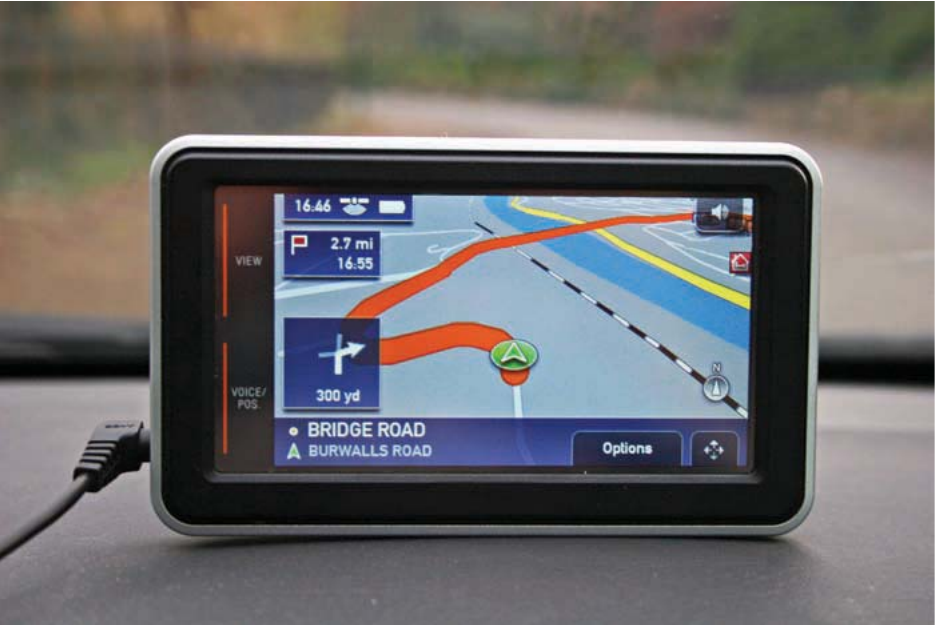
Today's satnav devices represent the latest evolution in solving the navigation problem. They combine large datasets (often updated in real-time), traffic information, and wireless technology. The devices use a simple interface - users just input their destination and follow the verbal and visual instructions.
Note
Notice how each stage of evolution maintained the same core functionality (getting from A to B) while improving efficiency and ease of use. This progression demonstrates how problem-solving techniques evolve to create more sophisticated solutions to the same underlying problem.
Defining and solving problems systematically
The satnav example demonstrates key aspects of problem solving. Whilst the problem itself seems simple ("How do I get from A to B?"), the solution is complex. As a computer scientist developing such a system, you need to consider numerous issues and constraints:
Journey parameters:
- How to define start and end points (e.g. town name, grid reference)
- What form of transport will be used (car, bicycle, walking)
- What routes are available (roads, ferries)
- What data is available (road networks, traffic information)
- How to keep data current and up-to-date
Route calculation:
- How to calculate the quickest or shortest route
- How to recalculate when traffic jams or road closures occur
- What communication channels will transmit the data
User interface:
- How to present information in the most user-friendly way
After identifying the problem, you develop an efficient solution through several iterations. A critical aspect of computing is that solutions must be thoroughly tested to ensure they actually solve the problem. With the satnav example, manufacturers conduct extensive in-house testing, followed by beta-testing with real users in real situations before public release. They then continuously review customer feedback to refine the technology.
Important
Simple problems can have complex solutions. The apparent simplicity of "getting from A to B" hides the numerous technical challenges that must be addressed. Always consider all constraints, data requirements, and edge cases when designing computational solutions.
Algorithms
An algorithm is a sequence of step-by-step instructions for carrying out a specific task. You've already encountered algorithms earlier in your course. Algorithms are the fundamental building blocks of computer programs - ultimately, all problems are solved by writing algorithms.
A simple algorithm example
To calculate journey duration, you could use this algorithm:
TimeParted = 15:00
TimeArrived = 16:00
Drivetime = TimeArrived - TimeDeparted
Pseudocode
This example shows pseudocode, which is a way of expressing algorithms without using any specific programming language. Working out the required algorithms during the planning stage is often the starting point for programmers. Writing pseudocode can be time-consuming depending on the solution's complexity.
Hand-tracing and dry running
Programmers use techniques called hand-tracing or dry running to work through their code line by line, following the logic to understand what's happening. This helps identify problems before the code is implemented. There's an example of dry running in Chapter 5. Most programs consist of multiple related procedures, so it's important to identify how these link together to create the complete program.
Note
Hand-tracing and dry running are essential debugging techniques. By manually working through your code before execution, you can catch logical errors early and ensure your algorithm produces the expected results for different inputs.
From pseudocode to programming code
Once all procedures have been identified and written in pseudocode, they can be converted into actual programming code using whichever language is most appropriate for solving the problem.
Abstraction
Abstraction means reducing problems to their essential features. Another way to understand abstraction is that it's the process of finding similarities or common aspects about a problem whilst ignoring differences. This is valuable for programmers because it allows viewing problems from a high level, concentrating on key design aspects whilst ignoring detail, particularly during initial design stages.
A key feature of abstraction is that once you've identified a solution for one problem, the abstraction can be applied to other similar problems that share the same common features.
There are two main types of abstraction: representational abstraction and abstraction by generalisation/categorisation.
Representational abstraction
This involves removing unnecessary details until it's possible to represent the problem in a way that can be solved. Think of it as viewing the 'big picture' - working out what's relevant to solving the problem and what's unnecessary detail that can be ignored.
Example
Worked Example: Satnav Abstraction
With the satnav problem, at a basic level, the challenge can be reduced to finding the shortest distance between point A and point B. An abstraction of this would be to:
- Identify point A and point B in some way
- Identify the connecting paths between A and B
- Calculate the shortest path between A and B
Once this abstraction is complete, a solution can be created to solve the problem. For example, a variation of Dijkstra's shortest path algorithm could be developed. Related problems can then be solved using the same abstraction.
Some information found on a map wouldn't be required to find a shortest route. For example, the location of rivers, railway lines, and landmarks could be ignored, so the map stored by the satnav would be an abstraction of the real location.
Abstraction by generalisation/categorisation
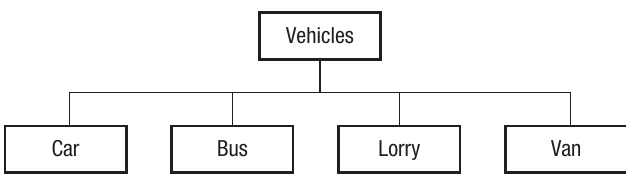
This is the process of placing aspects of a problem into broader categories to arrive at a hierarchical representation. It involves recognising common characteristics of representations so that more general representations can be developed. You've already seen this concept applied with object-oriented programming in Chapter 6, where subclasses are defined from the characteristics of a base class.
For example, to represent information about cars and buses, we recognise they have much in common, so we generalise/categorise them both as vehicles. When programming using an object-oriented language, we can represent this generalisation using inheritance.
Applications of abstraction in computing
The principle of abstraction can be applied to various elements of computing:
Procedural abstraction
This is the concept that all solutions can be broken down into a series of procedures or subroutines. This is how all procedural languages work, enabling programmers to identify the main processes needed to complete a task and contain these within procedures. At the design stage, it's sufficient for programmers to work out what each procedure will do without defining how it will do it. The procedure may call other procedures, although it doesn't need to know how these work to call them. This forms the basis for top-down design that we examined in Chapter 5.
Top-down design is related to the modular approach - it starts with the main system at the top and breaks it down into smaller and smaller units, somewhat like a family tree. Other considerations include what event will trigger the procedure, how procedures link together, including any possible side effects, and any errors that will be handled.
Note
The power of procedural abstraction is that you can design and call procedures without needing to understand their internal implementation. This allows you to work at different levels of detail and focus on the overall structure before worrying about specific implementations.
Functional abstraction
Similar to procedural abstraction, functional abstraction focuses on common functions that can be used to solve problems. Functions are a feature of procedural languages and the cornerstone of functional programming, where all main processes are defined in terms of functions. Functions can be created for any common procedure, and functions can be built on top of other functions, producing higher levels of abstraction. The program simply needs parameters to be input into the function to generate a result. Using functions reduces complexity as the function only needs to be written once.
Data abstraction
This is the process of organising and structuring data in a way that produces a particular view of the data that's useful for the programmer. Almost all data is abstracted - hence the term abstract data types that we examined in Chapter 7. For example, a queue is an abstract data type which may be made up of an array. By abstracting the data into a queue, all the programmer has to do is push and pop to the queue without worrying about the structure of the underlying dataset.
Another feature of data abstraction is that the data can be implemented in different ways. For example, once data is abstracted into an array, it could be used to create other abstract data types such as a stack or a binary tree. This is known as data composition, where data objects are combined to create a compound structure.
Important
Data abstraction involves separating the actual implementation from the interface. In the satnav example, the algorithm needs to find the shortest journey between two points. The interface provides this information, but how it's implemented is hidden. It doesn't matter whether the data is being stored in an array, as a vector, or in a relational database - providing the relevant answer is provided by the program.
Problem abstraction
This is the process of reducing a problem down to its simplest components until the underlying processing requirements that solve the problem are identified. By doing this, these underlying processes can be applied to solve analogous problems. For example, satnavs use vectors (see Chapter 11) and a variation of Dijkstra's algorithm (see Chapter 13). Neither of these concepts were developed specifically for satnavs, but both have been adopted to create the required solution. Therefore, the underlying principles used to solve one problem have been applied to a different problem with similar characteristics.
Another example is the use of graphs in general. In Chapter 9, we examined the use of graphs to explain relationships between nodes. Many problems have been solved using graph theory, as the underlying requirements of the problems are the same even though they may not appear to be. For example, graphs are used to optimise the transmission of data on computer networks, to model atomic and chemical structures, to predict the spread of disease, and to analyse social networks.
Note
Problem abstraction is particularly powerful because it allows you to apply proven solutions from one domain to completely different problems. The key is recognising when different problems share the same underlying structure or requirements.
Information hiding
Information hiding is the process of providing a definition or interface of a system or object whilst keeping the inner workings hidden. A common example of this principle is the car. All cars have a common interface: they have a steering wheel, gearbox, pedals, etc. By operating this common interface, it's possible to operate the car. The actual mechanics of how the car works is hidden. In fact, the mechanics of how the car works may change without impacting the interface. For example, changing from a petrol to a hybrid engine doesn't change the basic principles of how to drive a car.
Information hiding in computing
An example in computing is where a common interface such as a GUI is used. With the satnav example, the interface prompts the user to input an end point. The complexity of calculating the route is hidden. If the way in which the route was calculated changed, it wouldn't necessarily affect the interface. In this way, information hiding separates the user interface from the actual implementation of the program.
Note
The benefit of information hiding is twofold: it simplifies the user experience by hiding complexity, and it allows developers to change internal implementations without affecting how users interact with the system. This makes systems more maintainable and flexible.
Information hiding in programming
More specifically when programming, information hiding can be used to define a set of behaviours on a dataset, where the data can only be accessed through those behaviours. It's not possible for other parts of the program to access the dataset directly. This prevents unintended damage to the dataset and also means that how the dataset is stored can be changed without affecting any programs that use it, as they don't access it directly.
Information hiding is closely related to the concept of encapsulation, where data and behaviours are stored together within a class or object. Encapsulation can be seen as a method of implementing the information-hiding principle.
Decomposition and composition
Decomposition
Decomposition is the broad definition of breaking large complex tasks or processes down into smaller, more manageable tasks. Abstraction techniques will be used to help decompose the system requirements.
Procedural decomposition is the process of looking at a system as a whole and then breaking it down into procedures or subroutines needed to complete the task. This process is very similar to the idea of the top-down approach we examined in Chapter 5, where each main task is identified, then the subtasks that make up each task. Depending on the complexity of the system, subtasks may be further subdivided until the designer reaches a level of detail that's sufficient to start building the system.
Composition
Procedural composition is the process of creating a working system from the abstraction. This involves:
- Writing all the procedures and linking them together to create compound procedures
- Creating data structures and combining them to form compound structures
Important
Decomposition and composition work as complementary processes: decomposition breaks problems down into manageable pieces during the design phase, while composition builds these pieces back together into a functioning system during implementation.
Example: satnav system decomposition
A satnav system could be decomposed as follows:
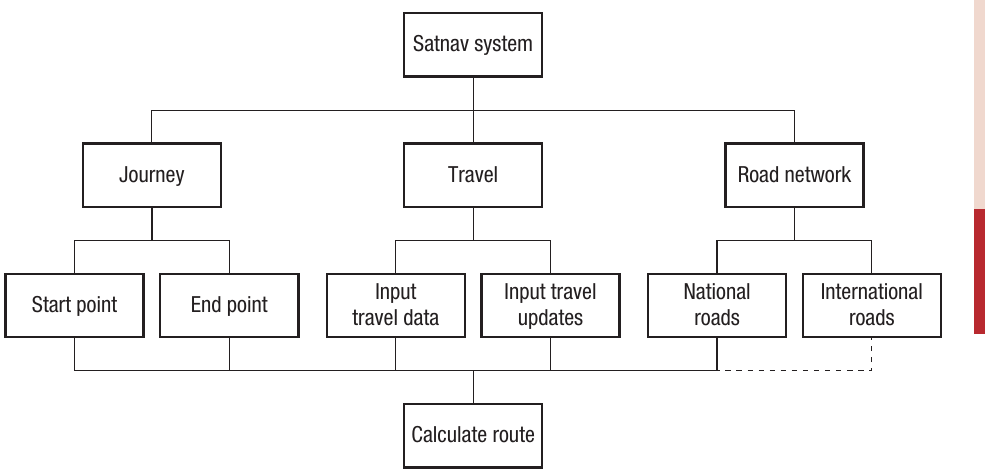
This diagram shows how the main satnav system breaks down into three major components: Journey (with start and end points), Travel (with input travel data and updates), and Road network (with national and international roads). All these components feed into the central "Calculate route" function.
Automation
Automation in this context is the process of creating computer models of real-life situations and putting them into action. Most computer programs are created to solve real problems. One of the objectives of creating computer systems is to create elegant solutions to difficult problems. The key to this is:
- Understanding the problem
- Being able to create suitable algorithms
- Building the algorithms up into program code
- Using appropriate data to solve the problem
Example: traffic flow modelling
Computer models are widely used to analyse traffic flows and to control traffic lights across road networks. Major cities and towns often have severe traffic congestion, and by controlling the traffic lights, it's possible to keep traffic moving more freely.
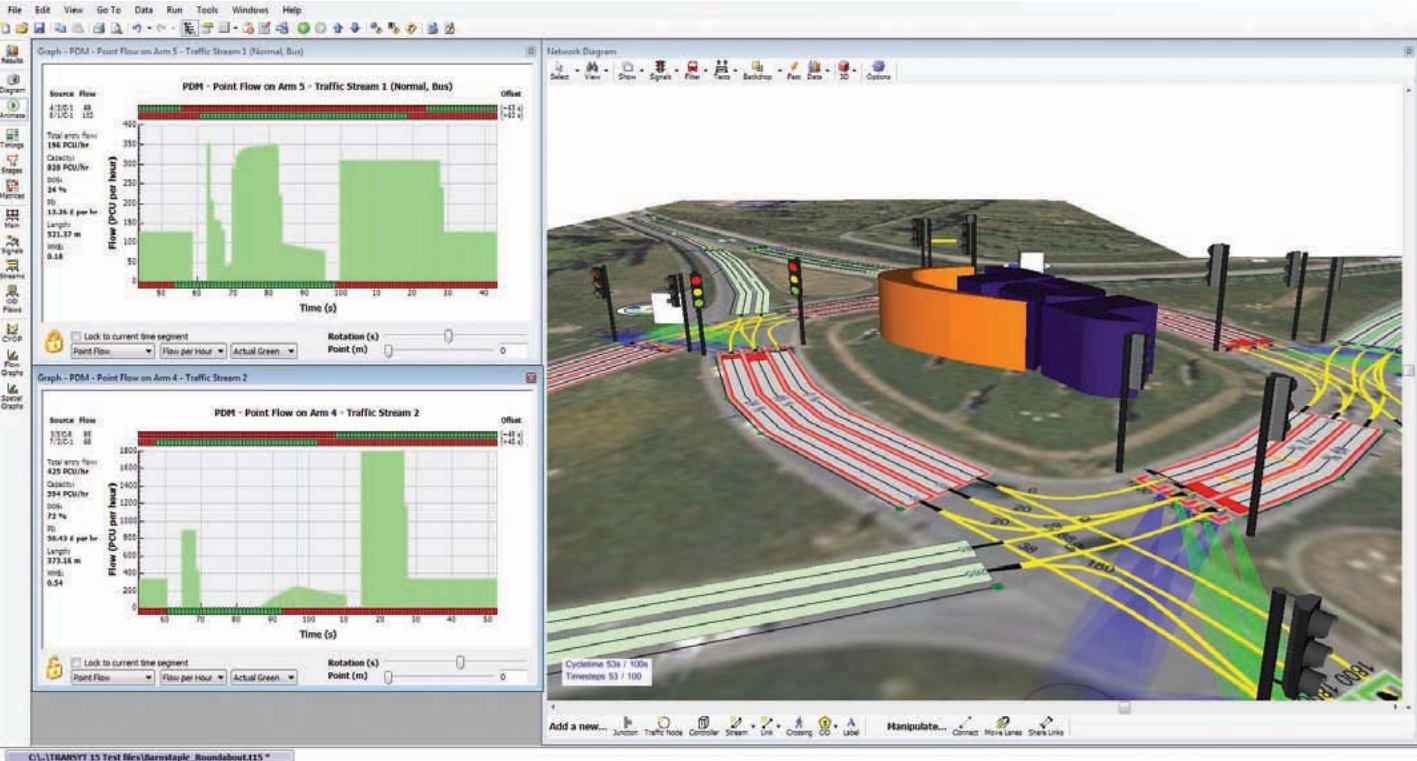
The screenshot shows a software model called TRANSYT, which demonstrates the traffic flow problem. When one set of lights is on green, you may assume the traffic is flowing freely. However, by definition, this means there's likely to be a queue of stationary traffic (or pedestrians) waiting at a red light. Where there are several sets of traffic lights close together, the problem becomes more difficult to solve.
Therefore, the outcome is to keep traffic moving as freely as possible around the network. The solution is far more complex than it first appears. The designer needs to consider:
- The location of all traffic lights
- The number of roads that meet at each set of traffic lights
- How many lanes of traffic there are at each set of lights
- How much traffic there is on each of the lanes
- What time of day it is (whether it's rush-hour and whether people are generally heading into or out of the city)
- Whether the lights control a pedestrian crossing as well as a road
Note
These are probably just some of the considerations. The challenge for the designer is to identify the key factors that will make the model accurate. In addition, they need to consider what data to use and where to get it from.
As a minimum, they'll need data for:
- The roads in the network
- The physical location of the lights
- The volume of traffic on the road, which will either be historical or real-time data
Implementing and calibrating automated models
Having collected all of this data, code must be written to optimise traffic flows, which involves switching the signals and leaving them on green or red for the correct amount of time. For example, if there's a busy main road with heavy traffic, more time on green must be allowed at the expense of traffic on the side roads.
Important
Using automated models in this way requires constant calibration of the model. This means that the designers need to see how well their modelled system works in real life. If traffic isn't flowing as expected, they need to make changes either to their algorithm or to their data to make the model more accurate.
Remember!
Summary
Key Points to Remember:
-
Logical reasoning uses known facts to determine whether new facts are true or false through deductive reasoning - it's essential for understanding problems and drawing valid conclusions.
-
Problem solving involves identifying a problem and working out efficient, reusable solutions. Simple problems may have complex solutions, as demonstrated by the evolution from verbal directions to maps to modern satnav systems.
-
Abstraction reduces problems to their essential features, removing unnecessary detail. There are two main types: representational abstraction (removing unnecessary details) and abstraction by generalisation (grouping similar aspects into hierarchical categories). Abstraction can be applied at multiple levels: procedural, functional, data, and problem abstraction.
-
Information hiding separates the interface from the implementation, hiding complexity from users. This allows the internal workings to change without affecting how the system is used, as seen in car controls or GUI interfaces.
-
Decomposition and composition work together - decomposition breaks large complex tasks into smaller manageable subtasks (often using top-down design), whilst composition builds working systems back up from these abstracted components by linking procedures and combining data structures.
-
Automation creates computer models of real-world situations and puts them into action. Successful automation requires understanding the problem, creating suitable algorithms, implementing them in code, and using appropriate data. Models need constant calibration to ensure they work accurately in real-life situations, as demonstrated by traffic flow control systems.