Regular and Context-Free Languages (AQA A-Level Computer Science): Revision Notes
📚Revision Notes
Regular and Context-Free Languages
Introduction
When designing programming languages or working with pattern matching in text, we need formal ways to describe what is and isn't allowed. There are two main approaches for this: regular languages and context-free languages. Both serve the purpose of defining rules for valid strings of characters, but they differ in complexity and power.
A regular language is any language that can be fully described using regular expressions. Regular expressions are patterns containing character sequences that let you find and match specific text. They're particularly useful for searching through data and validating input. These languages have a direct relationship with finite state machines, meaning every regular expression can be drawn as a state transition diagram.
A context-free language provides a more powerful way to describe language syntax, especially when the structure becomes too complex for regular expressions to handle. These languages use special notation systems like Backus-Naur Form (BNF) or syntax diagrams to define their rules. They're essential for describing programming language syntax where you need to handle nested structures and recursive patterns.
Note
The key difference is that regular expressions work well for simple, linear patterns, whilst context-free languages can handle complex, hierarchical structures that regular expressions cannot express. Think of regular expressions as tools for flat patterns, and context-free languages as tools for nested, tree-like structures.
Regular expressions
Regular expressions provide a shorthand method for defining sets of strings. A set is a collection of items where each element appears only once and the order doesn't matter. Regular expressions use special operators to build patterns that describe which strings belong to a set.
Regular expression operators
When writing regular expressions, you combine characters with special operators that control how the pattern matches. Here are the fundamental operators you need to know:
- | (pipe) - Acts as "or", allowing alternatives. For example,
a|b|cmatches either 'a' or 'b' or 'c' - Concatenation - Writing characters together means they must appear in that sequence. For example,
abconly matches the exact string 'abc' - * (asterisk) - Means "zero or more" of the preceding element. For example,
a*bcmatches 'bc', 'abc', 'aabc', 'aaabc', and so on - + (plus) - Means "one or more" of the preceding element. For example,
a+bcmatches 'abc', 'aabc', 'aaabc', but not 'bc' - ? (question mark) - Means "zero or one" of the preceding element (optional). For example,
ab?cmatches both 'ac' and 'abc' - () (parentheses) - Groups elements together so operators apply to the whole group. For example,
(a|b)cmatches 'ac' or 'bc'
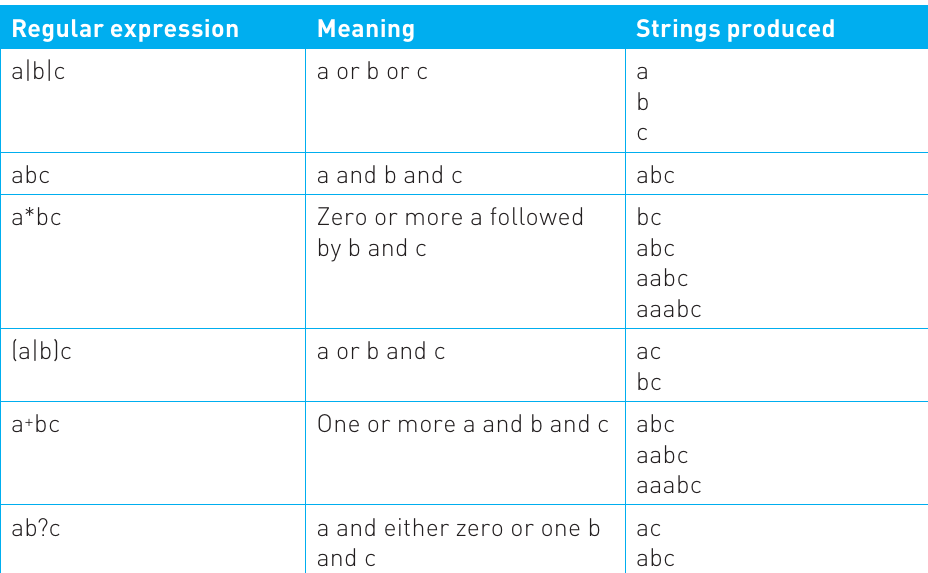
Let's look at a comprehensive table showing how different regular expressions work:
Note
Notice how the same operators can combine in different ways to create various patterns. The asterisk operator is particularly powerful because it allows infinite repetition. For instance, a*bc could theoretically match a string with millions of 'a' characters followed by 'bc', though it must always end with 'bc'.
Converting regular expressions to finite state machines
Every regular expression can be represented as a finite state machine (FSM), and vice versa. This connection is fundamental to understanding how regular expressions actually work under the hood. State transition diagrams provide a visual way to understand all the possible strings a regular expression might produce.
Example
Worked Example: Converting to an FSM
Consider the regular expression a*bc. This expression means "zero or more 'a' characters, followed by 'b', followed by 'c'". We can represent this as a state machine:
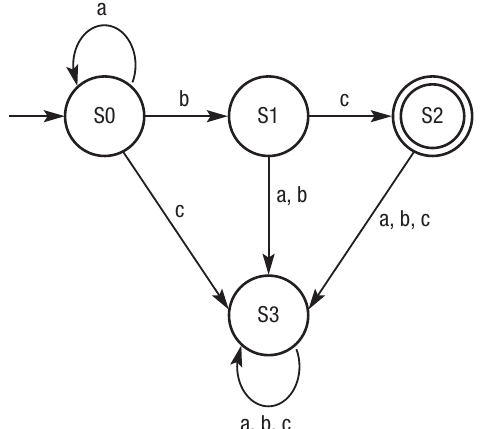
In this diagram:
- State S0 is the starting point
- The self-loop labelled 'a' means you can stay in S0 whilst processing any number of 'a' characters
- The 'b' transition takes you to S1
- The 'c' transition takes you to S2, which is the accepting state (shown with a double circle)
- If any invalid input arrives, the machine moves to S3, which is a reject state
Let's examine another example: a(bc)*. This means 'a' followed by zero or more repetitions of 'bc':
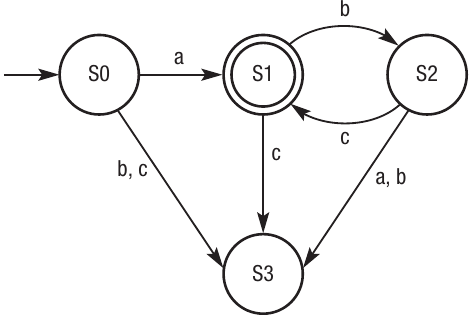
Here, S1 is the accepting state because after seeing 'a', we have a valid string. However, we can continue matching 'bc' pairs repeatedly, and each time we complete 'bc' we return to S1 (the accepting state).
For the expression (a|b)c, meaning 'a' or 'b' followed by 'c', the FSM looks like this:
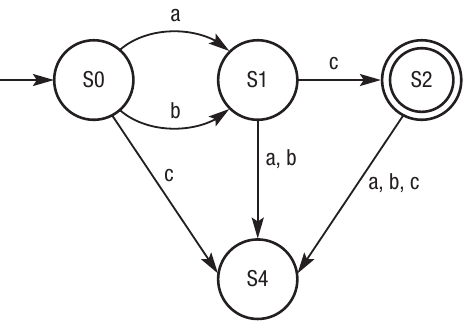
Both 'a' and 'b' from the start state can lead to valid strings if followed by 'c'. The accepting state S2 represents successfully matching either 'ac' or 'bc'.
Important
Understanding these state diagrams helps you visualise how a regular expression processor moves through input text, checking character by character whether the text matches the pattern. Each state represents a position in the matching process, and transitions represent valid next characters.
Searching with regular expressions
The true power of regular expressions lies in their ability to search through and validate text. Many programming languages include built-in support for regular expressions, though the exact syntax might vary slightly between languages. However, there's a standard set of expressions defined by POSIX (Portable Operating System Interface) that most systems support.
POSIX standard expressions
The POSIX standard defines several special characters that extend the basic regular expression operators.
These wildcards and special patterns make regular expressions extremely flexible:
- . (dot) matches any single character. For example,
.olewould match 'mole', 'hole', 'vole', etc. - [] (square brackets) match any one character from the set inside. For example,
[mh]olematches 'mole' or 'hole' but not 'vole' - [^] (caret in brackets) matches any character except those listed. For example,
[^m]olematches 'hole' and 'vole' but not 'mole' - * (asterisk) matches zero or more of the preceding character. For example,
m*olematches 'ole', 'mole', 'mmole', etc. - {m,n} matches the preceding character at least m times but no more than n times. For example,
a{2,5}matches 'aa', 'aaa', 'aaaa', or 'aaaaa'
Implementing regular expressions in code
Let's look at how you might use regular expressions in a real program. Here's an example in Visual Basic-style pseudocode that searches for digits 0 to 9 in a string:
'Set a variable that contains the search string
Dim myString As String = "Software Version 3"

'Define the alphabet
Dim regex = New Regex("[0-9]")

'Set a variable to store the matching characters
Dim match = regex.Match(myString)

'Where a match is found between the alphabet and
the search string, write the matching characters to
the screen

If match.Success Then
    Console.WriteLine(match.Value)
End If
Note
This code would output "3" because that's the first digit found in the string "Software Version 3". The regular expression [0-9] defines a character set containing all digits from 0 to 9. To use this functionality, you would need to import the System.Text.RegularExpressions library into your program.
Regular expressions are invaluable for tasks like:
- Validating email addresses or phone numbers
- Finding and replacing specific patterns in text
- Extracting data from formatted strings
- Checking that user input meets certain criteria
Context-free languages
Whilst regular expressions are powerful, they have limitations. They work well for linear patterns but struggle with nested structures or patterns that require counting and matching. This is where context-free languages become necessary.
When regular expressions aren't enough
Important
Limitations of Regular Expressions
Consider trying to define a binary palindrome using regular expressions. A binary palindrome is a number that reads the same forwards and backwards, like 01110. To verify this, you would need to match the first character with the last, the second with the second-to-last, and so on. There's no regular expression that can describe this pattern because regular expressions can't "remember" what they've seen earlier to match it later.
Similarly, regular expressions fail when you need to handle infinite nesting. Think about matching opening and closing brackets in mathematical expressions: ((2 + 3) * (4 + 5)). You need to ensure every opening bracket has a corresponding closing bracket, and they're properly nested. Regular expressions simply can't express these counting and matching requirements.
What are context-free languages?
A context-free language is a way of describing language syntax where the grammar rules can be applied regardless of the surrounding context. This makes them "unambiguous" - there's only one correct way to parse a valid string according to the rules. Context-free languages support recursion and can handle the nested structures that regular expressions cannot.
Note
These languages are essential for defining programming language syntax. When a compiler checks your code for syntax errors, it's using context-free grammar rules. The language might specify, for example, that an if-statement must contain a condition followed by a block of statements, which could themselves contain more if-statements - this recursive definition is natural in context-free languages but impossible in regular expressions.
Backus-Naur Form (BNF)
Backus-Naur Form (BNF) is the most common notation for writing context-free language rules. It provides a precise, unambiguous way to define what constitutes valid syntax in a language.
BNF notation and syntax
BNF uses a specific set of symbols to define language rules:
- Angle brackets enclose symbols that need further definition - ::= - Means "is defined as" or "can be replaced with"
- | - Separates alternative options (like "or")
- Terminal - An element that cannot be broken down further; it's a final, actual character
The process of using BNF involves substituting symbols with their definitions, continuing until you reach terminal elements that represent actual characters. Let's see how this works with a simple example.
Defining integers with BNF
Here's how you might define an integer in BNF:
<integer> ::= <digit> | <digit> <integer>
<digit> ::= 0|1|2|3|4|5|6|7|8|9
This definition tells us that an integer is either a single digit, or a digit followed by another integer. Notice how the definition of <integer> refers to itself - this is recursion, and it allows integers to be any length. The second line defines a digit as any of the numbers 0 through 9, which are terminals because they can't be broken down further.
Example
Worked Example: Generating the Integer 42 with BNF
To generate the integer 42 using the BNF rules above, follow these steps:
- Start with
<integer> - Apply the rule:
<digit> <integer>(choose the second option) - Replace first
<digit>with '4' - Now we have:
4 <integer> - Replace
<integer>with<digit>(choose the first option this time) - Replace that
<digit>with '2' - Result: '42'
This demonstrates how BNF rules can be applied step-by-step to build valid strings in the language.
More complex BNF examples
Let's look at a more sophisticated example for customer details in a database:
<customerdetails> ::= <name> <address>
<name> ::= <title> <firstname> <lastname>
<address> ::= <housenumber> <streetname> <town>
<county> <postcode>

...

<housenumber> ::= <integer>
<integer> ::= <digit> | <digit> <integer>
<digit> ::= 0|1|2|3|4|5|6|7|8|9

...
This shows how BNF builds up complex structures from simple components. The rules specify that:
- Customer details must contain a name and an address
- A name must contain a title, first name, and last name
- An address must contain a house number, street name, town, county, and postcode
- A house number must be an integer
- An integer is made up of one or more digits
Note
This is just a partial definition - you would continue breaking down each element (like <title>, <firstname>, <postcode>) into acceptable characters or character combinations. The beauty of BNF is that you can define each part independently and combine them to create complex, valid structures.
Syntax diagrams
Whilst BNF is powerful, it can be difficult to read when definitions become complex. Syntax diagrams provide a visual alternative that maps directly to BNF rules but is often easier to understand.
Understanding syntax diagram symbols
Syntax diagrams use three main shapes, each with a specific meaning:
- Ovals represent terminal elements - actual characters or tokens that appear in the final output
- Rectangles represent non-terminal elements that have their own syntax diagrams defining them
- Rectangles with arrows (loops) represent non-terminal elements that can be repeated multiple times
Note
The diagrams show flow from left to right, with arrows indicating the path you can take through the structure. Each complete path from start to finish represents one valid way to construct that element.
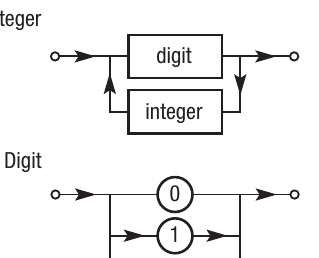
Syntax diagrams for integers
Let's see how the integer definition looks as syntax diagrams:
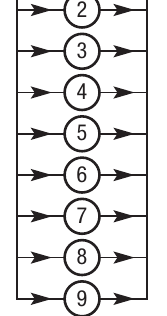
The top diagram shows that an integer consists of a digit, followed optionally by another integer (via the loop back). The bottom diagram shows that a digit is a choice of any number from 0 to 9 - the parallel paths represent alternatives.
Important
These diagrams are modular, so you often need multiple related diagrams to fully define a language component. Each rectangular box in one diagram has its own detailed diagram elsewhere. This modularity makes complex grammars easier to understand by breaking them into manageable pieces.
Syntax diagrams for customer details
Here's how the customer details example looks in diagram form:
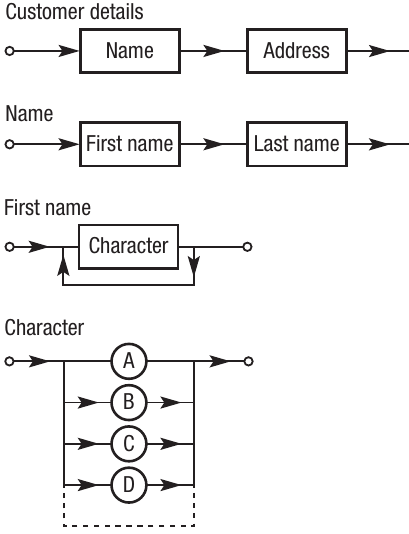
This hierarchical breakdown shows how customer details decompose into name and address, name breaks down into first name and last name, first name is made of multiple characters, and each character can be A, B, C, D, or other letters (represented by the ellipsis).
Password validation example
Suppose you want to define rules for a valid password where each character must be either an uppercase letter, lowercase letter, number, or special character, in any order. Here's the BNF:
<character> ::= <uppercase>|<lowercase>|<number>|<specialcharacter>
<uppercase> ::= "A" - "Z"
<lowercase> ::= "a" - "z"
<number> ::= 0|1|2|3|4|5|6|7|8|9
<specialcharacter> ::= *| - | _ | % | ^
Note
Note that all our elements are now terminals - we've reached the actual characters that will appear in the password.
If we wanted the password to start with an uppercase letter followed by any combination of other characters, the syntax diagram would be:
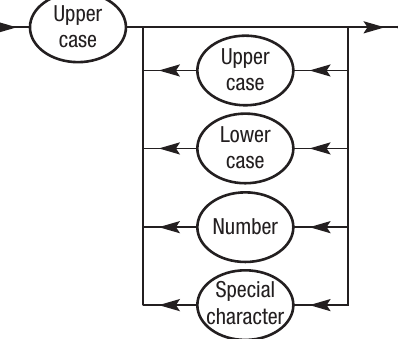
The initial uppercase letter is required (you must pass through it), but then you can choose any combination of character types for the remaining positions. The loop back means you can have any number of characters following that first uppercase letter.
Note
Syntax diagrams excel at showing these kinds of structural requirements visually. You can quickly see what's mandatory (elements you must pass through) versus what's optional (alternative paths or loops).
Summary
Key Points to Remember:
-
Regular expressions use special operators (|, *, +, ?, parentheses) to define patterns in text. They're perfect for searching and validating simple, linear patterns.
-
Finite state machines and regular expressions are interchangeable - every regular expression can be drawn as an FSM and vice versa. This relationship helps visualise how pattern matching works.
-
POSIX standard expressions extend basic regex with wildcards (.), character sets ([]), negation ([^]), and quantifiers ({m,n}), making searches more flexible and powerful.
-
Context-free languages become necessary when regular expressions can't handle the complexity, particularly for nested structures, recursion, or patterns requiring counting and matching.
-
Backus-Naur Form (BNF) uses ::= to define rules, | for alternatives, and angle brackets <> for symbols. Terminal elements cannot be broken down further, whilst non-terminals require additional rules.
-
Syntax diagrams provide a visual way to represent BNF rules, using ovals for terminals, rectangles for non-terminals, and arrows to show the flow through valid constructions.