Subroutines, Local and Global Variables (AQA A-Level Computer Science): Revision Notes
📚Revision Notes
Subroutines, Local and Global Variables
Introduction to subroutines
In programming, a subroutine is a self-contained block of code that carries out one or more specific tasks. Think of subroutines as mini-programs within your main program. They help break down complex problems into smaller, more manageable pieces.
Subroutines are sometimes called algorithms when they describe a step-by-step process. Each subroutine must have a unique name (identifier), which allows you to call it whenever needed during program execution.
Note
Subroutines are known by several other terms depending on the programming language and context:
- Procedures - commonly used in Visual Basic
- Subprograms - used in some programming contexts
- Routines - a general term for reusable code blocks
Despite the different names, they all refer to the same fundamental concept of reusable code blocks.
The key characteristic of a subroutine is that it performs a specific task and can be called multiple times throughout your program using its unique name.
How subroutines work
Imagine you're writing a program to manage a file system with options to add, amend, or delete records. Rather than writing all the code in one long sequence, you would create separate subroutines for each task:
Subroutine MainMenu
    Input Selected
    If Selected = "Add" Then Subroutine AddRecord
    If Selected = "Amend" Then Subroutine AmendRecord
    If Selected = "Delete" Then Subroutine DeleteRecord
End Subroutine
:
Subroutine AddRecord
    'Code to add a new record to a file
End Subroutine
:
Subroutine AmendRecord
    'Code to locate and amend an existing record
End Subroutine
:
Subroutine DeleteRecord
    'Code to delete an existing record
End Subroutine
In this example, when the variable Selected is set to "Add", the program calls the AddRecord subroutine. This modular approach makes your code much easier to understand and maintain.
Events and subroutines
An event is something that occurs during program execution that triggers a particular subroutine. For example, clicking a button in a graphical user interface is an event that might trigger a subroutine to execute.
Note
Events create a connection between user actions and program behavior. When you design programs with graphical interfaces, you'll often write subroutines that respond to specific events like mouse clicks, keyboard input, or timer events.
Benefits of using subroutines
Breaking your program into manageable subroutines offers several important advantages:
- Reusability: Subroutines can be called multiple times using their unique name, eliminating the need to write the same code repeatedly
- Overview: They provide a clear structure that helps you understand how the program fits together
- Top-down development: You can design the overall structure first, then fill in the details of each subroutine later
- Testing and debugging: Each subroutine is self-contained, making it easier to test and fix errors in isolation
- Collaboration: Different programmers can work on different subroutines simultaneously in large projects
Modules
As programs grow more complex, related subroutines can be grouped together into modules. A module contains several subroutines that work together, and multiple modules combine to form the complete program. This adds another layer of organization to your code structure.
Note
Some programming environments, like Visual Basic, automatically create subroutines for you when you add controls to your interface. Object-oriented programming takes this concept even further by organizing code around objects that contain both data and the subroutines that operate on that data.
Functions
While subroutines perform tasks, functions are a special type of subroutine that perform a task and then return a value back to the calling code.
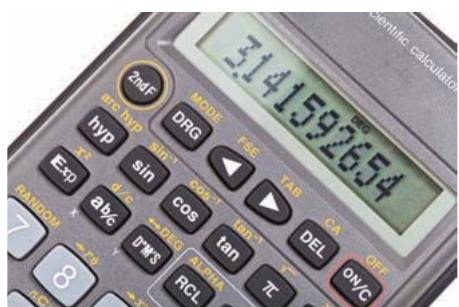
Think of a calculator as an analogy. Modern calculators have numerous built-in functions:
- Square function ()
- Square root function ()
- Trigonometric functions (sin, cos, tan)
When you enter a number and press a function key, the calculator performs a calculation and returns the result.
How functions work in programs
A function in a computer program works similarly to calculator functions. You supply the function with data (input), and it returns a value (output) based on that data.
Example
Worked Example: Volume Calculator Function
You could create a function to calculate the volume of a cylinder.
Input: Height and radius of the cylinder
Process: The function applies the formula
Output: The calculated volume is returned
This function can be called whenever you need to calculate a cylinder's volume, without rewriting the calculation code each time.
Functions aren't limited to numerical data. You could create a function that:
- Counts how many times the letter 'h' appears in a block of text
- Checks whether a file has read/write or read-only access permissions
- Validates user input
Benefits of functions
Functions provide two main benefits:
1. Code simplification: Some processes are complex and require many lines of code, but ultimately produce a single result. Placing this complex code in a function and calling it from your main program keeps the main program cleaner and easier to understand. If you need to modify the function, you only need to locate and change it in one place.
2. Code reuse: If you need to perform the same calculation or process in multiple places throughout your program, you write the code once as a function. Then you simply call that function from various locations. This keeps your program smaller and more maintainable. When you need to alter how the function works, you only modify one version of it.
Functional programming
Functional programming is a programming paradigm that relies exclusively on functions to create programs. This approach has advantages in certain types of applications. You'll learn more about functional programming in later chapters.
Parameters and arguments
For subroutines and functions to operate effectively, you need a mechanism to control what data they work with. This is achieved through parameters and arguments.
Important
Understanding the Difference:
A parameter acts like a variable placeholder in a subroutine definition. It identifies what type of data the subroutine expects to receive.
An argument is the actual value that you pass to the subroutine when you call it.
Think of it this way: the parameter is like an empty box with a label, and the argument is the actual item you put in that box.
Block interfaces
Because subroutines are called from elsewhere in your program (external to the current code), there must be a mechanism to ensure the program handles the data transfer correctly. This mechanism is called a block interface.
Note
The block interface is essentially a specification that describes:
- The type of data being passed
- The characteristics of that data
- How the data should be handled
Different programming languages implement block interfaces in different ways, but they all serve the same purpose: to ensure that when you call a subroutine, the program knows exactly what data is being transferred and how to process it.
Local variables
When you split your program into multiple subroutines and functions, you must decide on the scope of any variables you create. The scope determines where in your program a variable can be accessed and used.
A local variable is a variable that can only be used within the specific subroutine or function where it was created. It's not accessible from other parts of the program.
Advantages of local variables
Using local variables wherever possible is considered good programming practice for several reasons:
Important
Key Advantages of Local Variables:
1. Preventing unintended changes: You cannot accidentally change a local variable's value from another part of the program. This reduces errors and side effects.
2. Variable name reuse: You can use the same variable name in different subroutines, and each will be treated as a completely separate variable. For example, you might use Count as a local variable in several different functions without any conflict.
3. Memory efficiency: When a local variable is no longer needed (when the subroutine finishes executing), it is removed from memory, freeing up resources for other uses.
Variable state and side effects
Variables change their values throughout program execution. When subroutines pass values between each other, changes made in one subroutine can affect variables in another. This is called a side effect.
Important
One of the main causes of program errors is when a variable's value is changed within one subroutine, and this change unexpectedly impacts another subroutine. Keeping track of variable states across multiple subroutines is crucial for preventing bugs.
Declaring local variables
The syntax for declaring local variables varies by programming language:
Visual Basic:
Dim Age As Integer
This declares a local variable called Age of integer type.
Python: By default, all variables in Python are assumed to be local when they are defined within a function. You don't need special syntax to declare them as local.
Password = "password"
When written inside a function, this creates a local variable called Password.
Global variables
A global variable is a variable that can be accessed from anywhere in the program. It's available to all subroutines and functions throughout the entire application.
When to use global variables
You should only use a global variable when it genuinely needs to be accessible throughout your entire program.
Example
Worked Example: Password as Global Variable
You might store a password as a global variable if you want different sections of your code to check or use it.
Scenario: Multiple authentication checks across different parts of your application
Solution: Declare Password as a global variable
Benefit: All subroutines can access and verify the password without passing it as a parameter each time
Important
Use Global Variables Sparingly
Overusing global variables can make your program harder to debug and maintain because changes to a global variable can affect many different parts of your code in unexpected ways. Only use them when a variable truly needs program-wide accessibility.
Declaring global variables
Different programming languages use different syntax to indicate whether a variable is local or global:
Visual Basic: Global variables are declared as public:
Public Password As Text
This declares a global variable called Password of text type.
Python: In Python, you must explicitly tell the system to make a variable global using the global keyword:
global Password
This declares Password as a global variable. Without the global keyword, Python assumes the variable is local.
Some other languages: In certain programming languages, if you declare a variable outside any subroutine or function, it is automatically assumed to be global. You must be careful with variable declarations in such languages to ensure variables have the intended scope.
Example: Visual Basic code with mixed variable scopes
Public Password As String
Private Sub CalculateMathsGrade
    Dim Score As Integer
    Dim Grade As String
    If Score > 50 then
        Grade = "Pass"
    Else
        Grade = "Fail"
End Sub
Private Sub CalculateEnglishGrade
    Dim Score As Integer
    Dim Grade As String
    If Score > 50 then
        Grade = "Pass"
    Else
        Grade = "Fail"
End sub
Note
Understanding Variable Scope in This Example:
- Password is a global variable accessible from both subroutines
- Score and Grade are local variables in each subroutine
- Even though both subroutines use variables called Score and Grade, they are completely separate variables
- This is like having two different people named John Smith with different characteristics
Exception handling (A-level only)
Sometimes a subroutine needs to stop executing because an exceptional circumstance occurs that causes an error. This doesn't always mean something unexpected has happened; it simply means an event has occurred that requires the current subroutine to pause or stop.
Example
Worked Example: Division by Zero Error
A division by zero error is a common exception.
Scenario: The subroutine expects a number to divide by
Problem: It receives an undefined value because it's attempting to divide by zero
Result: The subroutine 'throws' an error
This is a predictable exception that can be handled with proper error-checking code.
The exception handling process
If a program cannot handle ('catch') an error, it may produce a fatal error, causing the entire program to stop running immediately.
To prevent fatal errors, you implement exception handling code. These are often called catch blocks - specific sections of code that are triggered in response to particular errors.
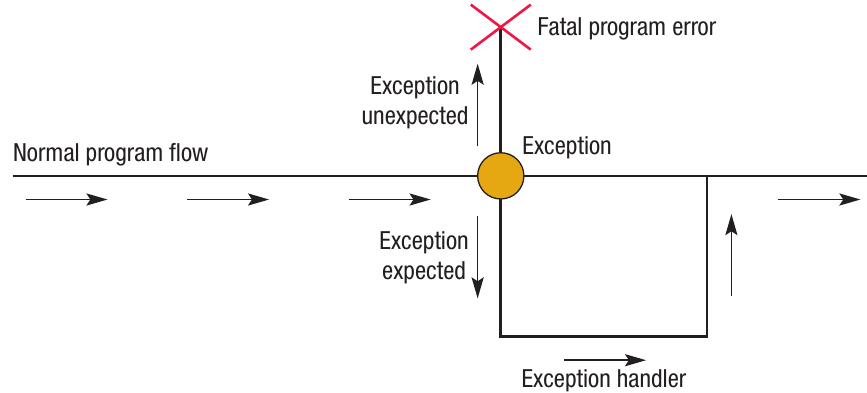
When an exception occurs, the normal flow of the program is interrupted:

Note
The Exception Handling Process:
The exception handling process follows these steps:
- Error thrown: When an error occurs, the current subroutine stops or pauses
- State saved: The current state of the subroutine is saved in memory
- Exception handler executed: The exception handling code (catch block) runs to deal with the error
- Resume execution: After the exception handler completes, the normal subroutine can resume from where it was saved
Just as subroutines can be triggered by events (like button clicks), error-handling blocks of code are triggered whenever specific errors occur.
Expected vs unexpected exceptions
Expected exceptions: These are errors you anticipate might happen and write code to handle. For example, checking for division by zero before performing a calculation.
Unexpected exceptions: These are errors you didn't anticipate. If your code doesn't have a handler for an unexpected exception, it may result in a fatal program error.
Important
Proper exception handling makes your programs more robust and prevents them from crashing when errors occur. It's an essential skill for writing professional-quality software.
Remember!
Summary
Key Points to Remember:
- Subroutines are reusable code blocks that perform specific tasks and help break programs into manageable pieces
- Functions are subroutines that return values - they take input, process it, and send back a result
- Parameters define what data a subroutine expects, while arguments are the actual values passed when calling it
- Local variables only exist within their subroutine and are preferred because they prevent accidental changes, allow name reuse, and free memory when finished
- Global variables are accessible throughout the entire program but should only be used when truly necessary
- Exception handling prevents program crashes by catching and managing errors before they become fatal