Wired and Wireless Networks (AQA GCSE Computer Science): Revision Notes
📚Revision Notes
Wired and wireless networks
How devices connect in networks
For computers and other devices to share information and communicate with each other in a network, they need to be physically or wirelessly linked together. There are two main ways to achieve these connections: through wired connections using cables, or through wireless connections using radio signals.
Understanding wired networks
Wired networks create connections between devices using physical cables. These cables carry data signals directly from one device to another, creating reliable pathways for information to travel. Wired networks are particularly common in offices and buildings where devices stay in fixed positions.
Note
Physical cable connections provide dedicated pathways for data transmission, which is why wired networks typically offer more consistent performance compared to wireless alternatives.
There are two main types of cables used in wired networks:
Copper cables
Copper cables contain individual copper wires that are arranged in pairs and twisted together. This twisting design helps reduce interference from other electronic signals, which makes data transmission more reliable.
These cables work by sending data through electrical signals that travel along the copper wires. The bandwidth (which tells us how much data can be transmitted per second) for copper cables typically ranges from 100 megabits per second (Mbps) up to 1 gigabit per second (Gbps), depending on the cable quality and distance involved.
Most computers come equipped with ethernet ports - special sockets that allow devices to connect directly to wired networks using established networking protocols. This makes copper cable connections very straightforward since you can often use existing infrastructure, such as telephone network wiring already installed in buildings.
Note
Copper cables work best over shorter distances, typically within about 100 metres, making them perfect for connecting devices within a single building or local area network (LAN).
Fibre-optic cables
Fibre-optic cables use a completely different approach - they contain extremely thin glass strands (called fibres) that carry data as pulses of light rather than electrical signals. This light-based system offers several significant advantages over traditional copper wiring.
Because light travels without suffering from electrical interference, fibre-optic cables can maintain signal quality over much longer distances. They can achieve incredibly high bandwidth speeds of up to 100 terabits per second (Tbps) and can transmit data reliably over distances of 100 kilometres or more.
Important
Fibre-optic cables are the backbone of modern internet infrastructure. The undersea cables that connect different continents to create our global internet are made from fibre-optic technology, enabling high-speed data transmission across vast distances without signal degradation.
These impressive capabilities make fibre-optic cables the preferred choice for connecting wide area networks (WANs) that span large geographical areas. However, fibre-optic cables are more expensive to purchase and install compared to copper alternatives, which is why they're typically reserved for long-distance and high-bandwidth applications.
Understanding wireless networks
Wireless networks eliminate the need for physical cables by using radio waves to transmit data between devices. Technologies like Wi-Fi and Bluetooth are common examples of wireless networking that you probably use every day.
Radio waves work well for wireless communication, but they do have natural limitations. The strength of radio signals decreases as they travel further from their transmission source, which means wireless networks are generally effective only over relatively short distances - typically up to 100 metres from a wireless access point (WAP).
Note
Radio waves can experience interference from other radio signals operating on the same or similar frequencies. Additionally, physical obstacles like walls, floors, and furniture can partially block radio signals, which may affect connection quality and speed.
Despite these limitations, radio waves are ideal for mobile devices because they allow users to connect to networks while moving around, as long as they remain within range of a wireless access point. Most wireless networks provide bandwidth of around 300 Mbps, which is sufficient for most everyday computing tasks.
Comparing wired and wireless networks
Understanding the trade-offs between wired and wireless networks helps you choose the right solution for different situations.
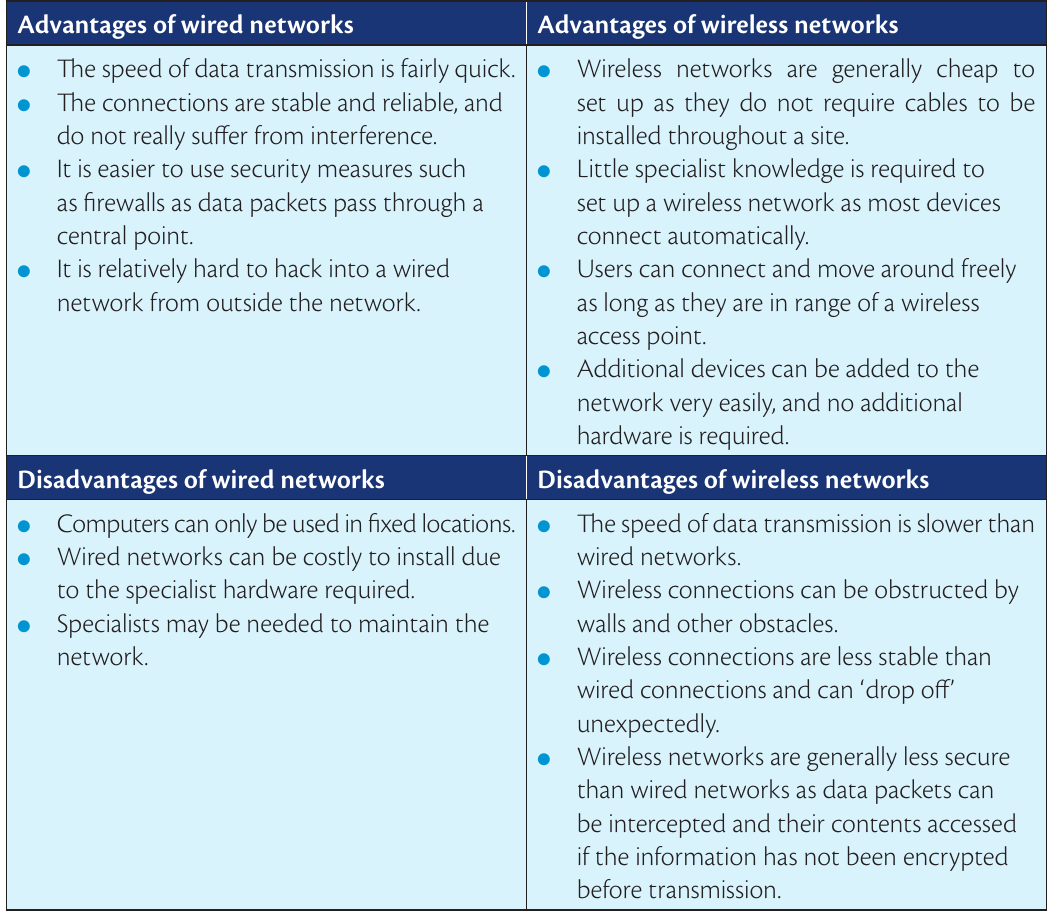
Benefits of wired networks
Wired networks offer several key advantages. Data transmission speeds are typically faster and more consistent since cables provide dedicated pathways for information. The connections remain stable and reliable because they don't suffer from radio interference or signal degradation.
Important
From a security perspective, wired networks are naturally more protected since data travels through physical cables rather than being broadcast through the air. It's much more difficult for unauthorised users to intercept wired network traffic from outside the building.
Drawbacks of wired networks
The main limitations of wired networks relate to flexibility and installation costs. Computers and devices can only be used in fixed locations where network cables are available, which restricts mobility. Installing wired networks can be expensive and time-consuming, especially when specialist hardware and expert knowledge are needed. You may need to hire professionals to run cables through buildings and set up the network infrastructure properly.
Benefits of wireless networks
Wireless networks shine when it comes to convenience and flexibility. They're generally much cheaper and easier to set up initially since you don't need to install cables throughout a building. Most devices can connect automatically once the wireless network is configured.
Users enjoy complete freedom of movement within the wireless coverage area, making wireless ideal for laptops, tablets, and smartphones. Adding new devices to the network is simple and doesn't require any additional hardware installation.
Drawbacks of wireless networks
Wireless networks typically provide slower data transmission speeds compared to wired alternatives. The connections can be easily disrupted by physical obstacles like walls, or by interference from other electronic devices operating on similar radio frequencies.
Important
Wireless connections are generally less stable than wired ones and may unexpectedly disconnect or "drop off" without warning. Security can also be more challenging since wireless signals can potentially be intercepted by unauthorised users if the data hasn't been properly encrypted before transmission.
Summary
Key Points to Remember:
-
Wired networks use physical cables (copper or fibre-optic) to create fast, reliable connections that work best for fixed locations and high-security applications
-
Copper cables are cost-effective for short distances and local networks, while fibre-optic cables excel at long-distance, high-speed connections
-
Wireless networks use radio waves to provide flexible, mobile connections that are easy to set up but may have speed and security limitations
-
Choose wired when you need maximum speed, security, and reliability in fixed locations
-
Choose wireless when mobility, easy setup, and cost-effective installation are priorities