Analogue sound (Edexcel GCSE Computer Science): Revision Notes
📚Revision Notes
Analogue sound
What is analogue sound?
Sound exists naturally as continuous waves that travel through air, water, or other materials. When we want to store or transmit these sounds digitally, we need to convert them from their natural analogue form into digital data made up of 1s and 0s.
Analogue sound recordings capture the continuous changes in air pressure as voltage changes. These voltage variations directly represent the sound waves, creating a smooth, continuous signal that mirrors the original sound.
Note
The key difference between analogue and digital sound is that analogue signals are continuous and smooth, while digital signals consist of discrete samples taken at specific time intervals.
Understanding sound sampling
To convert analogue sound into digital format, we use a process called sampling. Think of this like taking photographs of a moving object - the more photos you take per second, the smoother the movement appears when you play them back.
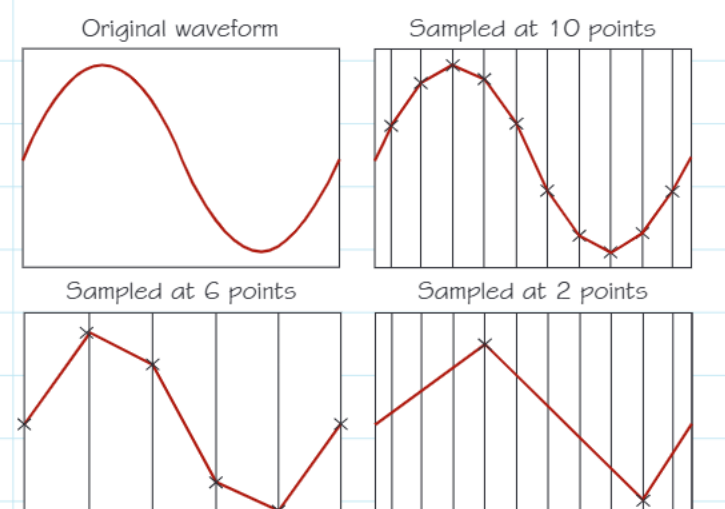
During sampling, we measure the sound wave's amplitude (height) at regular, fixed time intervals. Each measurement is called a sample, and the time between each sample is the sample interval. The number of samples taken per second is called the sample rate.
Note
Key Sampling Principle
More samples per second means better quality reproduction of the original sound wave. With fewer samples, we lose detail and the reconstructed sound becomes less accurate.
How digital sound recording works
Digital devices like computers and phones use components called transistors that can only be in two states - on or off. This means they cannot continuously reproduce the smooth changes of analogue signals.
Instead, digital recording works by taking "snapshots" of the sound wave at regular intervals, then playing these snapshots back one after another very quickly. This creates an illusion of continuous sound, similar to how an animated film uses many still images played rapidly to create the illusion of movement.
These digital snapshots are called samples, and when played back in sequence, they reconstruct an approximation of the original analogue sound.
Understanding bit depth
Bit depth refers to the number of binary digits (bits) used to store each sample of sound. This is crucial because it determines how precisely we can measure each sample's amplitude.
The more bits we use, the more precise our measurements become:
- 8 bits: Allows for 256 different volume levels
- 16 bits: Allows for 65,536 different volume levels
- 24 bits: Allows for 16.7 million different volume levels
Important
Higher bit depth means better sound quality because we can capture more subtle variations in the sound wave's amplitude. This is why professional audio recordings often use 24-bit depth rather than the standard 16-bit used on CDs.
Calculating audio file sizes
The size of a digital audio file depends on three main factors, which we can calculate using this formula:

Note
Factors Affecting File Size
Larger file sizes result from:
- Higher sample rates (more samples per second)
- Greater bit depth (more bits per sample)
- Longer recording duration
For stereo recordings (like most music), remember that there are two audio channels (left and right), so the total file size will be doubled compared to a mono recording.
Common sample rates and frequencies
Different audio formats use different sample rates:
- CD audio: 44,100 samples per second (44.1 kHz)
- Blu-ray audio: 96,000 samples per second (96 kHz)
Understanding frequency measurements:
- 1 hertz (Hz) = 1 cycle per second
- 1 kilohertz (kHz) = 1,000 Hz
Higher sample rates capture more detail but create larger files.
The concept of fidelity
Fidelity describes how accurately a digital copy matches the original analogue sound. Better fidelity means the digital version sounds more like the original.
Important
Important Limitation
It's important to understand that analogue signals can never be perfectly reproduced in digital format. There will always be some loss of information during the conversion process, though with sufficient sample rate and bit depth, this loss can be minimised to imperceptible levels.
Worked example
Example
Worked Example: Calculating Audio File Size
Let's calculate the file size for a digital audio recording:
Problem: Find the size in megabytes of a 3-minute stereo audio file recorded at 44.1 kHz sample rate with 16-bit depth.
Solution:
- Sample rate = 44,100 samples per second
- Bit depth = 16 bits per sample
- Recording length = 3 minutes = 180 seconds
- Stereo = 2 channels
Step 1: Apply the formula
Step 2: Substitute the values
Step 3: Convert to megabytes
- Convert bits to bytes: bytes
- Convert bytes to megabytes: MB
Answer: The file size is approximately 30.3 MB
Summary
Key Points to Remember:
- Analogue sound is continuous and smooth, while digital sound uses samples taken at regular intervals
- Higher sample rates capture more detail but create larger files
- Bit depth determines how precisely each sample can be measured - more bits mean better quality
- File size depends on sample rate, bit depth, recording length, and number of channels (mono vs stereo)
- Fidelity measures how closely the digital copy matches the original analogue sound
- Perfect reproduction of analogue sound in digital format is impossible, but high-quality approximations are achievable