Introduction to HTML (Grade 11 NSC Matric Computer Application Technology): Revision Notes
📚Revision Notes
Introduction to HTML
Understanding HTML fundamentals
HTML forms the backbone of every website on the internet. Whether you're browsing social media, online shopping, or reading news articles, HTML is working behind the scenes to structure and display all the content you see. Learning HTML is like learning the fundamental language of the web - it's an essential skill that opens doors to understanding how websites work and how you can create your own.
HTML is used to create the basic structure of web pages, telling browsers how to display text, images, links, and other content. Think of it as the skeleton of a webpage - it provides the framework that everything else builds upon. In this unit, you'll discover what HTML is, how HTML editors can make your coding easier, and the basic rules (syntax) that govern how HTML works.
Note
Web browsers interpret HTML code to display the visual websites you see every day. Without HTML, the internet as we know it wouldn't exist - every webpage, from simple blogs to complex social media platforms, relies on HTML as its foundation.
What is HTML?
HTML is an acronym that represents HyperText Markup Language. At first glance, this might seem like technical jargon, but let's break it down into simpler terms to understand what each part means:
HyperText refers to HTML's ability to create clickable links that connect different web pages or sections together. When you click on a link and jump to another page or section, you're experiencing hypertext in action. This is similar to how you might use hyperlinks in a Microsoft Word document to navigate between different sections, but HTML extends this concept across the entire internet.
Note
Understanding HyperText
The "HyperText" in HTML is what makes the web truly interconnected. Unlike traditional documents that you read from beginning to end, hypertext allows you to jump between different pieces of information instantly. This revolutionary concept transformed how we access and consume information online.
Markup Language means that HTML uses special codes to "mark up" or format regular text in ways that web browsers can understand and display properly. These special codes tell the browser things like "make this text bold," "create a heading here," or "insert an image at this spot." It's like giving instructions to the browser about how to present your content to visitors.
Note
Understanding Markup Language
Think of markup language like annotations in a book. Just as you might underline important text or add notes in the margins, HTML uses tags to annotate content and tell the browser how to display it. The browser reads these annotations and formats the content accordingly.
Together, these components make HTML a powerful tool for creating interactive, structured web content that can be understood and displayed by any web browser around the world.
What is an HTML editor?
An HTML editor is a specialised text editing programme designed to make writing HTML code easier and more efficient. While you could technically write HTML in any basic text editor, HTML editors provide helpful features that save time and reduce errors when creating web pages.
Notepad++ is one of the most popular free HTML editors available. It offers several advantages over basic text editors, including syntax highlighting (which colours different parts of your code to make it easier to read), line numbers for easy navigation, and error detection features. Other excellent free options include Brackets and Atom, each offering their own unique features to help streamline the coding process.
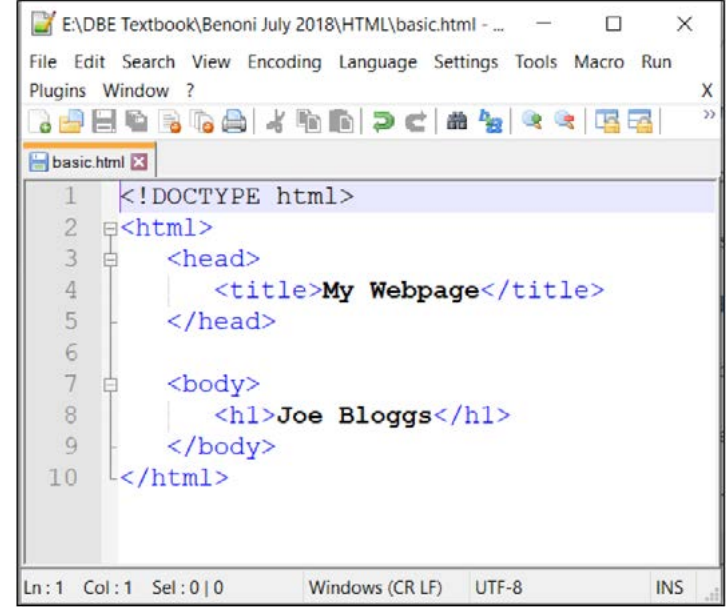
The screenshot above shows Notepad++ in action, displaying a simple HTML document. Notice how the code is colour-coded - this syntax highlighting makes it much easier to spot different HTML elements and identify any potential mistakes in your code structure.
Important
File Extension Warning
When saving your work in Notepad++, remember to change the file extension from '.txt' to '.html' so that web browsers will recognise and properly display your web page. This is a common mistake that can prevent your webpage from displaying correctly.
Using an HTML editor like Notepad++ means you don't need to purchase expensive software to start creating websites. It's more sophisticated than the basic Notepad application that comes with Windows, offering features specifically designed for coding.
Beyond Notepad++, there are more advanced HTML editors available, such as Adobe DreamWeaver, KompoZer, and Microsoft Expression Web. These tools often include visual design interfaces that allow you to create web pages without writing code directly. However, for learning purposes in Computer Applications Technology, you'll be writing HTML code directly to understand how it works fundamentally.
Note
Visual vs. Code Editors
While visual HTML editors can create websites without writing code, learning to write HTML by hand gives you complete control over your code and a deeper understanding of how websites work. This foundation is invaluable for troubleshooting problems and creating more sophisticated web pages later.
HTML syntax
HTML syntax refers to the set of rules that govern how HTML code should be written and structured. Think of syntax as the grammar rules of the HTML language - just as English has rules about sentence structure and punctuation, HTML has specific rules about how elements should be formatted and organised.
Understanding proper HTML syntax is crucial because web browsers rely on these rules to interpret and display your web pages correctly. If you don't follow the syntax rules properly, your website might not display as intended, or worse, it might not work at all. This becomes especially important as websites become more complex and different pages depend on each other to function properly.
Important
Why Proper Syntax Matters
Following HTML syntax rules isn't just about best practices - it's essential for functionality. Browsers are very literal in how they interpret code. A single missing closing tag or misplaced character can break an entire webpage or cause it to display incorrectly across different browsers.
The fundamental building blocks of HTML syntax are elements and tags. All HTML elements are created using pairs of tags enclosed in angled brackets (< >).
For example, to create a heading, you might write <h1>My Heading</h1>.
The first tag tells the browser where the heading starts, and the closing tag indicates where it ends. Notice how the closing tag includes a forwards slash to distinguish it from the opening tag.
Example
Worked Example: Basic HTML Tag Structure
Let's break down a simple HTML heading:
-
Opening tag (tells browser "start a main heading here")
-
Content (the actual text that will be displayed)
-
Closing tag (tells browser "end the main heading here")
The forwards slash (/) in the closing tag is crucial — it signals to the browser that this element is ending.
Each HTML element serves a specific purpose and has its own syntax requirements. Links, lists, images, and other web page components all have their own unique tag structures that must be written correctly for the browser to understand and display them properly. The syntax also determines the hierarchy and relationship between different elements on your page.
HTML syntax is standardised by the World Wide Web Consortium (W3C), an international organisation that develops and maintains web standards. The W3C has released many versions of HTML over the years, with each new version adding features and improvements. The current standard is HTML5, which includes many modern features for creating interactive and multimedia-rich websites.
While you'll be learning an earlier version of HTML in this course, the fundamental concepts and syntax rules remain consistent across versions. This foundation will prepare you well to adapt to newer versions of HTML as web technology continues to evolve.
Note
HTML Version Evolution
HTML has evolved significantly since its creation, but the core principles remain the same. Learning older versions first helps you understand the fundamental concepts before moving on to more advanced features. It's like learning basic arithmetic before calculus - the foundational knowledge is essential.
Summary
Key Points to Remember:
- HTML stands for HyperText Markup Language and forms the foundation of all websites on the internet
- HyperText enables clickable links between pages, while Markup Language provides formatting instructions for browsers
- HTML editors like Notepad++ make coding easier with features like syntax highlighting and error detection
- HTML syntax consists of elements and tags enclosed in angled brackets (< >) that must follow specific rules
- The W3C maintains HTML standards, with HTML5 being the current version, though learning earlier versions provides a solid foundation