Calculating Area (Grade 11 NSC Matric Geography): Revision Notes
📚Revision Notes
Calculating Area
Area represents the surface space that a geographical feature occupies. This is a fundamental skill that geographers use regularly when analysing spatial features on maps and photographs. You might need to calculate the size of urban land-use zones, drainage basins, or other geographical features for your studies and exams.
Understanding area calculations
When working with area calculations in geography, you'll encounter two main types of features that require different calculation approaches. Understanding these differences is essential for accurate measurements.
Note
Key terms you need to know:
- Area: The surface space occupied by any geographical feature
- Regular features: Square or rectangular shapes that are typically human-made structures
- Polygon: A closed plane figure with three or more line segments as boundaries
- Irregular features: Natural features that don't follow regular geometric patterns
Area of regular features
Regular features are typically square or rectangular in shape and are often human-made structures. These features follow predictable geometric patterns, making them easier to calculate using basic mathematical formulas.
Example
Step-by-step calculation process
Step 1: Use a ruler to measure both the length and breadth of the feature on the map, recording your measurements in centimetres.
Step 2: Convert these map measurements to actual ground distances using the map's scale. This conversion is crucial because you need real-world measurements, not just map measurements.
Step 3: Apply the area formula to calculate the total area. The basic formula is or .
Always express your final answer in appropriate square units such as square metres (m²), square kilometres (km²), or hectares (ha).
Understanding unit conversions
It's important to remember that 1 hectare equals 100 metres × 100 metres, which equals 10,000 square metres. This conversion will help you express areas in the most appropriate units for different sized features.
Example
Worked Example: Calculating a repair quay area
Let's examine how this process works in practice. Consider a repair quay in Durban harbour that appears as a regular rectangular feature on a topographical map.
Step 1: Measure on the map
- Length: 4 centimetres
- Breadth: 1.3 centimetres
Step 2: Convert using map scale (1:50,000)
- 1 centimetre on the map = 0.5 kilometres on the ground
- Length on ground: kilometres
- Breadth on ground: kilometres
Step 3: Calculate the area
Area of irregular features
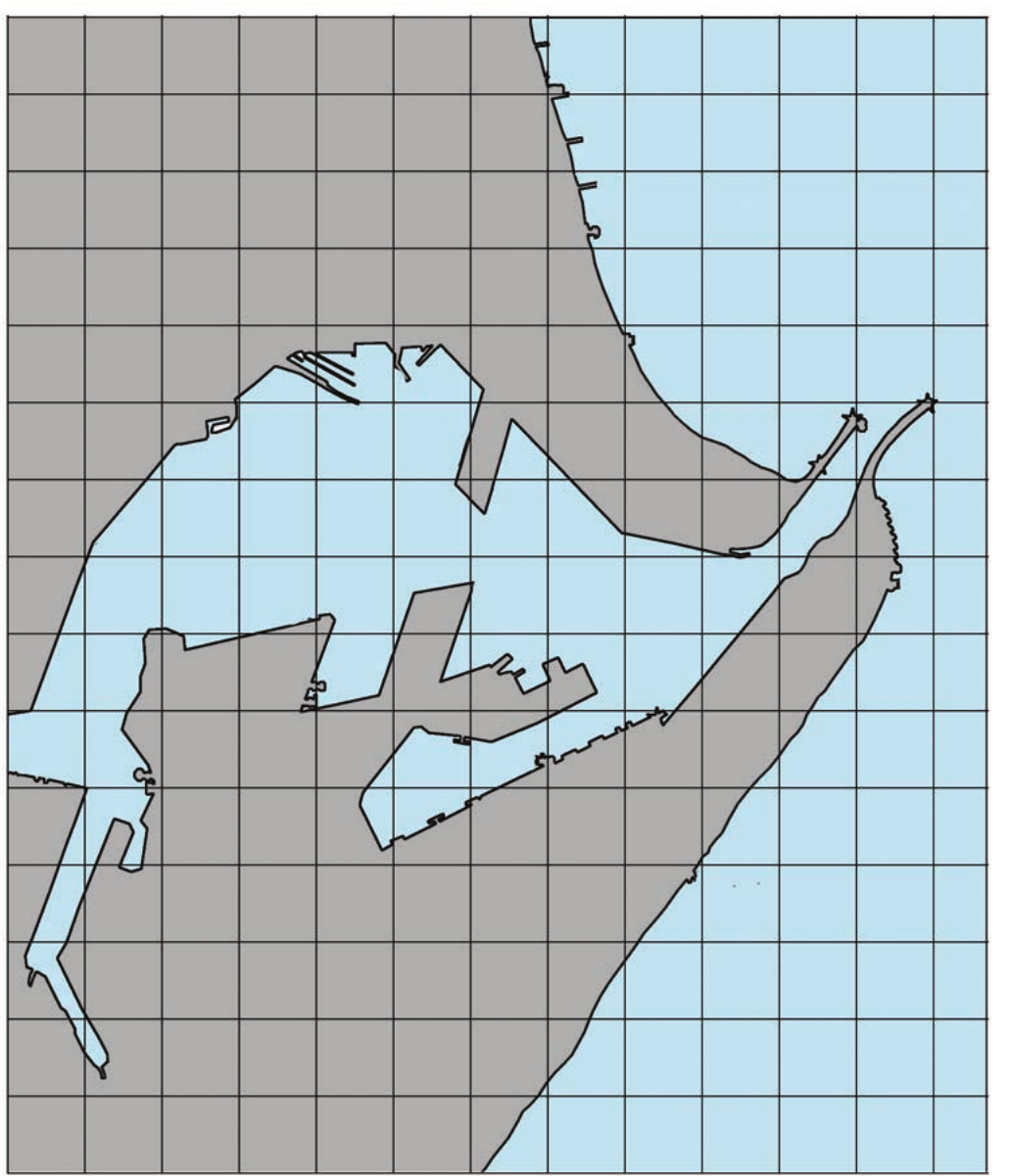
Most natural geographical features have irregular, polygon-like shapes that don't follow the neat rectangular patterns of human-made structures. These features require a different calculation approach using the grid method.
Example
The grid overlay method
Step 1: Trace the irregular feature onto a sheet of paper to create a clear outline of the area you need to measure.
Step 2: Draw a grid pattern over the traced feature. For larger features, use 1 centimetre × 1 centimetre grid squares. For smaller features, use 0.5 centimetre × 0.5 centimetre squares for greater accuracy. Each grid square represents a specific area on the ground based on your map scale.
Step 3: Count all the complete squares that fall entirely within the feature boundary. Mark each square as you count it to avoid double-counting or missing squares.
Step 4: Count all the partially filled squares (squares that are only partly covered by the feature). For each partially filled square, either divide the total by two or estimate how many complete squares they would make if combined.
Step 5: Add your complete squares to your partially filled squares (or their equivalent) to get the total number of squares.
Step 6: Multiply this total by the area that each square represents to get your final area measurement.
Note
Understanding grid calculations
When working with a topographical map, each 1 cm × 1 cm grid square typically represents 0.25 km² because . You'll need to adjust this calculation based on your specific map scale.
Example
Worked Example: Calculating harbour area
Using the grid method on an irregular harbour feature:
Step 1: Count the squares
- Complete squares: 10
- Partially filled squares: 34
Step 2: Calculate equivalent complete squares
- Partially filled squares ÷ 2 = equivalent complete squares
Step 3: Find total squares
- Total squares:
Step 4: Calculate final area
- Area calculation:
Practical tips for accurate calculations
When calculating areas, always remember to work systematically and double-check your measurements. Start with careful measurement using a ruler, ensure accurate scale conversion, and apply the appropriate calculation method for your feature type.
Note
Method Selection Guidelines
For regular features, the length × breadth formula provides quick and accurate results. For irregular features, the grid method gives you reliable area measurements even when dealing with complex shapes.
Important
Critical Unit Conversion Rule
Pay special attention to units throughout your calculations. Convert everything to the same units before calculating, and express your final answer in the most appropriate unit for the size of your feature.
Summary
Key Points to Remember:
- Area calculation is essential for analysing spatial features on maps and photographs
- Regular features use the simple formula: , but require scale conversion first
- Irregular features need the grid overlay method with complete and partial square counting
- Always convert map measurements to ground measurements using the map scale before calculating
- Express your final answer in appropriate square units (m², km², or hectares) depending on the feature size