Dummy Activities (HSC SSCE Mathematics Standard): Revision Notes
📚Revision Notes
Dummy Activities
What are dummy activities?
In network diagrams for project planning, we sometimes face a challenge when two activities share some, but not all, of their immediate predecessors. A dummy activity is an imaginary activity used to correctly show these complex predecessor relationships in the network diagram.
Note
Think of dummy activities as invisible connectors that help us represent the true dependencies between tasks without breaking the rules of network diagrams. They are a crucial tool for accurately modeling complex project relationships.
When do we need dummy activities?
Dummy activities are needed in a specific situation: when two different activities share at least one immediate predecessor, but each also has at least one predecessor that the other doesn't have.
Let's look at a simple example to understand this better:
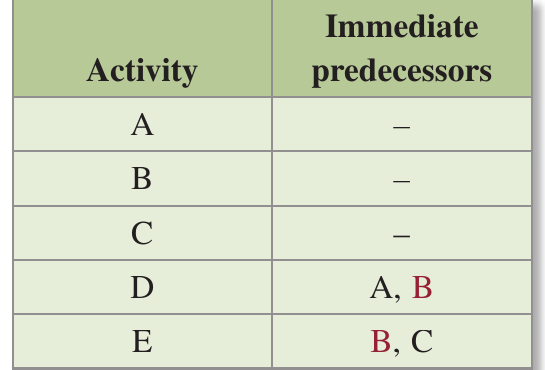
In this activity chart, notice that:
- Activity has immediate predecessors and
- Activity has immediate predecessors and
- Both activities share predecessor , but each has another predecessor the other doesn't have
The problem without dummy activities
When we try to draw a network diagram, we face a difficulty: each activity can only be represented by one edge (arrow) in the diagram. However, activity needs to follow from both and , and activity needs to follow from both and .
Important
If we try to draw this without dummy activities, we cannot properly show all the predecessor relationships. We would need multiple edges for the same activity, which isn't allowed in network diagrams. This is the fundamental problem that dummy activities solve.
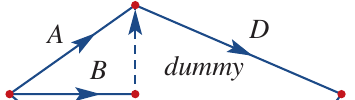
The solution: using dummy activities
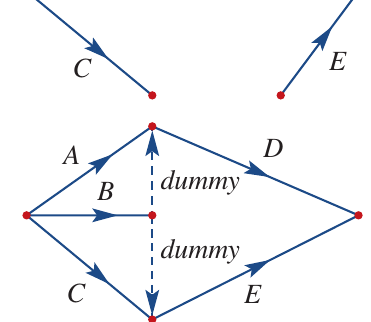
The solution is to draw the diagram with each activity starting after one of its immediate predecessors, and using a dummy activity to represent the connection to the other predecessor.
Note
In this corrected diagram:
- The dummy activity from to ensures that follows both and
- The dummy activity from to ensures that follows both and
This approach maintains all the necessary dependencies while respecting the rules of network diagrams.
Key properties of dummy activities
Understanding these important properties will help you use dummy activities correctly:
Duration: A dummy activity takes no time to complete. Its duration is always because it represents a logical connection, not a real task.
Representation: Dummy activities are shown as dotted lines (rather than solid arrows) in network diagrams. This visual difference makes it clear they are not real activities.
Purpose: A dummy activity connects the end of a shared immediate predecessor to the start of an activity that has additional immediate predecessors.
Labelling: While you can label dummy activities as "dummy" for clarity in your own diagrams, this label is not required. The dotted line itself indicates it's a dummy activity.
Note
The zero duration is the most important property to remember - dummy activities represent logical dependencies, not work that requires time to complete.
Special case: multiple activities with the same predecessors
Note
If two activities share exactly the same immediate predecessors and end at the same node, you don't need a dummy activity. Instead, simply draw multiple lines between the two nodes to represent the different activities.
Worked example 1: Drawing a network diagram with a dummy activity
Let's work through how to construct a network diagram when dummy activities are needed.
Example
Worked Example: Drawing a Network Diagram with a Dummy Activity
Question: Draw a network diagram from this activity chart:
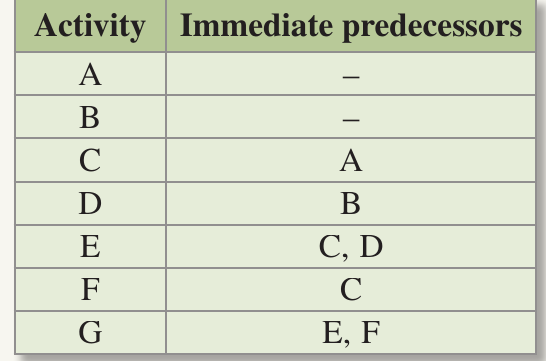
Solution:
Step 1: Identify activities with no predecessors.
- Activities and have no predecessors, so they will lead from the start vertex.
Step 2: Identify activities that lead to the finish.
- Activity is not a predecessor for any other activity, so it will lead to the end vertex.
Step 3: Determine where a dummy activity is needed.
- Activity has predecessors and
- Activity has predecessor only
- Activities and share predecessor , but has an additional predecessor that doesn't have
- Therefore, a dummy activity is required from the end of activity to the start of activity
Step 4: Draw the complete network diagram.
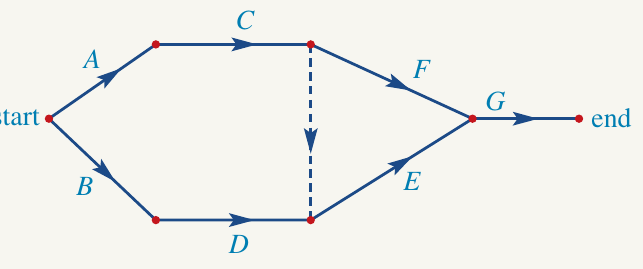
The dummy activity ensures that correctly follows both and , while only follows .
Worked example 2: Creating an activity chart from a network diagram
Sometimes you need to work backwards, creating an activity chart from a network diagram that contains dummy activities.
Example
Worked Example: Creating an Activity Chart from a Network Diagram
Question: Construct an activity chart for this network diagram:
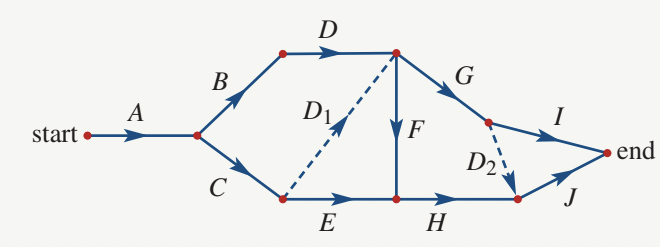
Solution:
Step 1: Create a table with rows for each activity.
Step 2: For each activity, identify its immediate predecessors.
- Look at what leads directly into each activity
- Include connections made by dummy activities
Step 3: Consider the effect of dummy activities.
- Dummy activity makes activity a predecessor of activities and (as well as )
- Dummy activity makes activity a predecessor of activity (as well as )
Step 4: Complete the activity chart.
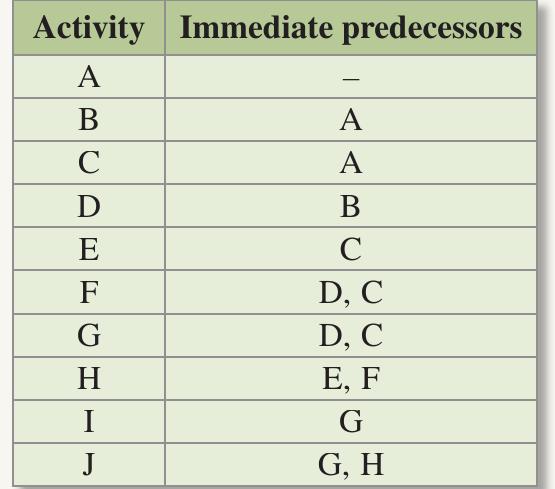
Notice how the dummy activities ensure that all the predecessor relationships are correctly captured in the activity chart.
Scheduling on network diagrams
Activity charts often include the duration of each activity - the length of time it takes to complete. Including time information in project planning is called scheduling.
Scheduling helps project managers:
- Hire staff for the right periods
- Book equipment when needed
- Estimate overall project costs
- Determine the total project completion time
On a network diagram, we show scheduling using weighted edges. The number (weight) on each edge indicates the duration of that activity.
Important
Important rule: The weight of dummy activities is always because they represent logical connections, not real tasks that take time.
This is a critical point to remember when drawing scheduled network diagrams - forgetting to label dummy activities with is a common mistake.
Worked example 3: Scheduling on a network diagram
Let's see how to draw a network diagram when durations are included.
Example
Worked Example: Scheduling on a Network Diagram
Question: Draw a network diagram from this activity chart:
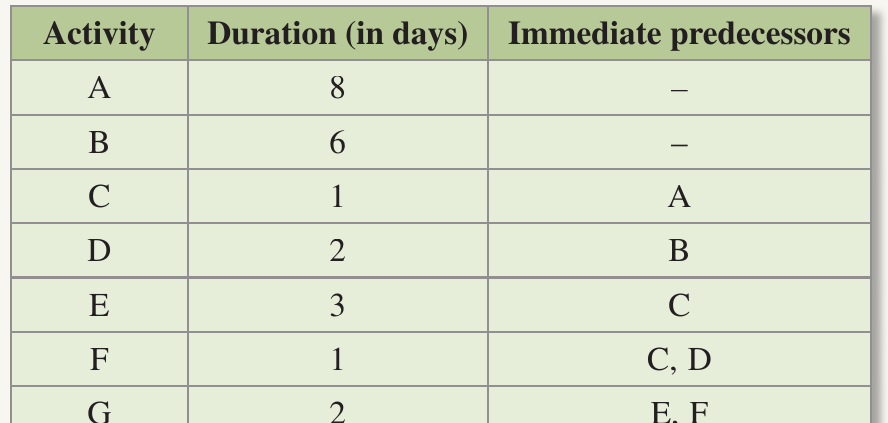
Solution:
Step 1: Identify starting and ending activities.
- Activities and have no predecessors, so they lead from the start vertex
- Activity leads to the end vertex
- Label each edge with its duration
Step 2: Analyse predecessor relationships.
- Activity has predecessors and
- Activity has predecessor only
- Activities and share predecessor , but has additional predecessor
- Activity has predecessors and (these are not shared with any other activity)
Step 3: Draw the network diagram with a dummy activity.
A dummy activity is required from the end of activity to the start of activity to show that and share immediate predecessor . Remember to label the dummy activity with weight .
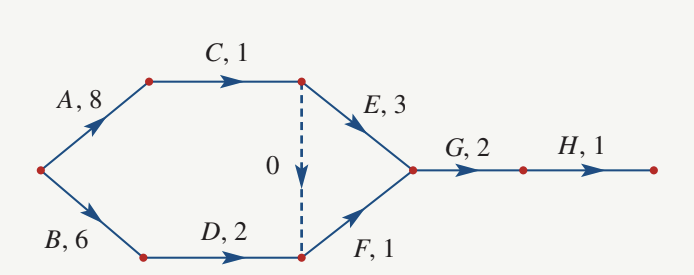
The complete network diagram shows:
- Activities labelled with their letters and durations (e.g., )
- The dummy activity as a dotted line with weight
- All predecessor relationships correctly represented
Summary
Summary
Key Points to Remember:
- Dummy activities are needed when two activities share some, but not all, of their immediate predecessors
- Dummy activities are imaginary - they represent logical connections, not real tasks
- Dummy activities have zero duration - they take no time to complete
- Dummy activities are shown as dotted lines on network diagrams to distinguish them from real activities
- A dummy activity connects the end of a shared immediate predecessor to the start of an activity that has additional predecessors
- When scheduling, always label dummy activities with weight