The Basics of a Matrix (VCE SSCE General Mathematics): Revision Notes
📚Revision Notes
The Basics of a Matrix
What is a matrix?
A matrix is a rectangular arrangement of numbers organized in rows and columns. Matrices are incredibly useful for organizing and presenting data in a structured way.
Think of a matrix as a table that helps us keep track of related information. For example, imagine a market stall that operates on Fridays and Saturdays. We can record their sales of shirts, jeans, and belts in a matrix:

To understand this matrix better, let's look at how rows and columns work:
Rows run horizontally (left to right):
- Row contains Friday's sales:
- Row contains Saturday's sales:
Columns run vertically (top to bottom):
- Column shows shirts sold:
- Column shows jeans sold:
- Column shows belts sold:
Note
From this matrix, we can extract useful information:
- On Friday, 8 pairs of jeans were sold
- On Saturday, 1 belt was sold
- Total items sold on Friday:
- Total belts sold across both days:
Order of a matrix
The order (or size) of a matrix tells us its dimensions. We express this as:
Important
Always write the number of rows first, then the number of columns.
For the market stall matrix above, we have rows and columns, so the order is (read as "two by three").
Note
Exam tip: Remember "RC Cola" - Rows then Columns! This helps you remember the correct order when describing matrix dimensions.
Examples of matrix orders
Let's look at matrices of different sizes:
- A matrix with row and columns has order 1 × 4
- A matrix with rows and columns has order 3 × 2
- A matrix with rows and columns has order 4 × 4
Elements of a matrix
The individual numbers within a matrix are called elements. Each element has a specific position that we can identify using subscript notation.
Element notation
We use lowercase letters with subscripts to identify elements. For a matrix called , we write:
The first subscript () tells us the row number, and the second subscript () tells us the column number.
Example: Consider the matrix:
- Element is in row , column , and its value is 4
- Element is in row , column , and its value is 7
- Element is in row , column , and its value is 3
Worked example: Interpreting matrix elements
Example
Worked Example: Interpreting Matrix Elements
Matrix shows the number of boys and girls in Years to at a particular school.
where rows represent Years , , and respectively, and columns represent Boys and Girls respectively.
a) Give the order of matrix .
Count the rows and columns:
- Number of rows = (Year , Year , Year )
- Number of columns = (Boys, Girls)
Order = 3 × 2
b) What information is given by the element ?
The element is in row (Year ) and column (Girls).
This tells us: There are 63 girls in Year 10.
c) Which element gives the number of girls in Year ?
Year is represented by row , and Girls are in column .
Therefore, element gives the number of Year 12 girls.
d) How many boys are there in total?
We need to add all values in the Boys column (column ):
Total number of boys = 144
e) How many students are in Year ?
We need to add all values in row (Year ):
Total students in Year 11 = 102
Types of matrices
Matrices come in different forms depending on their dimensions and properties. Let's explore the main types.
Row matrices
A row matrix consists of a single horizontal row of elements. Its order is always , where is the number of columns.
Example: The Friday sales from our market stall can be written as:
This is a 1 × 3 row matrix.
Column matrices
A column matrix consists of a single vertical column of elements. Its order is always , where is the number of rows.
Example: The jeans sales from our market stall can be written as:
This is a 2 × 1 column matrix.
Square matrices
In a square matrix, the number of rows equals the number of columns. These matrices have orders like , , , and so on.
Examples of square matrices:
matrix:
matrix:
matrix:
Note
Square = Same: Square matrices always have the same number of rows and columns, making them easy to identify!
Symmetric matrices
A symmetric matrix is a special type of square matrix where elements can be swapped according to this rule:
This means the element in row , column equals the element in row , column .
Example: The matrix shown above is symmetric because:
- and ✓
- and ✓
- and ✓
Note
Symmetric matrices mirror across their main diagonal (the line from top-left to bottom-right).
Working with matrices on calculators
Modern graphing calculators can store and manipulate matrices, making calculations much easier. Here's what you need to know:
Creating a matrix
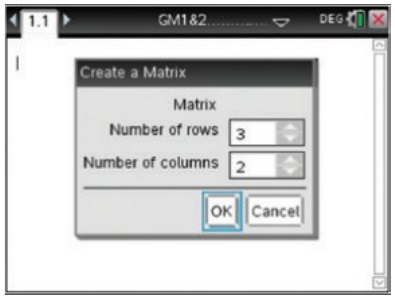
To create a matrix on a calculator:
- Access the matrix creation tool
- Specify the number of rows
- Specify the number of columns
- Enter the values for each position
Displaying matrices
Once entered, calculators can display the complete matrix and allow you to:
- View specific elements
- Perform calculations
- Store matrices with variable names (like , , )
To find a specific element, use notation like b[2,1] to access element .
Important
Exam tip: While calculators are helpful, make sure you understand the underlying concepts. Exam questions may require you to work with matrices by hand.
Remember!
Summary
Key Points to Remember:
- A matrix organizes numbers in rows (horizontal) and columns (vertical)
- The order of a matrix is always written as rows × columns (remember: "RC Cola")
- Elements are identified using subscript notation: means row , column
- Special matrix types include:
- Row matrices ()
- Column matrices ()
- Square matrices ()
- Symmetric matrices (where )
- Matrices are practical tools for organizing real-world data like sales figures, student numbers, and other tabular information