Number Bases (AQA A-Level Computer Science): Revision Notes
📚Revision Notes
Number Bases
Introduction to digital data representation
Computers work with data in a digital format, which means they represent everything as distinct values using zeros and ones. This is called binary data, and it forms the foundation of how computers process information. In this topic, you'll explore how binary works and how it connects to other number systems such as decimal and hexadecimal.
Note
Understanding number bases is fundamental to computer science. As you work through this topic, you'll discover why computers use binary, how different number systems relate to each other, and how to convert between them - essential skills for programming and understanding how computers work at a low level.
The bit
A bit is the smallest unit of data in computing. It stands for binary digit and can have only one of two values: 0 or 1. Think of a bit as an on/off switch - the computer either receives an electrical signal (1) or doesn't receive one (0).
Computers process data using microprocessors (also called chips or silicon chips). These chips contain millions of tiny electronic circuits. When electricity flows through these circuits, the processor interprets this as different signals. The processor can recognise whether electricity is flowing (on) or not flowing (off). This simple two-state system is what we call binary.
Each binary digit is either:
- 0 representing "off" (no signal)
- 1 representing "on" (signal present)
By combining these zeros and ones at very high speeds, computers can represent text, numbers, sounds, images and everything else you use your computer for. Modern processors work at speeds measured in gigahertz (GHz). For example, a 2 GHz processor receives 2 billion electrical pulses every second, allowing it to process vast amounts of binary data incredibly quickly.
Note
Why Binary?
Computers use binary because it's the most reliable way to represent data electronically. It's much easier for a circuit to distinguish between two states (on/off) than to accurately detect multiple voltage levels. This makes binary perfect for the physical reality of how computers work.
The byte
While a single bit can only represent two values, computers need to represent much more information than just on or off. This is where the byte comes in.
A byte is a group of bits, typically 8 bits grouped together. This group of 8 bits forms a useful unit because it provides enough different combinations to represent all the characters you can type on a keyboard.
The number of different values you can represent with bits follows a pattern based on powers of 2:
- One bit gives 2 possibilities: 0 and 1 (written as )
- Two bits give 4 possibilities: 00, 01, 10, 11 (written as )
- Three bits give 8 possibilities ()
- Four bits give 16 possibilities ()
- Eight bits give 256 possibilities ()
Important
The Permutation Formula
Each time you add one more bit, you double the number of possible combinations. The formula is:
where is the number of bits.
This exponential growth means that adding just a few bits dramatically increases the number of values you can represent.
Eight bits (one byte) provides different combinations. This is sufficient to represent every letter of the alphabet (both uppercase and lowercase), all digits, punctuation marks, and other keyboard characters. That's why one byte typically represents one character.
Example
Calculating Permutations with Different Bit Lengths
Let's see how the number of possible combinations grows as we add more bits:
16 bits: permutations
24 bits: permutations (approximately 16.8 million)
32 bits: permutations (over 4 billion)
Notice how rapidly the possibilities increase! This is why modern systems use 32-bit or 64-bit architectures - they can handle enormous amounts of data.
Units of data storage
When measuring computer memory and storage capacity, we combine bytes into larger units. However, there's an important distinction between two types of units: binary prefixes and decimal prefixes.
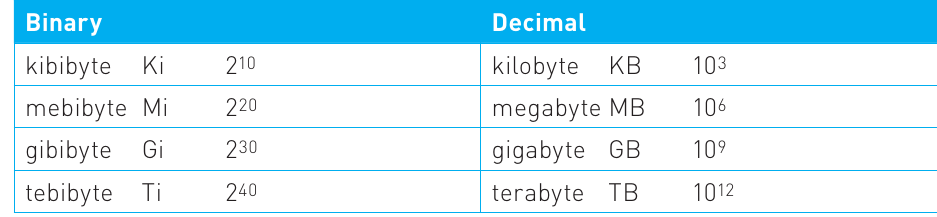
Binary prefixes are based on powers of 2 and are more accurate for describing computer memory. These use the terms kibibyte, mebibyte, gibibyte, and tebibyte:
- Kibibyte (Ki) = bytes = 1,024 bytes
- Mebibyte (Mi) = bytes = 1,048,576 bytes
- Gibibyte (Gi) = bytes
- Tebibyte (Ti) = bytes
Decimal prefixes are based on powers of 10 and are often used in marketing for storage devices. These use the familiar terms kilobyte, megabyte, gigabyte, and terabyte:
- Kilobyte (KB) = bytes = 1,000 bytes
- Megabyte (MB) = bytes = 1,000,000 bytes
- Gigabyte (GB) = bytes
- Terabyte (TB) = bytes
The table below shows the comparison:
Important
Why the Difference Matters
Notice that the binary values (Ki, Mi, Gi, Ti) are slightly larger than their decimal equivalents (KB, MB, GB, TB). For example, 1 kibibyte (1,024 bytes) is larger than 1 kilobyte (1,000 bytes).
This difference becomes more significant with larger units. A "500 GB" hard drive advertised by manufacturers (using decimal) actually contains less storage than 500 GiB (binary). This is why your new hard drive might appear smaller than expected when viewed in your operating system!
In practice:
- Use binary prefixes (Ki, Mi, Gi, Ti) when discussing RAM or technical specifications
- Storage manufacturers often use decimal prefixes (KB, MB, GB, TB) for marketing purposes
Understanding number bases
A number base (also called a radix) indicates how many different digits are available in a particular number system. The base determines which digits can be used and how place values work in that system.
Humans typically use decimal, which is base 10. This means it uses 10 different digits: 0, 1, 2, 3, 4, 5, 6, 7, 8, and 9. We likely developed this system because we have ten fingers to count on.
Computers use binary, which is base 2. This means it uses only 2 different digits: 0 and 1. Binary works perfectly for computers because it matches their two-state electrical system (on or off).
Computing also uses hexadecimal (often shortened to "hex"), which is base 16. This system uses 16 different digits: 0-9 (just like decimal) plus the letters A, B, C, D, E, and F to represent the values 10-15.
Note
Subscript Notation for Number Bases
To show which number base you're using, you write the base as a subscript after the number:
- means the number is in decimal (base 10)
- means the number is in binary (base 2)
- means the number is in hexadecimal (base 16)
This notation prevents confusion when working with multiple number systems. Without subscripts, you wouldn't know if "101" means one hundred and one in decimal, five in binary, or two hundred and fifty-seven in hexadecimal!
The number base tells you how many digits are needed to represent a value. For instance, the decimal number 98 requires two digits in base 10, but the same value written in binary () requires seven digits. This is why longer codes are often needed in binary - there are fewer digits available, so more positions are needed to represent larger numbers.
Hexadecimal
Hexadecimal is particularly useful in computing because it provides a convenient shorthand for binary. Since binary numbers can become very long, hex offers a more compact way to represent the same values.
Important
Two Hex Digits = One Byte
The key advantage of hexadecimal is that two hex digits represent exactly one byte (8 bits). This works because each hex digit represents 4 bits:
- 1 hex digit = 4 bits (called a "nibble")
- 2 hex digits = 8 bits = 1 byte
This neat relationship makes hex perfect for representing bytes in a compact, readable format.
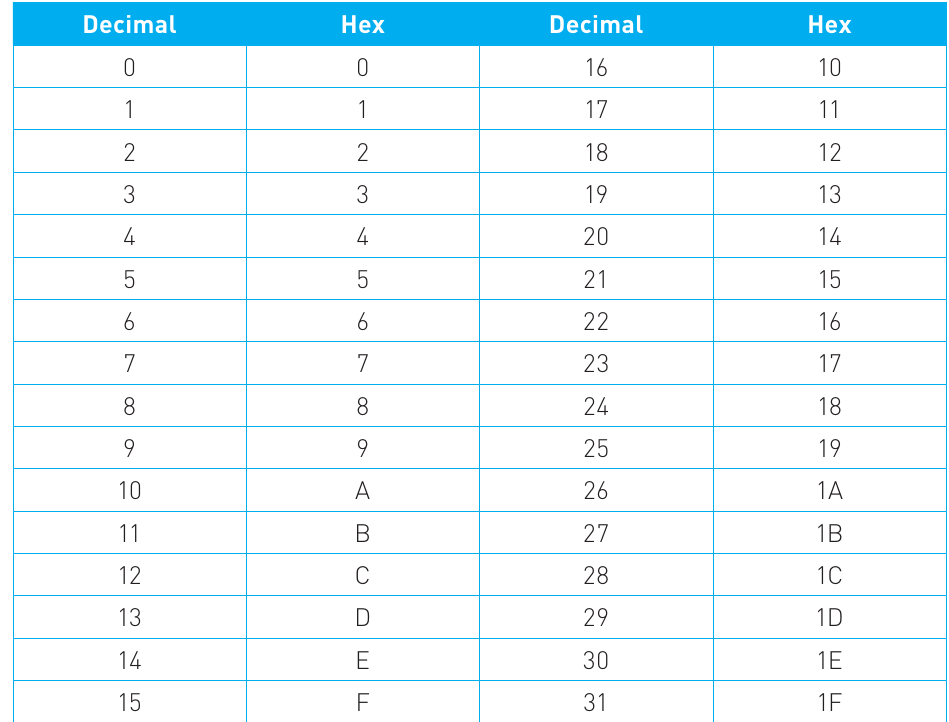
Hexadecimal uses 16 different symbols:
- 0-9 represent the values 0 to 9 (same as decimal)
- A represents 10
- B represents 11
- C represents 12
- D represents 13
- E represents 14
- F represents 15
Here's a lookup table showing decimal numbers and their hexadecimal equivalents:
Hexadecimal is commonly used in several computing contexts:
- Memory addresses are displayed in hex
- Colour codes in web design use hex (e.g., #FF0000 for red)
- Machine code and assembly language often display values in hex
- Error codes and debugging information frequently use hex
Example
Comparing Binary, Decimal, and Hexadecimal
Consider the 8-bit binary number :
- In decimal:
- In hexadecimal:
You can see how hex provides a much shorter representation than binary while still accurately representing the same value. This makes hex especially useful for displaying memory addresses and other long binary values in a human-readable format.
Working with number bases
To understand how different number bases work, it helps to think about how we use decimal in everyday life.
How decimal works
When you write the number 2098 in decimal, each digit has a different place value based on powers of 10:
- The rightmost digit (8) is worth ()
- The next digit (9) is worth ()
- The next digit (0) is worth ()
- The leftmost digit (2) is worth ()
Adding these together:
Each position is worth ten times more than the position to its right. This is why we call it base 10.
How binary works
Binary follows the same principle, but each position is worth two times more than the position to its right because it's base 2.
Consider the 8-bit binary number :

Reading from right to left, each bit position represents a power of 2:
- Position 1 (rightmost):
- Position 2:
- Position 3:
- Position 4:
- Position 5:
- Position 6:
- Position 7:
- Position 8 (leftmost):
Note
Most Significant Bit (MSB) and Least Significant Bit (LSB)
The leftmost bit is called the Most Significant Bit (MSB) because it has the highest place value. The rightmost bit is called the Least Significant Bit (LSB) because it has the lowest place value.
Think of it like decimal numbers: in 2098, the leftmost digit (2) is the most significant because it represents thousands, while the rightmost digit (8) is the least significant because it represents only units.
To find the decimal value, add up the place values where there's a 1:
Therefore,
Converting between number bases
Being able to convert between binary, decimal, and hexadecimal is an essential skill in computer science. Here are the methods for each type of conversion.
Binary to decimal conversion
To convert a binary number to decimal, follow these steps:
- Write down the binary number
- Above each bit, write the place value (starting from 1 on the right and doubling each time as you move left)
- Wherever there's a 1, add that place value to your total
- Wherever there's a 0, ignore that place value
Example
Binary to Decimal Conversion
Convert to decimal:
| 128 | 64 | 32 | 16 | 8 | 4 | 2 | 1 |
|---|---|---|---|---|---|---|---|
| 1 | 0 | 0 | 0 | 0 | 1 | 1 | 1 |
Step 1: Identify the place values The place values are: 128, 64, 32, 16, 8, 4, 2, 1 (powers of 2)
Step 2: Add place values where there's a 1
Result:
Decimal to binary conversion
There are two common methods for converting decimal to binary. Both give the same result.
Method 1: Using a place value table
- Write down the powers of 2 (place values) from right to left
- Starting from the left (MSB), put a 1 or 0 in each position to make the sum equal your target number
- Work through each place value, asking "Can I include this without going over?"
Example
Decimal to Binary Using Place Value Table
Convert to binary:
| 128 | 64 | 32 | 16 | 8 | 4 | 2 | 1 |
|---|---|---|---|---|---|---|---|
| 0 | 1 | 1 | 0 | 0 | 0 | 1 | 0 |
Working from left to right:
- 0 under 128 (98 is less than 128)
- 1 under 64 (98 ≥ 64, leaving 34)
- 1 under 32 (34 ≥ 32, leaving 2)
- 0 under 16 (2 < 16)
- 0 under 8 (2 < 8)
- 0 under 4 (2 < 4)
- 1 under 2 (2 ≥ 2, leaving 0)
- 0 under 1 (nothing left)
Result: (or simply if we remove the leading zero)
Method 2: Repeated division by 2
- Divide the decimal number by 2
- Write down the remainder (0 or 1)
- Divide the quotient by 2 again
- Keep repeating until the quotient is 0
- Read the remainders from bottom to top
Example
Decimal to Binary Using Repeated Division
Convert to binary:
Division steps:
- remainder 0
- remainder 1
- remainder 0
- remainder 0
- remainder 0
- remainder 1
- remainder 1
Reading the remainders from bottom to top:
Check: ✓
Decimal to hexadecimal conversion
The most common approach for converting decimal to hex is to first convert the decimal to binary, then convert the binary to hex.
Example
Decimal to Hexadecimal Conversion
Convert to hexadecimal:
Step 1: Convert 211 to binary using the place value method
| 128 | 64 | 32 | 16 | 8 | 4 | 2 | 1 |
|---|---|---|---|---|---|---|---|
| 1 | 1 | 0 | 1 | 0 | 0 | 1 | 1 |
Result:
Step 2: Split the binary number into groups of 4 bits (starting from the right)
1101 | 0011
Step 3: Convert each group of 4 bits to its hex equivalent
For 1101:
| 8 | 4 | 2 | 1 |
|---|---|---|---|
| 1 | 1 | 0 | 1 |
For 0011:
| 8 | 4 | 2 | 1 |
|---|---|---|---|
| 0 | 0 | 1 | 1 |
Result:
Hexadecimal to decimal conversion
To convert hex to decimal, first convert each hex digit to binary (using 4 bits per hex digit), then convert the complete binary number to decimal.
Example
Hexadecimal to Decimal Conversion
Convert to decimal:
Step 1: Convert each hex digit to its 4-bit binary equivalent

- (remember A = 10 in decimal)
Step 2: Combine the binary groups
(or removing leading zeros)
Step 3: Convert the binary to decimal
| 512 | 256 | 128 | 64 | 32 | 16 | 8 | 4 | 2 | 1 |
|---|---|---|---|---|---|---|---|---|---|
| 1 | 0 | 1 | 0 | 1 | 0 | 0 | 0 | 1 | 1 |
Result:
Note
Exam Tip
When converting between bases, always show your working clearly. Use tables to organise your place values, and check your answer by converting back the other way when time permits. Remember that the hex lookup table can help you quickly convert between decimal and hex for values 0-15.
Remember!
Summary
Key Takeaways
-
Bits are the foundation: A bit is a single binary digit (0 or 1) that represents the basic unit of data in computing, corresponding to electrical signals being off or on.
-
Bytes group bits together: A byte consists of 8 bits and can represent 256 different values (), which is enough to represent all keyboard characters. Remember that more bits mean exponentially more possible values ().
-
Three main number bases: Computing uses three number bases: binary (base 2, digits 0-1), decimal (base 10, digits 0-9), and hexadecimal (base 16, digits 0-9 and A-F). Each serves a different purpose - humans use decimal, computers use binary, and hex provides a convenient shorthand.
-
Place values follow powers of the base: In any number system, each position is worth the base raised to a power. In binary, positions are worth 1, 2, 4, 8, 16, 32, 64, 128... (powers of 2). Understanding this pattern is crucial for all conversions.
-
Master the conversion methods: Binary to decimal means adding place values where there are 1s. Decimal to binary can use repeated division by 2 or a place value table. Hexadecimal conversions typically go via binary, using 4 bits per hex digit. Practice these methods until they become automatic.